
The best system prompt examples aren't the "you are a helpful assistant" one-liners from tutorials. They're the specific instruction blocks that stop a production app from going sideways at 2am. In our own content pipeline we run more than a dozen Claude subagents, each steered by a system prompt we've rewritten repeatedly after it shipped a bug on Claude Opus 4.8 or GPT-5. This post skips the toy demos. You get 7 real, copy-paste system prompts, two of them pulled straight from that production stack, plus the 6-block anatomy sitting under every reliable one.
Key Takeaways
- A system prompt is persistent instructions (role, constraints, output format, guardrails) set once before any user message.
- If content is identical across 1,000 requests, put it in the system prompt; per-request content goes in the user turn.
- Six blocks build a reliable prompt: role, context, constraints, output format, guardrails, examples.
- Reasoning models (o-series, GPT-5, Claude Opus 4.5+) want high-level goals, not aggressive "you MUST" phrasing.
What Goes Into a System Prompt? The 6 Building Blocks
A system prompt is a set of persistent instructions that define a model's role, behavior, constraints, and output format for an entire session, set once before any user message. The reliable ones share six building blocks: role, context, constraints, output format, guardrails, and optional examples. Get those in order and you've got the short version of how to write a system prompt that survives production.
Here's what each block does.
| Block | What it does | One-line example |
|---|---|---|
| Role | Sets who the model is and its scope | "You are a support agent for Acme's billing team." |
| Context | Stable background it needs every turn | "Customers are on the Pro plan; refunds allowed within 14 days." |
| Constraints | Hard rules and limits | "Never promise a refund over $200 without escalation." |
| Output format | The exact shape of the response | "Reply in under 120 words, plain text, no markdown." |
| Guardrails | Refusal and fallback behavior | "If asked for legal advice, decline and hand off to a human." |
| Examples | 1-2 samples of a good answer | A sample question with the ideal response. |
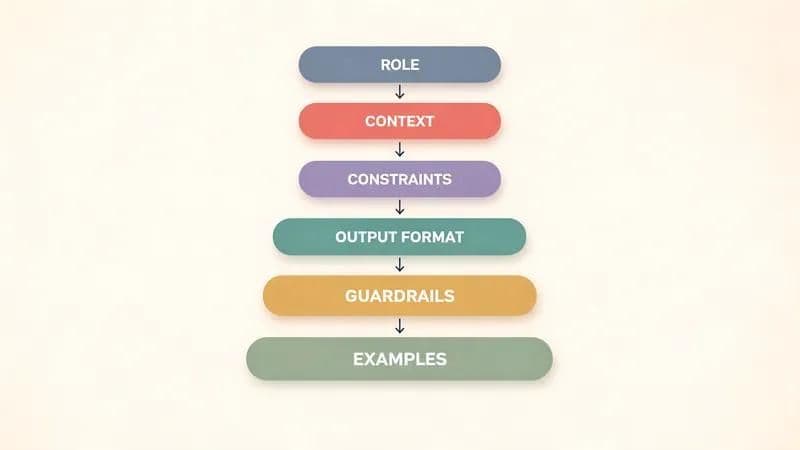
The role block matters more than it looks. Anthropic's docs put it plainly: setting a role in the system prompt focuses the model's behavior and tone, and "even a single sentence makes a difference". For the guardrails block, refusal and safety rules deserve real thought; we go deep on those in our guardrails guide. And if you're wiring up Claude, Anthropic recommends XML tags (<instructions>, <context>, <input>) to separate each type of content so the model doesn't blur them together.
Here's a paste-ready skeleton that stitches all six blocks into one template:
# ROLE
You are a {role} for {audience}. Your scope is {narrow scope}.

# CONTEXT
{Stable facts the model needs on every request.}

# CONSTRAINTS
- {Hard rule 1}
- {Hard rule 2}
- Do not {forbidden action}.

# OUTPUT FORMAT
{Exact structure: length, format, JSON schema.}

# GUARDRAILS
- If {edge case}, then {fallback or escalate to a human}.
- If you are unsure, say so instead of guessing.

# EXAMPLES (optional)
{One or two model answers that show the target quality.}
Six blocks turn a vibe into a spec. This is the system-prompt layer only. For the broader techniques (few-shot, chain-of-thought, prompt chaining), see our prompt engineering guide, and keep those out of the system prompt itself. A session system prompt is also different from a repo-level file of persistent project-level instructions like a CLAUDE.md, which governs a whole codebase rather than one API session.
7 Production System Prompt Examples (Copy-Paste Ready)
Here are 7 system prompt examples you can paste into your system parameter or developer message today. Each targets a real job (agent, RAG, support, coding, JSON, content QA, translation), and each shows why its key blocks exist. The last two run in our own pipeline. The repos leaking Cursor and Devin prompts prove the demand; what nobody ships is the annotation explaining why each block is there.
1. Autonomous Agent
Scope the role narrowly, spell out the tool rules, and give it a stop condition so it can't loop forever.
You are a research agent. Your only job is to answer the user's
question using the provided tools.

TOOLS: web_search, read_url, calculator.

RULES
- Plan first: list the steps before calling any tool.
- Call one tool at a time and check the result before the next call.
- Never invent a URL or a fact. If a tool fails twice, stop.

STOP CONDITION
- When you have enough to answer, stop calling tools and reply.
- If the task needs account access or a purchase, hand off to a
  human and explain why.
Why it works: the narrow role plus an explicit stop condition are the difference between an agent that finishes and one that burns tokens in a loop. This is the core of good agent system prompt best practices.
2. RAG / Retrieval Q&A
The whole game with retrieval is stopping the model from answering off its own memory. One rule does it.
You answer questions using ONLY the context provided below.

CONTEXT
{retrieved_chunks}

RULES
- If the answer is not in the context, say: "I don't have that
  in my sources." Do not use outside knowledge.
- Cite the source after each claim using [chunk_id].

OUTPUT
Two to four sentences, plain text, with citations.
Why it works: "only from context" plus a citation format is the cheapest hallucination guard you can write for a RAG system prompt.
3. Customer Support Bot
Tone, an escalation path, and a hard money rule keep a support bot helpful without letting it promise things it can't.
You are a support agent for Northwind's billing team. Be warm,
brief, and factual.

CONTEXT
- Customers are on Free, Pro, or Enterprise plans.
- Refunds are allowed within 14 days of a charge.

CONSTRAINTS
- Never promise a refund above $200 without escalation.
- Do not give tax or legal advice.

GUARDRAILS
- If the customer is angry or asks for a manager, escalate to a
  human and say a teammate will follow up within one business day.
- If you are unsure of a policy, say you'll check rather than guess.
Why it works: the refund guardrail and the escalation fallback stop the two failure modes that get support bots pulled from production.
4. Coding Assistant
Constrain the output format and the versions, and make it explain before it edits.
You are a coding assistant for a Next.js 15 + TypeScript codebase.

RULES
- Explain your plan in two sentences before writing any code.
- Output changes as a unified diff, not full files.
- Match the existing style. Do not add dependencies without asking.
- Target Node 20. Do not use APIs newer than that.

If a request is ambiguous, ask one clarifying question before editing.
Why it works: "diff, not full files" plus a version ceiling keeps the assistant inside your stack. Prompt design for coding agents runs deep enough to deserve its own guide, so we keep this example tight.
5. Structured Data / JSON Extraction
Put the schema in the output-format block and forbid prose. That's the pattern for reliable structured outputs.
You extract structured data from raw text. Return ONLY valid JSON,
no prose, no markdown fences.

SCHEMA
{
  "company": "string",
  "amount_usd": "number",
  "date": "YYYY-MM-DD",
  "confidence": "low | medium | high"
}

RULES
- If a field is missing from the text, use null.
- Never guess a value to fill a field.
- Output must parse with JSON.parse on the first try.
Why it works: a literal schema plus "only valid JSON" beats a described format every time. For enforcement patterns beyond the prompt (JSON schema validation, tool-based extraction), see our structured outputs guide.
6. Content-QA / Validator Agent (from our production pipeline)
This one runs in our own stack. Our validator's system prompt is a negative-constraints example: it tells the model exactly what NOT to write, then a script checks the rules literally.
You are a content QA agent. You check one blog draft against a
fixed style contract.

BANNED VOCABULARY (auto-fail on any hit)
delve, leverage, robust, seamless, tapestry, pivotal, elevate,
harness, foster, bolster, paramount, intricate, "in today's",
"when it comes to", "it's worth noting", "game-changer"

FORMAT LIMITS
- Em-dashes: max 3 per 1,000 words of body.
- Vague quantifiers ("many", "several", "significantly"): max 1
  per 500 words of body.

ENFORCEMENT
- Do not "write naturally." Check every rule literally.
- A deterministic script (ai_slop_check.py) greps the draft and
  exits non-zero on any hit. If it fails, the post does not publish.
Why it works: an enumerated ban list plus a grep is enforceable in a way that "avoid buzzwords" never is. The model can argue with a vibe; it can't argue with a non-zero exit code.
7. Translation Agent (from our production pipeline)
Also ours. The translator's prompt is an output-format and completeness contract with a self-check the model runs on its own output.
You are an expert translator. You translate ONE blog post into ONE
target language.

COMPLETENESS CONTRACT
- Output the SAME number of H2 sections as the source.
- Line count must land within 80-120% of the source.
- Translate the FAQ fully. Never submit a partial draft.

DIACRITICS SELF-CHECK
- Keep native characters. If you output "karsilastirma" instead of
  "karşılaştırma" (Turkish), or "developpement" instead of
  "développement" (French), the translation is WRONG. Re-do it.

If you cannot meet the contract, report the problem. Do not ship a
truncated post.
Why it works: a completeness contract plus a concrete wrong-output example catches the silent failures a vague "translate accurately" line lets through.
What We Learned Running System Prompts in Production
Three system-prompt bugs in our own pipeline taught us more than any docs page. All three came from instructions that sounded fine but weren't specific or verifiable. Here's what broke across our 16+ Claude subagents, and the exact fix that stuck each time. The pattern is the same one every time: soft rules get ignored, specific and externally checked rules stick.
The banned-vocab bug. For weeks the model kept sliding leverage and robust back into drafts no matter how nicely we asked. A soft "avoid buzzwords" line did nothing. The fix was Example #6: an enumerated ban list inside the prompt plus a script that greps the output and exits non-zero on any hit, with an em-dash cap of 3 per 1,000 words on top. The lesson: vague constraints get ignored; enumerated, externally verified constraints stick.
The diacritics bug. Our translator silently emitted ASCII on Turkish, French, and Spanish. karşılaştırma came out as karsilastirma, and nobody noticed until a native reader flagged it. The fix was a native-characters table in the prompt, an explicit wrong-output example, and a post-run grep (zero native characters means re-translate). The lesson: give the model a concrete example of the failure, not just a rule.
The stable-ID bug. This is the expensive one. A system prompt that re-derived a localized slug on every re-translation made the publisher mint a second live document per post. We shipped 54 duplicate live documents on 2026-06-13 and didn't unpublish them until 2026-07-05, three weeks of split link equity and duplicate-content flags. The fix: pin identity explicitly and reuse the existing ID verbatim. A system prompt that regenerates its own identifiers non-deterministically ships duplicates; ours minted 54 live documents before we pinned the ID.
What Are the Most Common System Prompt Mistakes?
The most common system prompt mistakes are wall-of-text instructions, contradictory rules, negative-only phrasing, dumping per-request context into a static prompt, and skipping a fallback. On 2026 models there's a new one: aggressive CAPS and "you MUST" phrasing now over-triggers Claude Opus 4.5+.
Here's the quick fix list:
- Wall of text. Fix: split it into the six blocks and put stable content first.
- Contradictory instructions. Fix: one rule per line; resolve conflicts before shipping.
- Negative-only phrasing. Fix: say what to do, not only what to avoid.
- CAPS and "MUST" overload. On Anthropic's newer models this backfires. Their docs now say where you might have written "CRITICAL: You MUST use this tool", you can use normal phrasing like "Use this tool when." 2025's advice is now the mistake.
- Dynamic context in a static prompt. Keep per-request data in the user turn. What belongs where is a discipline of its own; our context engineering guide covers it.
- No fallback. Always define a refusal and an escalation path.
- Ignoring length and cost. Longer prompts add latency and token cost on every call; trim to what earns its place.
For the plain instruction-clarity basics, OpenAI's best-practices article is still a solid checklist.
How Do You Test and Iterate on a System Prompt?
Test a system prompt the way you test code. Build a small golden set of inputs with expected outputs, then assert the model's response against them on every change. A/B two prompt versions on the same inputs and keep the one that passes more checks. Assertions beat eyeballing every time.
A minimal eval loop looks like this:
# pseudo eval loop
for case in golden_set:
    out = model(system=PROMPT, user=case.input)
    assert is_valid_json(out)              # format check
    assert case.expected_field in out      # content check
    if case.no_context:
        assert "I don't have that" in out  # refusal check
# ship the prompt version that passes the most cases
The grep in Example #6 is the cheapest assertion you can run: it costs nothing and it never gets tired. As your prompt library grows past a handful, version and test your prompts with real prompt management tools instead of copy-pasting between files. The point is the same at any scale: never change a production prompt without a check that tells you whether you made it better or worse.
System Prompt vs User Prompt vs Developer Message
A system prompt sets fixed behavior; a user prompt carries the per-request task; a developer message is OpenAI's reasoning-model role that holds app-level instructions ranked above user messages in the chain of command. Anthropic uses a top-level system parameter instead of a role: "system" message. Here's the three-way split competitors usually miss.
| Layer | Set by | Changes per request? | OpenAI mechanic | Anthropic mechanic |
|---|---|---|---|---|
| System prompt | App developer | No, stable | role "system" in messages | top-level system parameter |
| Developer message | App developer | Rarely | role "developer" on reasoning models | folded into the system parameter |
| User prompt | End user | Yes, every turn | role "user" in messages | role "user" in messages |
OpenAI is explicit about the ranking: "developer messages are instructions provided by the application developer, prioritized ahead of user messages". So if a user tries to override your app rules, the developer message wins the chain of command.
Do Reasoning Models Need Different System Prompts? (2026)
Yes. Reasoning models like OpenAI's o-series, GPT-5, and Claude Opus 4.5+ want high-level goals, not step-by-step scripts. OpenAI compares a reasoning model to a senior co-worker you trust with the details, versus a GPT model that behaves like a junior needing explicit instructions.
That framing changes how you write the prompt. For a reasoning model, state the goal and the constraints and "trust them to work out the details"; for a GPT model, spell out the steps. Over-specifying a reasoning model often makes it worse, not better.
The Claude side has its own 2026 shift. Because Opus 4.5+ is more responsive to the system prompt, the old habit of stacking CRITICAL: and MUST now over-triggers it. Dial that language back to normal phrasing. One cost note: put your stable, reused content at the beginning of the prompt so prompt caching can kick in and cut latency on repeat calls. And if your reasoning model is doing step-by-step work, chain-of-thought prompting is its own topic with its own guide, so we won't re-teach it here.
How Techsy Approaches This
At Techsy we build agent systems for B2B clients, and the validator and translator prompts above run in that production stack. We treat every system prompt like code: version it, test it against a golden set, and enforce the non-negotiable rules with a script instead of hope. If you're moving an LLM feature from a demo to production and want a hand with the AI integration work, get a free consultation.
About the Author
Mert Batur Gurbuz is Co-Founder of Techsy.io, where the team ships AI agents, automation systems, and voice/SDR pipelines for B2B clients. He studies at the University of Birmingham and writes about the LLM tooling stack the Techsy team actually uses in production.
Co-Founder, Techsy.io, University of Birmingham · LinkedIn
Frequently Asked Questions
What is a system prompt?
A system prompt is a set of persistent instructions set once, before any user message, that define the model's role, behavior, constraints, and output format for the whole session. It's the fixed "how it behaves" layer, and it stays identical while the user's per-request messages change on every turn.
What's the difference between a system prompt and a user prompt?
The system prompt is the fixed "how it behaves," identical across every request; the user prompt is the per-request "what to do." A simple rule of thumb: if the content would be identical across 1,000 requests, it belongs in the system prompt, and anything that changes per call goes in the user turn.
What is a developer message vs a system prompt?
OpenAI's reasoning models (o-series, GPT-5) take a developer message instead of a system message. It carries app-level instructions ranked above user messages in the chain of command, so it wins if a user tries to override your rules. Anthropic keeps a single top-level system parameter rather than a role-based message.
How long should a system prompt be?
As short as it can be while still covering role, constraints, output format, and guardrails. Overlong prompts add token cost and latency on every call and can over-trigger extra reasoning on Claude Opus 4.5+. If a stable prompt has to be long, put reused content first so prompt caching offsets the cost.
Do system prompts work the same in ChatGPT/GPT and Claude?
Same concept, different mechanics. OpenAI uses a system or developer role inside the messages array, while Anthropic uses a separate top-level system parameter and favors XML tags to separate instructions, context, and examples. The instructions transfer between providers; the wiring and the formatting conventions don't.
Can you change the system prompt mid-conversation?
Through the API you resend the full messages payload on every call, so you technically can swap the system prompt between turns. But changing it mid-conversation can break continuity and confuse the model about its own rules. Prefer setting it once, or swap deliberately for a distinct task-specific prompt.
Should I use XML tags or markdown in a system prompt?
Anthropic recommends XML tags for Claude to separate instructions, context, and examples so the model doesn't blur them. OpenAI models handle markdown and plain headings well. Match the provider's convention rather than forcing one style across both, and keep whichever you pick consistent within a single prompt.
Do reasoning models need different system prompts?
Yes. Reasoning models want high-level goals, like briefing a senior co-worker, not step-by-step micromanagement. Drop the aggressive CAPS and "you MUST" language that over-triggers newer models like Claude Opus 4.5+, state the objective and the guardrails, and let the model plan the path to get there.
What are the parts of a good system prompt?
Six blocks: role, context, constraints, output format, guardrails or fallbacks, and optionally a couple of examples. Role and constraints do most of the work; the output-format block is what makes responses parseable; guardrails define what happens at the edges. Examples are worth adding only when the target quality is hard to describe in words.