
If you typed "supabase vs drizzle" expecting a winner, here's the twist: there isn't one, because Supabase is a Postgres backend (a Backend-as-a-Service) and Drizzle is a TypeScript ORM that runs on top of a database connection — including a Supabase one. They live at different layers of your stack, so they don't really compete. Don't worry, this is simpler than it sounds.
TL;DR: Use Supabase for the backend (database, auth, storage, realtime). Add Drizzle if you want type-safe SQL on your heavier queries. Most production apps end up using both — think "house and toolbox," not "house or toolbox."
Supabase vs Drizzle at a glance
Here's the side-by-side most "vs" pages skip. Notice how little these two overlap — that's the whole point.
| Dimension | Supabase | Drizzle |
|---|---|---|
| What it is | Postgres Backend-as-a-Service | TypeScript ORM / query builder |
| Layer | Backend platform | Data-access library |
| Database | Managed Postgres | Connects to any Postgres (incl. Supabase) |
| Auth / Storage / Realtime | Yes (built-in) | No (out of scope) |
| Type-safe queries | Partial (generated types) | Yes (first-class, inferred) |
| Migrations | SQL editor / CLI | drizzle-kit (schema-as-code) |
| Edge / serverless | Edge Functions (Deno) | ~7.4 kb, edge-native |
| Pricing | Free / $25 / $599 | Free (open-source) |
| Real competitors | vs Firebase, other BaaS | vs Prisma, other ORMs |
See how the rows barely collide? Supabase answers "where does my app live?"; Drizzle answers "how do I query it in TypeScript?" Whether you search supabase vs drizzle or drizzle vs supabase, that difference shapes every decision below.
What Supabase actually is
Supabase is a managed Postgres backend that bundles almost everything a typical app needs on day one. BaaS — Backend-as-a-Service — means you get a real backend (database plus services) without standing up servers yourself. The key word is real: under the hood it's genuine PostgreSQL, not a proprietary abstraction you can't escape later.
Here's what you get out of the box:
- Auth — email/password, magic links, social logins, SSO, passwordless.
- Storage — S3-backed file storage with Row Level Security policies and image transforms.
- Realtime — listen to database changes, presence, and broadcast channels.
- Edge Functions — TypeScript functions on Deno, distributed globally.
- Auto REST API via PostgREST (it turns your tables into an instant REST API) plus GraphQL through
pg_graphql. - Vector support for embeddings, so AI features have a home.
The default way you talk to all of this from your app is supabase-js, the official client library. It handles database reads and writes (routed through PostgREST), auth sessions, realtime subscriptions, and file uploads — one client for the whole platform. If you're weighing backends in the first place, our full Supabase vs Firebase breakdown covers that side of the decision in detail.
What Drizzle actually is
Drizzle is a lightweight TypeScript ORM and query builder. An ORM (object-relational mapper) is just a library that lets you write database queries in your programming language instead of raw SQL strings — but Drizzle keeps things refreshingly close to SQL, so you're never fighting a heavy abstraction.
What makes it stand out:
- Tiny footprint — around 7.4 kb min+gzip with zero external dependencies, which makes it edge-native.
drizzle-kit— the CLI that handlesgenerate,migrate, andpull(introspecting an existing database into TypeScript).- Drizzle Studio — a free visual database browser for local development.
- Type inference — define your schema once in TypeScript and your query results are fully typed automatically.
- Multi-database — works with Postgres, MySQL, SQLite, and more.
- Fully open-source — it costs $0.
Now, the important part: Drizzle is not a backend — no auth, no storage, no realtime, no API server. It does exactly one thing: talk to a database in a type-safe way. Calling it an "ORM" answers the common "supabase orm" search — Supabase doesn't ship a heavy ORM of its own, so people reach for Drizzle (or Prisma) when they want one.
supabase-js vs Drizzle: the same query, written both ways
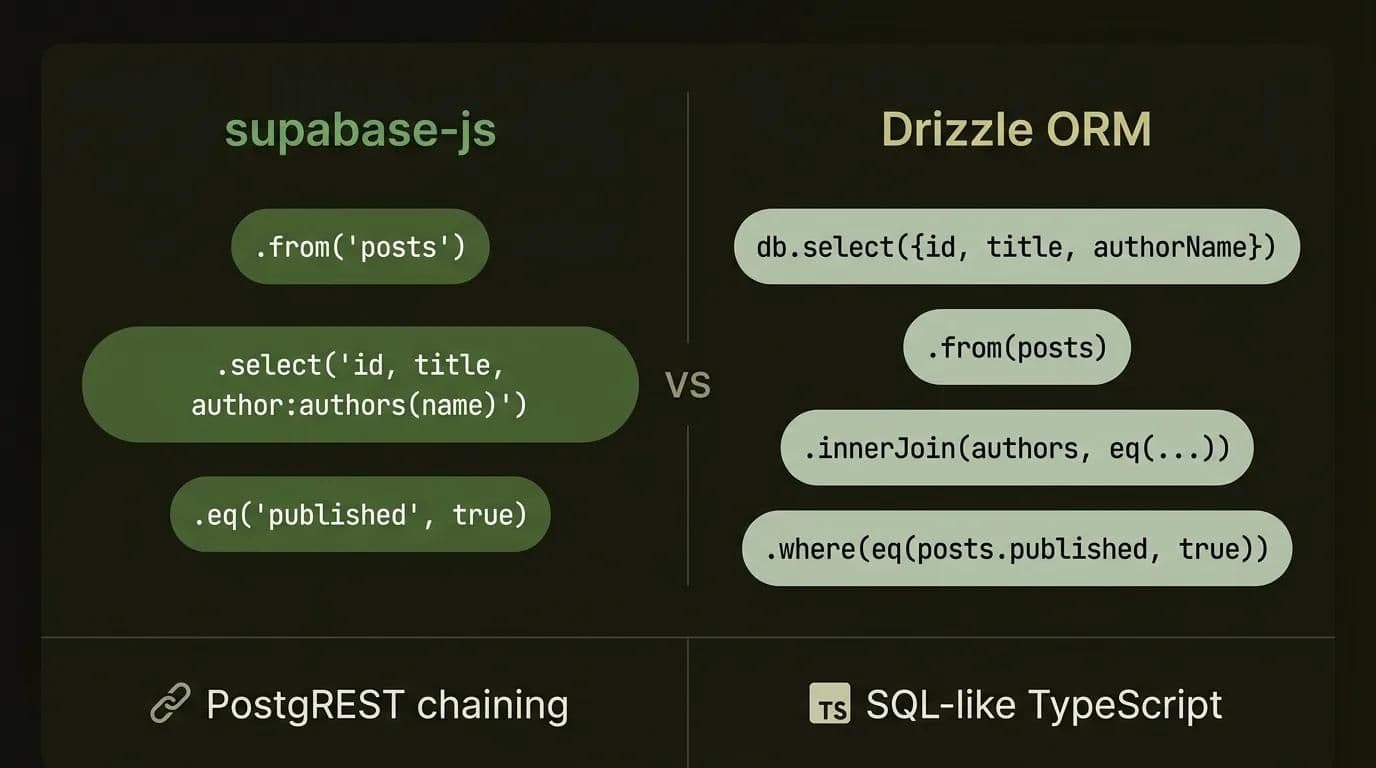
The difference between supabase-js and Drizzle: supabase-js is the full platform client (database via PostgREST, plus auth, realtime, and storage), while Drizzle is a type-safe Postgres ORM that does nothing but query the database. To make that concrete, here's the exact same query — "get published posts with their author" — written first in supabase-js, then in Drizzle.
First, the supabase-js (PostgREST) version:
import { createClient } from "@supabase/supabase-js";

const supabase = createClient(SUPABASE_URL, SUPABASE_ANON_KEY);

// Get published posts with their author
const { data, error } = await supabase
  .from("posts")
  .select("id, title, author:authors(name)")
  .eq("published", true);

if (error) throw error;
// data: { id, title, author: { name } }[]
Now the Drizzle version of the identical query:
import { drizzle } from "drizzle-orm/postgres-js";
import { eq } from "drizzle-orm";
import postgres from "postgres";
import { posts, authors } from "./schema";

const client = postgres(DATABASE_URL, { prepare: false });
const db = drizzle(client);

// Get published posts with their author
const data = await db
  .select({
    id: posts.id,
    title: posts.title,
    authorName: authors.name,
  })
  .from(posts)
  .innerJoin(authors, eq(posts.authorId, authors.id))
  .where(eq(posts.published, true));
// data is fully typed from your schema — no codegen step
Spot the difference in feel? supabase-js uses PostgREST chaining — .from().select().eq() — and expresses joins through that nested author:authors(name) string syntax, which reads beautifully for simple shapes. Drizzle reads like SQL with TypeScript superpowers: explicit joins, explicit conditions, and the result type is inferred straight from your schema with no separate type-generation step.
Neither is "better" in a vacuum: the supabase-js query is shorter and ships with the platform, while the Drizzle query gives you compile-time safety on the join and gets clearer as queries grow complicated — three joins, conditional filters, aggregations. That's the real trade-off.
Do you even need Drizzle with Supabase? (decision framework)
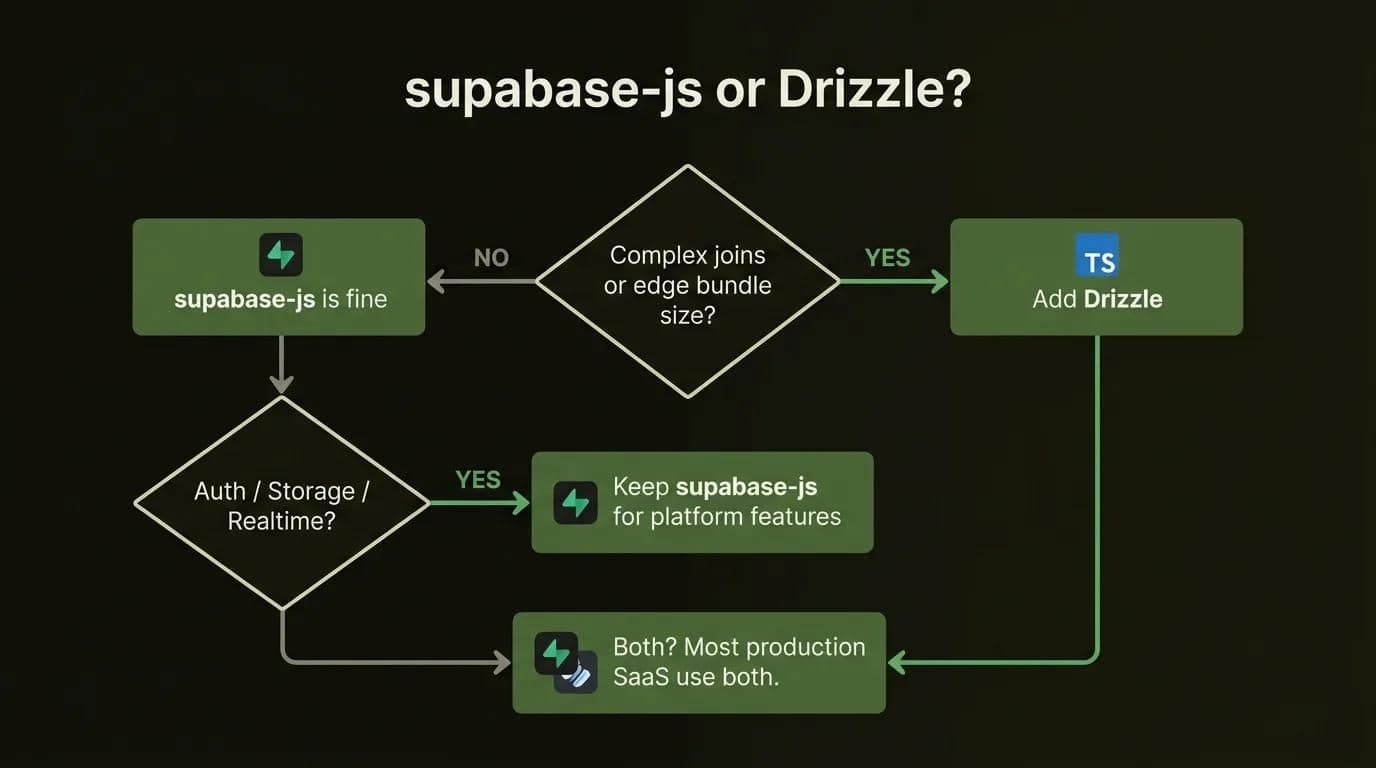
No, you usually don't need Drizzle with Supabase — supabase-js ships most apps to production on its own. Add Drizzle only when you want compile-time type safety on complex queries or a smaller edge bundle. Before you add a dependency, run through this honest decision matrix.
Stick with supabase-js when:
- You lean on realtime subscriptions, file/storage operations, or auth flows.
- Your queries are mostly straightforward CRUD.
- You want a single client for the whole app.
- You're prototyping and want maximum speed.
Add Drizzle when:
- You have complex joins or aggregations that are getting awkward in PostgREST syntax.
- You want compile-time type safety on raw-ish SQL.
- Bundle size matters because you're shipping to edge or serverless runtimes.
- You prefer schema-as-code migrations you can review in a pull request.
Use both (the most common outcome) when:
- You want
supabase-jsfor auth, storage, and realtime, plus Drizzle for the heavy data queries.
| Your need | Reach for |
|---|---|
| Realtime, storage, quick CRUD, auth | supabase-js |
| Complex joins, type-safe SQL, edge bundle size | Drizzle |
| A typical production SaaS | Both |
Pro tip: Start with
supabase-js. Reach for Drizzle when a query gets genuinely painful — not before. Premature ORM-adding is a real thing, and it just adds setup you don't need yet.
If you're sketching out an entire stack rather than one query, choosing the right SaaS tech stack walks through how the backend and ORM decision fits the bigger picture.
How to use Supabase and Drizzle together (the correct setup)
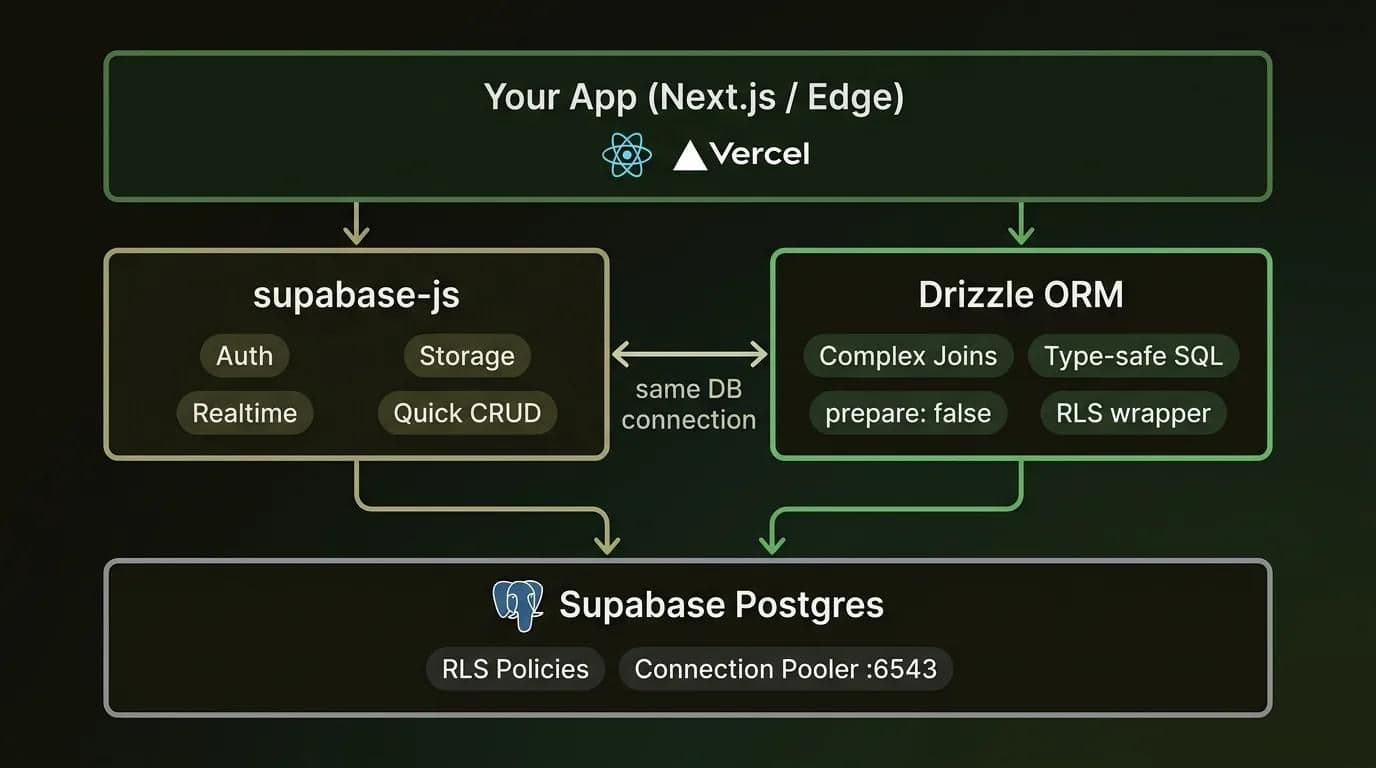
Yes, you can use Supabase and Drizzle together — and most production teams do. Keep supabase-js for auth, storage, and realtime, then point Drizzle at the same Supabase Postgres connection for type-safe data queries. A few correctness details trip people up, though, so let's nail all of them in one place.
Install and connect (the postgres-js driver)
Install the three packages you need:
npm install drizzle-orm postgres
npm install -D drizzle-kit
Then connect using the postgres-js driver and hand the client to Drizzle:
import { drizzle } from "drizzle-orm/postgres-js";
import postgres from "postgres";

// prepare: false is REQUIRED with Supabase's transaction pooler
const client = postgres(process.env.DATABASE_URL!, { prepare: false });

export const db = drizzle(client);
That prepare: false flag isn't optional — keep reading, because it's the single most common reason a Supabase + Drizzle setup breaks.
Pooler vs direct connection: which string do you use?
Supabase gives you two connection strings, and the right one depends on your runtime:
- Pooler (port 6543, transaction mode) — use this for serverless and edge functions. Each invocation is short-lived, so you want a pooled connection that's handed out per transaction.
- Direct connection (port 5432) — use this for long-running servers that hold a connection open.
Pick the wrong one and you'll either exhaust connections (direct on serverless) or add needless overhead. The pooler is also exactly what makes the next gotcha necessary.
The prepare: false gotcha
You need prepare: false because Supabase's transaction-mode pooler doesn't support prepared statements, which Drizzle's postgres-js driver uses by default. Put those two facts together and, without the flag, your queries throw errors the moment they run through the pooler — which, on serverless, is always.
In production this is the line that bites people: everything works against a direct connection locally, then every query fails after you deploy to Vercel or a Supabase Edge Function. The fix is one flag:
const client = postgres(DATABASE_URL, { prepare: false });Gotcha: If your Drizzle queries work locally but break in deployment, check this flag first. Nine times out of ten, that's it.
Keeping RLS intact
Row Level Security (RLS) is one of Supabase's best features, and you don't have to give it up to use Drizzle — but you do have to be deliberate. There are two kinds of client:
- An admin client using the service-role key bypasses RLS entirely. It's powerful and dangerous — keep it strictly server-side, never near the browser.
- An RLS-respecting client wraps each query in a transaction that sets the Postgres auth config (the current user's role and claims) so your existing RLS policies apply exactly as they would through
supabase-js.
Here's the shape of an RLS-respecting query — set the auth context, then run your Drizzle query inside the same transaction:
import { sql } from "drizzle-orm";

async function rlsQuery(userJwtClaims: { sub: string; role: string }) {
  return db.transaction(async (tx) => {
    // Tell Postgres who's asking, so RLS policies kick in
    await tx.execute(
      sql`select set_config('request.jwt.claims', ${JSON.stringify(
        userJwtClaims
      )}, true)`
    );
    await tx.execute(sql`set local role authenticated`);

    // This query now runs under the user's RLS policies
    return tx.select().from(posts);
  });
}
Drizzle also ships a native RLS API and a drizzle-orm/supabase import with Supabase's predefined roles (authenticated, anon), making schema-as-code policies cleaner. The headline: keep RLS on in Supabase, and let your RLS-respecting Drizzle client honor it.
Should you turn off the Data API / PostgREST?
Only if you query exclusively through Drizzle. Supabase lets you disable the Data API (PostgREST) in API Settings, which shrinks your attack surface. But if any part of your app still uses supabase-js for data — and it usually does, for realtime or quick reads — leave PostgREST on. There's no penalty for keeping it.
If your app lives in Next.js (a very common pairing here), picking your Next.js framework setup covers the routing and rendering side that wraps around this data layer.
Wiring up Drizzle + Supabase with RLS and pooling correctly trips up a lot of teams. Need a second pair of eyes on your backend? Get a free consultation →
Edge and serverless: where Drizzle pulls ahead
If you're deploying to the edge, this is where Drizzle earns its keep. At roughly 7.4 kb with zero native binaries, it slips into constrained runtimes that heavier ORMs struggle with — Cloudflare Workers, Vercel Edge, AWS Lambda, and even Supabase Edge Functions on Deno.
Why does size matter so much here? Edge functions are penalized by cold starts and bundle limits, so a lean, dependency-free library means faster cold starts and bundles that actually fit. supabase-js works at the edge too, but for raw data access, Drizzle's footprint is hard to beat.
A couple of things to keep in mind at the edge:
- Use the transaction-mode pooler connection string (with
prepare: false). - Keep your query logic lean so the function stays small and fast.
The runtime you deploy to shapes this too — where you deploy your edge functions compares the platforms so you can match your data layer to the right host.
Migrating from supabase-js to Drizzle without a rewrite
Already shipped on supabase-js and now want Drizzle for a few gnarly queries? Good news: you don't need a big-bang rewrite. You can run both in the same file. Here's the incremental path teams actually use.
- Keep
supabase-jsexactly where it is — auth, storage, realtime, and the simple CRUD it already handles well. Don't touch it. - Introspect your existing schema into TypeScript so Drizzle knows your tables (including the
authschema reference if you need it):
npx drizzle-kit pull- Add the Drizzle client alongside your existing Supabase client — same database, second connection, with
prepare: falsebaked in. - Migrate one heavy query at a time. Pick your most painful join or aggregation, rewrite just that one in Drizzle, and ship it.
- Leave everything else on
supabase-js. There's no prize for converting queries that were already fine.
Don't worry: You can call
supabase-jsand Drizzle in the same function. Nothing forces you to choose globally — migrate at the pace that makes sense.
Rewriting queries by hand is the slow part, and it's exactly the kind of mechanical work the AI coding agents that speed this up handle well — point one at a PostgREST query and have it draft the Drizzle equivalent for you to review.
Pricing in 2026: what each actually costs
Drizzle is free — it's fully open-source, so it costs $0. Supabase has a free tier, then paid plans at $25/mo (Pro) and $599/mo (Team) in 2026. So the only bill you pay for this stack is Supabase; adding Drizzle costs nothing.
| Tier | Supabase | Drizzle |
|---|---|---|
| Free | $0 (500 MB DB, 50k MAU; pauses after 1 week inactivity, 2-project cap) | $0 — fully open-source |
| Pro | $25/mo + usage (8 GB DB, 100k MAU, $10 compute credit) | — (free) |
| Team | $599/mo (SOC2/ISO, 14-day backups, priority support) | — (free) |
| Enterprise | Custom (HIPAA, BYO cloud) | — (Studio's embeddable B2B version is the only paid piece) |
Drizzle is $0 and fully open-source (Drizzle Studio included), so your only data-layer bill is Supabase — the ORM rides along for free.
One caveat: the Supabase Free tier pauses projects after a week of inactivity and caps you at two — great for prototypes, but you'll want Pro for anything real. If you're cost-conscious and building lean, our roundup of tools that are actually worth it for startups keeps the same pragmatic lens.
What about Prisma?
The natural follow-up: if you want an ORM, why Drizzle and not Prisma? Both work perfectly well with Supabase, so this is a fair fight — unlike Supabase vs Drizzle.
- Drizzle — ~7.4 kb, edge-native, SQL-like syntax, younger but growing fast (roughly 900k weekly npm downloads). Great when bundle size and edge runtimes matter.
- Prisma — heavier, but a famously smooth developer experience and broader adoption (around 2.5M weekly downloads). Great on traditional long-running servers where the bundle isn't a constraint.
(Treat those numbers as approximate — they shift constantly.) The honest summary: pick Drizzle for edge/bundle-size, pick Prisma for ergonomics on a regular server. Either one slots onto a Supabase Postgres connection without drama.
How Techsy approaches this
At Techsy we ship production-tested apps on Supabase, Next.js, and PostgreSQL every day, so this isn't a doc-skimming opinion. Our default: supabase-js** for platform features** (auth, storage, realtime) and Drizzle on data-heavy paths where type safety and complex joins pay off — RLS kept on, prepare: false baked in from line one.
And honestly? Plenty of projects we ship never need Drizzle at all. If an app is mostly CRUD with realtime, supabase-js alone is the cleaner answer — and we'll tell you that rather than add a dependency for its own sake.
Want a second opinion on your Supabase backend — schema, RLS, and connection setup included? Talk to our team →
Frequently asked questions
Is Drizzle a replacement for Supabase?
No. They sit at different layers — Supabase is your backend (database, auth, storage, realtime), while Drizzle is just an ORM that queries a database. You don't replace one with the other; if anything, Drizzle queries the Postgres database that Supabase hosts.
Do I need Drizzle if I'm already using Supabase?
No — it's completely optional. supabase-js handles most apps perfectly well. Add Drizzle when you want compile-time type safety on complex queries or you're shipping to edge runtimes where bundle size matters.
Can I use Supabase and Drizzle together?
Yes, and it's the most common setup in practice. Keep supabase-js for auth, storage, and realtime, then point Drizzle at the same Supabase Postgres connection for your data queries. They coexist happily in the same codebase.
What's the difference between supabase-js and Drizzle?
supabase-js is a full client — database access via PostgREST plus auth, realtime, and storage. Drizzle is a direct, type-safe Postgres ORM with no auth or realtime; it just does SQL in TypeScript. One is the whole platform's client, the other is purely a query layer.
Does Drizzle work with Supabase Row Level Security (RLS)?
Yes. Keep RLS on and use an RLS-respecting client that wraps queries in a transaction setting the Postgres auth context. A service-role admin client bypasses RLS, so use that one server-side only and never expose it to the browser.
Why do I need prepare: false with Supabase and Drizzle?
Supabase's transaction-mode connection pooler doesn't support prepared statements, which Drizzle's postgres-js driver uses by default. Setting prepare: false avoids the resulting errors. Skip it and your queries will break in pooled or serverless setups — often only after you deploy.
Should I use the pooler or direct connection string?
Use the pooler (transaction mode, port 6543) for serverless and edge functions, and the direct connection (port 5432) for long-running servers. The pooler is also what makes prepare: false necessary, so the two choices go hand in hand.
Is Drizzle free? Is Supabase free?
Drizzle is fully open-source — $0, including Drizzle Studio for local development. Supabase has a free tier, then Pro at $25/mo and Team at $599/mo (2026 pricing). In short: your only bill is Supabase, and Drizzle adds nothing to it.
Drizzle vs Prisma for Supabase — which ORM should I pick?
Both work with Supabase, so you can't go badly wrong. Drizzle is lighter (~7.4 kb) and edge-native; Prisma has a more mature developer experience and broader adoption. Pick Drizzle for edge and bundle size, Prisma for ergonomics on traditional servers.
The bottom line
So, Supabase vs Drizzle? It was never really a contest. Here's what to take away:
- They're not competitors. Supabase is your backend; Drizzle is an optional type-safe ORM that sits on top of it.
- Using both is the common answer —
supabase-jsfor auth/storage/realtime, Drizzle for the heavy data queries. - Get the correctness details right:
prepare: false, the right connection string, and an RLS-respecting client. These are what trip teams up in production. - Drizzle is free, so adding it costs nothing — your only bill is Supabase.
- Start simple. Reach for Drizzle when a query actually hurts, not before.
Stuck deciding between supabase-js, Drizzle, or both for your stack? Get a free backend consultation →