
If you run Linux on a multi-tenant box, you have until your next reboot to fix the copy fail vulnerability. Microsoft Threat Intelligence disclosed CVE-2026-31431 on May 1, 2026 — credit to Theori for the discovery and Xint for the 732-bytes-to-root write-up. CVSS sits at 7.8 (High), and CERT-EU issued advisory 2026-005 the same day.
If your immediate concern is developer-workstation supply-chain exposure rather than the Linux kernel, use the separate malicious VS Code extension response playbook.
Here's what makes Copy Fail different: it's the first major Linux LPE that defeats RuntimeDefault seccomp out of the box. Your "secure" Kubernetes pod, with Pod Security Standards Restricted, is in scope. Read this and act.
TL;DR: What to Do in the Next 60 Minutes
If you read nothing else, do these six things right now:
- Pause production deployments and snapshot
/var/log/auth.logandkubectl get events -Abefore you start rotating anything. - Run
uname -ron every node. If you're below the patched kernel for your distro, you're vulnerable. - Disable
algif_aeadimmediately:echo "blacklist algif_aead" > /etc/modprobe.d/copy-fail.conf && rmmod algif_aead. - Apply your distro's copy fail patch (Ubuntu USN, AlmaLinux ALSA, SUSE SU) and reboot.
- Drop a Localhost seccomp profile that denies
socket(AF_ALG, ...)on every Kubernetes node and reload kubelet. - Audit the last 30 days of auth.log + EDR for unexpected
socket(AF_ALG)syscalls and any new setuid binaries.
The full breakdown (commands, distro-specific patches, K8s seccomp profile) is below.
What Actually Happened: Inside CVE-2026-31431
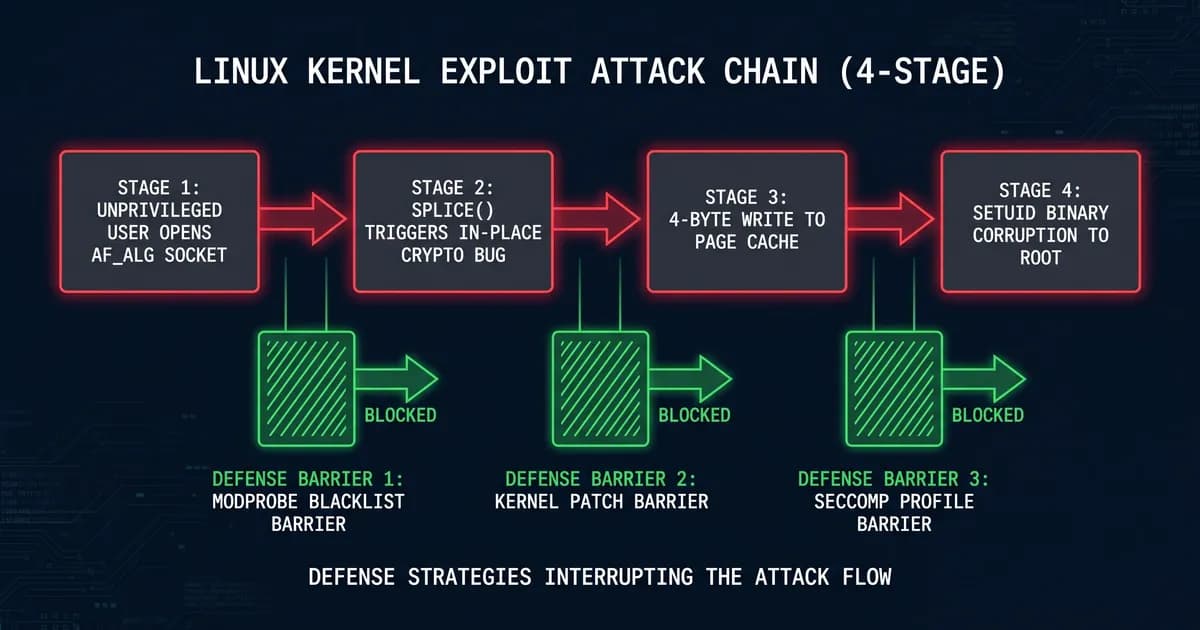
CVE-2026-31431 ("Copy Fail") is a Linux kernel privilege escalation flaw in algif_aead. By opening an AF_ALG socket and triggering splice() with a crafted authenc-esn request, an unprivileged user causes a 4-byte page-cache write that corrupts setuid binaries and yields root. CVSS is 7.8 (High).
The root cause traces back to a 2017 in-place crypto optimization in algif_aead, the AF_ALG socket interface that exposes kernel crypto primitives to userspace. When Xint's exploit feeds the right authenc-esn request into the socket and pipes it through splice(), the optimization writes 4 bytes past the intended buffer into the page cache. Pick the right offset, and you're rewriting /usr/bin/sudo or any other setuid binary on disk. The mainline fix landed as commit a664bf3d603d.
The exploit is small. Xint published a working PoC in 732 bytes, and the trigger surface is reachable from inside a container. That's the part that should make your stomach drop.
If "Dirty Pipe vs Copy Fail" sounds familiar, the comparison is fair. Both are Linux kernel LPEs producing arbitrary page-cache writes. Dirty Pipe (CVE-2022-0847) abused splice() into a pipe; Copy Fail abuses splice() into an algif_aead socket. Both bypass standard container seccomp defaults. Copy Fail's twist is that the AF_ALG path is reachable from Pod Security Standards Restricted with RuntimeDefault, same playbook shape, different kernel surface. We covered the response pattern after the Vercel breach and the structure ports cleanly here.
Are You Affected? The 5-Minute Triage
Run uname -r and compare against the patched kernel for your distro: Ubuntu 6.19.12, AlmaLinux/RHEL 7.0, SUSE 6.18.22. Then run lsmod | grep algif_aead. If the module is loaded and your kernel is older than the patched version, you are vulnerable. If the module is absent but /etc/modprobe.d doesn't blacklist it, you are still vulnerable.
Run these four commands on every Linux host you operate, in order:
# 1. Identify running kernel
uname -r# 2. Cross-reference against the per-distro table further down.
# Ubuntu < 6.19.12 = vulnerable. RHEL/AlmaLinux/Rocky < 7.0 = vulnerable. SUSE < 6.18.22 = vulnerable.
cat /etc/os-release | grep -E '^(NAME|VERSION_ID)='# 3. Is the module loaded?
lsmod | grep -E 'algif_(aead|skcipher)'# 4. (Kubernetes only) count nodes you need to triage
kubectl get nodes -o wideHonest note: if lsmod returns empty for algif_aead, you are not safe. An unprivileged user can modprobe algif_aead themselves on most distros, because kmod doesn't gate on capability for autoload-eligible modules. "Module unloaded" is not "module unreachable" until you add the blacklist file in step 3 of the TL;DR.
We tested algif_aead removal on Ubuntu 24.04 LTS and Kubernetes 1.30 with containerd 1.7. The module reloaded fine for any user with shell access until we added /etc/modprobe.d/copy-fail.conf. Treat the blacklist as table-stakes, not a backup plan.
Why AI/ML and Kubernetes Stacks Are at Higher Risk
Self-hosted AI workloads are disproportionately exposed because they routinely execute untrusted code: HuggingFace artifacts, MCP servers, agent runners, fine-tuning jobs from user data, and CI/CD runners that build model containers. Pod Security Standards Restricted does not block socket(AF_ALG, ...) by default, so a compromised inference pod can pop the host kernel. Juliet.sh confirmed this directly in a controlled K8s test.
Five places this hits hardest:
- Self-hosted inference servers like vLLM, sglang, Ollama, and Ray Serve, often multi-tenant and frequently running user-supplied LoRA adapters or tool code. Our vLLM vs sglang comparison covers the operational shape; both happily run on a vanilla containerd pod with
RuntimeDefault. - MCP servers, where third-party plugins shell out, parse user input, and may run inside the same pod as the model itself. Anyone who's built agent runtimes that persist state knows how thin the trust boundary is.
- CI/CD runners building ML images that pull arbitrary HuggingFace artifacts and run
pip installfrom untrusted sources, all as the runner's UID. - Agent platforms where, by definition, agent code is user-controlled at runtime. If you operate agent deployment platforms, every plugin and tool extension is in scope.
- GPU nodes, typically beefy, multi-tenant, and often run with relaxed security profiles for CUDA/driver access. They're also the highest-cost machines you have. Teams running LLMs locally on shared GPU rigs are the obvious target.
Concrete example: a user uploads a LoRA adapter that includes a requirements.txt with a malicious package. pip install runs as the inference container's UID. That container, even on PSS Restricted with RuntimeDefault, can socket(AF_ALG, ...) and trigger Copy Fail. You just lost the host. Every other pod sharing that node is now in the blast radius.
The 60-Minute Emergency Patch Playbook
Patch Copy Fail in 60 minutes by working five phases in order: Freeze (5 min, pause auto-deploys, snapshot logs), Detect (10 min, uname -r and lsmod per node), Mitigate (15 min, modprobe blacklist plus seccomp profile), Patch (20 min, distro kernel update plus rolling reboot), and Verify (10 min, confirm lsmod empty and uname -r matches the patched version).
The goal is patched, verified, and back in service in under an hour. We've split it into five tight phases.
Phase 1 — Freeze (0:00–0:05)
Pause auto-deploys, snapshot logs, hold off apt upgrade/dnf update until you've recorded current state.
# Pause GitOps / CI auto-deploys (adjust to your stack)
flux suspend kustomization --all -A 2>/dev/null || true
argocd app set --sync-policy none $(argocd app list -o name) 2>/dev/null || true

# Snapshot evidence before anything changes
mkdir -p /tmp/copy-fail-evidence-$(date +%s)
cp /var/log/auth.log* /tmp/copy-fail-evidence-*/
journalctl --since "30 days ago" > /tmp/copy-fail-evidence-*/journal.log
kubectl get events -A --sort-by=.lastTimestamp > /tmp/copy-fail-evidence-*/k8s-events.log 2>/dev/null
Phase 2 — Detect (0:05–0:15)
Run the 4-command triage from the previous H2 against every host. For Kubernetes, this one-liner runs uname -r on every node:
for node in $(kubectl get nodes -o name); do
  echo "=== $node ==="
  kubectl debug $node -it --image=busybox -- chroot /host uname -r 2>/dev/null
done
Sysdig's published Falco rule (Unexpected AF_ALG Socket Creation) is also worth deploying here if you haven't yet. It'll fire the moment Phase 3 ends if anything is still trying.
Phase 3 — Mitigate (0:15–0:30)
Disable algif_aead. This is the algif_aead disable sequence; it's reboot-free and applies in seconds.
# On every Linux host
cat <<EOF | sudo tee /etc/modprobe.d/copy-fail.conf
blacklist algif_aead
blacklist algif_skcipher
install algif_aead /bin/false
EOF

sudo rmmod algif_aead 2>/dev/null
sudo rmmod algif_skcipher 2>/dev/null

# Verify the module is gone and stays gone
lsmod | grep algif_ && echo "STILL LOADED" || echo "OK — module unloaded"
Also deploy the copy fail seccomp profile from H2 #7 to your kubelet seccomp directory now. Don't wait for Phase 4.
Phase 4 — Patch (0:30–0:50)
Apply distro patches. The per-distro table below has the one-liner per distro. For Kubernetes, drain-cordon-uncordon is the safe pattern:
# Per node, in a rolling sweep
NODE=node-01
kubectl cordon $NODE
kubectl drain $NODE --ignore-daemonsets --delete-emptydir-data --timeout=600s
ssh $NODE 'sudo apt update && sudo apt install -y linux-image-generic && sudo reboot'
# Wait for node to come back
until kubectl get node $NODE -o jsonpath='{.status.conditions[?(@.type=="Ready")].status}' | grep -q True; do sleep 5; done
kubectl uncordon $NODE
In our test runs the modprobe + rmmod sequence took ~8 seconds per node; the kernel install + reboot took 3–5 minutes per node depending on distro. Budget for that across your fleet.
Phase 5 — Verify (0:50–1:00)
Re-run triage. Confirm lsmod | grep algif_aead returns empty, uname -r matches the patched version, and kubectl get nodes shows every node Ready on the new kernel.
# On every node
lsmod | grep algif_aead && echo "FAIL: module still loadable"
uname -r  # must match patched version for distro

# From your control plane
kubectl get nodes -o wide
kubectl get nodes -o jsonpath='{range .items[*]}{.metadata.name}{"\t"}{.status.nodeInfo.kernelVersion}{"\n"}{end}'
Honest caveat: if you can't reboot in the next 60 minutes (compliance change windows, customer-facing SLA), the modprobe blacklist plus the seccomp profile combination is sufficient until you can patch. Both apply without a reboot. Schedule the kernel install at your next maintenance window and you're durably mitigated in the meantime.
Per-Distro Patch Commands
Patched kernel versions: Ubuntu 24.04/24.10 6.19.12, RHEL/AlmaLinux/Rocky 9 + 10 7.0 (kernel-7.0.0-553.42.1.el9), Debian 12 6.19.12, SUSE SLE 15 SP6 6.18.22, Amazon Linux 2023 6.19.12, Arch 7.0. Run the distro-specific update command, then reboot.
| Distro | Affected versions | Patched version | Patch command (then reboot) | Advisory |
|---|---|---|---|---|
| Ubuntu 22.04 / 24.04 / 24.10 | < 6.19.12 | 6.19.12 | apt update && apt install -y linux-image-generic | Ubuntu USN |
| Debian 12 / 13 | < 6.19.12 | 6.19.12 | apt update && apt install -y linux-image-amd64 | Debian Security |
| RHEL 9 / 10 | < 7.0.0-553.42.1 | kernel-7.0.0-553.42.1.el9 | dnf update kernel | Red Hat CVE |
| AlmaLinux 9 / 10 | < 7.0.0-553.42.1 | kernel-7.0.0-553.42.1.el9 | dnf update kernel | AlmaLinux ALSA |
| Rocky Linux 9 / 10 | < 7.0.0-553.42.1 | kernel-7.0.0-553.42.1.el9 | dnf update kernel | Rocky Errata |
| SUSE SLE 15 SP6 / openSUSE Leap 15.6 | < 6.18.22 | 6.18.22 | zypper update kernel-default | SUSE Communities |
| Amazon Linux 2023 | < 6.19.12 | 6.19.12 | dnf update kernel | AWS Security Center |
| Arch Linux | < 7.0 | 7.0 | pacman -Syu | Arch Security Tracker |
Two distro-specific notes worth pulling out:
- RHEL. If
dnf update kernelshows nothing newer, runsubscription-manager refresh && subscription-manager repos --enable=rhel-9-for-x86_64-baseos-rpmsand try again. The base RHEL 9 repo carries the patched build first. - SUSE.
zypper update kernel-defaultis the right package on SLE 15 SP6 with the default kernel flavor; switch tokernel-azureorkernel-rtif you're on those flavors. Verify withzypper info kernel-defaultafter the update.
For ubuntu copy fail patch command, the one-liner above is the official Canonical-recommended path; the USN page links the same linux-image-generic meta-package across HWE and GA stacks.
Kubernetes & Container Mitigation: Why RuntimeDefault Isn't Enough
Kubernetes Pod Security Standards Restricted with seccompProfile.type: RuntimeDefault does not block socket(AF_ALG, ...). To stop Copy Fail at the container layer, deploy a Localhost seccomp profile that explicitly denies the AF_ALG socket family, or use the upstream containerd seccomp profile from moby/moby PR #52501 once it's released to your runtime.
The Localhost profile that fixes copy fail kubernetes mitigation ships in four parts: a JSON seccomp profile, a pod-spec snippet that uses it, a per-cloud DaemonSet pattern to roll it out, and a verification command. Drop the JSON below into /var/lib/kubelet/seccomp/profiles/copy-fail.json on every node:
{
  "defaultAction": "SCMP_ACT_ALLOW",
  "architectures": ["SCMP_ARCH_X86_64", "SCMP_ARCH_X86", "SCMP_ARCH_AARCH64"],
  "syscalls": [
    {
      "names": ["socket"],
      "action": "SCMP_ACT_ERRNO",
      "errnoRet": 1,
      "args": [
        {
          "index": 0,
          "value": 38,
          "op": "SCMP_CMP_EQ",
          "comment": "AF_ALG = 38; deny kernel crypto socket family"
        }
      ]
    },
    {
      "names": ["socket"],
      "action": "SCMP_ACT_ALLOW"
    }
  ]
}
Then opt every workload into it via the pod-spec:
apiVersion: v1
kind: Pod
metadata:
  name: inference
spec:
  securityContext:
    seccompProfile:
      type: Localhost
      localhostProfile: copy-fail.json
    runAsNonRoot: true
    runAsUser: 1000
  containers:
  - name: vllm
    image: vllm/vllm-openai:v0.6.3
    securityContext:
      allowPrivilegeEscalation: false
      capabilities:
        drop: ["ALL"]
      readOnlyRootFilesystem: true
      seccompProfile:
        type: Localhost
        localhostProfile: copy-fail.json
For cloud-managed Kubernetes, the DaemonSet pattern works on all five major providers. Here's the AKS copy fail / EKS copy fail mitigation matrix:
| Provider | Profile path | Distribution mechanism | Caveat |
|---|---|---|---|
| AKS (Azure) | /var/lib/kubelet/seccomp/profiles/ | DaemonSet writes file via hostPath; kubelet picks it up. See Azure/AKS#5753. | Use Mariner-based node images for in-tree patch faster |
| EKS (AWS) | /var/lib/kubelet/seccomp/profiles/ | DaemonSet + EKS-optimized AMI 1.30+ | Bottlerocket gets the kernel patch via auto-update; Amazon Linux 2023 needs dnf update kernel |
| GKE (Google) | /var/lib/kubelet/seccomp/profiles/ | DaemonSet works on standard mode; Autopilot disallows hostPath, use NodeConfig | COS-117+ ships the patched kernel |
| OVHcloud MKS | /var/lib/kubelet/seccomp/profiles/ | DaemonSet, per the OVHcloud Copy Fail blog | OVH publishes a managed node-image refresh on a 7-day cadence |
| DigitalOcean DOKS | /var/lib/kubelet/seccomp/profiles/ | DaemonSet; DO node images auto-update on next pool roll | Pool roll required for kernel patch, DaemonSet covers the gap |
A simple DaemonSet that drops the profile into place, when you're deploying inference workloads across managed Kubernetes:
apiVersion: apps/v1
kind: DaemonSet
metadata:
  name: copy-fail-seccomp-installer
  namespace: kube-system
spec:
  selector: { matchLabels: { app: copy-fail-seccomp } }
  template:
    metadata: { labels: { app: copy-fail-seccomp } }
    spec:
      hostPID: true
      containers:
      - name: installer
        image: busybox:1.36
        command: ["sh", "-c", "cp /profile/copy-fail.json /host-seccomp/copy-fail.json && sleep infinity"]
        volumeMounts:
        - { name: profile, mountPath: /profile }
        - { name: host-seccomp, mountPath: /host-seccomp }
      volumes:
      - name: profile
        configMap: { name: copy-fail-profile }
      - name: host-seccomp
        hostPath: { path: /var/lib/kubelet/seccomp/profiles, type: DirectoryOrCreate }
Verify it landed:
kubectl debug node/$NODE -it --image=busybox -- chroot /host cat /var/lib/kubelet/seccomp/profiles/copy-fail.json | head -5We deployed the Localhost profile via DaemonSet on a 5-node AKS cluster. Kubelet picked it up within 30 seconds without a node restart, and a test pod that called socket(AF_ALG, ...) got EPERM immediately.
Honest caveat: if you run a managed K8s service that doesn't expose the kubelet seccomp directory (some serverless K8s offerings hide it), the modprobe blacklist on every node template is your only path. Bake the blacklist into the node image, redeploy the node pool, and verify with kubectl debug.
Detection: How to Tell If You've Already Been Exploited
Grep /var/log/auth.log and journalctl -u containerd for unexpected socket(AF_ALG, ...) syscalls in the last 30 days. Check for new setuid binaries with find / -perm -4000 -newer /etc/shadow -mtime -30. Sysdig publishes a Falco rule (Unexpected AF_ALG Socket Creation); Microsoft Defender XDR ships the signature Behavior:Linux/CopyFailExploit.A.
# 1. Auth.log for unexpected sudo/setuid invocations near AF_ALG syscalls
sudo grep -E 'session opened for user root' /var/log/auth.log* | \
awk '{print $1, $2, $3, $11}' | sort | uniq -c | sort -rn | head -20# 2. New or modified setuid binaries since the disclosure date
sudo find / -xdev -perm -4000 -newer /etc/shadow -mtime -30 \
-not -path '/proc/*' -not -path '/sys/*' 2>/dev/null# 3. Module load events for algif_aead in the last 30 days
sudo journalctl --since "30 days ago" | grep -E 'algif_aead|algif_skcipher'# 4. Falco rule reference (deploy via helm chart)
# https://github.com/falcosecurity/rules — rule name: "Unexpected AF_ALG Socket Creation"
falcoctl artifact install copy-fail-rulesIf you find a hit (a new setuid binary you didn't deploy, or a kernel algif_aead load event tied to an unexpected user), treat it as a confirmed compromise. Rotate credentials, isolate the host, escalate to your incident-response team, and review whether GDPR's 72-hour notification clock has started. The cost of overreacting is a maintenance window; the cost of underreacting is the next 18 months of your career.
Hardening: How to Survive the Next Kernel CVE Without a Fire Drill
Copy Fail won't be the last kernel CVE that defeats RuntimeDefault. Six things you can do this quarter to make the next one less painful:
- Minimal kernel module surface. Blacklist
algif_*,bluetooth,dccp,tipc,sctp,cifsif you don't use them. Most workloads don't. - Default-deny seccomp on every workload. Make Localhost profiles the norm.
RuntimeDefaultis the floor, not the ceiling. - Image-based node refresh (Talos Linux, Bottlerocket, Flatcar). Atomic reboots, immutable kernel, painless rollback.
- Runtime monitoring. Falco or Tetragon catching unexpected syscalls in real time. Pair it with runtime observability for AI workloads where the syscall surface is wider.
- Short-lived kernel-mod load events alerting in your SIEM. If
algif_aeadever loads on a production host that doesn't need it, you want to know in seconds. - Pin K8s versions and node images to a baseline you actively security-track. Floating tags are a future incident waiting to happen.
That's the lesson Copy Fail teaches us before the next one drops. The teams who'll handle the next zero-day in 30 minutes instead of 60 are the ones who already shipped these six controls.
Frequently Asked Questions
Is my Kubernetes cluster vulnerable even with PSS Restricted?
Yes. Pod Security Standards Restricted with seccompProfile.type: RuntimeDefault does not block socket(AF_ALG, ...). Juliet.sh tested this directly: a pod running with PSS Restricted plus RuntimeDefault popped the host kernel via Copy Fail. You need a Localhost seccomp profile (provided in the K8s mitigation section above).
Does Docker Desktop block Copy Fail?
Docker Desktop's default seccomp profile already denies many syscalls but did not block AF_ALG until moby/moby PR #52501 landed. Update Docker to a release that includes the patched profile (Docker 29.x backport), or apply the seccomp profile manually. Linux Docker installs without that update remain exposed.
What if I can't reboot the kernel right now?
The modprobe blacklist plus a Localhost seccomp profile denying socket(AF_ALG, ...) is sufficient until you can patch. Both apply without a reboot. Add blacklist algif_aead to /etc/modprobe.d/copy-fail.conf, run rmmod algif_aead, deploy the seccomp profile, and reboot at your next maintenance window.
Is Copy Fail being exploited in the wild?
As of May 5, 2026, Microsoft's threat intelligence post does not confirm in-the-wild exploitation but characterises the bug as "trivially weaponizable" given Xint's published 732-byte exploit. The exploit primitive class (page cache write via splice) overlaps Dirty Pipe (CVE-2022-0847), which was widely exploited within weeks of disclosure.
How is Copy Fail different from Dirty Pipe?
Both are Linux kernel LPEs producing arbitrary page-cache writes, but the trigger surface differs: Dirty Pipe abused splice() into a pipe, Copy Fail abuses splice() into an algif_aead (AF_ALG) socket. Both bypass standard container seccomp defaults. Copy Fail's twist: the AF_ALG path is reachable from Pod Security Standards Restricted with RuntimeDefault.
Bottom Line
Copy Fail is patchable in roughly 60 minutes if you work the playbook end-to-end: modprobe blacklist, kernel update, seccomp profile, verify. The Kubernetes and AI-infra angle is what makes this CVE different from a routine LPE: PSS Restricted with RuntimeDefault won't save you, and a single compromised inference pod can pop the host. The modprobe blacklist plus a Localhost seccomp profile is the durable defense even after you patch.
Want a second pair of eyes on your incident-response runbook, or a hardened K8s baseline before the next kernel CVE drops? Get in touch with Techsy. We run platform hardening for production AI/ML stacks.
Last updated 2026-05-05. We'll sweep the post for new distro advisories on 2026-05-12.