GitHub Got Hacked by a VS Code Extension (May 2026): The 60-Minute Emergency Playbook Every Developer Should Run Tonight
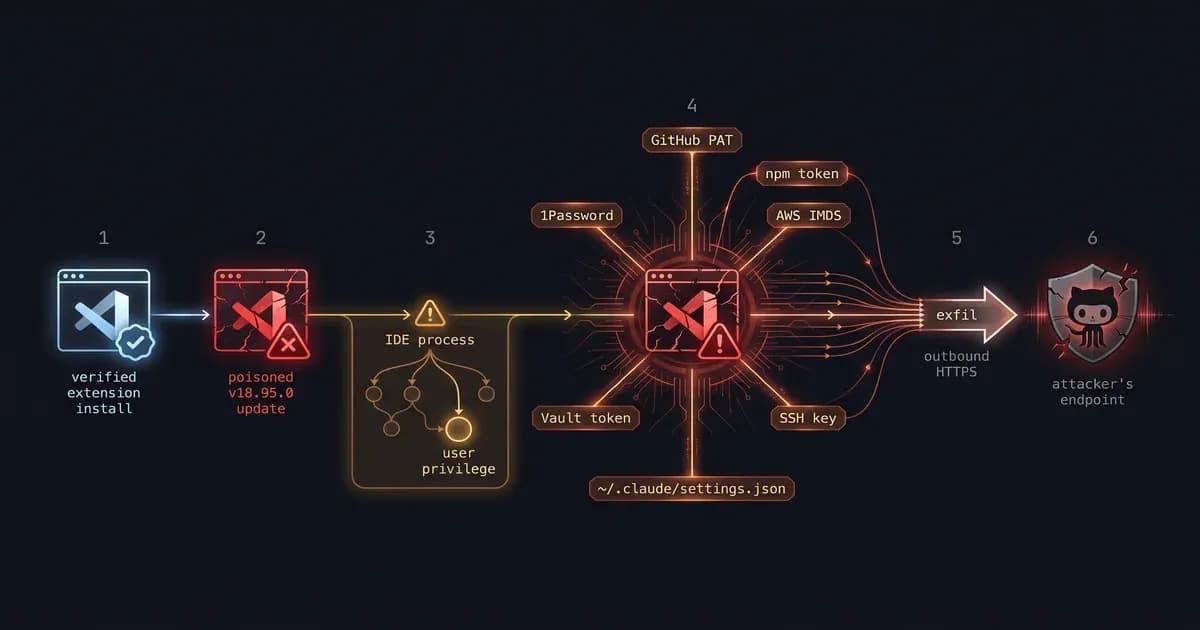
On May 20, 2026, GitHub confirmed approximately 3,800 of its internal source-code repositories were exfiltrated via a malicious VS Code extension installed on an employee's workstation. If you used a GitHub PAT or npm token inside VS Code in the last 14 days, the next 60 minutes matter. This is the playbook: what actually happened, whether you're affected, and what to rotate first.
Key Takeaways
- What happened: GitHub.com production wasn't breached, an employee's VS Code installed a poisoned extension (highly likely Nx Console v18.95.0) that exfiltrated PATs and dumped ~3,800 internal repos.
- Customer data: Not affected. The compromised data is GitHub's internal source code, not customer code or accounts.
- Who's at risk: Any developer who installed a VS Code extension between roughly May 18, 12:36 UTC and May 18, 12:47 UTC (the 11-minute window), or anyone using long-lived GitHub PATs from inside VS Code.
- What to do now: Rotate GitHub PATs first, npm tokens second, AWS/cloud keys third, full playbook in the "What Developers Must Do" section below.
TL;DR: The 6 Things to Do in the Next Hour
The fastest way to contain blast radius from the github hacked vscode extension story is to rotate the credentials a poisoned extension can reach, audit what's installed on your laptop, and check your GitHub org log for the May 18-20 UTC window. Six actions, ranked by impact, in order.
- Revoke every GitHub Personal Access Token created or used in VS Code in the last 30 days.
- Rotate npm tokens via
npm token revokeand re-issue with 2FA + trusted publishing. - Scan your laptop for IoCs from GHSA-c9j4-9m59-847w (file paths, processes; commands below).
- Audit
code --list-extensions --show-versionsand uninstall anything you can't justify. - Pin extension versions in
devcontainer.jsonand enforce an org-level allow-list. - Check your GitHub org audit log for unfamiliar repo pushes between May 18-20 UTC.
If you only have time for two, do #1 and #3. The rest can wait an hour.
Did GitHub Actually Get Hacked? Let's Clear Up the Headline
No, GitHub.com's production infrastructure was not breached on May 20, 2026. A single GitHub employee's workstation was compromised after the employee installed a malicious VS Code extension (highly likely Nx Console v18.95.0). The attacker, calling itself TeamPCP (tracked as UNC6780), exfiltrated approximately 3,800 of GitHub's internal source-code repositories. Customer code, customer accounts, and GitHub's production services are not affected.
Here's the cleaner version of what did and didn't happen.
| What happened | What did NOT happen |
|---|---|
| An employee's laptop was compromised via a poisoned VS Code extension | GitHub.com production was breached |
| ~3,800 internal source-code repositories were exfiltrated | Customer repositories or accounts were touched |
| GitHub employee credentials on that endpoint were stolen | Customer PATs, npm tokens, or OAuth grants were stolen from GitHub's systems |
| TeamPCP demanded a ransom (per Tom's Hardware) | GitHub paid (no evidence of payment) |
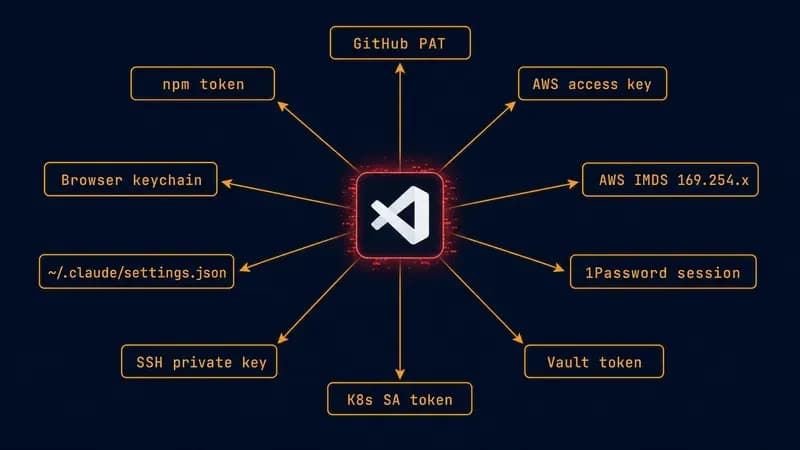
Why does this framing matter? Because the takeaway isn't "github hacked." The takeaway is that developer endpoints are now the soft underbelly of every engineering org. Every secret your team owns (GitHub PATs, npm tokens, AWS keys, vault sessions, AI provider keys) sits on a laptop with little to no EDR coverage. A single poisoned extension running in your IDE inherits all of it.
GitHub's own spokesperson, quoted in Bleeping Computer, confirmed the employee-endpoint framing and the "no customer data" line. Help Net Security added the TeamPCP attribution. The technical chain-of-custody for the extension lives in advisory GHSA-c9j4-9m59-847w.
GitHub.com was not breached. A GitHub employee was. Hold that frame in your head as you read the rest.
What Actually Happened: Timeline of the May 2026 Breach
The github breach 2026 story unfolded across four stages over roughly 48 hours. A poisoned extension was published on May 18 at 12:36 UTC, removed 11 minutes later, detected by GitHub the next day, and publicly disclosed on May 20. The compact timeline, with sources:
| Time (UTC) | Event | Source |
|---|---|---|
| May 18, 12:36 | Nx Console v18.95.0 published to OpenVSX / Visual Studio Marketplace (highly likely) | StepSecurity / GHSA-c9j4-9m59-847w |
| May 18, 12:47 | Malicious version removed, 11-minute window | StepSecurity |
| May 19 | GitHub detects employee endpoint compromise; contains the incident | GitHub spokesperson via Bleeping Computer |
| May 20 | Public disclosure; TeamPCP / UNC6780 publicly claims attribution | Help Net Security, Hackread |
That 11-minute window is the strangest detail. It suggests the attacker rotated extensions to evade marketplace detection, the same pattern Koi Security documented in the GlassWorm OpenVSX worm of October 2025. TeamPCP / UNC6780 has previously claimed 2026 compromises against Trivy, KICS, LiteLLM, TanStack, and MistralAI. Same group, same playbook, different targets.
Last month it was Vercel's env vars. Today it's GitHub's repos. The pattern we've watched develop over 9 months keeps shifting blast radius outward. See our breakdown of the Vercel breach response for the sibling incident.
The Extension Likely at Fault: Nx Console v18.95.0 (And Why GitHub Won't Confirm)
GitHub has not formally named the extension involved in the employee-endpoint compromise. Forensic evidence aligns strongly with Nx Console v18.95.0, but this remains highly likely, not confirmed. We'll update this post if GitHub publicly names a different extension. Treat the rest of this section as best-available attribution, not declared fact.
Four pieces of circumstantial evidence align Nx Console with the GitHub disclosure:
- Timing match: The GHSA-c9j4-9m59-847w advisory window (May 18, 12:36-12:47 UTC) sits inside the GitHub-employee-endpoint compromise window in GitHub's own disclosure.
- Forensic IoC overlap: StepSecurity's published Nx Console payload analysis (file paths, processes like
__DAEMONIZED, network endpoints) matches the artifacts seen on the compromised endpoint per Wiz's writeup. - TeamPCP attribution pattern: TeamPCP / UNC6780 has been active in the VS Code supply-chain space (Trivy, KICS, LiteLLM, TanStack, MistralAI in 2026) with a consistent payload structure.
- The 11-minute removal window: Characteristic of supply-chain attacks where the attacker controls the publish moment but the marketplace catches it quickly.
If you didn't install Nx Console, you're still not safely out of the woods. The broader attack pattern (__DAEMONIZED processes, IMDS abuse, ~/.claude/settings.json exfil) generalizes to any poisoned extension. The triage in the next section applies regardless of which extension you suspect.
Are You Affected? The 5-Minute Triage
There are three quick tests. (1) Did you install or auto-update a VS Code extension between May 18, 12:36 and 12:47 UTC? (2) Are any of the IoC files from GHSA-c9j4-9m59-847w on your laptop right now? (3) Have you used a GitHub PAT inside VS Code in the last 14 days? Run all three in under five minutes.
Test 1, Extension audit
# List all installed extensions with versions
code --list-extensions --show-versions

# Specifically check for Nx Console v18.95.0
code --list-extensions --show-versions | grep -i "nrwl.angular-console\|nx-console"
Anything that auto-updated between May 17 and May 18 deserves a second look. If you see Nx Console at exactly 18.95.0, you're a likely match. The patched version is 18.100.0. Either uninstall or jump straight to the playbook below.
Test 2, IoC scan
# Check for the daemonized credential-harvest process artifacts (GHSA-c9j4-9m59-847w)
ps aux | grep -i "__DAEMONIZED" | grep -v grep
ls -la ~/.local/share/kitty/ 2>/dev/null
find ~ -name "*.daemonized*" 2>/dev/null

# IMDS abuse indicator (AWS credential harvest)
# Check shell history for unexpected curl to 169.254.169.254
grep -E "169\.254\.169\.254|metadata\.google\.internal" ~/.zsh_history ~/.bash_history 2>/dev/null
A clean machine should return nothing for the __DAEMONIZED grep, no .daemonized files, and no IMDS hits in your shell history. If any of those land, assume the laptop is compromised and treat every credential it has touched in the last 30 days as burned.
Test 3, PAT exposure
If you've used a GitHub PAT (classic or fine-grained) inside any VS Code terminal, integrated git, or any extension that calls the GitHub API in the last 14 days, assume it's compromised and proceed to the rotation playbook below. This is the conservative default, you can't audit "was the token in memory while the extension was active." Rotate it.
If you use Claude Code, the IoC list specifically includes ~/.claude/settings.json. Check our Claude Code hooks guide for what's stored in that file and which keys to rotate first.
Verdict. If any of these three trip a positive, stop reading the narrative. Jump straight to the playbook in the next section. The next 55 minutes matter more than the post-mortem.
What Developers Must Do: The 60-Minute Emergency Playbook
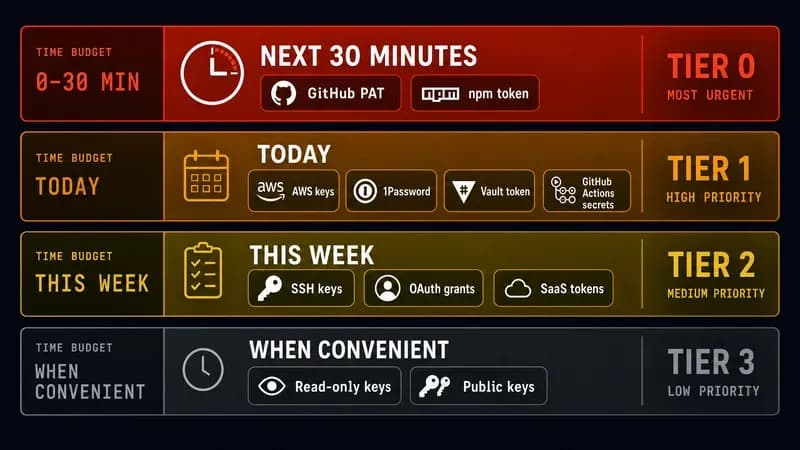
Rotate credentials in priority order. Tier 0 (next 30 min): GitHub PATs and npm tokens. Tier 1 (today): AWS / cloud keys, 1Password / Vault, GitHub Actions secrets. Tier 2 (this week): third-party SaaS, OAuth grants, SSH keys. Tier 3 (when convenient): read-only and public keys. Each tier maps to a specific blast-radius reduction.
RIGHT NOW: If You Think You're Hit
If your triage came back positive, do these three things in order before anything else.
- Kill the daemon and uninstall the suspect extension:
# Kill the malicious payload (GHSA-c9j4-9m59-847w)
pkill -f __DAEMONIZED
pkill -f "nx-console.*18.95.0"

# Uninstall the suspect extension immediately
code --uninstall-extension nrwl.angular-console- Pull your laptop's network cable if you have any evidence of active exfil. Sounds extreme. It is. Do it anyway. You can re-investigate offline.
- Call your security team or post in
#securitySlack before running anything else. If you're solo, skip to Tier 0 below.
Tier 0 (Next 30 Minutes): GitHub + npm
GitHub PAT revocation via the gh CLI and the web settings UI:
# Confirm what you're authenticated as
gh auth status

# List app installations the token has access to (helps inventory blast radius)
gh api -H "Accept: application/vnd.github+json" /user/installations

# The gh CLI cannot revoke classic PATs directly — use the web UI:
#   https://github.com/settings/tokens
# Click "Revoke" on EVERY token. Do not selectively keep "the one that's probably fine."

# Re-issue with fine-grained PATs + ≤90-day expiration:
#   https://github.com/settings/personal-access-tokens/new
# Scope one repo at a time, never the whole account.

# For org-owned PATs and installations:
gh api /orgs/{ORG}/installations
npm token rotation:
# List and revoke every npm token
npm token list
npm token revoke <token-id-1>
npm token revoke <token-id-2>

# Force 2FA on auth and writes
npm profile enable-2fa auth-and-writes

# For CI: migrate to OIDC trusted publishing — no more long-lived tokens
# Docs: https://docs.npmjs.com/trusted-publishers
If you maintain published packages, your npm token is the single most dangerous credential you own. Rotate it before AWS.
Tier 1 (Today): Cloud + Vaults + CI Secrets
AWS access keys come next. The IoCs show IMDS abuse, so any IAM user that touched the compromised endpoint is suspect:
# List access keys for the current IAM user
aws iam list-access-keys --user-name $(aws sts get-caller-identity --query 'Arn' --output text | cut -d/ -f2)

# Deactivate the old key (don't delete yet — let workloads fail loudly first)
aws iam update-access-key --access-key-id AKIA... --status Inactive --user-name <user>

# Create a new key
aws iam create-access-key --user-name <user>

# Once deployed and verified, delete the old key
aws iam delete-access-key --access-key-id AKIA... --user-name <user>

# If any EC2 instance was using IMDSv1, force IMDSv2 immediately
aws ec2 modify-instance-metadata-options --instance-id i-... --http-tokens required
1Password CLI: sign out of every device (op signout --all), regenerate session tokens, and audit recent vault access via 1Password's web audit log for anything that ran from the compromised endpoint.
HashiCorp Vault: revoke your user token (vault token revoke -self) and have an admin issue a new one with a shorter TTL.
GitHub Actions secrets: if any rotated credential is also in Actions, update it. Use gh secret set GITHUB_PAT --body <new-pat> per repo, or the org-level UI for org secrets.
Anthropic and OpenAI API keys: the GHSA-c9j4-9m59-847w IoC list specifically calls out ~/.claude/settings.json as a harvest target. Revoke and re-issue your Anthropic console API key and any OpenAI key you've ever stored in that file.
Tier 2 (This Week): SSH + OAuth + Password Vaults
SSH keys are slower-moving but still in scope. The extension had filesystem read on ~/.ssh/:
# Audit existing SSH keys (when were they generated?)
for key in ~/.ssh/id_*; do
  if [ -f "$key" ]; then
    echo "Key: $key"
    stat -c '%y' "$key" 2>/dev/null || stat -f '%Sm' "$key"
  fi
done

# Generate a new Ed25519 key
ssh-keygen -t ed25519 -C "rotated-$(date +%Y%m%d)" -f ~/.ssh/id_ed25519_new

# Upload public key to GitHub
gh ssh-key add ~/.ssh/id_ed25519_new.pub --title "rotated-$(date +%Y%m%d)"

# Delete the old key from GitHub via web UI, then verify SSH still works
ssh -T [email protected]
Browser password manager and OS keychain: rotate any password the extension could plausibly have seen via clipboard. Realistic exposure is passwords you copied to clipboard while the extension was active.
Tier 3 (When Convenient): Audit + Verify
Audit your GitHub org log for the compromise window. This requires org admin:
# Pull push events for the May 18-20 window
gh api -X GET /orgs/{ORG}/audit-log \
  --paginate \
  -f phrase='action:repo.push created:2026-05-18..2026-05-20' | jq '.[] | {actor, created_at, repo}'

# Spot-check suspicious commits (unexpected authors, large diffs)
gh api -X GET /repos/{ORG}/{REPO}/commits \
  -f since=2026-05-18T00:00:00Z \
  -f until=2026-05-20T23:59:59Z | jq '.[] | {sha, author: .commit.author, message: .commit.message}'

# Refresh OAuth grants
gh auth refresh -s admin:org -s admin:public_key
If the audit log shows pushes from the compromise window that you didn't make, escalate to your security team and preserve the audit log JSON. Don't try to "undo" anything in the repo. Preserve evidence first.
We covered the same tiered-rotation logic for the Vercel env-var breach in April: same shape, different layer.
The 5-Question Extension Audit Framework (Use This Forever)
Before installing or trusting any VS Code extension, run it through five tests: publisher domain age, version velocity, package.json activation events, permission scope vs expected behavior, and open-source repo audit. Nx Console v18.95.0 would have failed Test #2: a sudden version jump after a stable release cadence is the classic supply-chain tell.
- Publisher domain age. Is the publisher's domain older than one year? New publishers on newly registered domains carry more risk. Check via the Visual Studio Marketplace publisher page or
whoison the publisher email's domain. - Version velocity. Does the version history show normal cadence (one release every 1-4 weeks) or a sudden spike (three releases in 24 hours)? Sudden velocity is signal. Nx Console v18.95.0 was a velocity anomaly.
package.jsonactivation events. Open the.vsixfile (it's a zip) and readactivationEvents. Extensions that activate on*(always-on) have the largest attack surface. Prefer extensions that activate on a specific language or filename.- Required permissions vs expected behavior. Does a "theme" extension request network access? Does a "snippet" extension need filesystem write? Mismatches are red flags. Cross-check against Microsoft's extension runtime security docs.
- Open-source repo audit. Is the source on GitHub? Read the last five commits for suspicious changes: post-install hooks, base64-encoded blobs, network calls to unfamiliar domains.
An extension that activates on * and asks for network access is functionally a remote shell with VS Code stapled to it.
The same audit framework applies to MCP servers, the next extension-class supply-chain surface. See our best MCP servers 2026 breakdown for which ones we trust and why.
Why This Keeps Happening: The 2025-2026 Supply Chain Wave
The May 20 GitHub breach is one node in a 9-month arc: Shai-Hulud npm worm (Sept 2025), GlassWorm OpenVSX worm (Oct-Nov 2025), Shai-Hulud 2.0 (Nov 2025, 25,000+ affected repos), Mini Shai-Hulud (early 2026), Nx Console (May 18, 2026), GitHub endpoint compromise (May 20, 2026). Developer endpoints have become the new soft underbelly.
- Sept 2025, Shai-Hulud npm worm. Self-propagating malware in popular npm packages. CISA issued an alert on the widespread compromise.
- Oct-Nov 2025, GlassWorm. The first self-propagating worm targeting VS Code extensions on OpenVSX. Koi Security disclosure.
- Nov 2025, Shai-Hulud 2.0. Over 25,000 repos exfiltrated. Microsoft Security Blog published containment guidance.
- Early 2026, Mini Shai-Hulud. TeamPCP variant. Smaller-scale repeats against Trivy, KICS, LiteLLM, TanStack, and MistralAI.
- May 18, 2026, Nx Console v18.95.0. Highly likely vector for the GitHub endpoint compromise.
- May 20, 2026, GitHub discloses. ~3,800 internal repos exfiltrated. Per Wiz's Shai-Hulud forensic series, the IMDS abuse pattern is a direct evolution.
The pattern is clear: developer laptops hold every secret in the org (GitHub PATs, AWS keys, vault tokens, AI provider keys) and have close to zero EDR coverage. Until that imbalance flips, this wave continues.
Defensive AI is one piece of the answer. We covered this angle in our breakdown of how AI prevents data breaches earlier this year.
GitHub's Bigger Response: Trusted Publishing, FIDO 2FA, 90-Day Tokens
GitHub had already been rolling out four supply-chain controls before May 20: mandatory 2FA for npm publishers, a 90-day cap on granular write tokens, TOTP deprecation in favor of FIDO and passkeys, and OIDC trusted publishing for GitHub Actions and GitLab CI. The May breach accelerates an already-running migration; it doesn't introduce a new policy.
| Control | Status | Action for you |
|---|---|---|
| Mandatory npm 2FA | Live | Enable now: npm profile enable-2fa auth-and-writes |
| 90-day granular write token cap | Rolling out (existing tokens forced to expire) | Migrate to fine-grained PATs with ≤90-day TTL |
| TOTP deprecation, FIDO / passkeys | Phased rollout 2026 | Register a passkey on every GitHub account today |
| OIDC trusted publishing | Live for GitHub Actions + GitLab CI | Migrate CI from long-lived npm tokens to OIDC |
GitHub's broader plan for a more secure npm supply chain pre-dates this incident by months. The faster you align with it, the smaller your blast radius next time.
Hardening: How to Survive the Next One
Six forward-looking moves: pin extension versions in devcontainer.json, enforce an org-level extension allow-list, run EDR with extension-process visibility, secret-scan every push, scope PATs to one repo, and adopt OIDC trusted publishing instead of long-lived tokens. None of these would have prevented every incident, together they shrink blast radius from "everything on the laptop" to "one repo."
{
  "name": "secure-dev",
  "extensions": [
    "[email protected]",
    "[email protected]",
    "[email protected]"
  ],
  "settings": {
    "extensions.autoUpdate": false,
    "extensions.autoCheckUpdates": false
  },
  "containerEnv": {
    "VSCODE_GALLERY_SERVICE_URL": "https://your-internal-allow-list.example.com"
  }
}
In short:
- Pin every extension version in
devcontainer.jsonto kill auto-update. - Allow-list at the org level by pointing
VSCODE_GALLERY_SERVICE_URLat an internal mirror. - EDR with IDE process visibility: Crowdstrike, SentinelOne, or Microsoft Defender for Endpoint with VS Code in scope.
- Secret-scan every push: pre-commit and push-time, server-side.
- Scope every PAT to one repo: no
*scopes, ever. - OIDC trusted publishing: no long-lived npm or registry tokens in CI.
Last week's Linux copy_file_range CVE is a sibling story: different layer, same lesson. The trust boundary you forgot about is the one that bites.
If you're considering AI coding agents next, apply the same audit framework. They have the same trust profile as extensions. Our best AI coding agents 2026 breakdown walks through which agents earn that trust.
Frequently Asked Questions
Did GitHub get hacked?
No, not in the sense most headlines imply. GitHub.com production was not breached. A GitHub employee installed a malicious VS Code extension on their workstation, which exfiltrated approximately 3,800 of GitHub's internal source-code repositories. Customer code, customer accounts, and GitHub's production services are not affected.
What VS Code extension was actually involved?
GitHub has not formally confirmed the extension name. Forensic evidence from StepSecurity, Wiz, and GHSA-c9j4-9m59-847w points highly likely to Nx Console v18.95.0, published May 18 at 12:36 UTC and removed 11 minutes later. We treat this as "highly likely, not confirmed" until GitHub names it.
Is Nx Console safe to use now?
The patched version is 18.100.0. If you have an older v18.95.0 installed, uninstall immediately, run the IoC scan in our triage section, and re-install only from the official Nrwl publisher at version 18.100.0 or later. Verify the publisher domain before reinstalling and pin the version in devcontainer.json.
Was customer data affected by the GitHub breach?
No. Per GitHub's official statement via Bleeping Computer, customer source code, customer accounts, OAuth tokens, and GitHub-hosted production data were not accessed. The compromised data is GitHub's internal source code from the employee endpoint. Treat this as an employee-laptop incident, not a platform breach.
How do I know if my GitHub PAT was stolen?
You don't, with certainty. The conservative assumption: if you used any GitHub PAT inside VS Code in the last 14 days, treat it as compromised and rotate it. Check your GitHub audit log via gh api /orgs/{ORG}/audit-log for unfamiliar push events between May 18-20 UTC, then revoke and re-issue the token.
What is TeamPCP and UNC6780?
TeamPCP is a threat-actor group; UNC6780 is the tracking ID assigned by incident-response vendors. They've publicly claimed attribution for the GitHub breach. The same group has claimed 2026 compromises against Trivy, KICS, LiteLLM, TanStack, and MistralAI, a consistent VS Code and npm supply-chain targeting pattern.
Are VS Code extensions sandboxed?
No, not meaningfully. VS Code extensions run in the IDE's Node.js process with the user's full filesystem and network privileges. They can read every file in your home directory, including SSH keys, ~/.aws/credentials, ~/.claude/settings.json, and process memory via /proc/*/mem on Linux. Microsoft documents the runtime security model and its limits in the official extension docs.
Did this affect GitHub Codespaces or CI runners?
No evidence so far. The compromise was an employee workstation, not GitHub-hosted infrastructure. Codespaces, GitHub Actions runners, and customer-facing CI infrastructure are not reported as affected. We'll update this post if new IoCs change that picture.
Bottom Line
Three things to walk away with:
- GitHub.com wasn't hacked. An employee's VS Code workstation was. The lesson generalizes to every developer.
- Rotate now, audit framework forever. The 60-minute playbook is the patch; the 5-question audit framework is the immune system.
- This isn't a one-off. It's node #6 in a 9-month supply-chain wave that isn't slowing.
Last updated: May 20, 2026. We will sweep this post on May 27, 2026 with new IoCs, vendor advisories, and any GitHub-confirmed extension attribution.
If your team needs help auditing your VS Code extension surface, your PAT and token hygiene, or building an org-level allow-list policy, get a free consultation. We've been heads-down on developer-endpoint security since the Vercel breach in April, and the playbook above is what we run with clients on day one.