15 Best MCP Servers for Claude Code, Cursor, and Codex (2026): What We Actually Install
On a fresh laptop, we install three MCP servers before anything else: GitHub MCP, Context7, and Playwright. That's it. The rest you add when a real workflow demands them. And here's the part most lists won't tell you: Anthropic quietly archived 13 of its 20 original reference servers in 2025, so half the "official MCP server" tutorials floating around are pointing at code that's no longer maintained. We use MCP servers daily; we don't sell one. This is the list we'd hand a teammate.
Using Claude Code as your main editor? We've since published a Claude-Code-native setup guide: 11 Best MCP Servers for Claude Code (2026).
Key Takeaways
- The 3-server starter pack: GitHub MCP + Context7 + Playwright. Install these first, every time.
- Anthropic archived 13 of its 20 reference MCP servers in 2025; only 7 remain active.
- MCP isn't free: each connected server burns 2,000-5,000 tokens on schema injection alone.
- Linux Foundation's AAIF now governs MCP (Dec 2025), with Anthropic, OpenAI, Google, and Microsoft on the board.
Featured: MCP360, One Gateway to 100+ Tools
MCP360 is a unified gateway and marketplace that connects AI agents to 100+ external tools and custom MCPs through a single integration. Instead of configuring a separate server for every service, your agent gets one connection that standardizes workflow execution and scales automatically as new marketplace tools are added.
Honest disclosure: MCP360 is a vendor product. We're featuring it on merit because the single-gateway model solves a real problem that the per-server approach creates: config sprawl.
When to use it: multi-tool agent builds where per-service setup is the bottleneck. If you're wiring an agent to a dozen services and the config sprawl is the pain, one gateway beats a dozen separate installs.
Real pitfall: you're depending on a third-party gateway's uptime, so confirm SLAs before you lean on it in production. Docs at github.com/mcp360/unified-gateway-mcp.
What Is an MCP Server (in 30 Seconds)?
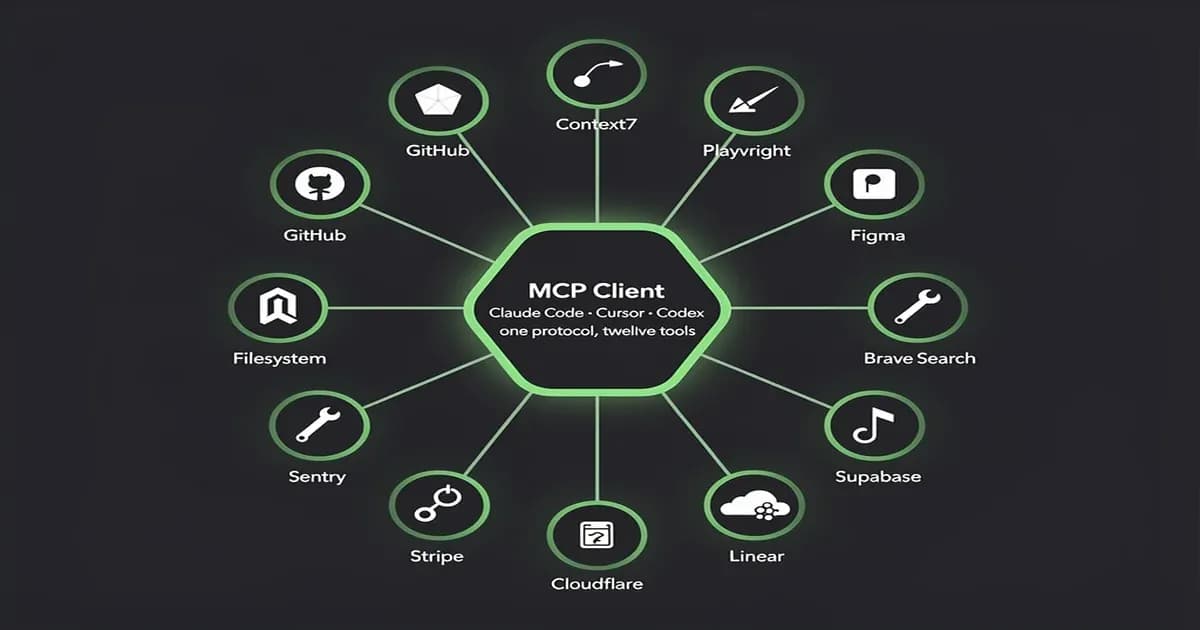
An MCP server is a tool adapter that exposes a service (GitHub, your filesystem, Figma) to any LLM client (Claude Code, Cursor, Codex) over the Model Context Protocol. Think USB-C for AI tools: one plug, many devices. Build the adapter once, and every compliant host can use it.
Before MCP, you had an N×M problem: every AI host needed a custom integration with every tool. MCP collapses that to N+M. The same GitHub MCP server works in Claude Code, Cursor, Codex CLI, Windsurf, and Cline without rewriting anything.
Two transports matter in practice. stdio is the local one: the server runs as a subprocess of the host, communicates over stdin/stdout, has no auth, and is fastest. Streamable HTTP is the remote one: runs on a URL, uses OAuth 2.1 for scoped access, and adds 30-200ms of latency. If you want the deeper protocol breakdown, our full MCP protocol breakdown walks through transports, auth, and tool schemas in detail. The official spec lives at modelcontextprotocol.io.
Which 3 MCP Servers Should You Install First?
Install GitHub MCP, Context7, and Playwright first. GitHub MCP collapses "find that PR, read that file, open that issue" into a single ask. Context7 pulls version-pinned docs into your prompt so the model stops hallucinating package APIs. Playwright handles real browser actions for QA and scraping. With those three, you've covered code, docs, and the web: about 80% of what you'd ever want an AI agent to touch.
On a fresh laptop, this is the only loadout we install before we start working. Everything below is conditional. These three are not.
1. GitHub MCP (vendor-maintained, official)
The single most context-switch-reducing MCP server for any developer. GitHub MCP lets the agent read code, search across orgs, manage PRs, comment on issues, and open new ones, all through the same chat where you're writing.
When to use it: any time you're shipping code. Even on solo projects, "what did I change in this file last Tuesday?" becomes a one-liner instead of a tab switch.
Real pitfall: scope your Personal Access Token to repo read only unless you actively want the agent merging things. We've watched agents helpfully open PRs nobody asked for. Install docs and the official source live at github.com/github/github-mcp-server. Note: this is the new vendor-maintained server. The old Anthropic reference GitHub server was archived; don't install that one.
2. Context7 MCP (community, Upstash-maintained)
The single highest-use server for stopping package-API hallucination. Context7 fetches version-pinned, real documentation for any library on demand and injects it into your prompt. So when the model is about to confidently invent a Next.js 15 API that doesn't exist, you can say "use Context7 to get the actual docs" and it grounds itself.
When to use it: every coding session. Especially anything Next.js, React, Tailwind, or framework-version-sensitive where the model's training data is months behind reality.
Real pitfall: Context7 is only as good as its index. Niche libraries may not be there yet, in which case fall back to a real doc URL via Fetch. Docs at context7.com. If you want the broader category, our best context-engineering tools roundup goes deeper on doc-grounding patterns.
3. Playwright MCP (Microsoft, official)
Browser actions for any AI client without writing Playwright scripts. Playwright MCP lets the agent navigate, click, fill forms, screenshot, and run JavaScript in a real Chromium instance.
When to use it: AI-driven QA, web scraping that needs JavaScript rendering, visual regression checks, form testing, "log into this and grab my dashboard data" workflows.
Real pitfall: each action takes ~500ms and screenshots are big, so budget your tokens. A 30-step browser flow can eat 20k tokens just on screenshot data. Docs at playwright.dev/docs/mcp.
A-Tier: 6 High-Use Servers to Add Next
After the starter pack, add servers as your workflow demands them. Figma Dev Mode for design-to-code, Filesystem for local file ops, Brave Search for web research, Firecrawl for site-to-data extraction, Supabase for database work, and Sentry for debugging real errors. Each one earns its slot when the work is there; don't install all six on day one.
4. Figma Dev Mode MCP (Figma, official)
Live design context (hierarchy, auto-layout, variants, design tokens) fed directly into your prompt. Figma Dev Mode MCP is the difference between "build a card component" guessing at spacing, and "build this card component" with the actual tokens and layout rules attached.
When to use it: frontend work where there's a real Figma file. Pitfall: requires a paid Figma Dev seat. Docs at figma.com.
5. Filesystem MCP (Anthropic reference, still active)
Local file read/write with configurable access controls. Filesystem MCP is one of the 7 still-active Anthropic reference servers. It's the right answer when you want the agent to manipulate files in a specific sandbox directory without giving it your whole machine.
When to use it: scaffolding, batch refactors, content migrations. Pitfall: in most coding workflows, the host (Claude Code, Cursor) already has filesystem access, so installing this on top is redundant. Source at github.com/modelcontextprotocol/servers.
6. Brave Search MCP (Brave, vendor)
Live web search through Brave's independent index. Brave Search MCP is the most common "give the agent the web" choice because the API is cheap and the results aren't Google-shaped.
When to use it: research, fact-checking, "what's the current price of X." Pitfall: results quality varies on niche queries, so pair with Fetch or Firecrawl when you need to actually read what you found. Docs at brave.com/search/api/mcp.
7. Firecrawl MCP (Firecrawl, vendor)
Turns any website into clean LLM-ready data. Firecrawl handles JavaScript rendering, paginated crawls, and structured extraction in one call.
Honest disclosure: Firecrawl is a vendor. They make MCP servers and a paid product. Their server is legitimately good; we're ranking it here on merit, not bias. 110k+ GitHub stars helps too.
When to use it: scraping content sites, competitor research, building doc indexes. Pitfall: the hosted tier costs real money once you're past the free quota. Docs at firecrawl.dev.
8. Supabase MCP (Supabase, official)
Query Postgres, run migrations, manage auth and storage, all from the chat. Supabase MCP is the cleanest example of "infra as conversation" that actually works.
When to use it: any project where Supabase is the backend. Pitfall: give the agent a read-only role for exploration; the migration capability is powerful and unforgiving. Docs at supabase.com/docs/guides/getting-started/mcp.
9. Sentry MCP (Sentry, vendor)
Pull errors, debug stack traces, manage issues. Sentry MCP is the fastest way we've found to triage a production incident with an AI assistant: paste the error ID, get the trace, get the suggested fix.
When to use it: debugging real errors in real apps. Pitfall: scope the token to a single project. You don't want the agent reading errors from every project in your org. Docs at the Sentry MCP page.
B-Tier: 6 Workflow-Specific Servers (Install on Demand)
B-tier servers earn their token budget only for specific workflows. Linear for product and PM work, Notion for docs and knowledge bases, Stripe for payments agents, Cloudflare for infra-as-conversation, Kubernetes for cluster ops, and Sequential Thinking for structured reasoning. Don't install these unless you're actually doing the work.
10. Linear MCP (Linear, official)
Issues, sprints, projects. Pulls Linear context into Claude Code or Cursor so "what's left in this sprint?" becomes one ask. Best for engineering teams that already live in Linear. Docs at linear.app/docs/mcp.
11. Notion MCP (Notion, official)
Read and write Notion docs, query databases, update pages. Good for teams whose runbook lives in Notion. Pitfall: Notion's API is rate-limited; bulk operations can choke.
Slite MCP (Slite, official)
Provider: Slite · Type: Official, remote MCP server · Endpoint: api.slite.com/mcp · Authentication: OAuth
Company knowledge without the context bloat. Slite MCP is a single remote server that gives compatible AI clients access to more than 40 tools for searching company knowledge and reading, writing, creating, and organizing Slite documents. It uses the user's existing permissions. One connection can reach Slite documents and connected sources such as Slack, Linear, GitHub, and Jira.
When to use it: use Slite MCP to give Claude, Cursor, ChatGPT, and other AI clients durable company context, including policies, runbooks, account notes, onboarding information, and product decisions. It's especially useful for questions such as "What is our current pricing?" and for multi-step workflows that require internal company knowledge rather than only live actions.
Real pitfall: the sources available through the server depend on the customer's Slite plan. Cross-tool search across Slack, Linear, GitHub, Jira, and other connected services is a Pro feature. On the Basic plan, the MCP primarily accesses Slite documents. Retrieval quality also depends on how accurate and current the underlying documentation is. Slite uses verification cycles to help prevent company knowledge from becoming outdated. Docs at slite.com/help.
12. Stripe MCP (Stripe, official)
Read customer, subscription, and invoice data. Excellent for support workflows and revenue-side agents. Use a restricted key with read-only scopes. Don't let an agent issue refunds it didn't mean to.
13. Cloudflare MCP (Cloudflare, official)
Workers deploys, R2 storage, KV reads. Great for "infra you talk to" workflows. Pitfall: a typo in a Workers deploy can take down a route, so review before applying.
14. Kubernetes MCP (community, multiple implementations)
Kubectl-style operations from chat. There are several competing implementations; pick the one with active maintenance and read-only mode by default. Don't give an agent write access to a prod cluster on day one. Ever.
15. Sequential Thinking MCP (Anthropic reference, still active)
A structured chain-of-thought aid that asks the model to plan in explicit steps. One of the 7 still-active Anthropic reference servers. Good for hard reasoning problems where the model tends to rush.
The Anthropic Reference Servers That Got Archived
Anthropic moved 13 of its 20 original reference servers to github.com/modelcontextprotocol/servers-archived in 2025. GitHub, Slack, Postgres, Google Drive, Brave Search, Sentry, SQLite, Puppeteer, EverArt, AWS-KB, Redis, Google Maps, and GitLab are now vendor-maintained instead. Only 7 reference servers remain actively maintained by Anthropic.
The active 7: Everything, Fetch, Filesystem, Git, Memory, Sequential Thinking, and Time. The archived 13 are listed above. If a stale 2024 blog post tells you to install Anthropic's GitHub or Slack MCP server, stop. Those references were archived.
Why did this happen? December 2025, the Linux Foundation's Agentic AI Foundation (AAIF) took over MCP governance, with Anthropic, OpenAI, Google, Microsoft, AWS, Cloudflare, and Bloomberg on the board. Vendor-maintained adapters are healthier than Anthropic trying to carry every integration alone: Slack knows Slack better than Anthropic does. The archive isn't death; it's a handoff. The replacement servers (vendor-maintained GitHub MCP, Slack's own MCP, etc.) are the ones to install.
How Much Do MCP Servers Actually Cost in Tokens?
Each connected MCP server injects 2,000-5,000 tokens of tool schemas at session start. Three servers means 6,000-15,000 tokens consumed before you write your prompt. Scalekit's public benchmark found a single GitHub query took 44,026 tokens via MCP vs 1,365 via the gh CLI, a 32× markup. MCP is convenient. It's not free.
We measured this on a real Claude Code session and the numbers track. Schema injection compounds with conversation length, too: every turn the model re-reads the tool definitions.
| Server | Schema tokens (est.) | Direct alternative | Approx. ratio |
|---|---|---|---|
| GitHub MCP | ~4,000 | gh CLI | 7-32× more tokens |
| Filesystem MCP | ~1,800 | Bash / built-in fs | 3-8× more |
| Brave Search MCP | ~1,500 | curl API call | 4-10× more |
| Playwright MCP | ~3,500 | Playwright script | 5-15× more |
| Context7 MCP | ~2,200 | npm view <pkg> readme | 2-6× more |
The MCP rule of thumb: install three servers, not thirteen. Each one is a tax on every prompt you ever send.
So when do you pay the tax? When the convenience genuinely beats the cost: when the same tool needs to work across Claude Code, Cursor, and Codex from one config, when the workflow is exploratory and you don't know which commands you'll run, when a human is in the loop and shell muscle memory is the bottleneck. Otherwise, use the CLI.
Are MCP Servers Safe? The Security State of the Union
MCP servers are tool adapters with broad permissions. Treat them like installing a CLI from a stranger's GitHub. OX Security disclosed an RCE in an MCP server with 150M+ downloads in April 2026. Researchers filed 30+ CVEs against popular MCP servers in January and February 2026 alone. Systematic scans found security findings in roughly 66% of popular servers. Pin versions, scope OAuth tokens minimally, and prefer vendor-maintained over random GitHub forks.
The rough safety tiers we use:
- Verified / vendor-maintained: GitHub, Microsoft Playwright, Figma, Supabase, Stripe, Cloudflare, Linear, Notion, Sentry. Backed by the company whose name is on the box. Lowest risk, but still scope your tokens.
- Active community (audit before install): Context7, Firecrawl, Brave Search. Reputable maintainers, real review history. Pin to a known-good version.
- Anything else: assume it's untrusted. Read the source. Run it in a container if possible. Don't give it write access to anything you care about.
OAuth 2.1 scoping is your friend on Streamable HTTP servers: request repo:read not repo, request a single project not the org. For stdio servers, the rule is simpler: don't run unknown binaries. If the install instructions are "curl this script and pipe to bash," that's not a server; that's a supply-chain incident waiting to happen. Our full MCP protocol breakdown has a deeper OAuth section, and if you'd rather build your own MCP server than install someone else's, our step-by-step MCP server tutorial walks through the whole thing in Python and TypeScript.
Host-Support Matrix: Which Servers Work With Claude Code, Cursor, Codex?
The five most universally supported servers (work in every major host) are GitHub MCP, Context7, Playwright, Filesystem, and Brave Search. Beyond those, support thins out. Official vendor servers tend to target Claude Code first, then add Cursor and VS Code, with Codex and Windsurf usually catching up later. The matrix below is current as of May 2026.
| Server | Claude Code | Cursor | Codex CLI | Windsurf | Cline | VS Code |
|---|---|---|---|---|---|---|
| GitHub MCP | yes | yes | yes | yes | yes | yes |
| Context7 | yes | yes | yes | yes | yes | yes |
| Playwright | yes | yes | yes | yes | yes | yes |
| Figma Dev Mode | yes | yes | partial | partial | partial | yes |
| Filesystem | yes | yes | yes | yes | yes | yes |
| Brave Search | yes | yes | yes | yes | yes | yes |
| Firecrawl | yes | yes | yes | partial | yes | yes |
| Supabase | yes | yes | yes | partial | partial | partial |
| Sentry | yes | yes | partial | partial | partial | yes |
| Linear | yes | yes | partial | partial | partial | yes |
| Notion | yes | yes | partial | partial | partial | partial |
| Stripe | yes | yes | partial | partial | partial | partial |
| Cloudflare | yes | yes | partial | partial | partial | partial |
| Kubernetes | yes | yes | yes | partial | partial | partial |
| Sequential Thinking | yes | yes | yes | yes | yes | yes |
"Partial" usually means it works but you'll be hand-editing a config file rather than running one command. Cursor users picking between editors should check our Windsurf vs Cursor breakdown: host choice affects which MCP install path you'll be on.
How to Install MCP Servers (Per Host, in 30 Seconds)
Each host has its own config path and command style. Claude Code uses claude mcp add. Cursor reads .cursor/mcp.json. Codex CLI reads a TOML file at ~/.codex/config.toml. Windsurf and Cline both use JSON config files in the host's settings directory. The shapes are similar; the locations differ.
Claude Code:
claude mcp add github -- npx -y @modelcontextprotocol/server-githubCursor (.cursor/mcp.json):
{
  "mcpServers": {
    "github": {
      "command": "npx",
      "args": ["-y", "@modelcontextprotocol/server-github"],
      "env": { "GITHUB_PERSONAL_ACCESS_TOKEN": "ghp_..." }
    }
  }
}
Codex CLI (~/.codex/config.toml):
[mcp_servers.github]
command = "npx"
args = ["-y", "@modelcontextprotocol/server-github"]
env = { GITHUB_PERSONAL_ACCESS_TOKEN = "ghp_..." }
Cline / Windsurf: both use JSON in their host settings directory. See each host's docs for the exact path. The schema mirrors the Cursor example above.
If you want a walked-through install with screenshots, our Higgsfield MCP walkthrough shows the full Claude Code install path end to end. And once you've got servers configured, document them in your repo's CLAUDE.md so teammates pick them up automatically, our CLAUDE.md best practices guide covers that pattern.
MCP vs CLI vs Skill vs Function-Calling: When to Use What
Use a CLI when latency and tokens matter and you can shell out. Use an MCP server when you want the same tool across Claude Code, Cursor, and Codex with one config. Use a Claude Skill when the workflow is prompt-shaped, not tool-shaped. Use function-calling when you're building the agent yourself and need direct API control. Pick the right shape; the wrong one costs you tokens, latency, or both.
| Approach | Best for | Worst for | Token cost |
|---|---|---|---|
| CLI | Power users, scripted ops, scale | Cross-host portability | Lowest |
| MCP server | Tools used across hosts, exploratory work | High-frequency repeated ops | Highest |
| Claude Skill | Prompt-shaped workflows, templates | Live data, tool calls | Medium |
| Function-calling | Your own agent, direct API | Cross-host portability | Low-medium |
For the deeper boundary, our Claude Skills tutorial walks through when a Skill beats an MCP server, and our Claude Code hooks guide covers the Hooks vs MCP question (Hooks fire on lifecycle events; MCP servers are summoned by tool calls; different shapes entirely).
How We Use MCP at Techsy (and What We Quietly Dropped)
Our real .mcp.json runs five servers, not fifteen: Sanity MCP for content operations on the CMS that powers this blog, ScraplingServer for stealth web scraping, Playwright for browser automation we can drive from chat, analytics-mcp (Google's official GA4 server via PyPI) for traffic data, and Higgsfield MCP for image and video generation when we're producing hero assets. That's the whole loadout.
What did we drop? In 2024 we tried several Anthropic reference servers (the original GitHub one, Slack, Postgres) and most got archived out from under us. We also dropped a few token-heavy community servers that injected 6k+ tokens of schema for one or two tools we used twice a month. The math didn't pencil. Our real MCP loadout is five servers, not fifteen. Anything heavier and we'd rather use a CLI. If you want to see one of these installs walked through end to end, our Higgsfield MCP walkthrough is the worked example.
FAQ
What is an MCP server? An MCP server is a tool adapter that exposes a service to an AI client over the Model Context Protocol. Think USB-C for AI tools: one plug, many devices. Claude Code, Cursor, and Codex all speak MCP, so the same GitHub or Playwright server works across every host without you rewriting integrations.
How many MCP servers are there in 2026? Community directories list 5,000+ servers as of May 2026, but the practical universe is smaller. Anthropic actively maintains 7 reference servers. Roughly 50 vendor-maintained "tier-1" servers exist (GitHub, Figma, Stripe, Supabase, Linear, etc.). The rest are community projects of widely varying quality and maintenance.
Are any of the Anthropic reference servers still maintained? Yes, seven: Everything, Fetch, Filesystem, Git, Memory, Sequential Thinking, and Time. The other 13 (GitHub, GitLab, Slack, Google Drive, Postgres, Sentry, SQLite, Puppeteer, EverArt, AWS-KB, Redis, Google Maps, Brave Search) were archived and replaced by vendor-maintained versions. Install the new ones; ignore stale tutorials pointing at the archived repos.
Are MCP servers free?
Most are free, open-source software. But you pay in tokens. Each connected server injects 2,000-5,000 tokens of tool schemas at session start, and Scalekit's benchmark showed a single GitHub query cost 32× more tokens through MCP than through the gh CLI. The software is free; the inference bill isn't.
Are MCP servers safe? Treat them like CLIs from strangers. OX Security disclosed an RCE in an MCP server with 150M+ downloads in April 2026, and security researchers filed 30+ CVEs against popular servers in early 2026. Pin versions, scope OAuth tokens to the minimum needed, prefer vendor-maintained servers, and audit anything else before installing.
What's the difference between stdio and Streamable HTTP transports? stdio runs the server as a local subprocess, communicates over stdin/stdout, has no auth, and is fastest. Streamable HTTP runs the server on a URL, uses OAuth 2.1 for scoped access, and adds 30-200ms of latency per call. Use stdio for local dev, Streamable HTTP for remote and shared deployments.
What MCP servers should I install first? Start with GitHub MCP, Context7, and Playwright. Those three cover code, docs, and the web, which is roughly 80% of what you'll ever want an AI agent to touch. Everything else is conditional on a specific workflow. Don't install the long list on day one; you'll burn tokens on schemas you never use.
Do MCP servers work with Cursor and Codex, not just Claude Code?
Yes. MCP is a protocol; any compliant host can use any server. The install path differs: Claude Code uses claude mcp add, Cursor reads .cursor/mcp.json, Codex CLI reads ~/.codex/config.toml. Windsurf, Cline, and VS Code each have their own config locations. The server itself is the same binary.
How much do MCP servers cost in tokens?
Roughly 2,000-5,000 tokens per server in schema injection at session start, paid again as conversation context grows. Scalekit benchmarked a single GitHub query at 44,026 tokens through MCP versus 1,365 through the gh CLI: a 32× markup. The rule of thumb: install three servers, not thirteen, and use a CLI when you can.
Who governs MCP in 2026? The Linux Foundation's Agentic AI Foundation (AAIF) took over governance in December 2025. The board includes Anthropic, OpenAI, Google, Microsoft, AWS, Cloudflare, and Bloomberg. That handoff is why Anthropic stopped maintaining 13 of its reference servers: vendor-maintained adapters are healthier than one company carrying every integration.
The Bottom Line
Three things to take away. One, start with the three-server starter pack (GitHub, Context7, Playwright) and add more only when a real workflow asks for it. Two, half the "official Anthropic MCP server" tutorials out there point at archived code; check before you install. Three, MCP isn't free, so budget your tokens and reach for a CLI when convenience doesn't justify the markup.
Need help building MCP-aware agents into your stack? Talk to Techsy.
Techsy's editorial team builds AI-augmented software for clients. The MCP loadout in this post is our actual .mcp.json, Sanity, ScraplingServer, Playwright, analytics-mcp, Higgsfield. We use MCP servers daily; we don't sell one.