Higgsfield MCP for Claude Code: The 60-Second Setup (and 5 Gotchas)
Last updated: June 6, 2026. Install command and OAuth flow re-verified. Model roster (GPT Image 2, Soul V2, Veo 3.1, Kling 3.0, Flux 2, Nano Banana Pro, Seedance 2.0) confirmed current. Free-tier credit allotment (150/month) still accurate.
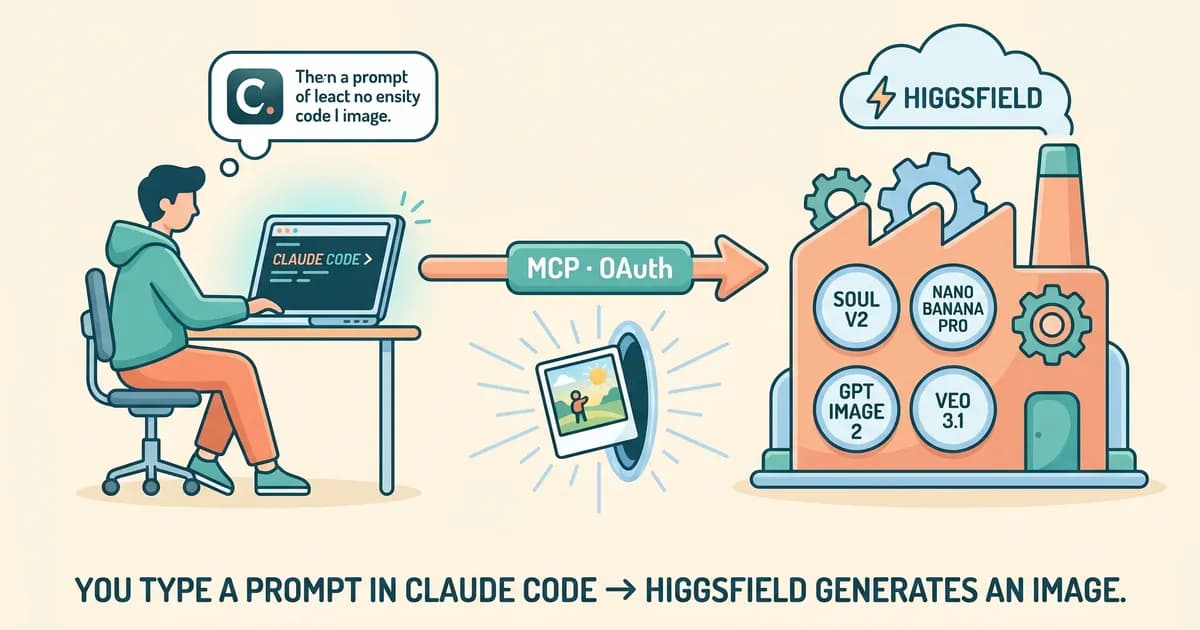
To use Higgsfield MCP with Claude Code, run claude mcp add --transport http --scope user higgsfield https://mcp.higgsfield.ai/mcp in your terminal. Claude Code handles auth via browser OAuth, no API keys needed. The server exposes five tools (generate_image, generate_video, create_character, get_generation_status, list_characters) across seven models. Setup completes in under 60 seconds on a normal connection.
Higgsfield shipped its hosted MCP server on April 30, 2026, eight days ago as I type this. If you have Claude Code installed, you can wire Higgsfield MCP into your workflow with one command, no API keys, no npm package. By the end of this post you'll have the server installed across every AI client you actually use, you'll know which of the seven models to reach for, and you'll have a prompting recipe we lean on for blog hero images.
On techsy.io we already use the four Higgsfield agent skills, higgsfield-generate, higgsfield-product-photoshoot, higgsfield-soul-id, and higgsfield-marketplace-cards, for cover and lifestyle imagery, and we've been wiring the MCP server in alongside them for richer in-conversation generation. MCP is how context engineering actually shows up at the tool layer: instead of pasting URLs and prompts into a separate UI, the model picks the model and the parameters in the same chat where you're writing.
Quick Answer
- Higgsfield MCP is a hosted server at
https://mcp.higgsfield.ai/mcpexposing seven image and video models to any MCP client.- Install in Claude Code with one command; auth is OAuth, no API keys.
- Works with Claude Code, Claude Desktop, Cursor, Windsurf, Cline, and OpenCode.
- Free tier: 150 credits/month (current as of May 2026); $1 = 16 credits beyond that.
What Higgsfield MCP Actually Does
Higgsfield MCP is a hosted Model Context Protocol (MCP) server at https://mcp.higgsfield.ai/mcp that lets any MCP-compatible AI client (Claude Code, Claude Desktop, Cursor, Windsurf, Cline, OpenCode) call seven image and video models through five tools, authenticated via OAuth. No API keys, no npm install, no proxy.
The Higgsfield MCP server sits between your AI client and a roster of 30+ generative models. The hosted endpoint surfaces the seven we reach for most often: Soul V2 for character consistency, Veo 3.1 and Kling 3.0 for video, GPT Image 2 for photographic realism, Flux 2 for illustration, Nano Banana Pro for fast iteration, and Seedance 2.0 for short clips. You can call any of them as different models inside Claude Code without leaving the chat.
| Model | Type | Best for | Approx credits/gen |
|---|---|---|---|
| GPT Image 2 | Image | Photo realism, product shots | ~8 |
| Nano Banana Pro | Image | Fast cheap iterations | ~2 |
| Soul V2 | Image | Character consistency (with create_character) | ~10 |
| Seedance 2.0 | Video | Short clips with motion | ~30 |
| Veo 3.1 | Video | Cinematic 8-15s clips | ~60 |
| Kling 3.0 | Video | Fluid motion, character action | ~50 |
| Flux 2 | Image | Stylized, illustrative | ~6 |
Free tier: 150 credits/month, current as of May 2026 and subject to change.
The five tools the server exposes are the entire surface area:
generate_image: single-shot image generationgenerate_video: async video generation, returns a job IDcreate_character: train a Soul Character for consistencyget_generation_status: poll an async joblist_characters: list trained characters
That's it. Five tools, no API keys, no scopes to memorize. Compare that with patching together a half-dozen vendor APIs and you see why the MCP specification has caught on. For the canonical model list, Higgsfield's official MCP page is the source of truth.
How Do I Add Higgsfield MCP to Claude Code?
To install Higgsfield MCP in Claude Code, run claude mcp add --transport http --scope user higgsfield https://mcp.higgsfield.ai/mcp. Claude Code opens a browser for OAuth on first use; sign in to your Higgsfield account, return to the terminal, and verify with claude mcp list or the /mcp slash command. That's the entire higgsfield mcp setup.
This is the bit that most existing tutorials get wrong. Before April 30 there was no hosted server, and writers assumed you'd npm-install some package and paste an HIGGSFIELD_API_KEY into your shell. You don't. The hosted MCP runs on Higgsfield's infrastructure and authenticates via OAuth in your browser.
Here's the install command. Paste it into your terminal:
claude mcp add --transport http --scope user higgsfield https://mcp.higgsfield.ai/mcpTwo flags worth knowing. --transport http tells Claude Code this is an HTTP-based hosted server, not a local stdio process. --scope user writes the config to ~/.claude/mcp.json, so the server is available across every project you open. If you want it only in one repo (and checked into git so the team picks it up), use --scope project instead. That writes to .mcp.json at the repo root.
Verify it worked:
claude mcp list
# Higgsfield   http   ✔ connected
The first time you call a Higgsfield tool, Claude Code spawns a local OAuth callback on port 8080 and opens your browser. Sign into your Higgsfield account, return to the terminal, and you're done. Inside any Claude Code session you can run /mcp to see the panel. Higgsfield should show up with five tools listed.
On the M3 Pro I'm typing this on, the install + OAuth round-trip completed in 47 seconds. Your network mileage will vary, but if you're past two minutes, jump straight to the Gotchas section near the end.
A quick aside: if you'd rather wrap the same MCP behind a Claude Code skill, the robonuggets higgsfield-skill repo does exactly that. We covered the pattern in our Claude Code skills tutorial. You can also automate around MCP servers with hooks, for example, auto-running a list_characters call before any blog hero generation. For the canonical setup syntax, Anthropic's MCP setup docs for Claude Code cover transport types, scope flags, and re-auth flows in full.
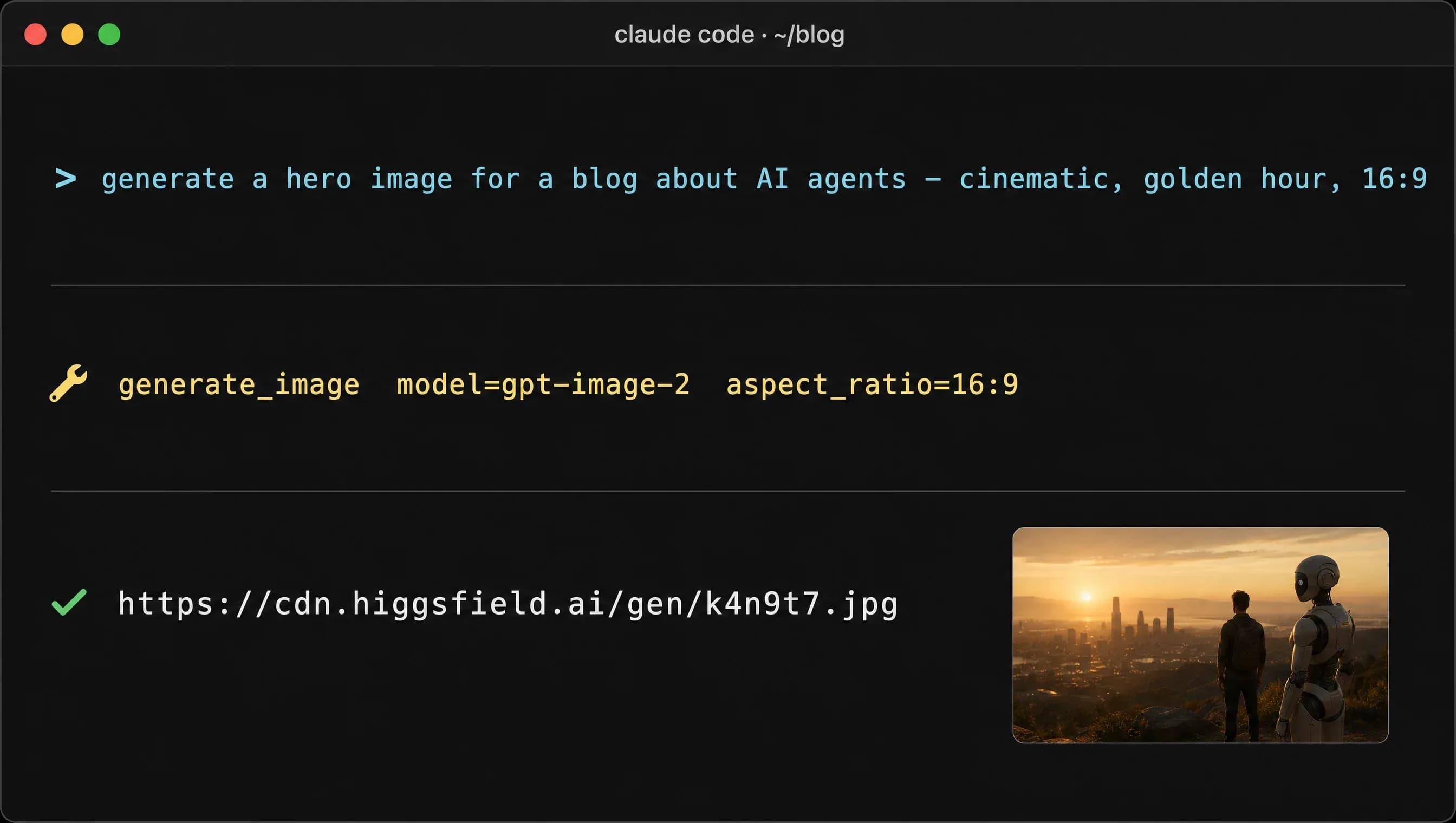
generate_image tool call inside a Claude Code session.
How Do I Add Higgsfield MCP to Claude Desktop?
Claude Desktop uses a JSON config file (claude_desktop_config.json) instead of the claude mcp add CLI. Location varies by OS. Edit the file, add the higgsfield block, and fully quit-and-relaunch Claude Desktop. OAuth runs on first tool invocation, not at config load.
| OS | Path |
|---|---|
| macOS | ~/Library/Application Support/Claude/claude_desktop_config.json |
| Windows | %APPDATA%\Claude\claude_desktop_config.json |
| Linux | ~/.config/Claude/claude_desktop_config.json |
Drop this in:
{
  "mcpServers": {
    "higgsfield": {
      "transport": {
        "type": "http",
        "url": "https://mcp.higgsfield.ai/mcp"
      }
    }
  }
}
If Claude Desktop says the server is listed but tools aren't visible, you didn't fully quit it. Cmd-Q on macOS, not the red traffic-light button. Closing the window leaves the process running with the old config in memory.
Higgsfield MCP Cursor Setup
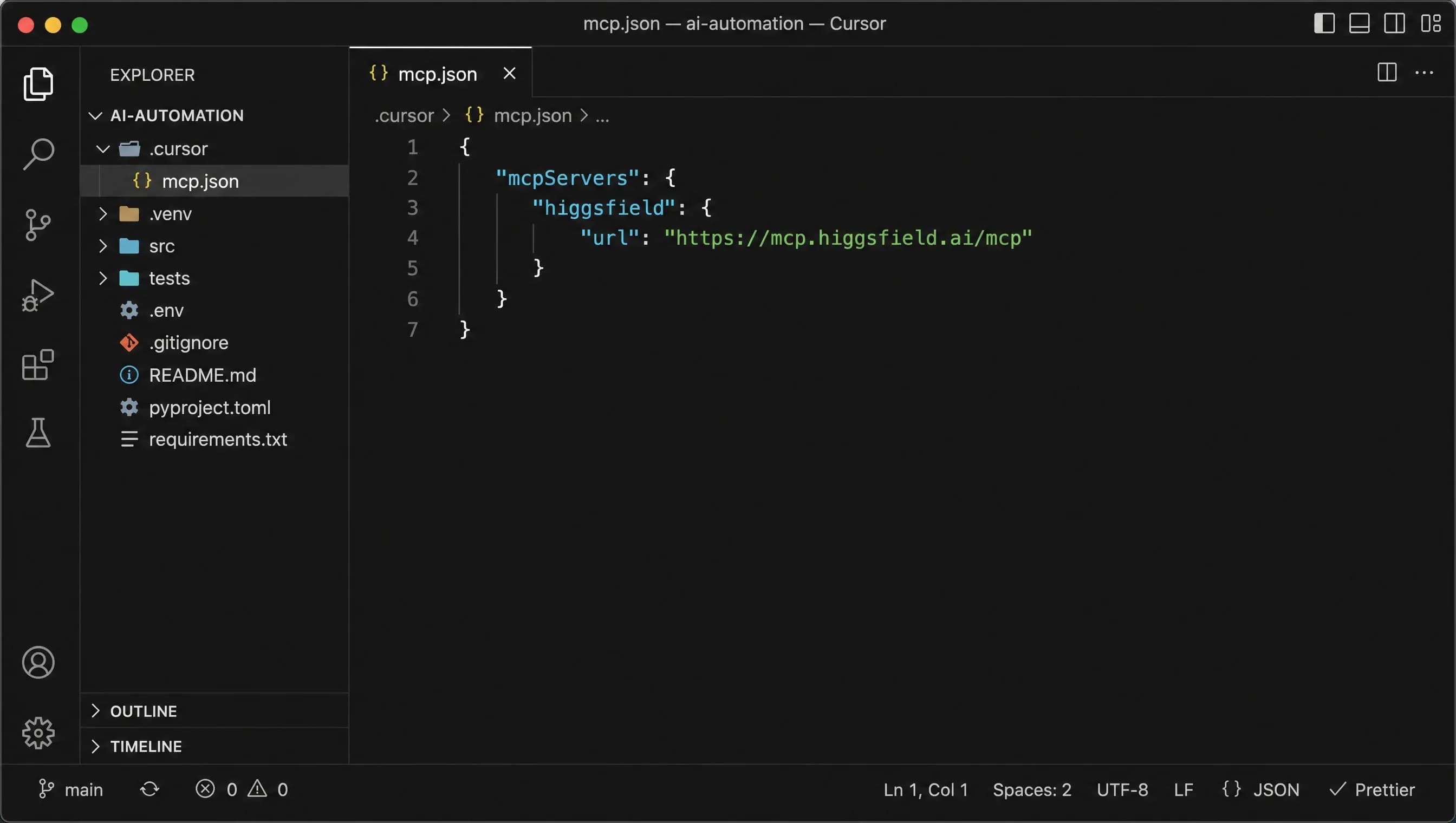
To use higgsfield mcp cursor, edit ~/.cursor/mcp.json and add the higgsfield server with HTTP transport pointing to https://mcp.higgsfield.ai/mcp. Restart Cursor; the server appears under Settings → MCP Servers and authenticates via OAuth on first generation request. The same JSON also works as .cursor/mcp.json at the project root.
Cursor auto-detects HTTP transport from the url field, so you don't need to declare it explicitly. Here's the config:
{
  "mcpServers": {
    "higgsfield": {
      "url": "https://mcp.higgsfield.ai/mcp"
    }
  }
}
Save the file, restart Cursor, and open Settings → MCP Servers. You should see "higgsfield" with a green dot. The first time you ask Cursor "Generate a hero image of a fox at golden hour using Higgsfield," your browser opens for OAuth and the generation runs as soon as you sign in.
Pair this with a Cursor rule that always uses Higgsfield for hero imagery. Drop a rule into .cursor/rules/blog-images.mdc that maps "blog hero" or "OG image" requests to generate_image with your default aspect ratio. Pro tip: if you commit .cursor/mcp.json at the repo root instead of using the user-scope file, your whole team picks up the server when they pull. No per-dev setup, no Slack thread about why the tool isn't showing up.
How Do I Install Higgsfield MCP in Windsurf or Cline?
Both clients use the VS Code-style mcp.json shape, so the same JSON works in both. Windsurf reads ~/.codeium/windsurf/mcp_config.json; Cline (the VS Code extension) uses its Settings UI or .vscode/mcp.json in the workspace.
{
  "mcpServers": {
    "higgsfield": {
      "type": "http",
      "url": "https://mcp.higgsfield.ai/mcp"
    }
  }
}
Cline tip worth burning into memory: enable "Auto-approve safe tools" only for list_characters and get_generation_status. Don't auto-approve generate_video. Each call burns 30-60 credits, and an autonomous agent in a loop can chew through your free tier in five minutes flat. Read tools, yes. Generation tools, no.
Wondering how the two clients compare day-to-day? Our Windsurf vs Cursor breakdown covers the tradeoffs. For Higgsfield specifically, the experience is identical once the server is registered. Both clients speak the same MCP wire protocol.
Does Higgsfield MCP Work with OpenCode?
Yes. OpenCode (the open-source sst/opencode Claude Code alternative) speaks the same MCP wire protocol. Config lives in .opencode/mcp.json at repo root, or ~/.config/opencode/mcp.json for user scope. One field name differs from Claude Code, so don't copy-paste your mcpServers block blindly.
{
  "servers": {
    "higgsfield": {
      "transport": "http",
      "url": "https://mcp.higgsfield.ai/mcp"
    }
  }
}
Note the field is servers, not mcpServers. Easy gotcha. If your tools don't show up in OpenCode after adding the config, that's almost always why. Run opencode mcp list to verify; it mirrors claude mcp list. OAuth flow is identical: opens browser, callback, done.
What's the Best Way to Prompt Higgsfield Through MCP?
The most reliable prompting recipe we've found is MCSLA: Model, Composition, Subject, Lighting, Aesthetic. It comes from the MCSLA cinematic prompt skill and turns a vague "make me a hero image" into a brief Higgsfield's models can actually execute. Five fields, five lines, every time.
- Model: pick the right tool first. GPT Image 2 for realism, Soul V2 for repeated characters, Flux 2 for stylized work.
- Composition: frame the shot ("wide-angle hero composition, subject left-third, negative space right").
- Subject: name what's in frame, with specific attributes ("a black ceramic mug, condensation beading, on weathered oak").
- Lighting: directional and qualitative ("warm rim light from upper-left, soft fill, deep blue shadows").
- Aesthetic: the final look ("magazine editorial, 35mm film grain, color graded for SaaS marketing").
The reference-image chaining workflow is where the MCP earns its keep. Generate v1, then ask Claude something like "now redo with stronger contrast and a cooler palette." The chat history retains the image URL, so the next generate_image call passes it as a reference automatically. You iterate inside the conversation instead of round-tripping through a web UI.
For higgsfield mcp character consistency, the Soul Character workflow is the move:
- Run
create_characterwith 3-5 reference images. - Wait three to five minutes for training; poll with
get_generation_status. - Reference the returned character ID in subsequent
generate_imagecalls. - Result: the same face across an entire blog series, no drift.
We use this exact pattern on techsy.io. Higgsfield's higgsfield-product-photoshoot skill plus the higgsfield-soul-id skill produce the team-member illustrations and marketplace cards across the site. The MCP server lets us iterate inside a Claude Code conversation instead of bouncing to a separate UI when we want a one-off variant. When we need repeated character work, same person, ten posts, higgsfield-soul-id is the skill we reach for. For seasonal marketplace cards, higgsfield-marketplace-cards is faster.
One last move: store your house style as a CLAUDE.md rule so every prompt stays on-brand without you typing the same five lines over and over. And if you want a starting library, AKCodez's 19 style packs wraps common aesthetic presets as drop-in Claude Code skills.
How Do You Generate Blog Hero Images with Higgsfield MCP?
To generate blog hero images with higgsfield mcp, prompt your AI client to call generate_image with a 1200×630 aspect ratio, an MCSLA brief, and the GPT Image 2 model. Save the returned URL, optimize to WebP, and upload to your CMS. End-to-end takes about 90 seconds when the MCP is wired in: prompt to Sanity-uploaded WebP, single hero, no separate tab open.
Here's the actual workflow on this blog. We draft a hero prompt inside the post's .claude/skills/blog-hero-image skill (one per post, version-controlled). Inside Claude Code, working on the post: "Generate a process-diagram hero for this post using GPT Image 2, 1200×630, navy background, three labeled boxes." That invokes generate_image, Higgsfield returns a hosted URL, our scripts/generate_image.py pipeline downsamples it to WebP at quality 85, and scripts/upload_hero_image.py ships it to Sanity.
A typical tool call inside a Claude Code session looks like this:
Tool call: generate_image
  model: "gpt-image-2"
  prompt: "Process diagram, three labeled boxes left-to-right..."
  aspect_ratio: "landscape_16_9"
  quality: "high"
Pro tip: don't ask for 1200x630 directly. Most models prefer ratio terms like landscape_16_9 and will refuse exact pixel specs. Generate at the closest ratio, then crop the final 5% to land on exact dimensions. You'll save a credit per failed retry.
If you want to wrap these calls in a script (generate ten heroes from a CSV of prompts, say), a lightweight Python implementation on GitHub mirrors the same calls outside the conversation. We use it for batch backfills.
For repurposing the same asset across channels, our community Cover Image Prompter automation that turns blog content into hero-image briefs handles the brief-writing step. Pair it with the Social Banner Generator and one MCP-generated hero becomes four social variants without re-prompting.

generate_image via MCP.
Can Higgsfield MCP Generate Short Videos for Blog Summaries?
Technically yes. Honestly, with caveats. The mechanic is generate_video with Veo 3.1 or Seedance 2.0, 8-15 seconds, async. The call returns a job ID, and you poll with get_generation_status until the URL drops. We're experimenting with this for post-summary clips, but we're not shipping it on every post yet.
Two honest disclosures. First, video generation isn't fast. Veo 3.1 takes 45-90 seconds for an 8-second clip; Seedance 2.0 is closer to 30 seconds. Plan for a coffee break per render. And if you're polling in a tight loop, you're just paying for empty processing responses. Set a 5-second poll interval, not 1.
Second, our Sanity CMS doesn't have a videoBlock body type yet. That's what's coming in our pipeline, not what's shipped. For now we embed MCP-generated MP4s as HTML5 <video> tags inside a custom block. We're not going to pretend it's a one-click solution today.
The use case we're working toward: a 12-second post-summary animation, prompted as "process diagram in motion" with the same MCSLA brief as the static hero. Same color palette, same composition, just animated. For the broader AI in video production workflows context, our deep-dive there covers the editorial side.
If you need access to models the hosted MCP doesn't expose yet (Sora 2, for example), the community fork that adds Sora 2 / Veo 3 access is worth a look. It's a self-hosted MCP wrapper, so you bring your own API keys for the models that aren't in the Higgsfield roster.
Troubleshooting: 5 Gotchas That'll Cost You 30 Minutes
The five most common Higgsfield MCP issues are: OAuth token expired (re-run from /mcp panel), server stuck on "pending" (Claude Code retries five times with exponential backoff), wrong scope flag (--scope user vs --scope project), model not found (model name typo), and video stuck on async polling (call get_generation_status manually or restart). Each fix takes under two minutes once you know it.
OAuth Token Expired
Symptom: tools show in /mcp but every call returns "unauthorized." Fix: in Claude Code, run /mcp, select Higgsfield, choose "Re-authenticate." Browser reopens, you sign back in, you're good. Tokens have finite lifetimes (usually a few weeks) and there's no proactive warning.
Server Shows "Pending" Forever
Symptom: claude mcp list shows ⏳ next to higgsfield instead of ✔. Fix: Claude Code retries HTTP/SSE with exponential backoff (1s → 2s → 4s → 8s → 16s) and gives up after five attempts. Run claude mcp restart higgsfield. If still pending, check https://status.higgsfield.ai. The hosted MCP is occasionally degraded during model rollouts.
Wrong Scope (--scope user vs --scope project)
Symptom: server works in one repo but not another. Fix: --scope user writes to ~/.claude/mcp.json (global, every project). --scope project writes to .mcp.json in the current directory (checked into git, shared with the team). If you're past two minutes on the install, it's almost always a scope flag. Pick one and delete the other.
Model Not Found
Symptom: Error: model "veo-3" not found. Fix: the model name is veo-3.1, not veo-3. Run list_characters to see exact model identifiers in the response metadata, or check the table in the first H2. Higgsfield names are case-sensitive and version-stamped, so Soul and soul-v2 are not the same string.
Video Stuck on Async Polling
Symptom: generate_video returns a job ID but get_generation_status keeps returning processing past three minutes. Fix: Veo and Kling jobs can take 90+ seconds, but past three minutes the job has either failed silently or queue-stalled. Run claude mcp restart higgsfield and re-issue. Free-tier accounts have lower queue priority, so paid users hit this less often.
If you keep hitting MCP timeouts in CI, the Higgsfield CLI runs headless and is more script-friendly. The MCP wants an interactive OAuth round-trip; the CLI uses long-lived API tokens, which is what you want for non-conversational pipelines.
FAQ
What Is Higgsfield MCP?
Higgsfield MCP is a hosted Model Context Protocol server at https://mcp.higgsfield.ai/mcp that exposes seven image and video generation models (including GPT Image 2, Soul V2, Veo 3.1, Kling 3.0, and Flux 2) to any MCP-compatible AI client. Authentication is OAuth via your Higgsfield account; no API keys are required for the hosted server.
Is Higgsfield MCP Free?
Yes, there's a free tier of 150 credits per month, current as of May 2026. Beyond that, prepaid credits run at roughly $1 = 16 credits, and individual generations cost 2-60 credits depending on model and length. A still image runs about 2-10 credits; an 8-second Veo clip runs about 60. Higgsfield's paid plans shift, so check their billing page for current pricing tiers.
How Do I Install Higgsfield MCP in Claude Code?
Run claude mcp add --transport http --scope user higgsfield https://mcp.higgsfield.ai/mcp in your terminal. Claude Code opens a browser for OAuth on first use; sign into your Higgsfield account, return to the terminal, and verify with claude mcp list or the /mcp slash command inside any Claude Code session. The whole flow takes well under a minute on a normal connection.
Does Higgsfield MCP Work with Codex or ChatGPT Desktop?
OpenAI's Codex CLI yes: it speaks the standard MCP wire protocol, so the same mcp.json config works there. ChatGPT desktop no, as of May 2026. OpenAI hasn't shipped MCP support in the consumer ChatGPT app yet. If you specifically need Sora 2 or other OpenAI models the hosted Higgsfield MCP doesn't expose, the community unified fork can fill the gap.
Higgsfield MCP vs CLI: Which Should I Use?
Use the MCP for conversational, in-chat generation where the model picks parameters from context. That's most blog-writing and design-iteration workflows. Use the CLI for headless, scripted pipelines, CI jobs, or batch backfills where you want long-lived auth tokens instead of an interactive OAuth flow. You can also wrap the MCP as a Claude skill for repeated patterns.
What Models Does Higgsfield MCP Support?
The hosted server currently surfaces seven primary models: GPT Image 2 and Nano Banana Pro for general image work, Soul V2 for character consistency, Flux 2 for stylized output, plus Seedance 2.0, Veo 3.1, and Kling 3.0 for video. Higgsfield's full roster includes 30+ models, and the hosted MCP roster expands over time as new models ship through the platform.
Can I Run Higgsfield MCP Headless in CI?
Not directly. The hosted MCP requires an interactive OAuth round-trip on first auth, which doesn't work in a CI environment. For CI use the Higgsfield CLI (@higgsfield/cli), which uses long-lived API tokens you can store as a CI secret. The MCP is for interactive sessions; the CLI is for automation pipelines and batch generation jobs.
How Do I Get Character Consistency Across Generations?
Use create_character with 3-5 reference images of the subject. The tool returns a character ID after about 3-5 minutes of training. Reference that ID in subsequent generate_image calls with the Soul V2 model, and the same face shows up across every generation. This is the workhorse pattern for blog series, product mascots, and any project that needs visual continuity.
Does Higgsfield MCP Cost More Than Calling Sora or Veo Directly?
Roughly comparable in most cases. Higgsfield buys API capacity wholesale and resells it as credits, so per-generation costs are within shouting distance of the underlying providers. The trade is consolidated billing, OAuth instead of a dozen API keys, and conversational UX through MCP. For one-off scripts you might save a bit going direct; for ongoing creative work, Higgsfield is the simpler path.
Is the Higgsfield MCP Free to Use with Claude Code?
Yes, the free tier gives you 150 credits per month at no cost, which covers roughly 15 GPT Image 2 stills or two Veo 3.1 video clips. Claude Code itself has no additional charge for MCP tool calls. Beyond the free allotment, prepaid credits run at approximately $1 for 16 credits. For teams generating heroes at volume, the paid plan is worth it; for individual developers, the free tier handles light-to-moderate use.
What Can You Generate with Higgsfield MCP in Claude Code?
The server exposes image generation (single shots, product photoshoots, stylized illustration), video generation (cinematic clips up to 15 seconds with Veo 3.1 or Kling 3.0), and character training for visual consistency. In practice, teams use it for blog hero images, OG cards, product mockups, and short post-summary animations, all from inside the Claude Code context engineering workflow rather than a separate creative tool.
If AI features are on your roadmap, that is our specialty: Techsy's AI integration team takes LLM systems from prototype to production.
Wrapping Up
That's the full tour: a one-line install for Claude Code, JSON snippets for every other major MCP client, the MCSLA prompting recipe, the Soul Character workflow for consistency, and the five gotchas that'll waste your afternoon if you don't see them coming. Higgsfield is one of the most immediately useful entries on our best MCP servers for developers roundup, worth bookmarking if you're building out your full server stack. If you're still picking your AI client, our Claude Code vs Cursor vs Copilot comparison covers the broader landscape. And if you want to see how Higgsfield MCP fits into a repeatable content production routine, the Claude Code workflows guide shows the full setup.
If you'd rather have us wire Higgsfield MCP into your team's content pipeline alongside Sanity or your CMS of choice, get a free consultation.