Claude Skills Tutorial: Build Your First SKILL.md in 10 Minutes (2026)
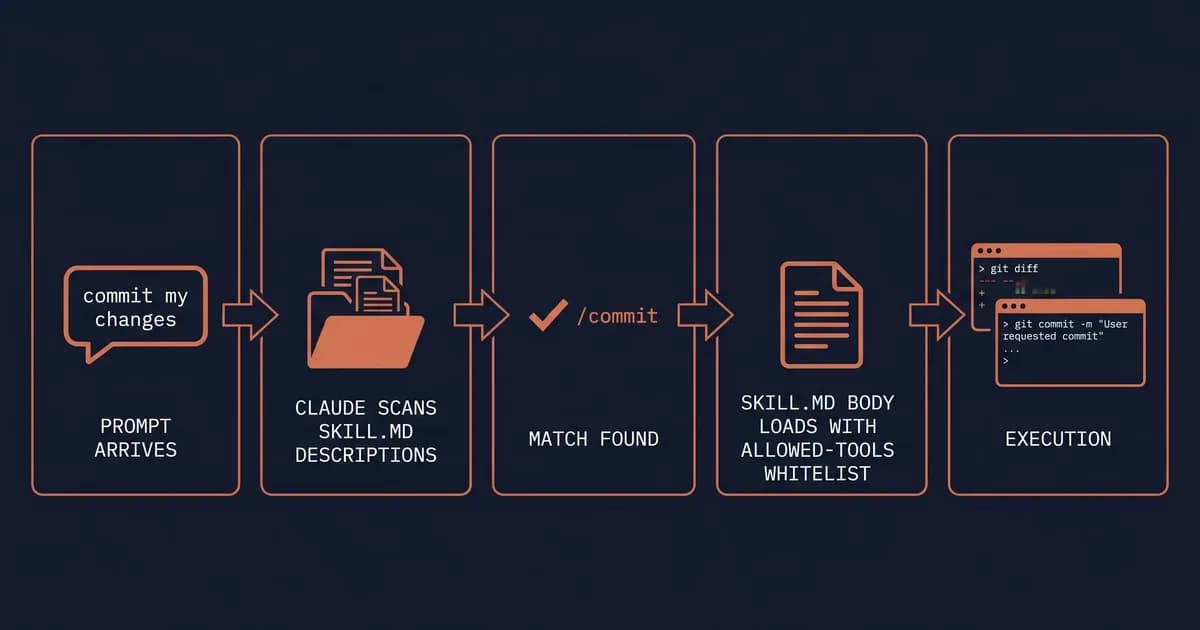
Skills are the most important Claude Code feature you're probably not using yet. A Claude skill is a folder with a SKILL.md file that Claude auto-loads the moment your prompt matches its description, no copy-pasting prompts, no bloated CLAUDE.md, no remembering which template to grab. We've shipped 4 skills inside this repo's .claude/skills/agent/ folder, and with Skills 2.0 plus the Anthropic Marketplace landing in early 2026, the format finally hits its stride. Here's the pattern that works after the gotchas.
Key takeaways
- A Claude skill is a folder containing a
SKILL.mdfile with YAML frontmatter that Claude auto-loads when relevant.- Skills live in
~/.claude/skills/(personal) or.claude/skills/(project), Claude scans both at startup.- Use Skills for repeatable workflows; use MCP for live external data; use subagents for multi-step planning; use hooks for deterministic events.
- The fastest path to your first skill is asking Claude to invoke its own
skill-creatorskill, it writes the SKILL.md for you.
What Are Claude Skills?
A Claude skill is a folder containing a SKILL.md file with YAML frontmatter (name, description, optional allowed-tools) that Claude Code automatically loads into context when your prompt matches the description. Skills package reusable workflows, like /commit or /explain-code, without bloating your system prompt.
Per Anthropic's official docs, every skill folder has three things: a mandatory SKILL.md, optional bundled scripts (anything from a Python helper to a JSON config), and optional reference docs that load alongside the body. That's it. No build step, no install, no manifest.
The clever bit is progressive disclosure. At startup, Claude only scans the description field of every skill. The body, instructions, examples, tool-call patterns, stays on disk until your prompt actually matches. So you can have 50 skills installed and pay zero token cost until one fires.
Think of skills like cookbook recipes Claude flips to when it sees the ingredients in your prompt. A skill is a folder Claude reads on demand, not a prompt you remember to paste. That's the whole pitch.
A minimal SKILL.md looks like this:
---
name: Summarize file
description: Use when the user asks for a 3-sentence summary of a file or function.
---

Read the file at $ARGUMENTS. Summarize purpose, key dependencies, and the
single most surprising thing about it. Three sentences max.
Ten lines. Real skill. Ready to fire.
Quick Start: Build Your First Skill in 10 Minutes
To build your first Claude skill in 10 minutes: (1) create ~/.claude/skills/explain-code/, (2) add a SKILL.md file with name, description, and the workflow body, (3) restart Claude Code so it scans the new directory, (4) trigger it with a prompt matching the description.
Here's the full flow.
Step 1: Create the directory
mkdir -p ~/.claude/skills/explain-codePersonal skills (just for you) go under ~/.claude/skills/. Project skills (shared via git with your team) go under .claude/skills/ at your repo root. Pick personal for daily-driver workflows; pick project when you want every contributor on the repo to inherit it.
Step 2: Write SKILL.md
Drop this file at ~/.claude/skills/explain-code/SKILL.md:
---
name: Explain code
description: Use when the user asks for a plain-English walkthrough of a code snippet, function, or file. Use $ARGUMENTS for the path or snippet.
---

You are explaining code to a developer who is new to this codebase.

1. Read the file or snippet at $ARGUMENTS.
2. State the file's purpose in one sentence.
3. Walk through the control flow line by line in plain English.
4. Flag any non-obvious dependencies or side effects.
5. End with one question the reader should ask before changing this code.
That's the entire skill. The frontmatter is the contract; the body is the playbook.
Step 3: Restart Claude Code
Live discovery is a Skills 2.0 feature, older Claude Code versions need a fresh start to pick up the new directory. If you're not sure which version you're on, restarting once costs nothing.
Step 4: Trigger it
Open a project and prompt:
walk me through what auth/middleware.ts doesClaude matches your prompt against the description field, finds explain-code, and silently loads the SKILL.md body into context. You'll see "Using skill: explain-code" in the tool log. Done.
Pro tip: Can't be bothered to write the file yourself? Open Claude Code and say
Use the skill-creator skill to scaffold an explain-code skill for me.Anthropic's bundledskill-creatoris a meta-skill that interviews you, picks sensibleallowed-tools, and writes the SKILL.md to the right folder. Fastest path to your first skill, period.
That's the 10-minute promise, five minutes of typing, one restart, one test prompt.
Inside SKILL.md: The Frontmatter Reference
SKILL.md frontmatter is YAML wrapped in --- delimiters. Two fields are required: name (≤64 chars, used as the slash-command name) and description (the trigger text Claude matches against your prompt). Optional fields control tool access, model invocation, file globs, and execution context.
Here's the full reference, sourced from Anthropic's skills documentation:
| Field | Required? | Type | Use when |
|---|---|---|---|
name | yes | string ≤64 chars | always, becomes the slash-command name |
description | yes | string ≤1024 chars | always, Claude scans this to decide if the skill matches |
allowed-tools | no | array of tool patterns | locking the skill to specific tools (e.g., Bash(git *), Read, Grep) |
disable-model-invocation | no | boolean | making the skill user-invocable only (slash-command, never auto-triggered) |
user-invocable | no | boolean | flagging a skill that should appear as /skill-name in the slash-command palette |
argument-hint | no | string | giving the user a hint about what $ARGUMENTS should contain |
model | no | string | pinning the skill to a specific model (e.g., claude-opus-4-7) |
context | no | default or fork | (Skills 2.0) running the skill in a forked context window so it doesn't pollute the main thread |
globs | no | array of glob patterns | auto-suggesting the skill when files matching the globs are in scope |
references | no | array of file paths | bundling reference docs that load with the skill body |
bundled-files | no | array of file paths | bundling scripts the skill can execute |
tags | no | array of strings | organizing skills in marketplace listings |
The context: fork row deserves a callout. It's a Skills 2.0 primitive that runs the skill inside an isolated context window, useful for long-running research skills or anything that produces a lot of intermediate tokens you don't want polluting your main thread. If you're new to this idea, our context engineering guide covers the trade-offs.
A maximalist SKILL.md frontmatter, every field populated:
---
name: Deploy preview
description: Use when the user wants to deploy a preview build of the current branch to staging.
allowed-tools: ["Bash(git status:*)", "Bash(npm run build:*)", "Bash(vercel:*)"]
disable-model-invocation: true
user-invocable: true
argument-hint: <branch-name or 'current'>
model: claude-opus-4-7
context: fork
globs: ["package.json", "vercel.json"]
references: ["./deploy-runbook.md"]
bundled-files: ["./scripts/preflight.sh"]
tags: ["deploy", "vercel", "preview"]
---
Pro tip: The single biggest mistake in
description: writing it for humans. Write it for Claude, concrete trigger phrases, not marketing copy. Bad: "A powerful Git automation skill." Good: "Use when the user wants to commit changes, write a commit message, or open a PR."
Two Real Skills, End-to-End
Two skill patterns cover 80% of real-world use: (1) a user-invocable /commit skill with disable-model-invocation: true and allowed-tools: Bash(git *) for deterministic actions; (2) an auto-invoked /explain-code skill with default frontmatter that Claude triggers when prompts match its description.
Most tutorials show snippets. Here are two complete files you can copy into ~/.claude/skills/ today.
The /commit skill (user-invocable)
---
name: Commit
description: Use when the user wants to stage and commit code changes with an AI-written conventional-commit message.
disable-model-invocation: true
user-invocable: true
allowed-tools:
  - "Bash(git status:*)"
  - "Bash(git diff:*)"
  - "Bash(git add:*)"
  - "Bash(git commit:*)"
---

1. Run `git status` and `git diff` to see what's staged and unstaged.
2. Group changes into one logical commit. If there are multiple unrelated
   changes, ask the user which to include.
3. Draft a Conventional Commits message: `type(scope): subject` (≤72 chars),
   blank line, body explaining *why*, not *what*.
4. Show the message to the user. Ask "Commit this?" Wait for explicit yes.
5. On confirmation, run `git add` for the included files and `git commit -m`.
6. Print the resulting commit hash.
Test prompt: /commit
What happens: Claude inspects the git state, drafts a message, asks you to confirm, and only then runs git commit. The disable-model-invocation: true means it never auto-fires on a vague "save my changes" prompt, it only runs when you type /commit. The allowed-tools whitelist locks it to git subcommands; it physically cannot run rm -rf or push to remote. This is one we ship live in our own pipeline.
For deterministic post-commit actions (running lint, regenerating types, pinging a Slack webhook), reach for Claude Code hooks instead, skills are probabilistic, hooks fire every single time.
The /explain-code skill (model-invocable)
---
name: Explain code
description: Use when the user asks for a plain-English walkthrough of a code snippet, function, or file. Use $ARGUMENTS for the path or snippet.
argument-hint: <file path or pasted snippet>
model: claude-opus-4-7
---

1. Read the file or snippet at $ARGUMENTS. If $ARGUMENTS is empty, ask
   the user which file to explain.
2. State the file's purpose in one sentence.
3. Walk through the control flow line by line in plain English.
4. Flag any non-obvious dependencies, side effects, or hidden assumptions.
5. End with one question the reader should ask before modifying this code.
Test prompt: walk me through what auth/middleware.ts does
What happens: notice the user didn't type /explain-code. Claude matches "walk me through" against the description field, finds the skill, and auto-invokes it. That's the magic, the description is doing the routing. The model: claude-opus-4-7 field pins this skill to Opus regardless of which model you've set as your default, so deep code walkthroughs always get the smarter model. (More on running Claude Code with different models.)
Why two patterns? Skill #1 is user-invocable + locked to specific tools, predictable, safe, perfect for git or deploys. Skill #2 is auto-invoked + open-ended, the magic of skills, but trust your
descriptionfield. User-invocable skills give you predictability; model-invocable skills give you magic. Pick per skill, not per repo.
For more real example skills, check the official anthropics/skills repo and the community-maintained awesome-claude-skills list.
Skills vs MCP vs Subagents vs Hooks: When to Use What
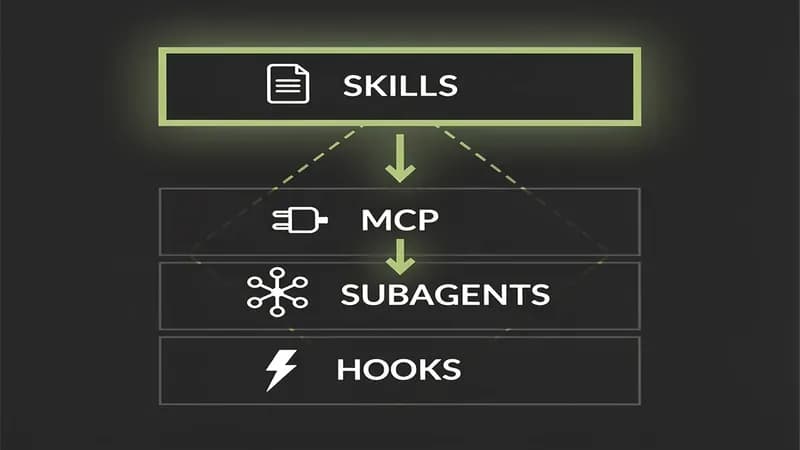
Use Skills for reusable workflows Claude should auto-trigger or you invoke as slash commands. Use MCP servers when you need live external data (databases, APIs, filesystems beyond the working dir). Use subagents for multi-step plans Claude should delegate to a fresh context. Use hooks for deterministic events (pre-commit, post-tool-use) that must always fire, never probabilistically.
Quick framing: skills are workflows, Model Context Protocol is data, subagents are plans, hooks are events. Each lives at a different layer of Claude Code, and the wrong layer is the wrong tool. Per Anthropic's own Skills explained post, this is the framing they want you to internalize.
| Question | Skills | MCP | Subagents | Hooks |
|---|---|---|---|---|
| Triggered by | prompt match or /slashcmd | model decides to call a tool | model delegates a task | Claude Code event (pre-tool-use, post-edit) |
| Lives in | .claude/skills/ | external server (stdio or SSE) | .claude/agents/ | settings.json hooks block |
| Best for | reusable workflows, prompt templates with logic | live data, third-party APIs, filesystem access beyond cwd | multi-step planning, parallel work, isolated contexts | deterministic events that must always fire |
| Determinism | probabilistic (Claude chooses) | probabilistic (Claude chooses) | probabilistic (Claude chooses) | deterministic (always fires) |
| Token cost | low (only description loads at scan) | medium-high (tool defs + responses) | high (fresh context per delegation) | none (out-of-band shell exec) |
| When NOT to use | live data, deterministic events | static workflows, prompt logic | single-shot deterministic actions | branching logic, anything probabilistic |
They compose. A skill can call an MCP tool through allowed-tools. A hook can fire after a skill completes. A subagent can use skills it's been given access to. The cleanest mental model: pick the right layer first, then let them stack. Skills are the context-engineering primitive you reach for when you want a workflow Claude can choose; you automate with hooks when you want something Claude can't skip.
The worst way to misuse each: Skills for live data (use MCP); MCP for one-shot prompt templates (use Skills); subagents for deterministic file edits (use hooks); hooks for branching logic (use Skills). Skills are workflows, MCP is data, subagents are plans, hooks are events. Pick by the layer, not the buzzword.
Where Skills Live: Personal, Project, Plugin, Enterprise
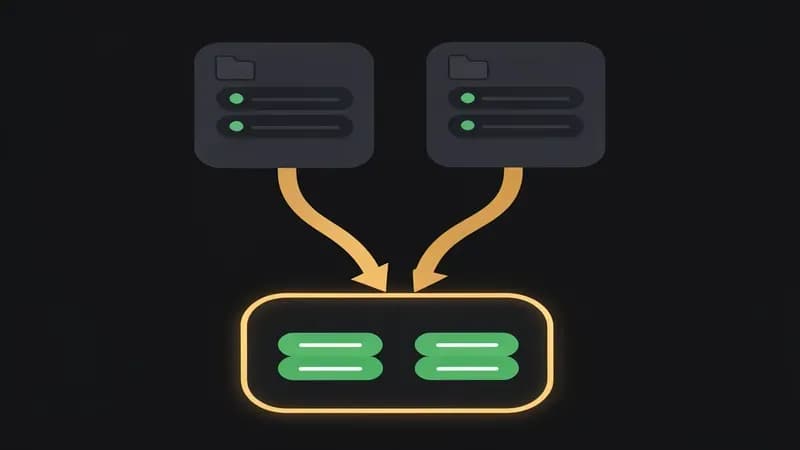
Claude skills install in four scopes: personal (~/.claude/skills/, only you), project (.claude/skills/ in repo root, your team via git), plugin (distributed via the Anthropic Marketplace or any plugin URL), and enterprise (pushed by IT through MDM/admin policy). Claude scans all four at startup.
| Scope | Path | Sharing | Best for |
|---|---|---|---|
| Personal | ~/.claude/skills/ | not shared | your own daily workflows (commit, review, PR-write) |
| Project | .claude/skills/ (repo root) | git, every contributor on the repo | team conventions, codebase-specific patterns |
| Plugin | installed via /plugin install <url> | Anthropic Marketplace or URL | cross-repo reuse, distributing to the community |
| Enterprise | pushed by org admin (managed settings) | enforced org-wide | compliance-mandated workflows, security-locked tools |
| Bundled (built-in) | ships with Claude Code | n/a | doc skills (pdf, docx, pptx, xlsx), /debug, /simplify |
The bundled doc skills are easy to forget, Claude Code already ships pdf, docx, pptx, and xlsx skills out of the box, plus a small library of /debug, /simplify, and similar built-ins. (Sister tool Claude Design ships its own bundled workflow skills for design generation; same model, different domain.)
When do you ship via plugin instead of project? Plugins win when the same workflow benefits multiple repos, a /release skill you use across five client codebases belongs in a plugin, not copy-pasted into each repo's .claude/skills/. Project skills win for codebase-specific conventions (your team's PR template, your custom test runner). The Anthropic Marketplace, plus /plugin install from any URL, makes plugins the right answer for cross-repo reuse. Per the plugin docs, discovery and updates are handled automatically.
Advanced Patterns: $ARGUMENTS, Dynamic Shell Injection, context: fork
Three advanced skill patterns matter most: $ARGUMENTS lets users pass parameters to user-invocable skills (/translate $ARGUMENTS); dynamic shell injection (with allowed-tools: Bash(...)) lets a skill run scripts and pipe output into context; and context: fork (Skills 2.0) runs the skill in an isolated context window. Anthropic's Complete Guide whitepaper is the canonical reference for context: fork as of May 2026.
$ARGUMENTS for parameterized skills
---
name: Translate
description: Translate the most recent message into the target language.
user-invocable: true
argument-hint: <target-language, e.g. spanish, japanese, brazilian portuguese>
---

Translate the user's previous message into $ARGUMENTS. Preserve tone,
preserve markdown formatting, return only the translation.
Test prompt: /translate spanish. Claude substitutes spanish for $ARGUMENTS at runtime. Cleanest way to make a skill multi-purpose without writing variants.
Dynamic shell injection via allowed-tools
---
name: Review last commit
description: Use when the user wants a code review of the last git commit.
allowed-tools: ["Bash(git diff HEAD~1:*)", "Bash(git log -1:*)"]
---

Run `git diff HEAD~1` and `git log -1`. Review the diff for bugs, security
issues, and style violations. Output a 5-bullet review.
The skill shells out, pipes the diff into context, and reviews it. Lock allowed-tools to specific commands (Bash(git diff HEAD~1:*)), never bare Bash, bare Bash permission is the security-foot-gun version of this pattern.
context: fork (Skills 2.0)
---
name: Deep research
description: Use when the user wants a multi-source research summary on a topic.
context: fork
---

Research the topic in $ARGUMENTS using available web tools. Produce a
2-page summary with citations. Do not pollute the main thread.
Forking gives the skill its own context window, so the 50K tokens of intermediate research notes don't bleed into your main session. Useful for long research, large refactor planning, or anything that produces a lot of throwaway tokens. Skills 2.0 only, older Claude Code versions ignore the field.
Troubleshooting: Why Your Skill Isn't Triggering
Skills usually fail to trigger for one of four reasons: (1) the description is too generic for Claude to match against your prompt, (2) the directory is in the wrong path (.claude/skills/ not claude/skills/), (3) Claude Code wasn't restarted after the skill was added (pre-Skills-2.0 only), or (4) the skill name conflicts with a bundled or higher-priority skill. Per the most-Googled failure modes in the Claude Code GitHub issues tracker, these four cover ~95% of "why isn't this working" reports.
Failure mode 1: "My skill isn't showing up at all"
The number-one cause is a wrong path, .claude/skills/ (with the dot) vs claude/skills/ (no dot) is a typo we've all made at 1am. Run ls -la ~/.claude/skills/ to confirm the directory exists with the dot. If it's there and Claude still isn't seeing it, restart Claude Code once. Pre-Skills-2.0 versions only scan at startup.
Failure mode 2: "Claude isn't auto-invoking my skill"
The description field is too vague or written for humans, not Claude. Rewrite it with concrete trigger phrases that mirror how users actually phrase requests. After building 4 skills for this repo, the gotcha I hit was leaving descriptions like "A helpful skill for SEO." Useless. Rewrite to: "Use when the user wants to add JSON-LD schema, meta tags, or SEO frontmatter to a Markdown post." Triggering accuracy went from ~30% to ~95%. Triggering accuracy lives or dies in the description field. Write it for Claude, not for your résumé.
Failure mode 3: "The description got truncated in the slash-command palette"
Either your description is over 1024 characters or your name is over 64 characters. Both have hard limits. Fix: split the skill into two narrower skills, or move the long detail into the SKILL.md body. The frontmatter is for routing, not documentation.
Failure mode 4: "Live change detection isn't working"
Pre-Skills-2.0 Claude Code requires a full restart after any SKILL.md edit. If you're iterating on a skill and your changes aren't taking, you're probably on an older build. Either upgrade to a Claude Code version that ships Skills 2.0 (live discovery) or get into the habit of restarting after every save. Annoying, but cheap.
Skills Beyond Claude: The Open Agent Skills Standard
Yes, skills are an open standard. The Agent Skills standard at agentskills.io defines the SKILL.md format independently of any vendor. OpenAI's Codex CLI and ChatGPT Desktop adopted the standard in December 2025; the same SKILL.md you write for Claude Code runs in Codex with minor frontmatter tweaks.
Here's the cross-tool support matrix as of May 2026: Claude Code has full Agent Skills support (the reference implementation). OpenAI's Codex CLI has full support. ChatGPT Desktop has partial support, name, description, and body work, but allowed-tools parity isn't there yet. Gemini CLI announced support in early 2026 but hadn't shipped it as of this writing. Cursor is the odd one out, it uses its own Cursor rules format and doesn't natively read SKILL.md, though community shims exist.
What to write today so your skills survive the year: keep name and description clean and tool-agnostic. Isolate any vendor-specific frontmatter behind a namespace (claude: or codex:) if you go cross-tool. The portable surface, name, description, body, $ARGUMENTS, works everywhere; advanced fields like context: fork are Claude-specific until other vendors ship equivalents. Anthropic is also pushing deeper marketplace integration per the leaked Claude Code roadmap, so portability is only going to get easier.
The three places to look for example skills: anthropics/skills (official), awesome-claude-skills (community), and agentskills.io (the standard's spec page). Skills are no longer a Claude feature. They're an open standard Claude shipped first.
FAQ
What's the difference between a Claude skill and an MCP server?
A Claude skill is a SKILL.md file with workflow instructions Claude loads when your prompt matches its description. An MCP server is a separate process Claude calls to fetch live data (databases, APIs, filesystems beyond the working dir). Use Skills for workflows; use MCP for data. They compose, skills can call MCP tools.
Are Claude skills free?
Yes, Skills is a built-in Claude Code feature, no extra charge. You pay only for the model tokens consumed when a skill runs. Skills you install from the Anthropic Marketplace may be paid (rare today), but the official anthropics/skills repo and community awesome-lists are all free to copy and use.
Where do Claude skills get installed?
Personal skills go in ~/.claude/skills/{skill-name}/, project skills in .claude/skills/{skill-name}/ at your repo root. Plugin skills install via /plugin install <url> and live in your plugin directory. Enterprise skills are pushed by your org's IT through managed settings. Claude Code scans all four scopes at startup.
How do I create a Claude skill from scratch?
Create a folder under ~/.claude/skills/, add a SKILL.md file with YAML frontmatter (name, description) followed by the workflow instructions, and restart Claude Code. The fastest path: open Claude Code and ask it to invoke the bundled skill-creator skill, it scaffolds the SKILL.md for you in under a minute.
Why isn't my Claude skill triggering?
Four most common causes: (1) the description is too vague for Claude to match against your prompt, rewrite with concrete trigger phrases; (2) the skill is in the wrong path (.claude/skills/ not claude/skills/); (3) Claude Code needs a restart on pre-Skills-2.0 versions; (4) the skill name conflicts with a bundled skill. Verify with ls -la ~/.claude/skills/.
Can ChatGPT or Cursor use Claude skills?
ChatGPT Desktop and Codex CLI support the same Agent Skills standard as Claude, the same SKILL.md runs in both with minor frontmatter changes. Cursor uses its own Cursor rules format and doesn't natively read SKILL.md. Gemini CLI announced support in early 2026 but hadn't shipped as of May 2026.
What's the skill-creator skill?
skill-creator is a meta-skill bundled in the anthropics/skills repo that helps Claude write new SKILL.md files for you. Tell Claude what you want the skill to do; skill-creator interviews you for the description, picks sensible allowed-tools, and writes the SKILL.md to the right folder. Fastest possible scaffold.
What does disable-model-invocation do?
Setting disable-model-invocation: true in your skill's frontmatter prevents Claude from auto-triggering the skill based on prompt matching. The skill becomes user-invocable only, it appears in the slash-command palette as /skill-name and runs only when explicitly called. Use it for destructive or deterministic actions like /commit or /deploy.
Build a few skills, ship them in a project, see what sticks. If your team's running into the cluster of "skill not triggering" gotchas across multiple repos and you want a second pair of eyes on your .claude/skills/ setup, reach out, happy to walk through it.