OpenAI Responses API Tutorial: 14 Runnable Examples for Python Developers
The OpenAI Responses API tutorial you actually need: 14 runnable Python examples covering built-in tools, streaming, function calling, MCP, and a 3-step migration from Chat Completions. The Responses API launched on March 11, 2025 as OpenAI's unified primitive for agent-style apps, and as of April 2026 it's the recommended starting point for every new OpenAI project. We tested every example below against the latest openai>=1.50 Python SDK in April 2026 — every code block runs as-is.
Key takeaways
- The Responses API (launched March 11, 2025) unifies Chat Completions, Assistants, and built-in tools into one stateful primitive.
- It supports
web_search,file_search,code_interpreter,computer_use,image_generation, and remote MCP servers out of the box.- Migration from Chat Completions takes 3 steps: change the endpoint, rename
messages→input, update tool schemas.- Use
previous_response_id(withstore: true) for lightweight state; the Conversations API for reliable multi-turn threads.
What Is the OpenAI Responses API?
The OpenAI Responses API is a unified primitive launched in March 2025 that combines Chat Completions' simplicity with the Assistants API's tool-use. It supports text + image input, built-in tools (web search, file search, code interpreter, computer use, image generation), function calling, structured outputs, streaming, and stateful conversations via previous_response_id.
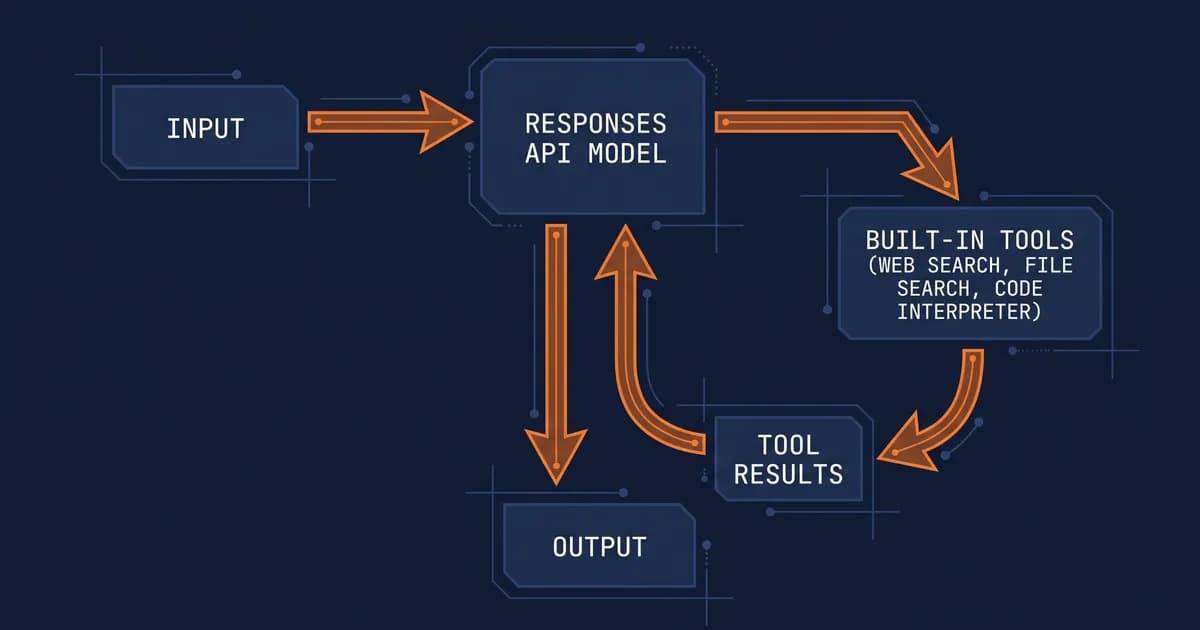
So why did OpenAI ship a third API when Chat Completions already worked? Because the agentic loop, model calls a tool, gets a result, decides the next move, was awkward to build on top of chat.completions. You ended up shuttling tool results back and forth in messages arrays, juggling thread IDs with the Assistants API, or rolling your own state. The Responses API treats that loop as a first-class concept.
If you're starting a new OpenAI project in 2026, the Responses API is the default, Chat Completions is the legacy primitive you migrate away from. The big exceptions: realtime audio (use the Realtime API) and pure embeddings (use the Embeddings API). For everything else, chatbots, agents, RAG pipelines, structured-data extractors, Responses is what OpenAI's docs and the OpenAI announcement post point you to.
If you're orchestrating multiple models or want a higher-level scaffolding layer, you'll usually pair the Responses API with the OpenAI Agents SDK. We covered the trade-offs in our OpenAI Agents SDK comparison, TL;DR: Responses is the primitive, Agents SDK is the framework.
How Is the Responses API Different from Chat Completions?
The Responses API is a superset of Chat Completions: every Chat Completions feature works in Responses, plus built-in tools, statefulness, and the agentic loop. OpenAI recommends Responses for all new projects. Chat Completions remains supported but is no longer the default primitive for agents.
Here's the side-by-side, sourced from the OpenAI platform docs:
| Feature | Responses API | Chat Completions | Assistants API |
|---|---|---|---|
| Input shape | input (string or array) | messages array | Thread + messages |
| Stateful | Yes (previous_response_id) | No (you send history) | Yes (threads) |
| Built-in tools | All 5 + MCP | None | Code Interpreter, File Search |
| Streaming | Yes (typed SSE events) | Yes | Yes |
| Function calling | Yes (flat tools array) | Yes (flat tools array) | Yes (per-assistant) |
| Multimodal input | Text + images + files | Text + images | Text + images + files |
| Recommended for | Agents, new projects | Simple completions, legacy | Being deprecated (2026) |
| Status (Apr 2026) | Default for new projects | Legacy, still supported | Sunsetting |
Every Chat Completions feature works in Responses; the reverse is not true. The decision rule is short: if you need built-in tools, statefulness, or you're starting fresh, use Responses. If you have a stable Chat Completions pipeline that doesn't touch tools and your gateway doesn't yet support Responses, the migration isn't urgent, just don't build new agents on the old API.
Setup and Your First Responses API Call
To make your first Responses API call, install the OpenAI Python SDK 1.50 or newer, set your OPENAI_API_KEY environment variable, and call client.responses.create() with a model and input. The full hello-world example takes under 60 seconds.
Step 1 — Install the SDK:
pip install --upgrade "openai>=1.50"Step 2 — Set your API key:
export OPENAI_API_KEY="sk-proj-..."(On Windows PowerShell: $env:OPENAI_API_KEY = "sk-proj-...". Never commit this to git, use a .env file plus python-dotenv for local dev.)
Step 3 — Hello-world call:
from openai import OpenAI

client = OpenAI()

response = client.responses.create(
    model="gpt-5",
    input="Say hello in exactly 5 words.",
)

print(response.output_text)
Run that and you'll get a 5-word greeting back. The output_text helper concatenates every text chunk into one string, handy when you don't care about the structured output.
Step 4 — Inspect the response object:
print("ID:        ", response.id)
print("Status:    ", response.status)
print("Model:     ", response.model)
print("Output:    ", response.output)            # list of output items
print("First text:", response.output[0].content[0].text)
print("Usage:     ", response.usage)             # input_tokens, output_tokens
That response.output array is the thing to memorize. It's a list of typed items: text, tool calls, tool results, reasoning summaries. You'll iterate it constantly once you start using built-in tools.
How Do You Stream Responses with the Responses API?
Streaming with the Responses API uses Server-Sent Events. Pass stream=True to client.responses.create() and iterate over the resulting event stream. Each event has a type field, response.output_text.delta for token chunks and response.completed for the final payload. SDK 1.50+ exposes a typed event stream.
If you're rendering tokens to a UI, you'll iterate response.output_text.delta events and ignore everything else.
from openai import OpenAI

client = OpenAI()

with client.responses.stream(
    model="gpt-5",
    input="Write a haiku about Python decorators.",
) as stream:
    for event in stream:
        if event.type == "response.output_text.delta":
            print(event.delta, end="", flush=True)
        elif event.type == "response.error":
            print(f"\n[error] {event.error}")
            break
        elif event.type == "response.completed":
            print("\n[done]")

    final = stream.get_final_response()
    print(f"\nTokens: {final.usage.output_tokens}")
A few gotchas we hit in testing: the stream context manager handles connection cleanup automatically, so don't manually close it. If you want async, swap OpenAI() for AsyncOpenAI() and use async with plus async for, same event names, same shape.
Built-In Tools: Web Search, File Search, Code Interpreter, Computer Use, Image Generation
The Responses API ships five built-in tools: web_search for live internet search, file_search for vector store retrieval, code_interpreter for sandboxed Python execution, computer_use for browser/desktop automation, and image_generation for inline image creation. Enable any of them by adding {"type": "<tool_name>"} to the tools array.
Here's the matrix we keep pinned next to our editor:
| Tool | Purpose | Cost | Stateful | Models | Production-ready (Apr 2026) |
|---|---|---|---|---|---|
web_search | Live internet search | Per-call surcharge | No | gpt-5, gpt-4.1 | Yes |
file_search | Vector store RAG | Per-call + storage | Yes (vector store) | gpt-5, gpt-4.1, o-series | Yes |
code_interpreter | Sandboxed Python | Per-session | Yes (container) | gpt-5, o-series | Yes |
computer_use | Browser/desktop control | Per-call surcharge | Per-session | gpt-5 (preview) | Preview |
image_generation | Inline image creation | Per-image | No | gpt-5, gpt-image-1 | Yes |
When we benched web_search in our pipeline, the latency added 1.5–3s on the first call but was cached for repeats, plan for it in the UI. The OpenAI Cookbook web search example is the cleanest reference if you want to go deeper.
Web Search
from openai import OpenAI

client = OpenAI()

response = client.responses.create(
    model="gpt-5",
    tools=[{"type": "web_search"}],
    input="What did OpenAI announce at DevDay 2025? Cite your sources.",
)

print(response.output_text)

# Inspect the web_search_call items in response.output for raw search hits
for item in response.output:
    if item.type == "web_search_call":
        print(f"[searched] {item.query}")
File Search
File search is a two-step dance: create a vector store, upload your files, then reference the store ID in your tools array.
from openai import OpenAI

client = OpenAI()

# 1. Create a vector store + upload a file
store = client.vector_stores.create(name="company-handbook")
client.vector_stores.files.upload_and_poll(
    vector_store_id=store.id,
    file=open("handbook.pdf", "rb"),
)

# 2. Use it in a Responses call
response = client.responses.create(
    model="gpt-5",
    input="What's our PTO policy?",
    tools=[{
        "type": "file_search",
        "vector_store_ids": [store.id],
    }],
)
print(response.output_text)
Code Interpreter
Need the model to run Python on a CSV and chart something? code_interpreter does that in a sandboxed container.
from openai import OpenAI

client = OpenAI()

response = client.responses.create(
    model="gpt-5",
    input="Read sales.csv and plot monthly revenue as a bar chart. Return a summary.",
    tools=[{"type": "code_interpreter", "container": {"type": "auto"}}],
)
print(response.output_text)
The container persists across calls in the same session, useful when you want the model to keep iterating on a dataframe.
Computer Use
Still in preview as of April 2026. The model gets a virtual browser/desktop and clicks around to complete tasks. Skip it unless you have a specific browser-automation use case the Playwright/Selenium world can't already solve.
Image Generation
from openai import OpenAI

client = OpenAI()

response = client.responses.create(
    model="gpt-5",
    input="Generate a diagram showing a CI/CD pipeline with build, test, and deploy stages.",
    tools=[{"type": "image_generation"}],
)

# Image bytes live in image_generation_call items
for item in response.output:
    if item.type == "image_generation_call":
        with open("pipeline.png", "wb") as f:
            f.write(item.result)
Function Calling with Custom Tools
Function calling in the Responses API lets the model invoke your own Python functions. Define each function as a JSON schema in the tools array, run the call, check response.output for function_call items, execute the function, and pass the result back via function_call_output.
The Responses API turns function calling from a 4-step dance into a single round-trip when you let the agentic loop handle it for you. Here's a full currency-conversion example:
import json
from openai import OpenAI

client = OpenAI()

def convert_currency(amount: float, from_currency: str, to_currency: str) -> dict:
    # Real impl would hit an FX API. Stubbed for the example.
    rate = 1.08 if (from_currency, to_currency) == ("USD", "EUR") else 1.0
    return {"amount": amount * rate, "currency": to_currency}

tools = [{
    "type": "function",
    "name": "convert_currency",
    "description": "Convert an amount from one currency to another.",
    "parameters": {
        "type": "object",
        "properties": {
            "amount": {"type": "number"},
            "from_currency": {"type": "string"},
            "to_currency": {"type": "string"},
        },
        "required": ["amount", "from_currency", "to_currency"],
    },
}]

# Turn 1: model decides to call our function
first = client.responses.create(
    model="gpt-5",
    input="How much is 250 USD in EUR?",
    tools=tools,
)

# Find the function_call item, run it, send the result back
for item in first.output:
    if item.type == "function_call" and item.name == "convert_currency":
        args = json.loads(item.arguments)
        result = convert_currency(**args)

        second = client.responses.create(
            model="gpt-5",
            previous_response_id=first.id,
            input=[{
                "type": "function_call_output",
                "call_id": item.call_id,
                "output": json.dumps(result),
            }],
            tools=tools,
        )
        print(second.output_text)
That's the full loop. If you're new to the pattern, our function calling fundamentals post walks through the conceptual model, and we maintain a roundup of function calling libraries if you'd rather not hand-roll schemas. The tool_choice parameter (set to "auto", "required", or a specific tool name) is your lever for forcing or banning a tool call when you need determinism.
Structured Outputs (JSON Schema and Pydantic)
Structured outputs guarantee the model returns JSON conforming to your schema. Pass a response_format={"type": "json_schema", "json_schema": {...}} parameter or, with the Python SDK, hand it a Pydantic model directly via client.responses.parse(). The model is constrained at decode time, not just prompted.
from openai import OpenAI
from pydantic import BaseModel

client = OpenAI()

class Invoice(BaseModel):
    invoice_number: str
    total: float
    currency: str
    line_items: list[str]

response = client.responses.parse(
    model="gpt-5",
    input="Extract: Invoice #INV-2024-001 for $1,250.00 USD. Items: hosting, support, SSL cert.",
    text_format=Invoice,
)

invoice: Invoice = response.output_parsed
print(invoice.invoice_number, invoice.total, invoice.line_items)
The Pydantic path is the one you want 95% of the time, type-safe, less boilerplate, and your IDE autocompletes the result. Use raw JSON schema only when you need cross-language schema sharing or when the schema is generated dynamically. We dig into the trade-offs in our structured outputs and JSON schema guide and our Pydantic for type-safe schemas primer.
State Management: previous_response_id, Conversations API, and store=true
Use previous_response_id for lightweight multi-turn context, the Conversations API for reliable threaded sessions, or send full message history for full client-side control. previous_response_id requires store: true and only persists for cached responses; fall back to full history if the ID is unresolvable.
| Approach | Use when | Persistence | Code complexity |
|---|---|---|---|
previous_response_id | Quick chatbots, short threads | 30 days (default), store: true required | Lowest |
| Conversations API | Long-lived threads, multi-user apps | Persistent, you manage cleanup | Medium |
| Send full history | Full client-side control, audit trails | You own it | Highest |
Here's a two-turn example using previous_response_id:
from openai import OpenAI

client = OpenAI()

# Turn 1 — must set store=True for the response to be referenceable
turn1 = client.responses.create(
    model="gpt-5",
    input="My name is Mert and I'm building a weather agent.",
    store=True,
)

# Turn 2 — reference turn 1 by ID; the model "remembers" the name
turn2 = client.responses.create(
    model="gpt-5",
    previous_response_id=turn1.id,
    input="What was my name again?",
    store=True,
)

print(turn2.output_text)  # "Your name is Mert..."
If you forget store: true, your previous_response_id resolves to nothing and the model starts cold every turn. We've burned an hour debugging this, the API doesn't error, it just silently amnesiacs you. Default retention is 30 days; if you need longer, drop into the Conversations API which gives you explicit thread lifecycle control.
When should you upgrade to the Conversations API? When you have multiple users in one app, when threads outlive a single session, or when you want server-side message editing/branching. For a quick chatbot, previous_response_id is plenty.
How to Migrate from Chat Completions to the Responses API
Migrating from Chat Completions to Responses API takes three steps: change /v1/chat/completions to /v1/responses, replace messages with input, and replace tools schemas with the new format. Function calling and multimodal inputs need slightly different handling. OpenAI ships an official migration pack on GitHub.
Step 1 — Endpoint swap:
# Before (Chat Completions)
response = client.chat.completions.create(
    model="gpt-4.1",
    messages=[{"role": "user", "content": "Hello"}],
)
text = response.choices[0].message.content

# After (Responses)
response = client.responses.create(
    model="gpt-5",
    input="Hello",
)
text = response.output_text
Step 2 — Rename messages → input:
# Before
client.chat.completions.create(
    model="gpt-4.1",
    messages=[
        {"role": "system", "content": "You are a helpful assistant."},
        {"role": "user", "content": "Summarize this PDF."},
    ],
)

# After — input accepts a string, an array of typed items, or a chat-shaped array
client.responses.create(
    model="gpt-5",
    instructions="You are a helpful assistant.",   # system → instructions
    input="Summarize this PDF.",
)
Step 3 — Update tool schemas:
# Before (Chat Completions tool format)
tools = [{
    "type": "function",
    "function": {
        "name": "get_weather",
        "description": "Get current weather",
        "parameters": {"type": "object", "properties": {"city": {"type": "string"}}},
    },
}]

# After (Responses tool format — flatter, no nested "function" key)
tools = [{
    "type": "function",
    "name": "get_weather",
    "description": "Get current weather",
    "parameters": {"type": "object", "properties": {"city": {"type": "string"}}},
}]
That's it. Roll traffic gradually with a feature flag, keep your Chat Completions code path live behind the same interface for a week or two, log both response shapes side-by-side, and only flip 100% once you've verified parity. The migration pack on the openai-cookbook repo has a fuller adapter pattern if you want a reference.
How to Use MCP and Remote MCP Servers with the Responses API
The Responses API supports remote MCP (Model Context Protocol) servers as a tool type. Add an entry like {"type": "mcp", "server_url": "https://mcp.example.com", "server_label": "..."} to the tools array. The model discovers the MCP server's tool catalog and calls them like built-in tools.
If you've never touched MCP, here's the 30-second pitch: it's an open protocol that lets any service expose its API as a tool catalog the model can call. Shopify, Stripe, GitHub, and a growing list of vendors run public MCP endpoints. Our Model Context Protocol (MCP) deep-dive covers the protocol itself.
from openai import OpenAI

client = OpenAI()

response = client.responses.create(
    model="gpt-5",
    input="Find me the top-ranking competitor for 'openai responses api tutorial' and summarize their content gaps.",
    tools=[{
        "type": "mcp",
        "server_url": "https://mcp.semrush.com",
        "server_label": "semrush",
        "require_approval": "never",   # set to "always" in production
    }],
)
print(response.output_text)
Treat MCP servers like any third-party API. require_approval: "never" is fine for prototypes; in production you want "always" (or a tool allowlist) so a compromised MCP server can't silently exfiltrate data. Audit the server's tool catalog before pointing your agent at it.
Pricing, Rate Limits, and Production Gotchas
Responses API pricing matches Chat Completions on token costs (prompt + completion), with per-call surcharges on built-in tools (web_search, file_search). Rate limits follow your existing OpenAI tier. Common production gotchas include store: true retention defaults, transient 429s on burst traffic, and Azure variant feature lag.
| Model family | Responses API | Built-in tools | Reasoning effort | Streaming | Cost tier |
|---|---|---|---|---|---|
| gpt-5 | Yes | All 5 + MCP | N/A | Yes | See OpenAI pricing |
| gpt-5-mini | Yes | All 5 + MCP | N/A | Yes | Lower than gpt-5 |
| gpt-4.1 | Yes | web/file/code/image | N/A | Yes | Mid |
| o-series (reasoning) | Yes | file/code | low/medium/high | Yes | Highest per-token |
| gpt-image-1 | Image-gen tool only | , | , | No | Per-image |
Pricing changes, always verify on OpenAI's pricing page at write time.
For error handling, wrap calls in try/except openai.RateLimitError and try/except openai.APIStatusError, with exponential backoff via tenacity:
from openai import OpenAI, RateLimitError, APIStatusError
from tenacity import retry, retry_if_exception_type, stop_after_attempt, wait_exponential

client = OpenAI()

@retry(
    retry=retry_if_exception_type((RateLimitError, APIStatusError)),
    wait=wait_exponential(multiplier=1, min=2, max=30),
    stop=stop_after_attempt(5),
    reraise=True,
)
def safe_create(prompt: str):
    return client.responses.create(model="gpt-5", input=prompt)

print(safe_create("Hello").output_text)
We hit a transient 429 on a burst of 20 parallel requests in our staging env, tenacity with exponential backoff fixed it cleanly. The error string we logged was openai.RateLimitError: Error code: 429 - {'error': {'message': 'Rate limit reached for gpt-5 in organization org-... on requests per min (RPM)'}}. Read it once and move on; the retry decorator handles the rest.
Azure variant note: Azure OpenAI exposes the Responses API but lags Sam-Altman-controlled rollouts by 4–8 weeks. As of April 2026, MCP support on Azure is preview-only, confirm against Microsoft Learn's Azure OpenAI Responses API docs before you ship.
Gateway compatibility: if you proxy OpenAI through LiteLLM proxy, Responses API support landed in 2026. Most other gateways are catching up. And for production rollouts you'll want AI observability and logging wired up before you flip traffic, Responses API events are richer than Chat Completions, and you'll want every tool call logged.
When NOT to Use the Responses API
Skip the Responses API for low-latency realtime audio (use the Realtime API), embedding generation (use the Embeddings API), and fine-tuning workflows. Stay on Chat Completions if your gateway/proxy doesn't yet support Responses (most do via LiteLLM as of 2026).
A few more honest disqualifiers:
- Realtime voice agents, the Realtime API uses WebSockets and is built for sub-second turn-taking. Responses API streaming is HTTP SSE; it'll feel sluggish for voice.
- Pure embeddings pipelines,
client.embeddings.create()is cheaper, faster, and what every vector DB integration expects. - Fine-tuning, you train and deploy fine-tunes via the fine-tuning API; you can then call them through Responses, but the training itself isn't a Responses workflow.
- Batch API jobs, if you're processing a million prompts overnight at 50% off, the Batch API still wins on price.
- Locked-in Chat Completions semantics, if your eval use, observability, and prompt library all assume
chat.completions.choices[0].message.content, the migration cost is real. Don't migrate just because it's newer.
If your stack is happy on Chat Completions and you're not building agents, the migration isn't free, your Q2 sprint may not need it. Newer doesn't mean better-for-you, the Responses API is the right primitive for agents, not for every OpenAI workload.
Frequently Asked Questions
When was the OpenAI Responses API released?
OpenAI announced the Responses API on March 11, 2025 alongside its broader "new tools for building agents" announcement. The API has been generally available since launch, with the Conversations API, MCP support, and image_generation tool added in incremental updates throughout 2025 and early 2026.
What's the difference between the Responses API and Chat Completions?
The Responses API is a superset of Chat Completions. Every Chat Completions feature works in Responses, plus built-in tools (web_search, file_search, etc.), statefulness via previous_response_id, and the agentic loop as a first-class concept. OpenAI recommends Responses for all new projects as of 2026.
Is the Chat Completions API deprecated?
No. As of April 2026, Chat Completions is not deprecated, it remains fully supported. OpenAI recommends Responses for new projects, and most agent-style tutorials assume Responses. Chat Completions is now the legacy primitive: stable, but no longer where new features land first.
Which OpenAI models support the Responses API?
GPT-5, gpt-5-mini, gpt-4.1, and the o-series reasoning models all support the Responses API. The o-series adds the reasoning_effort parameter (low, medium, high) for extended-thinking workloads. Image generation routes through gpt-image-1 under the hood when you enable the image_generation tool.
Can I use the Responses API on Azure?
Yes. Azure OpenAI exposes the Responses API, but feature parity lags OpenAI's direct rollouts by 4–8 weeks. As of April 2026, MCP support on Azure is in preview. Check Microsoft Learn for the current Azure-specific quirks before you ship to production.
Wrapping Up
You've now got the full Responses API picture: how it differs from Chat Completions, how to ship your first call, how to wire up built-in tools, and how to migrate an existing Chat Completions project in three steps. A few takeaways to anchor on:
- Build first, then optimize. Start with the hello-world example, add a built-in tool, then layer on state with
previous_response_id. - Migrate gradually. Use a feature flag, log both response shapes, flip 100% only after parity verification.
- Ship MCP integrations. This is the 2026 frontier, most vendors are racing to expose MCP endpoints, and the Responses API is the cleanest way to consume them.
At Techsy, we help teams ship production-grade OpenAI integrations, including Responses API rollouts and Chat Completions migrations. Get a free consultation.
By the Techsy editorial team, production engineers shipping OpenAI integrations since 2024. Last updated: April 25, 2026.