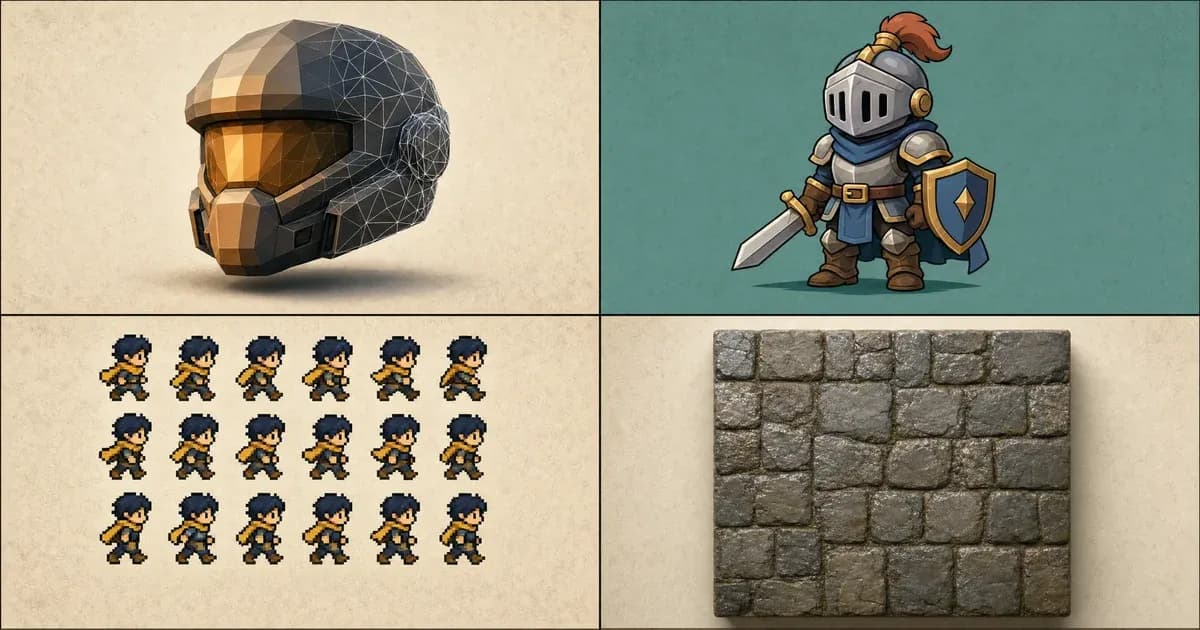
7 Best AI Game Asset Generators (2026): We Tested Them Across 3D, 2D & Pixel Art
The best AI game asset generators in 2026 still mostly do one trick: 3D meshes. We ran Meshy and it spat out 8 preview models in about a minute, which is great if you make 3D games. Make a pixel-art platformer or a sprite-driven roguelike? Most of those "best" lists leave you stranded. So we tested 7 tools across all four layers a real game needs: 3D, 2D, pixel art, and textures. Here's what's actually worth paying for.
Quick Picks by layer:
- Best overall: Meshy, the full 3D pipeline (text/image-to-3D + PBR + auto-rig + Unity/Unreal export).
- Best 3D quality: Rodin / Hyper3D, clean quad topology, premium tier.
- Best free 3D: Luma Genie, generous free text-to-3D for prototyping.
- Best 2D (trained style): Scenario, train on your art bible, generate on-style assets.
- Best versatile 2D + textures: Leonardo.Ai, game-tuned models plus texture synthesis.
- Best pixel art / sprites: Pixellab.ai, skeleton animation, 4/8-direction rotation, tilesets.
- Fastest iteration: Tripo, mesh in roughly 8–100 seconds.
The 7 Best AI Game Asset Generators at a Glance
The best AI game asset generators in 2026 are Meshy (best all-round 3D pipeline), Tripo (fastest iteration), and Rodin/Hyper3D (cleanest topology) for 3D, plus Scenario and Leonardo.Ai for 2D, Pixellab.ai for pixel art, and Luma Genie for free 3D. Each owns a different layer, so the right pick depends on what your game is made of.
| Tool | Layer | Best for | Output formats | Game-ready (topo + rig + export) | Free tier | Starting price |
|---|---|---|---|---|---|---|
| Meshy | 3D | All-round indie 3D | FBX, GLB, OBJ, USDZ | Auto-retopo + auto-rig + Unity/Unreal | Yes | ~$14.50/mo |
| Tripo | 3D | Speed & iteration | FBX, GLB, OBJ | Engine topology + rig | Yes | ~$12/mo |
| Rodin / Hyper3D | 3D | Top 3D quality | FBX, GLB, OBJ, USDZ | Quad topology + T/A-pose | Generate free, pay to export | ~$15/mo equiv |
| Scenario | 2D | Trained-style 2D art | PNG (props, UI, BG) | N/A (2D) | Limited | ~$20/mo |
| Leonardo.Ai | 2D + texture | Versatile 2D + PBR textures | PNG, texture maps | N/A (2D) | Yes (daily tokens) | ~$12/mo |
| Pixellab.ai | Pixel | Pixel art & sprite sheets | PNG, sprite sheets, GIF | N/A (2D) | Trial | ~$9.99/mo |
| Luma Genie | 3D (free) | Free prototyping/blockout | OBJ, GLB | Basic mesh, no rig | Yes (generous) | ~$1/scene tiers |
All prices below are hedged as of early 2026 since these tools change plans often. Always confirm on the official pricing page before you commit.
1. Meshy, Best Overall
Meshy is the best overall AI game asset generator because it runs the entire 3D pipeline in one browser tab: text-to-3D or image-to-3D, automatic PBR textures, built-in auto-rigging, and direct Unity, Unreal, and Blender export. For most indie 3D work, it's the default starting point and the tool we reached for first.
The current default for image-to-3D is Meshy 7, generally available since 10 August 2026. Meshy built it around image alignment: the generated mesh should match the reference photo, not just look like a valid 3D object.
In Meshy's own single-image geometry alignment benchmark, scored against held-out reference models rather than a human rater or a vision-language judge, Meshy 7 posted 81.0% overall proportion, 79.7% spatial distribution, and 59.8% surface details, leading the four competing models they tested. The widest gap was surface details, 5.3 points clear of the next tool. Those figures are Meshy's, published with the August 2026 release. We have not re-run our helmet test on Meshy 7. Text-to-3D in the product UI still runs on the Meshy 6 line. Generation is open on every plan; downloading a Meshy 7 mesh needs Pro or above.
What it does: Type a prompt or drop a reference image, get a textured, game-ready mesh with FBX/GLB/OBJ export and an auto-rig option for characters. Image-to-3D defaults to Meshy 7, which also adds Ultra Mode and multi-view (one primary image plus up to three extra angles). Text-to-3D stays on Meshy 6 or Meshy 6 Lite.
Best for: Solo and small-studio 3D devs who want props, characters, and environment pieces without leaving the browser.
Pricing: As of 2026, paid plans start around $14.50–$30/mo with a free tier that includes monthly credits. Meshy 7 generation is on every tier; downloads of those meshes need Pro or above. (Meshy pricing)
Pros:
- One tool covers mesh, texture, rig, and export
- Genuinely game-ready output with retopo built in
- Fast preview loop (multiple variants per generation)
- Meshy 7 is the default image-to-3D model, with Meshy's alignment scores on the public record
Cons:
- Raw topology still needs cleanup for hero assets
- Credits burn quickly on high-res texture runs
- Meshy 7 downloads need Pro; text-to-3D still sits on Meshy 6
Pick this if you want one tool that gets you 80% of a 3D asset in under a minute. We go deep on the three-way fight in our Meshy vs Higgsfield vs Pixellab compared breakdown.
2. Tripo, Best for Speed & Iteration
Tripo (Tripo3D) is the fastest AI game asset generator we tested, pushing meshes out in roughly 8 to 100 seconds with game-engine topology optimization and built-in rigging. If your workflow is "generate, reject, regenerate" twenty times before lunch, Tripo's loop is the one that keeps up.
What it does: Image-to-3D and text-to-3D with engine-tuned topology, quick rigging, and standard FBX/GLB export.
Best for: Devs iterating on a lot of variants who care more about turnaround than maximum fidelity.
Pricing: As of 2026, plans start around $12/mo with a free credit tier. (Tripo docs)
Pros:
- Blazing generation times
- Topology aimed at real engines, not just renders
- Built-in rigging on character meshes
Cons:
- Highest-detail outputs can spike poly count hard
- Texture quality trails Meshy slightly
Pick this if you value a tight image-to-mesh loop over squeezing out the last 10% of quality.
3. Rodin (Hyper3D), Best 3D Quality
Rodin, built on Hyper3D, is the best AI game asset generator for raw 3D quality. Its Rodin Gen-2 model (around 10B parameters, from ByteDance) produces clean quad topology, enforces T-pose or A-pose for riggable characters, and fuses multiple reference images. You generate for free and pay to download.
What it does: Multi-image fusion into high-fidelity meshes with quad-based topology that retopologizes far more cleanly than triangle soup.
Best for: Devs who need realistic hero-adjacent assets and care about topology they can actually edit.
Pricing: As of 2026, generation is free; downloads and pro tiers start around $15/mo equivalent. (Rodin / Hyper3D)
Pros:
- Cleanest topology of the 3D tools we ran
- T/A-pose enforcement helps rigging
- Multi-image fusion improves accuracy
Cons:
- Premium feel comes with premium pricing on exports
- Slower than Tripo
Pick this if topology quality matters more than speed and you'll do real rigging downstream.
4. Scenario, Best for 2D Game Art (Trained Style)
Scenario is the best AI game asset generator for 2D art that has to stay on-style, because you train a model on your own art bible and then generate hundreds of consistent props, UI elements, and backgrounds. This is the studio-grade answer to "AI art looks different every time."
What it does: Upload your reference art, train a custom style model, then batch-generate assets that match that look.
Best for: 2D teams with a defined visual identity who need volume without style drift.
Pricing: As of 2026, plans run roughly $20–$200/mo by usage and seats. (Scenario)
Pros:
- Style consistency no generic image model matches
- Built for game-asset workflows, not generic art
- Scales to thousands of on-brand assets
Cons:
- Training requires a decent reference set
- Pricier than general 2D tools
Pick this if you have an art style locked and need a machine to produce more of it.
5. Leonardo.Ai, Best Versatile 2D + Textures
Leonardo.Ai is the most versatile ai texture generator for games and 2D art on this list. It ships game-tuned models (pixel, hand-painted, realistic), dedicated texture synthesis for tileable PBR materials, sprite variations, and custom model training from the entry tier. It's the best price-to-flexibility blend we found.
What it does: General 2D generation plus a texture-generation mode that outputs tileable material maps for 3D surfaces.
Best for: Solo devs who need 2D art and textures from one affordable subscription.
Pricing: As of 2026, free daily tokens scale up to paid plans around $12–$60/mo. (Leonardo.Ai)
Pros:
- Covers 2D art and PBR textures in one tool
- Game-specific model presets
- Generous free daily allowance
Cons:
- Less consistent style than a trained Scenario model
- Texture maps sometimes need tiling cleanup
Pick this if you want one budget tool that handles both 2D assets and surface textures.
6. Pixellab.ai, Best for Pixel Art & Sprite Sheets
Pixellab.ai is the best ai sprite generator and pixel-art tool for games, with skeleton-based animation, 4/8-directional rotation, tilesets, and an Aseprite plugin. Quick disambiguation: this is the pixel-art product at pixellab.ai, not the separate text-to-3D tool with a similar name.
What it does: Generate pixel-art characters and tiles, then animate them with a skeleton rig and rotate sprites across directions for top-down and isometric games.
Best for: Indie and retro 2D devs building sprite-driven games.
Pricing: As of 2026, there's a free trial, then plans from around $9.99–$12/mo up to roughly $50 on higher tiers. (Pixellab.ai)
Pros:
- Skeleton animation is rare in pixel-art AI
- Directional rotation and tileset support
- Aseprite plugin fits existing pixel workflows
Cons:
- Frame consistency drifts on complex motions
- Pixel art still wants a human pass for polish
Pick this if you're shipping a pixel-art or retro game and want a head start on sprite sheets.
7. Luma Genie, Best Free 3D
Luma Genie is the best free ai 3d model generator for prototyping. Its fast text-to-3D and generous free access make it ideal for blockout and greyboxing, even if game-readiness trails Meshy and Tripo. For $0 experimentation, nothing else comes close.
What it does: Text-to-3D generation with quick turnaround, aimed at rough meshes for placeholder and prototype use.
Best for: Hobbyists, jam devs, and anyone blocking out a 3D scene before committing budget.
Pricing: As of 2026, there's a generous free tier with low per-scene paid options around $1. (Luma)
Pros:
- Genuinely free for real prototyping volume
- Fast, low-friction text-to-3D
- Great for blockout and idea validation
Cons:
- Meshes need heavy cleanup for production
- No serious rigging or export polish
Pick this if you're broke, experimenting, or just need placeholder geometry fast.
What We Saw When We Ran These Ourselves
We didn't trust the marketing pages, so we ran a handful of real prop and sprite tests in May 2026. The short version: AI gives you 80% of a game asset in 60 seconds, and you still do the last 20% by hand. The honest details matter more than the demo reels.
On Meshy, we generated a sci-fi helmet prop in May 2026, before Meshy 7 shipped. The raw mesh came in around 42K triangles with messy, dense topology in the visor area. It looked great in the preview, but it wasn't engine-ready. We spent roughly 25 minutes on retopo and UV cleanup in Blender before it dropped into Unity at a sane poly budget. That gap between "looks done" and "is done" is the part no vendor screenshot shows you. Indie Hackers reported similar tri-counts in their own 9-tool test, so this isn't a one-off.
On Pixellab.ai, we ran an 8-frame walk-cycle for a top-down character. The first six frames held shape and palette beautifully. Frames seven and eight drifted: the character's belt shifted a couple of pixels and one shadow flickered. Fixable in two minutes in Aseprite, but proof that pixel AI still needs a human eye on the timeline. The 4-directional set held up better than the animation did.
On Higgsfield, which our team uses daily for blog imagery, we tried it for concept and key art. It's excellent at mood, lighting, and "what should this level feel like" boards. What it is not is a game-asset exporter: no mesh, no sprite sheet, no rig. It's a concept layer, full stop. We cover why that distinction matters in the Meshy vs Higgsfield vs Pixellab pillar.
The pattern across all three: the generation is the easy 80%. Topology cleanup, frame fixes, and turning concept art into actual assets are the 20% that's still your job.
Are AI Game Asset Generators Good Enough for Commercial Games in 2026?
Yes for some layers, not yet for others. In 2026, AI asset tools are production-ready for props, blockout, concept art, and on-style 2D batches, but not yet for hero assets that need hand-tuned topology, tight poly budgets, or clean animation rigs. The honest answer depends entirely on what kind of asset you're making.
Where AI is genuinely ready: background props, environment kit-bashing, prototype geometry, texture variations, and batches of consistent 2D art from a trained model like Scenario. These are the high-volume, lower-scrutiny assets that eat the most artist hours, and that's exactly where the time savings land.
Where it still falls short: your protagonist, your boss enemy, anything with a strict poly budget on mobile, and anything that needs a production-grade rig and weight painting. The topology that AI generates is improving fast (Rodin's quad output is the closest), but retopo and UV work remain manual for assets that get scrutinized up close.
There's also the licensing question, and it's a real one. The GDC State of the Game Industry survey has repeatedly flagged generative-AI ethics and IP as a top concern among developers. Whether you can sell a game built with AI assets depends on each tool's terms of service and how its model was trained. Some tools grant full commercial rights on paid tiers; others don't. Read the per-tool ToS before you ship, and keep records of what you generated where.
The bottom line: treat these as a force multiplier for the boring 80% of your asset list, not a replacement for the craft on the assets players actually stare at.
How to Choose: 2D vs 3D vs Pixel vs Texture
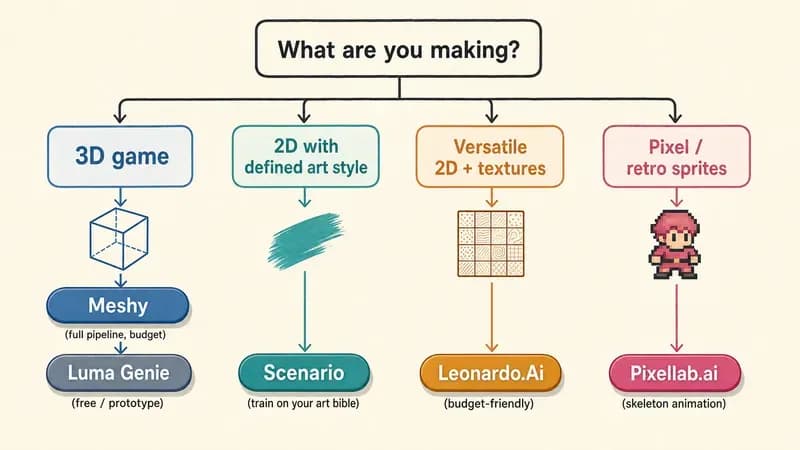
Pick by the layer your game actually needs, then by budget and engine. Making a 3D game? Start with Meshy, or Luma Genie if you're at $0. Building 2D with a locked art style? Scenario. Need versatile 2D plus textures cheaply? Leonardo.Ai. Pixel or retro? Pixellab.ai. That's the whole decision in five branches.
A quick way to route yourself:
- 3D game, real budget: Meshy for the all-round pipeline, Tripo when you're iterating fast, Rodin when topology quality is non-negotiable. They all export FBX/GLB into Unity, Unreal, and Godot.
- 3D game, zero budget: Luma Genie for blockout, plus open-source options (more on those below). Expect to do more cleanup.
- 2D with a defined style: Scenario, because a trained model is the only reliable way to kill style drift across hundreds of assets.
- 2D on a budget, plus textures: Leonardo.Ai gives you 2D art and PBR texture synthesis from one subscription.
- Pixel art / sprites: Pixellab.ai for skeleton animation and directional sprites; pair it with Aseprite for the human pass.
Engine matters less than you'd think: every 3D tool here exports the standard formats, so Unity, Unreal, Godot, and Blender all ingest them fine. If you're a solo dev weighing the whole AI stack, our roundup of the best AI tools for startups covers the budget tradeoffs beyond just art.
Honorable Mentions
A few tools didn't crack the ranked 7 but earn a mention depending on your needs:
- Kaedim: paid image-to-3D with studio-grade cleanup baked in. Good if you want game-ready meshes with less manual retopo and you'll pay for it.
- Sloyd: real-time parametric 3D. Excellent for blockout and procedural props where you tweak sliders instead of prompts.
- Retro Diffusion: a solid pixel-art alternative to Pixellab.ai, worth a look if you want a different generation style.
- Hunyuan3D / TRELLIS: free, open-source 3D generators. If you can run them locally, they're a genuine free ai game asset generator option, though setup is more involved than a browser tool.
- Higgsfield: a concept and key-art layer, not a game-asset exporter. Our team uses it daily for imagery; it shines at concept boards and cinematic shots. See the Meshy vs Higgsfield vs Pixellab pillar for where it fits, and our guide to AI video and voice tools for the broader creative stack.
We left thin general image tools like Recraft and OpenArt off the list on purpose. They generate nice pictures, but they don't export game-ready assets, animate sprites, or train on-style models, so they're not really game asset generators. If you're evaluating AI more broadly for your studio, our roundup of AI tools for business is a better starting point than forcing a generic image tool into a game pipeline.
Frequently Asked Questions
What is an AI game asset generator?
An AI game asset generator is a tool that turns a text prompt or reference image into game-ready content: 3D meshes, 2D art, pixel sprites, or PBR textures. The best ones handle topology, rigging, and engine export so output drops into Unity, Unreal, or Godot with minimal cleanup.
Is there a free AI game asset generator?
Yes. Luma Genie offers generous free text-to-3D for prototyping, and open-source models like Hunyuan3D and TRELLIS are free if you can run them locally. Meshy, Tripo, and Leonardo.Ai also include free credit tiers, though paid plans unlock higher resolution and commercial rights.
Can AI generate game-ready 3D models?
Partly. Tools like Meshy and Tripo produce textured, riggable meshes in seconds, but raw topology usually needs retopo and UV cleanup before it's truly engine-ready. In our May 2026 test, a Meshy helmet came in around 42K triangles and took roughly 25 minutes of Blender work to optimize.
What's the best AI tool for 2D game assets and sprites?
It depends on the layer. Scenario wins for 2D art that must stay on-style, since you train a model on your own work. Leonardo.Ai is the versatile budget pick for 2D plus textures. For pixel art and sprite sheets specifically, Pixellab.ai is the strongest tool.
What's the best AI pixel art generator for games?
Pixellab.ai is the strongest ai pixel art game asset generator, thanks to skeleton-based animation, 4/8-directional rotation, tilesets, and an Aseprite plugin. Retro Diffusion is a solid alternative with a different generation style. Both still benefit from a quick human pass to fix frame drift.
Can you sell games made with AI-generated assets?
Usually yes, but it depends on each tool's terms of service and how its model was trained. Some tools grant full commercial rights on paid tiers; others restrict commercial use or carry training-data risk. Always read the per-tool ToS and keep records of what you generated before you ship.
What's the best free AI 3D model generator for games?
Luma Genie is the best free ai 3d model generator for game prototyping, with fast text-to-3D and generous free access. For games or Roblox-style projects, it's great for blockout, though you'll do cleanup for production. Open-source options like TRELLIS and Hunyuan3D are free too if you can run them locally.
Are AI game asset generators actually good enough for commercial games, or just prototyping?
Both, depending on the asset. In 2026 they're production-ready for props, blockout, concept art, and on-style 2D batches, which is where most artist hours go. They're not yet ready for hero assets that need hand-tuned topology, tight poly budgets, or production rigs. Treat AI as a multiplier for the boring 80%, not a replacement for craft.
Which AI game asset tool works best with Unity, Unreal, Blender, or Godot?
Most 3D tools here export standard FBX, GLB, OBJ, and USDZ, so Unity, Unreal, Blender, and Godot all ingest them. Meshy and Tripo offer the smoothest direct export paths, including auto-rig options. For 2D and pixel art, output is PNG and sprite sheets, which every engine handles natively.