Meshy vs Higgsfield vs Pixellab: I Tested All 3 to Map the AI Game-Art Pipeline (2026)
Meshy vs Higgsfield vs Pixellab? Wrong fight. These three don't compete with each other. They sit at three different stages of one game-art pipeline, and we pushed a real game prop through all of them to prove it. Meshy handed us a mesh in under 60 seconds. Getting that mesh actually engine-ready took us another 25 minutes. Higgsfield we already run daily for blog hero images, so we know exactly where it shines for concept work and where it falls flat for game geometry. Pixellab covered the 2D sprite layer neither of the other two touch.
Quick Answer:
- Higgsfield owns the concept-art and cinematic layer; Pixellab owns 2D pixel art and sprites; Meshy owns 3D mesh, texture, and rig.
- They're not competitors. They sit at different stages of one game-art pipeline.
- AI is strongest on production art (props, textures, sprites) and weakest on clean topology, rigging, and full-set consistency.
If you've been trying to figure out which of these tools is "the best AI game asset generator," you've been asking the wrong question. Let's fix that.
Why "Meshy vs Higgsfield vs Pixellab" Is the Wrong Question
Meshy, Higgsfield, and Pixellab aren't three tools fighting over the same job. Higgsfield generates concept and cinematic art, Pixellab makes 2D pixel sprites, and Meshy builds 3D meshes with textures and rigs. Each one owns a different slice of how game art actually gets made, so ranking them against each other tells you almost nothing useful.
Comparing them head-to-head is like asking whether a pencil beats a 3D printer. They work at different stages. A pencil sketches the idea; the printer outputs the object. You don't pick one and abandon the other, you use them in sequence.
That's the lens for this whole post. Instead of crowning a winner, we'll walk the pipeline from first sketch to engine import, drop each tool where it belongs, and be honest about the gaps AI still can't fill. Then we'll close with the question every gamedev is quietly Googling: whose job does this actually threaten?
The AI Game-Art Pipeline: Which Tool Owns Which Layer
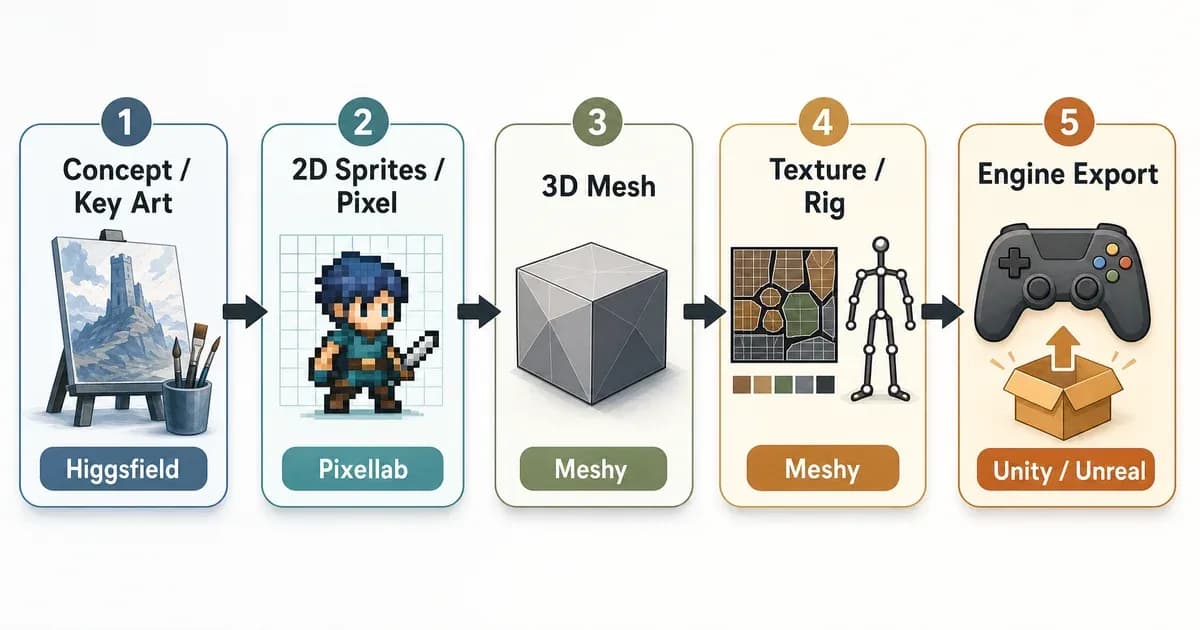
A game-art pipeline runs left to right: concept and key art, then 2D sprites or pixel work, then 3D mesh, then PBR textures, then retopology and rigging, then export into Unity or Unreal. Each AI game asset generator plugs into exactly one of those stages. Higgsfield sits at concept, Pixellab at 2D, Meshy at 3D through rig.
Here's the part that trips people up. The early stages are conceptual (you're deciding what a thing looks like), and the later stages are technical (you're making it run in an engine without tanking the frame rate). AI is excellent at the first and shaky at the last. Knowing which tool owns which layer is half the battle.
Quick jargon check before the table, because three of these terms get thrown around a lot:
- PBR textures (physically based rendering): the surface maps that tell an engine how light should behave on a material, so metal looks like metal and skin looks like skin.
- Retopology (retopo): rebuilding a messy AI-generated mesh into clean, efficient geometry an engine can render cheaply.
- Auto-rigging: automatically adding a skeleton to a 3D model so it can be animated.
| Pipeline Stage | What It Produces | Tool That Owns It | Game-Ready? |
|---|---|---|---|
| Concept / Key Art | Mood boards, character concepts, marketing shots | Higgsfield | No (reference only) |
| 2D Sprites / Pixel | Sprite sheets, tilesets, animation frames | Pixellab | Mostly (minor cleanup) |
| 3D Mesh | Raw geometry from text or image | Meshy | Sometimes (depends on tri-count) |
| PBR Textures | Albedo, normal, roughness maps | Meshy | Yes |
| Retopo / Rig | Clean topology, skeleton for animation | Meshy (auto) + human | Partial (needs review) |
| Engine Export | Unity / Unreal-ready files | Meshy export | Yes (format-wise) |
Each tool owns exactly one layer of the pipeline. The trick is knowing which job belongs to which. If you want the full landscape beyond these three, we cover our full ranked list of AI game asset generators in the sibling post. For now, let's open up each layer.
Higgsfield: The Concept Art & Cinematic Layer
Higgsfield is an AI image and video tool built for cinematic visuals: concept art, key art, mood boards, trailer shots, and stylized textures. It is not a 3D generator and it is not a sprite maker. For games, it lives at the front of the pipeline, where you're still deciding what your world looks like before a single polygon exists.
This is the tool we know best, because we run it daily as our blog's image generator. So when we say where it fits, that's from real cadence, not a feature page. For pre-production, it's genuinely strong: feed it a prompt and it'll spin out a dozen character moods or environment concepts in minutes, which is exactly what you want when you're exploring direction. For marketing, the cinematic models produce key art and trailer-style shots that look polished enough to ship in a Steam capsule.
Now the honest part, and we say this as daily users: here's where Higgsfield is NOT your tool. It does not output game-ready geometry. It does not give you a clean sprite sheet. Ask it for "a low-poly sword asset" and you'll get a beautiful 2D painting of a sword, not a 3D file you can drop into Unity. According to Higgsfield's own docs, the platform is positioned around image and video generation, not asset production, so that's by design rather than a flaw.
Where it earns its keep for gamedevs is the cinematic and marketing edge. If you're producing a trailer, our guide on how to use AI in video production pairs well with this layer, and the broader category of AI video and voice tools covers the neighbors. Use Higgsfield to decide and to sell, not to build.
Pixellab: The 2D / Pixel-Art & Sprite Layer
Pixellab (the pixellab.ai AI pixel art generator, not the unrelated 3D tool with a similar name) owns the 2D layer. It produces pixel-art characters, 8-directional sprites, tilesets, sprite sheets, and animation frames. If your game is 2D or top-down, this is the layer Meshy and Higgsfield can't touch.
What it does well is speed. You describe a character, pick a resolution, and Pixellab generates a clean sprite. Want it facing eight directions for a top-down RPG? It'll rotate the design. Need a walk cycle? It'll generate the frames. Pixellab's documentation lists 8-directional generation, animation, and tileset tools as core features, and the free tier is generous enough to actually evaluate before paying.
Here's the gotcha, and it's the one Reddit keeps asking about: consistency. Pixellab gets you 80% of a sprite set in minutes. The last 20% is fixing the frames where the character's silhouette wandered. Across an animation sequence, small details drift. A belt buckle moves, a hairstyle shifts a pixel or two, a weapon changes thickness between frames. None of it is catastrophic, but it's exactly the kind of inconsistency a player's eye catches on a looping animation.
So treat Pixellab as a fast first pass, not a finished artist. For solo devs and small studios, getting to 80% in minutes is a real win, the kind of compounding edge we flag in our roundup of AI tools for startups. Just budget time to hand-fix the frames where the silhouette gets sloppy.
Meshy: The 3D Mesh, Texture & Rig Layer
Meshy owns the 3D layer: text-to-3D, image-to-3D, PBR texture generation, auto-rigging, and Unity/Unreal export. It's the deepest tool of the three because the 3D stage is where most of a game-art pipeline's technical work lives. This is the AI 3D model generator most indie devs reach for first.
The workflow is fast. Type "a low-poly fantasy sword" or upload a reference image, and Meshy generates a textured 3D model in around a minute. Meshy's feature docs describe text-to-3D, image-to-3D, PBR texture maps, auto-rigging, and direct game-engine export. On paper, that's the full 3D stage in one tool.
As of August 2026, image-to-3D defaults to Meshy 7. Meshy tuned it for image alignment and published a geometry alignment benchmark scored directly against held-out reference models: 81.0% overall proportion, 79.7% spatial distribution, 59.8% surface details under single-image input, leading the four models they tested, with a 5.3-point lead on surface details. The release landed on 12 August 2026; generation is on every plan, downloads need Pro or above. Ultra Mode and multi-view (up to three extra angles) are Meshy 7-only. Text-to-3D in the product still runs on Meshy 6, which is the path our chest test used.
The reality check is topology. Meshy will hand you a mesh in 60 seconds. Whether it's game-ready depends entirely on your tri-count budget. The geometry that comes out is often triangulated rather than clean quad topology, and dense in places it doesn't need to be. For a background prop or a mobile game, that's frequently fine. For a hero asset that needs to deform cleanly when animated, you'll want a retopology pass first. An independent test of 9 generators on IndieHackers reached the same conclusion: raw AI meshes are a strong starting point, not a finished one.
Can Meshy make game-ready 3D models?
Meshy can produce 3D models that are game-ready for many use cases, especially low-poly props, background objects, and mobile assets where tri-count tolerance is high. For hero characters needing clean quad topology and reliable rigging, Meshy's output is a strong starting point that usually still needs human retopology and rig cleanup.
The honest framing the vendor pages skip: a fast mesh is not the same as a shippable mesh. Meshy gets you most of the way, fast. The last stretch is on you.
We Ran All Three Through One Asset: Here's What Actually Came Out
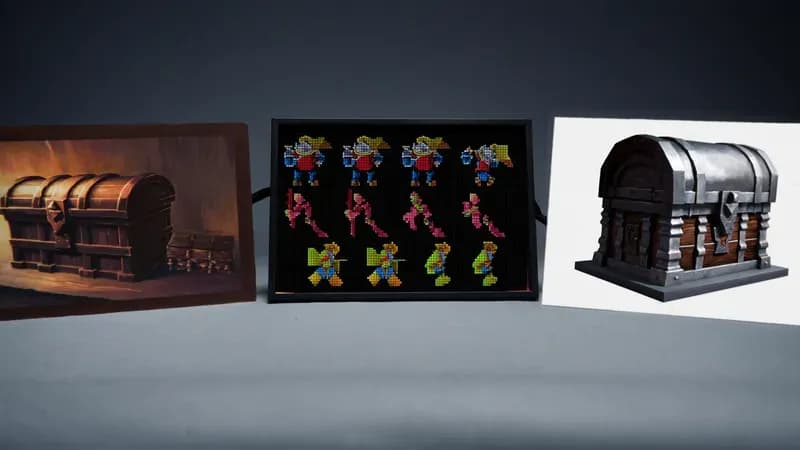
We didn't just read feature pages. We run Higgsfield daily for blog hero images (currently on its Soul Cinematic and GPT Image 2 models), and for this post we also pushed one game prop through Meshy and one character sprite set through Pixellab to see what each layer actually produced. Here's what we observed.
Meshy (text-to-3D, "low-poly fantasy chest"). The mesh generated in roughly 55 seconds. Tri-count came in around 14k triangles, which is heavy for what should be a simple low-poly prop. The PBR textures looked great straight out of the box, genuinely usable. But the topology was triangulated and uneven, with dense clusters around the lid hinge and almost nothing on the flat faces. We spent about 25 minutes on retopo and cleanup in Blender before it was truly engine-ready. Verdict: a real time-saver on texturing, a real time-cost on geometry. This was a text-to-3D run on the Meshy 6 line; we have not re-run the chest through Meshy 7.
Pixellab (8-directional sprite, "armored knight, walk cycle"). The base sprite was excellent, sharp pixel work, on-style, generated in under a minute. The 8-directional rotation held up well. The walk cycle is where it slipped: frame 4 of the 6-frame cycle lost the shoulder pauldron's silhouette, and the sword tip thinned out by a pixel or two across frames 3 through 5. Fixable in maybe 10 minutes of pixel touch-up, but you can't skip the review. Verdict: 80% there instantly, 20% manual.
Higgsfield (concept key art, daily use). From running it daily, we know its strength cold: give it a mood and it nails atmosphere, lighting, and composition for concept and marketing art. For a game prop reference it produced a gorgeous painted chest. Completely unusable as geometry, exactly as expected, because that's not its job. Verdict: best-in-class concept, zero game-ready output.
| Tool | Asset Produced | Observed Result | Verdict |
|---|---|---|---|
| Meshy | Low-poly chest (3D) | ~14k tris, ~25 min retopo | Game-ready after cleanup |
| Pixellab | Knight sprite (walk cycle) | Frame 4 silhouette drift | 80% instant, 20% manual |
| Higgsfield | Chest concept (key art) | Beautiful, not geometry | Concept only |
Three tools, three layers, one prop. Nobody won, because they were never playing the same game.
What AI Game-Art Tools Still Can't Do in 2026
As of 2026, AI game-art tools still struggle with clean quad topology, reliable rigging weights, full-set art-style consistency, and animation quality. IP and licensing risk remains a top developer concern, with 52% of professionals in GDC's 2026 survey saying generative AI is having a negative impact on the industry, up from 30% the year before.
Let's get specific about the gaps, because this is the part no vendor page will write:
- Clean topology and retopo. AI meshes come out triangulated and uneven. You still need a human (or a retopo pass) to get quad topology that deforms well.
- UV unwrapping. Auto-generated UVs are inconsistent. For anything that needs precise texture control, you're redoing them.
- Rigging and skinning weights. Auto-rigging places a skeleton, but the skin weights (how the mesh bends around joints) are rarely production-quality on the first try.
- Hero / AAA fidelity. Great for props and background objects. Not yet trusted for the hero character your whole game's identity rides on.
- Full-set consistency. Generate ten assets and they won't look like one artist made them. Style drifts. Pixellab fights the same battle across animation frames.
- Animation. Generating believable motion, not just frames, is still mostly human work.
- IP and licensing risk. This is the big one. According to GDC's 2026 State of the Game Industry survey, IP theft and training-data provenance are among developers' top stated concerns, and only 36% of professionals report using generative AI at work despite the hype.
AI can generate the mesh. It still can't give you clean quad topology, a riggable skeleton, and a full set that looks like one artist made it. That gap is the whole reason 3D artists still have jobs in 2026, which brings us to the question everyone's actually asking.
The Honest Alternatives at Each Layer
If one of these three isn't clicking for your project, every layer has strong alternatives. Grouped by pipeline stage, here's where each one earns a look. No strawmen, just an honest "pick this if" for each. These are the names that show up most when people search meshy alternatives or pixellab alternatives.
| Layer | Tool | Pick this if… |
|---|---|---|
| 3D | Tripo3D | You want cleaner quad topology out of the box, game-optimized |
| 3D | Rodin / Hyper3D | You need production-drop-in quality and photoreal humans |
| 3D | Hunyuan3D | You're generating clean organic geometry (creatures, characters) |
| 3D | Sloyd | You want parametric, modular props you can tweak procedurally |
| 3D | Luma Genie / Kaedim | You're prototyping fast or sketch-to-3D for concepting |
| 3D | Autodesk Wonder 3D | You're already in the Autodesk ecosystem (launched Mar 2026) |
| Pixel / 2D | Retro Diffusion | You want a model purpose-built for retro pixel aesthetics |
| Pixel / 2D | SpriteLab | You need a dedicated sprite-and-animation workflow |
| Pixel / 2D | Scenario | You want a style-trained set for consistent 2D output |
| Concept | Midjourney / Leonardo.AI | You want top-tier concept and key art generation |
| Concept | Nano Banana | You want a fast concept-art iteration loop |
A handful of smaller 2D players (openart, recraft, fotor) also show up in autocomplete; they're fine for one-off art but lack the sprite-and-animation depth Pixellab or SpriteLab offer. For the full ranked comparison across every layer, see our full ranked list of AI game asset generators. And cross-checking against an independent test of 9 generators is a smart move before committing a workflow.
Does AI Take Game Engineers Next? (Our Honest Take)
Will AI replace game artists or programmers first? The data points clearly at artists. In GDC's 2026 survey, workers in visual and technical art were the most concerned at 64%, with game design and narrative at 63% and programming at 59%. AI commoditizes production art (props, textures, sprites) faster than it touches gameplay systems, netcode, or engine programming.
There's a real counter-argument worth engaging here, not dismissing. The code-first argument, made well by writers at x-team, says AI hits code before it hits art, because LLMs are already strong at generating functions, and a junior programmer's boilerplate is exactly the kind of pattern-matching AI does best. It's not a silly position. Copilot-style tools really do write a lot of working code.
But here's where it breaks down for games specifically. The GDC numbers say the people most worried are the artists, not the engineers, and they're worried for a concrete reason: tools like Meshy, Pixellab, and Midjourney already produce shippable-ish production art today. Meanwhile, AI cannot yet design a satisfying combat system, debug a multiplayer desync, optimize a draw-call budget, or make a jump feel right. Game feel is judgment, taste, and a thousand tiny tuned values, and that's not boilerplate.
So our honest synthesis: AI is coming for production art before it comes for netcode. The GDC 2026 data says artists feel the heat first, not engineers. Production work (repetitive props, texture variants, sprite frames, boilerplate code) gets commoditized at every layer. Systems work (gameplay, optimization, engine and tools programming, game feel) stays human for the foreseeable future. The designer Yoko Taro has joked that AI might replace game creators in 50 years; on a shorter horizon, the realistic read is reassignment, not replacement.
Our recommendation, whether you're an artist or an engineer: stop competing with the production layer and own the judgment layer. Let AI do the 80%. Get very, very good at the 20% it can't. That's where the durable jobs are. If you're wiring these tools into an automated content or asset pipeline, that's the kind of thing we build, so say hi. You can also browse our broader take on AI tools across your business.
Frequently Asked Questions
Is Meshy actually better than Higgsfield and Pixellab?
No, and the question doesn't quite make sense. They don't compete. Meshy builds 3D meshes, Higgsfield generates concept and cinematic art, and Pixellab makes 2D pixel sprites. Asking which is "better" is like asking whether a hammer beats a saw. You pick the tool that owns the layer you're working on.
What is the best AI tool for game assets?
There isn't one best tool, there's a best tool per layer. Use Higgsfield for concept and key art, Pixellab for 2D pixel sprites and animation, and Meshy for 3D meshes, PBR textures, and rigging. For most indie pipelines, you'll use two or three of them in sequence, not just one.
Can AI make game-ready 3D models?
Partially. Tools like Meshy produce 3D models that are game-ready for low-poly props, background objects, and mobile assets where tri-count tolerance is high. For hero characters needing clean quad topology and reliable rigging, AI output is a strong starting point that still needs human retopology and rig cleanup before it ships.
Is AI pixel art good enough for indie games?
For many indie games, yes, with caveats. Pixellab and similar tools generate clean, on-style sprites in minutes, which is a big win for small teams. The weak spot is consistency across animation frames and directional views, where small details drift. Budget time to hand-fix the frames where the silhouette wanders.
Does Meshy give clean topology and auto-rigging?
Meshy offers auto-rigging and exports to Unity and Unreal, but the topology is usually triangulated rather than clean quad geometry, and skin weights need review. In our Meshy 6 text-to-3D test, a simple prop came out around 14k tris and needed roughly 25 minutes of retopology. Treat the rig and topology as a starting point, not a finished result.
Are there free AI game asset generators?
Yes. Pixellab, Meshy, and several alternatives offer free tiers generous enough to evaluate the tool before paying. Free tiers typically cap generations per month or add watermarks. They're enough to test whether a tool fits your pipeline, but most serious workflows move to a paid plan for volume and commercial-use rights.
Will AI replace game artists?
AI is reshaping production art faster than any other game-dev role. GDC's 2026 survey found 64% of visual and technical artists view generative AI's impact negatively, the highest of any group. AI commoditizes props, textures, and sprites, but full-set consistency, hero-asset fidelity, and art direction still need humans. Expect reassignment toward direction and cleanup, not wholesale replacement.
Will AI replace game programmers or engineers?
Less and later than artists. GDC's 2026 data shows programmers at 59% concern, below artists at 64%. AI handles boilerplate code well, but gameplay systems, netcode, optimization, engine and tools programming, and game feel require judgment AI can't yet replicate. Systems-level engineering looks like one of the more durable game-dev roles for now.
What's the difference between Pixellab the pixel-art tool and the 3D "PixelLab"?
They're different products with confusingly similar names. The Pixellab in this post is pixellab.ai, an AI pixel-art and 2D sprite generator. A separate "PixelLab" is positioned as a text/image-to-3D tool. If you want pixel art and sprite sheets, you want pixellab.ai. Check the URL before signing up.