How to Build an AI SDR With n8n: The $50/Month Architecture We Ship to Clients (2026)
11x charges around $2,000 per month. Artisan starts at $1,500. Regie at $1,000. We build the same outbound machine for our B2B clients in n8n for $50-65/month, and the architecture below is the exact one we deploy. Techsy operates an AI SDR agency, so this isn't theory, it's the workflow we've shipped across SaaS, fintech, and devtools accounts since early 2025.
Key Takeaways:
- An AI SDR built in n8n costs $50-65/month at 1,000 leads vs $1,500-2,000/month for managed tools like 11x or Artisan.
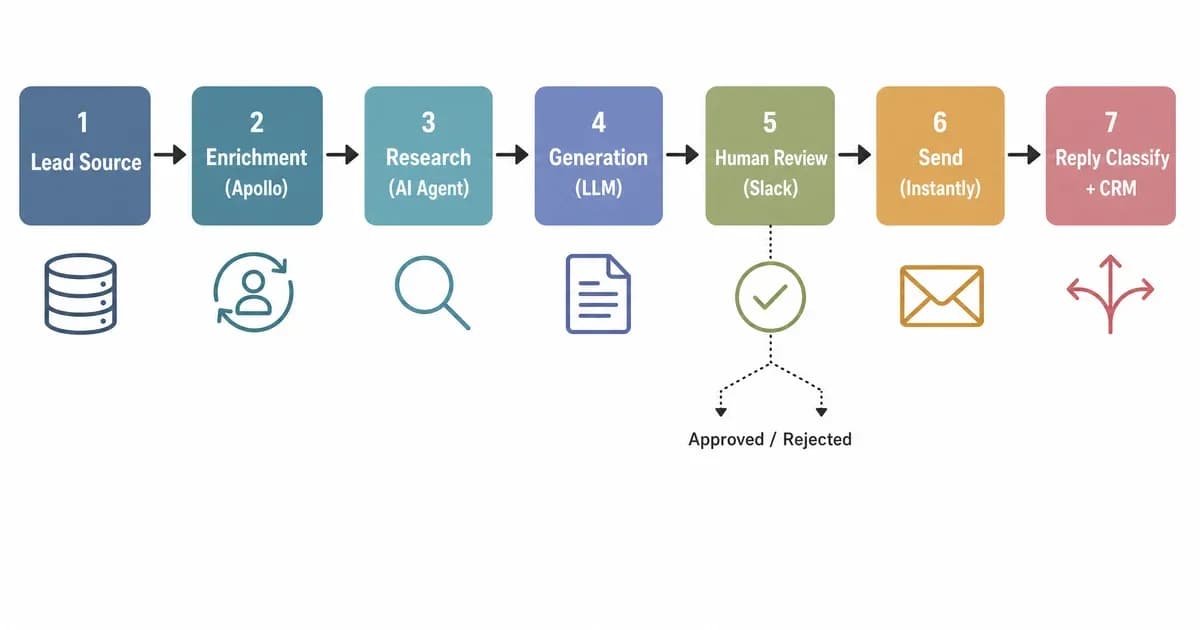
- The 7-stage architecture: lead ingestion, enrichment, research, generation, human review, send, reply classification.
- The single most-shipped asset is the AI Agent node system prompt, we publish a full 40-line template below.
- Don't build this if you send fewer than 100 cold emails per month or lack deliverability and warmup infrastructure.
What an AI SDR Actually Does (And Why n8n Is the Right Canvas)
An AI SDR (Sales Development Representative) is an autonomous workflow that ingests target leads, enriches them with firmographic and behavioral data, drafts personalized outbound emails using an LLM, sends them through a warmed inbox, and classifies replies, all without a human SDR in the loop. In n8n, it lives as a single visual workflow you can edit, debug, and own outright.
What stays automated: lead routing, enrichment lookups, research, email drafting, sending, reply triage, CRM updates. What stays human: target list curation (especially ICP definition), legal sign-off on copy, and the escalation path when a reply turns into a real conversation. An AI SDR is not a chatbot, it's a procurement system for outbound conversations.
Why n8n over Zapier or Make? Three reasons. The AI Agent node ships native tool calling and structured output (Zapier still wraps OpenAI in a generic HTTP step). Self-hosting gives you unlimited executions on a $5 VPS. And the visual canvas lets a non-engineer on your team debug a broken Apollo call without opening a JSON editor. If you're brand new to n8n's AI Agent node, start with our n8n AI Agents tutorial before this build, it covers the primitives. The official n8n Advanced AI docs cover the node reference.
The 7-Layer Architecture (Intent to Reply)
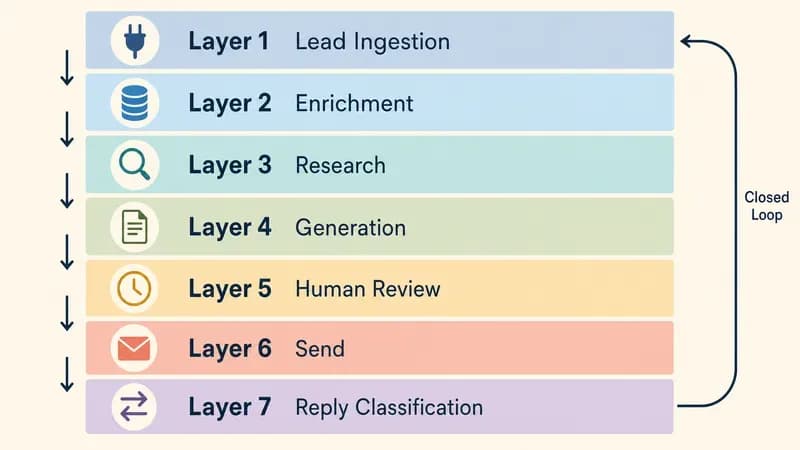
The seven layers are: Lead Ingestion (webhook or CSV), Enrichment (Apollo or Clay), Research (an AI Agent scraping context), Generation (the email LLM with guardrails), Human Review (Slack approval for the first 100), Send (Instantly or Smartlead), and Reply Classification (an AI Agent routing replies to CRM, Slack, or auto-respond). Every layer maps to exactly one n8n node, that's the design constraint that keeps the build maintainable.
Here's the layer-by-layer breakdown:
| # | Layer | Job | Primary Tool | n8n Node |
|---|---|---|---|---|
| 1 | Lead Ingestion | Pull target leads from a source | CSV / webhook / Apollo list | Webhook or Spreadsheet File |
| 2 | Enrichment | Add firmographic and contact data | Apollo, Clay, Proxycurl | HTTP Request |
| 3 | Research | Find pain hypothesis and trigger event | AI Agent with search tools | AI Agent |
| 4 | Generation | Draft subject + body within guardrails | GPT-4o-mini or Claude Haiku | AI Agent |
| 5 | Human Review | QA the first 100 emails | Slack approval | Send and Wait for Approval |
| 6 | Send | Deliver from warmed inbox | Instantly or Smartlead | HTTP Request |
| 7 | Reply Classification | Triage replies into 5 buckets | AI Agent + Switch | AI Agent + Switch |
The PageLines crew wrote a useful framing on the autonomous SDR stack that maps a similar lattice, we advance it here by making each layer concrete to n8n nodes. For multi-channel autonomy beyond outbound email (think LinkedIn + email + ads in one workflow), our B2B autonomous social media lead-generation guide covers the parallel pattern.
One closed-loop nuance: Reply Classification feeds back into Lead Ingestion as a negative signal, anyone who unsubscribes or replies "wrong person" gets a do-not-contact flag on the next enrichment pass. That loop is what makes this a system rather than a mail-merge.
Prerequisites: n8n Cloud vs Self-Hosted, LLM Keys, Sending Stack
Before you open n8n, you need four things: a hosting decision (Cloud or self-hosted), two LLM API keys (OpenAI plus Anthropic for fallback), a sending stack (Instantly or Smartlead, never Gmail at scale), and 3-5 warmed mailboxes on a separate sending domain. We default our clients to self-hosted on a $5 Hetzner box, n8n Cloud's execution cap bites the moment you cross 500 leads/day.
Cloud vs self-hosted, head to head:
| Factor | n8n Cloud Starter | Self-Hosted |
|---|---|---|
| Cost | $24/month (2,500 execs) | $5/month VPS (Hetzner CX11) |
| Executions | Capped per tier | Unlimited |
| Ollama support | No (no local LLM) | Yes (run Llama 3.3 locally) |
| DevOps overhead | Zero | Docker + reverse proxy + backups |
| Best for | Prototypes, <500 leads/mo | Production, >500 leads/mo |
If you self-host, here's the minimal docker-compose.yml we ship:
services:
  n8n:
    image: n8nio/n8n:latest
    restart: always
    ports:
      - "5678:5678"
    environment:
      - N8N_HOST=n8n.yourdomain.com
      - N8N_PROTOCOL=https
      - N8N_BASIC_AUTH_ACTIVE=true
      - N8N_BASIC_AUTH_USER=admin
      - N8N_BASIC_AUTH_PASSWORD=${N8N_PASSWORD}
      - WEBHOOK_URL=https://n8n.yourdomain.com/
    volumes:
      - ./n8n_data:/home/node/.n8n
Add Caddy or Traefik for HTTPS termination. For self-hosting plus local LLM (privacy-sensitive verticals), the n8n + Ollama walkthrough is the cleanest reference. LLM keys: get one OpenAI key (GPT-4o-mini will do 90% of the work) and one Anthropic key (Claude Haiku 3.5 as fallback). Sending stack: Instantly at $37/month gives you unlimited warmup and a clean API. Check n8n's pricing page for the latest Cloud tier numbers.
Step 1 — Lead Ingestion and Enrichment
Lead ingestion is just the front door. The real work happens at enrichment, where you turn an email + company name into a row with title, seniority, headcount, funding stage, tech stack, and recent LinkedIn activity. We default to Apollo for cold lookups and Clay for the messy fuzzy-match cases, same payload shape, different price-per-row. Apollo costs $0.02-0.05 per contact at scale; Clay starts at $349/month with richer signal mining.
1.1 The webhook trigger (or CSV import)
Two patterns. Pattern A: a webhook fires whenever your team adds a row to a "target leads" Airtable or Google Sheet. Pattern B: a manual CSV upload through n8n's Spreadsheet File node. We use Pattern A for ongoing campaigns and Pattern B for one-off lists from sales ops.
1.2 Apollo HTTP Request node
The Apollo /v1/people/match endpoint takes an email and returns the enriched record:
{
  "method": "POST",
  "url": "https://api.apollo.io/v1/people/match",
  "headers": {
    "Content-Type": "application/json",
    "Cache-Control": "no-cache",
    "X-Api-Key": "{{ $env.APOLLO_API_KEY }}"
  },
  "body": {
    "email": "={{ $json.email }}",
    "reveal_personal_emails": false,
    "reveal_phone_number": false
  }
}
Wire the response into a Set node that pulls out organization.industry, organization.estimated_num_employees, title, and seniority. That's your enrichment payload.
1.3 Clay and Apify alternatives
If Apollo misses (about 15-20% of B2B contacts in our experience), fall back to Apify Proxycurl for LinkedIn at $0.01/lookup, or Clay if you need waterfall enrichment across multiple providers. Build a try/catch branch in n8n using the IF node so missed leads get a second pass instead of dropping out.
1.4 Output schema
Standardize on a single JSON schema downstream:
{
  "lead_id": "string",
  "email": "string",
  "first_name": "string",
  "company": "string",
  "title": "string",
  "industry": "string",
  "headcount": "integer",
  "linkedin_url": "string",
  "enrichment_source": "apollo|clay|proxycurl"
}
Enrichment is where the post-Apollo personalization budget is set, every $0.04 contact is a $0.04 cap on how much LLM token spend that lead can justify.
Step 2 — Research Layer With the AI Agent Node
The Research Agent's job is to take an enriched lead and output a one-line pain hypothesis plus a recent trigger event (a funding round, a product launch, a new hire). It runs as an AI Agent node with two tools: a web-search tool (SerpAPI or Brave Search) and an optional LinkedIn lookup (Proxycurl). Output is structured JSON so the next node can branch on icp_fit_score. We've found GPT-4o-mini handles 80% of research jobs at 1/20th the Sonnet cost, escalate to Claude Sonnet only when the ICP fit score is borderline (0.4-0.6).
2.1 AI Agent node setup
Model: GPT-4o-mini. Temperature: 0.3 (you want consistency, not creativity). Memory: off, each lead is stateless. Max iterations: 5 (cap the tool-calling loop or token costs blow up on hallucinated searches).
2.2 Tools
Attach two HTTP Request tools: one for SerpAPI (https://serpapi.com/search?q={query}&num=5), one for Proxycurl LinkedIn. The Agent decides which to call.
2.3 Structured output
Force a JSON schema on the output:
You are a B2B research agent for an AI SDR pipeline. Given an enriched lead,
research their company in the last 90 days and return a structured assessment.

Tools:
- web_search(query): SerpAPI top 5 results
- linkedin_lookup(url): Proxycurl person + company profile

Rules:
- Spend at most 3 tool calls per lead.
- If no recent trigger found, set recent_trigger to null. Do not invent.
- ICP fit is for B2B SaaS sellers: prefer 50-500 headcount, recent funding.

Output JSON exactly:
{
  "icp_fit_score": 0.0-1.0,
  "pain_hypothesis": "string, ≤25 words",
  "recent_trigger": "string or null",
  "do_not_contact_reason": "string or null"
}
The do_not_contact_reason field is the guardrail, set it when the agent detects a competitor, a current customer, or a recent layoff. Anything with a value here skips the rest of the pipeline.
Step 3 — Email Generation With Guardrails
The Email Generation Agent is the most-shipped asset of the entire build. Its job: take the enriched lead plus the Research Agent's output and produce a subject line under 50 characters, a body under 80 words, and a single soft CTA. It also strips banned phrases via a post-generation regex pass. The banned-phrases list is the single most-shipped guardrail we deploy, strip "revolutionary" and reply rates jump 1-2 points overnight. Apollo's own guardrails playbook backs this up with vendor data.
3.1 The system prompt (hero asset)
Copy-paste this directly into your AI Agent node:
You are a B2B sales development rep with 3 years of tenure writing cold emails
for a SaaS company. You write the way an experienced AE writes — direct,
specific, no marketing fluff.

INPUT: enriched lead JSON + research JSON.

VOICE RULES:
- Write like a 3-year-tenure AE, not a marketer.
- One ask per email. Soft, low-friction (15-min call, not "demo").
- Reference the recent_trigger if present. Otherwise reference the pain_hypothesis.
- First sentence is NOT a greeting. Start with the trigger or pain.
- No exclamation marks. No emojis.

LENGTH:
- Subject: ≤ 50 characters.
- Body: ≤ 80 words.
- Single paragraph + CTA on its own line.

BANNED PHRASES (case-insensitive — never use any of these):
- "hope this email finds you well"
- "I wanted to reach out"
- "circle back"
- "touch base"
- "synergy"
- "leverage" (as verb)
- "revolutionary"
- "game-changing"
- "in today's fast-paced world"
- "I came across your"
- "quick question"
- "just checking in"

BANNED OPENERS:
- Any sentence starting with "I" or "We".
- Any compliment about the recipient's company ("love what you're doing").

OUTPUT JSON exactly:
{
  "subject": "string",
  "body": "string",
  "cta": "string (one sentence, the ask)",
  "intent_score": 0.0-1.0 (your confidence this lands)
}

If you cannot write an email that passes the rules without inventing facts,
return: {"subject": null, "body": null, "cta": null, "intent_score": 0.0}.
Do not invent quotes, statistics, or product features.
3.2 Structured output
The intent_score field is your second guardrail. Anything below 0.6 gets routed to the human review queue regardless of campaign stage. We tune the threshold per ICP, enterprise ICPs get a 0.75 floor, SMB gets 0.55.
3.3 Post-generation regex check
n8n's Function node runs a final regex sweep against the banned-phrases list (the LLM occasionally smuggles them back in via synonyms). Any match drops the email back to the queue with a feedback string for the next attempt. Every client engagement starts by handing us their last 50 outbound emails and our model drafts 50 alongside, that A/B comparison is how we calibrate the banned-phrase list per ICP.
Step 4 — Human-in-the-Loop Review (First 100 Emails)
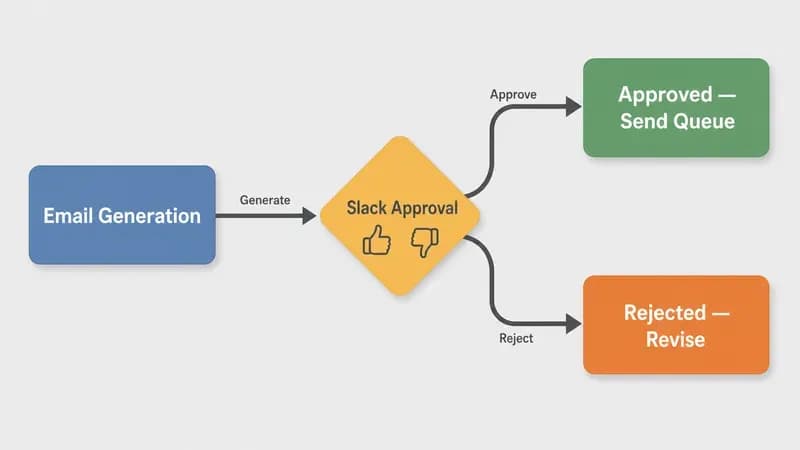
Human-in-the-loop matters for the first 100 emails because that's when the model's blind spots show: an ICP misfire, a tone-deaf reference, a banned phrase that snuck through. After 100 emails clear with under 5% rejection, you graduate to spot-check mode, a 10% rolling sample reviewed daily. We never let a client run autonomous until the first 100 emails clear with under 5% rejection, that's the hand-off gate.
Wire the HITL branch with n8n's Send and Wait for Approval node. It posts to a dedicated Slack channel with the lead's name, the generated subject, and the body. Reviewers hit Approve or Reject. Approve routes to Send; Reject loops back to Generation with a one-line feedback string ("too formal", "missed the trigger", "banned phrase: synergy").
What to QA in the first 100:
- Banned phrases (regex catches most, humans catch the rest)
- ICP misfires (you targeted CTOs, the email reads like it's for marketing)
- Tone (too eager, too formal, too transactional)
- Factual inventions (the model invented a feature, a competitor name, a quote)
Pro tip: log every rejection reason to a Postgres table. After 100 emails, run the rejections through a clustering pass to update the system prompt, that's how the prompt evolves with the ICP.
Step 5 — Sending and Deliverability (SPF, DKIM, DMARC, Warmup)
Deliverability is where 80% of AI SDR builds fall over. The non-negotiables: a separate sending domain (never your main domain), SPF + DKIM + DMARC fully configured, send caps of 40-50 emails/day per mailbox, and a 3-week warmup before the first cold send. If your spam rate crosses 0.3%, Google throttles your entire domain, not just the offending campaign.
5.1 Separate sending domain
Register a lookalike domain (getyourcompany.com instead of yourcompany.com). Forward replies to your main inbox. This isolates your reputation. If the cold domain gets burned, your real domain stays clean.
5.2 SPF, DKIM, DMARC
The full deliverability checklist:
| Item | Required value | Why it matters | Verification |
|---|---|---|---|
| SPF record | v=spf1 include:_spf.instantly.email ~all | Authorizes sending IPs | dig TXT yourdomain.com |
| DKIM | Provider-issued public key in DNS | Signs each email cryptographically | MXToolbox DKIM Lookup |
| DMARC | v=DMARC1; p=quarantine; rua=mailto:[email protected] | Tells receivers what to do with failures | dig TXT _dmarc.yourdomain.com |
| MX | Point to your inbox provider | Catches replies | dig MX yourdomain.com |
| List-Unsubscribe | RFC 8058 one-click header | Required by Gmail/Yahoo Feb 2024+ | Check raw email headers |
RFC 8058 is the one-click unsubscribe standard, Gmail and Yahoo now require it on bulk senders. Instantly and Smartlead add this header automatically.
5.3 Send caps and warmup
40-50 emails/day per mailbox, hard cap. Five warmed mailboxes = 200-250 emails/day per domain. Need more? Add more mailboxes, not more emails per mailbox. Warmup runs for 3 weeks before any real send. Instantly's free warmup pool will get you there.
5.4 Compliance
US: CAN-SPAM requires a physical mailing address and a working unsubscribe, the FTC's compliance guide is the canonical reference. EU: GDPR Article 6(1)(f) legitimate interest is the typical basis for B2B cold email, with documented opt-out within 72 hours, the official text is short, read it. Canada: CASL is stricter than CAN-SPAM and requires express or implied consent.
Instantly's deliverability report puts the 2025-2026 benchmark for inbox placement at 85-90% if every box above is checked. Most teams hit 50-60% because they skip the separate domain.
Step 6 — Reply Classification and CRM Sync
Reply classification routes incoming replies into five buckets, interested, objection, unsubscribe, out-of-office, wrong-person, and triggers a different action per bucket. Interested replies ping the founder's Slack and create a HubSpot deal. Objections route to a follow-up sequence. Unsubscribes write to a suppression list. OOO triggers a re-send in 7 days. Wrong-person updates the CRM and asks for a referral. On client deployments, this single H2 is what separates "AI generates emails" from "AI runs a pipeline", without reply classification you're just a fancy mail-merge.
6.1 IMAP trigger
n8n's IMAP Email trigger polls your sending inbox every 60 seconds. Filter to emails where the parent thread was originated by your campaign (match the In-Reply-To header against your Message-ID log).
6.2 Reply Classification Agent
You are a reply-classification agent for an AI SDR pipeline. Read the reply
and classify intent.

OUTPUT JSON exactly:
{
  "intent": "interested|objection|unsubscribe|ooo|wrong_person",
  "confidence": 0.0-1.0,
  "suggested_action": "string, ≤20 words"
}

Rules:
- "interested" = explicit yes, time proposal, or follow-up question.
- "objection" = "not now", "send info", "we use X".
- "unsubscribe" = any opt-out phrase, even polite.
- "ooo" = auto-reply detected.
- "wrong_person" = "I don't handle this", "try X@", "I left the company".

If confidence < 0.7, default intent to "objection" (safer than wrong action).
6.3 Switch node routing
n8n's Switch node fan-outs on intent:
- interested → HubSpot Contact Update (lifecycle = SQL) + Slack ping to #sales
- objection → Add to follow-up sequence with 5-day delay
- unsubscribe → Write to suppression Postgres table + send confirmation
- ooo → Schedule re-send +7 days
- wrong_person → CRM update, mark email invalid, request referral via auto-reply
6.4 HubSpot sync
n8n's HubSpot node handles contact creation, deal stage updates, and activity logging. We log every email sent and every reply received as a HubSpot Engagement, your reps see the AI thread inline with their manual outreach.
Step 7 — Evaluation Loop (Reply-Rate Targets and QA Cadence)
The evaluation loop is what keeps the system from drifting. Track reply rate weekly, run a 10% QA sample after the HITL graduation, A/B test prompt variants via a Switch node, and version every prompt change in a Postgres table. The biggest mistake we see: teams ship an AI SDR and never run the eval loop, six months later they're sending 10,000 emails at 0.4% reply rate and don't know why.
Reply-rate targets:
| Funnel stage | Target reply rate | Action if below target |
|---|---|---|
| Cold (first touch) | 3-8% | Revisit ICP or rebuild subject lines |
| Cold (sequence step 2-3) | 2-5% | Tighten the follow-up's CTA |
| Warm (replied once) | 8-15% | Check tone of human-style replies |
| Re-engagement (90-day dormant) | 1-3% | Cut spend, refresh list instead |
A/B test setup: clone your Email Generation Agent, change one variable (subject formula, opener style, CTA softness), wire both through a Switch node that round-robins traffic 50/50. After 200 sends per arm, the higher reply-rate variant becomes the default. For systematic prompt-quality tracking once you scale past 5,000 leads/month, see our LLM evaluation tools roundup, at that volume you want Langfuse or Arize, not Postgres.
QA cadence after HITL graduation: 10% random sample reviewed daily, full-week audit every Friday, prompt versioning whenever reply rate moves more than 1 point in either direction.
What This Actually Costs (1k vs 10k Leads/Month)
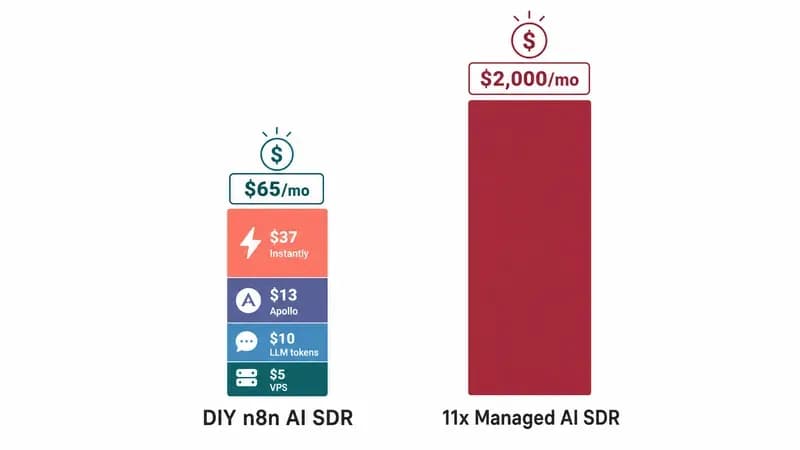
At 1,000 leads/month the DIY n8n stack runs $70-84. At 10,000 leads/month it scales to $280-340. Compared to 11x at $2,000/month or Artisan at $1,500/month, the 12-month TCO gap is staggering, about $24,000 vs $780 at the entry tier, and that includes the 8 hours of one-time build. At 1,000 leads/month, the DIY n8n stack costs less than 11x charges you for an hour.
Itemized monthly cost at two volumes:
| Line item | 1,000 leads/mo | 10,000 leads/mo |
|---|---|---|
| VPS (Hetzner CX11) | $5 | $5 |
| GPT-4o-mini tokens (research + gen) | $8-12 | $80-120 |
| Apollo enrichment | $20-30 | $150-200 |
| Instantly (10 mailboxes / 30 mailboxes) | $37 | $97 |
| Warmup (Instantly included) | $0 | $0 |
| Total | $70-84 | $332-422 |
GPT-4o-mini at $0.15/$0.60 per 1M tokens per OpenAI's pricing page is the math driver, Claude Haiku 3.5 on Anthropic's pricing is comparable. You can squeeze closer to $50 by running enrichment via Apify Proxycurl ($0.01/lookup) instead of Apollo, but we keep Apollo for accuracy on cold contacts. If you're still picking the LLM, our AI agent frameworks ranking walks through cost-per-1k-tokens tradeoffs.
12-month TCO across providers:
"12-Month AI SDR Cost: DIY n8n vs Managed Tools"
Data table
| "Annual Cost ($)" | "12-Month Cost" |
|---|---|
| "DIY n8n (this guide)" | 780 |
| "Regie" | 12000 |
| "Artisan" | 18000 |
| "11x" | 24000 |
The math is brutal for managed tools. Even adding 8 hours of build time at a $150/hr blended rate ($1,200), the DIY stack still saves $22,000/year against 11x.
When NOT to Build This
Skip this build if you send fewer than 100 cold emails per month, the 8-hour build won't pay back. Skip if you're in a regulated industry (healthcare, finance, government) without legal sign-off on cold outbound. Skip if you're a non-technical solo founder with zero bandwidth for maintenance. Skip if your team can't tell SPF from DKIM. Skip if your ICP is consumer, cold email is B2B-only, full stop.
The disqualifiers, expanded:
- <100 outbound emails/month: The build time exceeds the annual savings. Use a managed tool with a free tier or do it manually.
- Regulated industries without legal sign-off: HIPAA, GLBA, and similar regimes make cold outbound a compliance landmine. Get a lawyer first.
- No warmup infrastructure: If you don't have Instantly or Smartlead and aren't willing to spend three weeks warming a domain, you'll torch your sender reputation in week one.
- No maintenance bandwidth: This is a system that needs weekly eval. If nobody owns the reply-rate dashboard, it drifts into noise.
- Consumer ICP: Cold email to consumers is CAN-SPAM compliant but commercially dead. Use paid ads.
If your team can't tell SPF from DKIM, the AI SDR isn't your bottleneck, your sending infrastructure is. Fix that first. We unpack the same build-vs-buy 3-option frame for voice agents in our build-vs-buy AI voice agent guide, the framework applies directly.
How Techsy Ships This for Clients
We deploy this exact architecture as an agency engagement. The timeline: Week 1 we audit your ICP, set up the separate sending domain, configure SPF/DKIM/DMARC, and start mailbox warmup. Week 2 we build the n8n workflow against your CRM. Weeks 3-4 we run HITL alongside your team. Week 5 onward, autonomous with daily reply-rate monitoring.
What clients ship us: their ICP document, the last 50 outbound emails their humans wrote (we use those to calibrate the banned-phrase list per voice), and a count of warmed mailboxes they already own (we add more if needed). What we deliver: the n8n workflow configured to your stack, the system prompts tuned to your voice, 30 days of reply-rate monitoring, and a Notion runbook your team uses after handoff.
You're paying us for the warmup discipline and the reply-rate monitoring, not for n8n licenses. Want us to build it for you instead? Techsy's AI SDR agency page walks through how we ship this for B2B teams.
FAQ
What is an AI SDR and how does it work?
An AI SDR is an autonomous workflow that ingests target leads, enriches them with firmographic data, drafts personalized cold emails via an LLM, sends from a warmed inbox, and classifies replies into action buckets. The pipeline runs without a human SDR, though humans still own ICP definition, legal sign-off, and escalation when replies turn into real conversations.
How much does it cost to build an AI SDR in n8n in 2026?
At 1,000 leads/month, expect $70-84/month: $5 VPS, $8-12 GPT-4o-mini tokens, $20-30 Apollo, and $37 Instantly. At 10,000 leads/month it scales to $280-340. Compare that to 11x at roughly $2,000/month or Artisan at $1,500/month, the 12-month TCO gap exceeds $20,000 even after 8 hours of build time.
Can n8n really replace tools like Clay, Apollo, or 11x?
n8n replaces the orchestration layer and the email generation layer that 11x and Artisan charge for. It does not replace the underlying data, you still pay Apollo or Clay for enrichment because they own the contact database. The cost win is on the orchestration plus LLM tax that managed tools mark up 20-30x.
Is it safe to send cold emails from an n8n-built SDR?
Yes, if you configure deliverability properly: separate sending domain, SPF + DKIM + DMARC, send caps of 40-50/day per mailbox, RFC 8058 one-click unsubscribe, three-week warmup before the first send. Without those, you'll torch your sender reputation in week one regardless of which tool generates the email body.
What's the best LLM for an AI SDR, GPT-4o-mini, Claude Haiku, or Gemini Flash?
GPT-4o-mini is our default at $0.15/$0.60 per 1M tokens, handles 80% of research and generation jobs cleanly. Claude Haiku 3.5 is comparable, slightly better at tone matching. Gemini Flash is cheapest but less reliable on structured output. Use GPT-4o-mini primary, Claude Haiku as fallback for the 20% of borderline cases.
Do I need self-hosted n8n or can I use n8n Cloud?
Use n8n Cloud Starter ($24/month) if you're under 500 leads/month and don't need local LLM. Self-host on a $5 Hetzner VPS once you cross 500 leads/month, Cloud's execution cap will bite and you can't run Ollama. Self-hosting adds Docker maintenance but unlocks unlimited execs and local LLM options.
How do I keep my sending domain from getting blacklisted?
Send 40-50 emails/day max per mailbox, never your main domain, keep spam complaint rates under 0.3%, honor unsubscribes within 24 hours, monitor Google Postmaster Tools weekly, and rotate mailboxes if reputation dips. The biggest single fix is the separate domain, if a campaign goes wrong, your primary domain stays clean.
Should I build my own AI SDR or buy 11x/Artisan/Regie?
Build if you have an n8n-fluent developer, ship more than 500 cold emails/month, and want voice control over the email generation. Buy if you're a non-technical team, send fewer than 100/month, or need it live this week. The DIY 12-month TCO is roughly $780 vs $24,000 for 11x, but only if you actually maintain it.
How long does it take to build an AI SDR in n8n?
4-8 hours for an n8n-fluent developer who already has Apollo, OpenAI, and Instantly accounts. Closer to 16-20 hours if you're learning n8n alongside the build. Add another week for sending-domain setup and warmup before you can run real campaigns. The deliverability layer always takes longer than the workflow itself.
What's a realistic reply rate from an n8n AI SDR?
Cold first-touch reply rates land 3-8% with a tuned ICP and clean deliverability. Sequence steps 2-3 sit at 2-5%. Warm follow-ups (after one reply) hit 8-15%. If you're under 1% on first-touch, the problem is almost always ICP misfire or sending-domain reputation, not the email copy. Fix the upstream layer before tuning the prompt.