Learning how to make podcast clips for social media with AI comes down to one thing: a repeatable workflow, not a magic button. AI can turn a single 60-minute episode into a batch of captioned, vertical, platform-ready clips in minutes — but only if you feed it the right process and pick a tool that fits your budget (and whether you even have video). Here's the whole system.
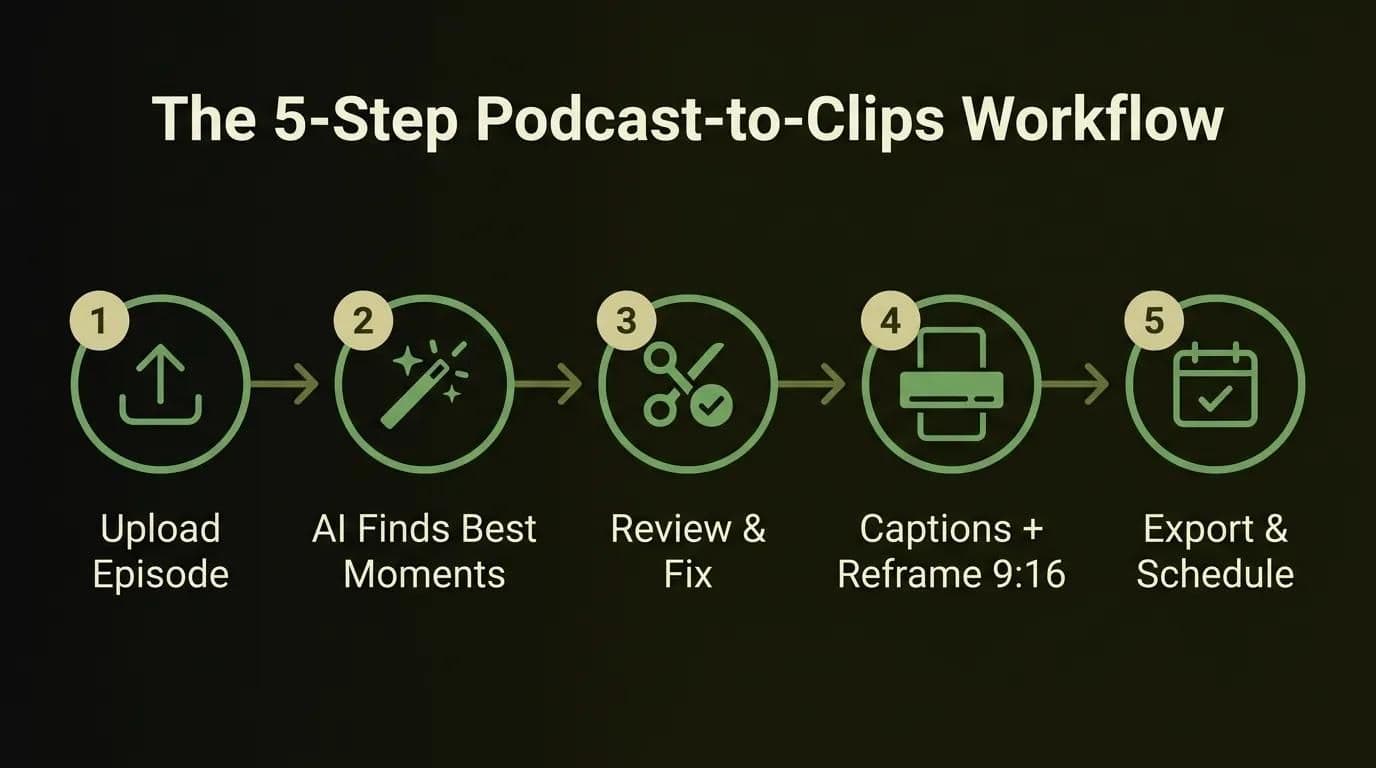
TL;DR: the 5-step podcast-to-clips workflow
Short on time? Here's the entire process as a checklist you can run on every episode:
- Upload your episode to an AI clip tool (audio or video, up to a couple of hours).
- Let AI find the best moments — it transcribes, scores segments, and suggests clips.
- Review, trim, and fix the AI's picks before you trust them.
- Add captions and auto-reframe to 9:16 vertical.
- Export per platform and schedule the batch.
And the question everyone asks first: how long should podcast clips be? Aim for 15–60 seconds as your core range, then tune per platform (the full matrix is below). That's the shape of it. Now let's make it actually work.
Before you start: do you have a video or audio-only podcast?
This is the fork most guides skip, and it changes your entire toolset. Before you touch a single tool, answer one question: was your episode recorded with a camera, or is it audio only? Your answer decides whether you're making clips or audiograms — and picking the wrong path wastes your first hour.
Video podcasts (interview or talking-head)
If you filmed the episode, you're in the easy lane. AI clip tools can detect the active speaker, crop a wide 16:9 recording down to a 9:16 vertical frame, and keep whoever's talking centered. Auto-reframe and speaker focus are the two features that matter here — they're what turn a static two-person Zoom recording into a dynamic clip that actually holds attention on a phone screen.
Audio-only podcasts, and how to make podcast clips without video
No camera? You're not stuck. Audio-only shows get clipped as audiograms — a short video built from a waveform or subtitle animation over a static or branded background. Do you need video to make podcast clips? No. An audiogram gives the algorithm something to show while your audio plays, and burned-in captions carry the message for the 85% of people watching on mute. Tools like Podsqueeze, Descript, and Headliner specialize in this route, so audio-first podcasters can repurpose without ever picking up a camera.
How to make podcast clips with AI, step by step
Here's the core workflow, and it's genuinely the same five steps no matter which tool you land on. Learn the process once and you can switch tools without relearning anything. This is how to turn a podcast into clips that are ready to post, not just ready to edit.
Step 1 — Upload your episode
Drop your full episode into the tool. Most accept MP4, MOV, MP3, or a direct RSS/YouTube link. Check the length ceiling before you commit: many tools cap uploads around 120 minutes or gate long files behind higher tiers, so a two-hour interview may need a paid plan. Pro tip: upload the highest-quality source you have — AI reframing and caption placement both look sharper when they start from clean footage.
Step 2 — Let AI find the best moments (and how to judge them yourself)
The tool transcribes your episode, then scores segments for "clip-worthiness." Under the hood it's looking for complete thoughts, emotional or emphatic language, questions and their punchlines, and natural start/stop points. You'll get a ranked list of suggested clips with confidence scores. Treat those scores as a starting draft, not a verdict — the model is good at finding where something interesting happens and mediocre at knowing why it lands.
Step 3 — Review, trim, and fix the AI's mistakes
This is the step that separates clips that perform from clips that flop, and it's the one every tool's marketing page pretends you can skip. From real repurposing runs, here are the four failures you'll fix most often:
- Mid-sentence cuts. AI clips often start or end a beat too early. Nudge the in/out points to a clean breath or sentence boundary.
- Weak hook selection. The model sometimes leads with setup instead of payoff. Move the strongest line to the first 3 seconds.
- Multi-speaker framing errors. On interviews, auto-reframe can lock onto the wrong face during crosstalk. Correct the speaker track or switch to a split frame.
- Caption typos. Transcription is ~90–95% accurate, which means one wrong word per clip. Names, brands, and jargon are the usual suspects — scan and fix.
Being honest about this is the point: AI-generated clips are a great first pass, not a finished product. Budget five minutes of review per clip and your batch quality jumps.
Step 4 — Add captions and auto-reframe to 9:16
Captions aren't optional. Around 85% of social video is watched on mute, so a clip without burned-in text is a clip most people scroll past. Turn on auto-captions, pick a legible style, keep the text inside the safe zone, and set the frame to 9:16 vertical for TikTok, Reels, and Shorts. If your captions need serious polish or animation, that's a deeper topic — adding captions to your podcast clips well enough for accessibility and retention is a discipline of its own, and worth doing properly.
Step 5 — Export per platform and schedule
Export each clip in the aspect ratio its destination wants (more on that in the matrix below), then batch-schedule instead of posting one-by-one. Most tools export in 1080p on paid tiers; some auto-post directly to connected accounts. Schedule a week or two ahead so one editing session feeds days of content.
The best AI podcast clip tools in 2026 (honest picks by budget)
There's no single "best AI podcast clip generator" — there's the right tool for your format, volume, and budget. Below is the honest breakdown, with verified 2026 pricing, so you can match a tool to your show instead of a marketing page's claims.
| Tool | Entry paid tier | Free tier | Billing model | Best for |
|---|---|---|---|---|
| OpusClip | Starter $15/mo (150 min) | Yes — 60 min/mo, watermark | 1 credit = 1 min of source video | Hands-off virality scoring, auto-reframe |
| Vizard | Creator ~$19–20/mo (~1,200 min) | Yes — ~60–120 min, watermark | 1 credit = 1 upload min | Best value per minute, volume |
| Podsqueeze | Starter $18/mo (160 min, 10 clips) | Limited trial | Minutes + clip caps | Audio-only shows and audiograms |
| Choppity | $20/mo | Preview only (no downloads) | 120 min / 4GB upload max | Fast end-to-end, multi-speaker tracking |
| Kapwing | $24/mo | Yes — exports watermarked | Standard editor limits | Free start, filler-word removal |
| Descript | $24/mo | Limited | Standard editor limits | Transcript editing, 95%+ accuracy |
| Submagic | $19/mo | Trial | Standard editor limits | Best animated captions |
| CapCut | Free (Pro ~$9.99/mo) | Yes — no watermark | Free / Pro | Manual control, no AI moment detection |
OpusClip — virality scoring
OpusClip is the popular default because it does the tedious parts automatically: it scores each clip's viral potential, reframes to vertical, and adds captions. Starter is $15/mo for 150 minutes of source video; the $29/mo Pro tier unlocks 1080p, virality scoring, auto-posting, and brand kits. Great if you want hands-off output and don't mind reviewing the model's confidence guesses.
Vizard — best value per minute
If you publish a lot, Vizard is usually the cheapest per minute. The Creator plan (~$19–20/mo) includes around 1,200 upload minutes — roughly 20 hours — which is a different universe of volume from OpusClip's Starter. It's also strong at spotting Q&A moments in interviews. For high-output shows, this is the value pick.
Podsqueeze — best for audio-only
Podsqueeze is where audio-first podcasters should look. Its $18/mo Starter produces audiograms, quote images, and captioned clips without needing video. There's also an AI-voice angle for transcription and dubbing, which matters if you run a global show and want to repurpose one episode into multiple languages — the same multilingual reach we build into content for clients who publish across a dozen markets.
Free to start (Kapwing, Choppity, CapCut)
Want to test before you pay? Vizard, OpusClip (60 min/mo), and Kapwing all have free tiers, though most stamp a watermark or cap exports. CapCut is free with no watermark but has no AI moment-finding — you clip manually. If you're bootstrapping, start free and only upgrade once clips are earning their keep; the same cost-first thinking runs through the startup-friendly AI tool shortlist we keep for early-stage teams.
How to choose: the cost-per-input-minute math
Here's the number nobody publishes, and it's the one that actually decides your bill. Because OpusClip, Vizard, and Podsqueeze all bill by input minutes, a 60-minute episode "costs" 60 credits no matter how many clips come out of it. So sticker price is the wrong comparison — the real math is minutes included ÷ your monthly episode length.
Work a real example. A weekly 60-minute show is roughly 240 minutes per month. OpusClip Starter (150 min) runs out before month's end; Vizard Creator (~1,200 min) or Podsqueeze Pro (320 min) covers you comfortably. That single calculation flips a lot of "OpusClip is cheapest" assumptions — it's the same honest, use-case-first approach we take in the complete AI video & voice toolkit and in how we break down software costs honestly for buyers. If you're stuck between the two front-runners, a head-to-head on which clip generator to pick is coming as a dedicated comparison.
How long should podcast clips be? The platform matrix
Keep podcast clips 15–60 seconds as your core range, then tune per platform: TikTok 20–45s, Instagram Reels 15–90s, YouTube Shorts ≤60s, and LinkedIn 30–90s. Shorter clips finish more often, and completion rate is what the short-form algorithms reward. Below is the single reference matrix — length, aspect ratio, and caption norm per platform, so you never have to guess again.
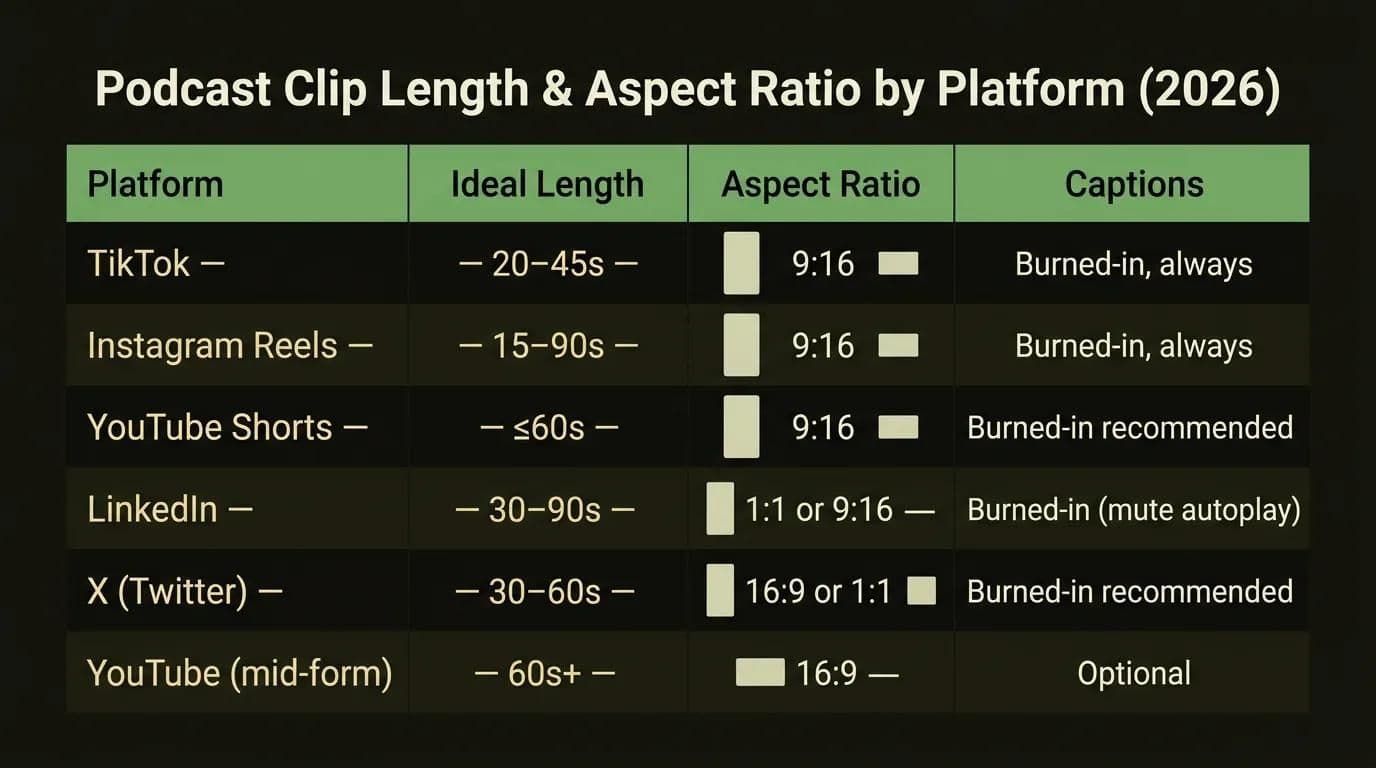
| Platform | Ideal length | Aspect ratio | Captions |
|---|---|---|---|
| TikTok | 20–45s | 9:16 | Burned-in, always |
| Instagram Reels | 15–90s | 9:16 | Burned-in, always |
| YouTube Shorts | ≤60s | 9:16 | Burned-in recommended |
| 30–90s | 1:1 or 9:16 | Burned-in (mute autoplay) | |
| X (Twitter) | 30–60s | 16:9 or 1:1 | Burned-in recommended |
| YouTube (mid-form) | 60s+ | 16:9 | Optional |
The safe default: 9:16 vertical, 15–60 seconds, captions burned in. That single format works everywhere the short-form algorithms live, and you can cut a 1:1 or 16:9 variant for LinkedIn and X when a clip earns extra distribution.
What makes a podcast clip go viral
A viral clip isn't luck — it's selection. The AI can find candidates, but knowing how to turn long podcasts into viral short clips is a judgment call you keep. Run every suggested clip through four quick tests before you approve it:
- It stands on its own. A viewer with zero context should understand it. No "as I was saying" openers.
- It leaves them wanting more. A strong opinion, an unfinished thought, or a "wait, what?" that sends people to the full episode.
- It carries a strong reaction or take. Bland is invisible. Conviction, surprise, and disagreement travel.
- It delivers real value. A tip, a story, or a genuinely funny moment — something worth a share.
Then the rule that beats everyone else's criteria: the hook lives in the first 3 seconds. Lead with the payoff, not the setup. If the most interesting sentence in your clip is at second 20, move it to second 1 and let the context follow. That one edit does more for retention than any caption animation.
Turn one episode into 40+ posts: a batching and cadence plan
One episode isn't one clip — it's a content calendar. Once you know how to make podcast clips for social media with AI, this is the system competitors leave out entirely, and it's where the ROI actually lives. How many clips from one podcast episode? A 60-minute show reliably yields 8–12 usable clips. Batch those across four platforms and one recording session becomes 40+ posts.
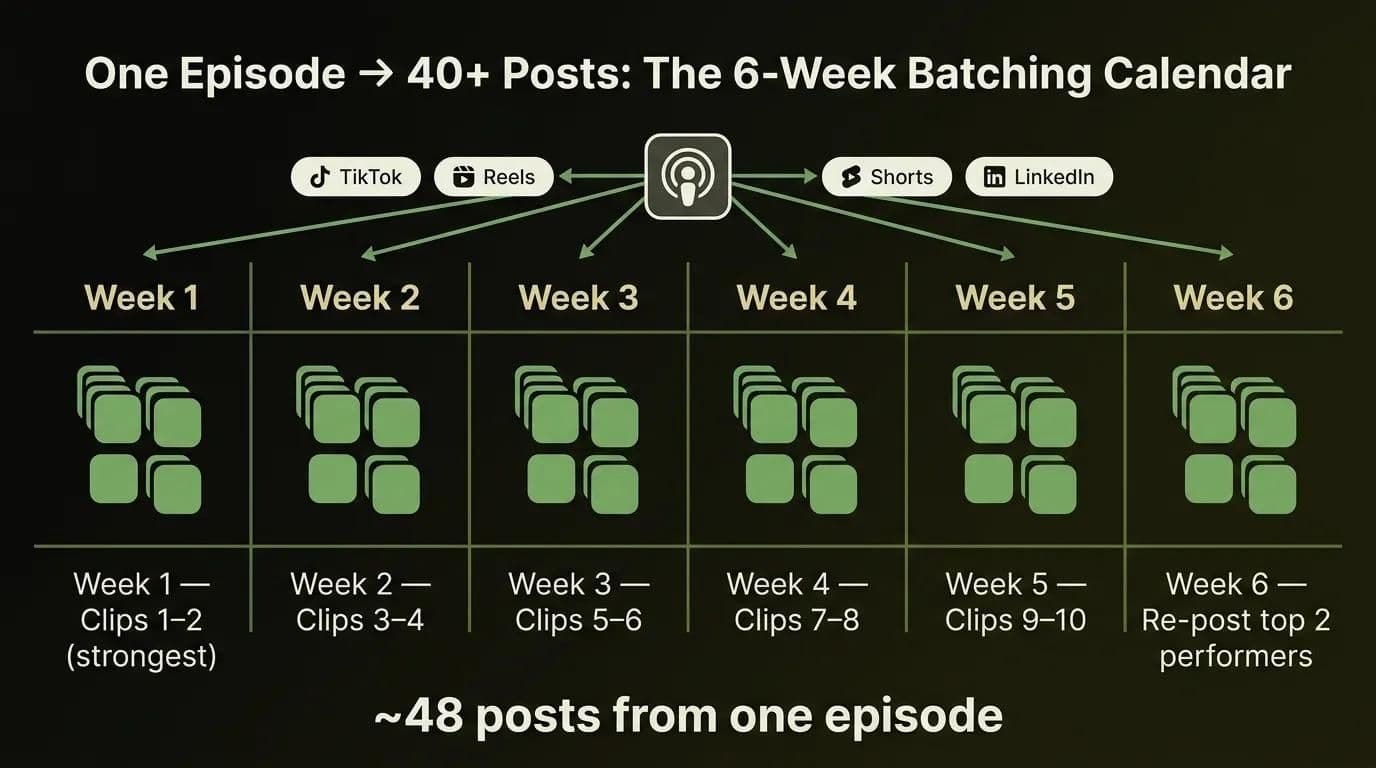
Here's how to repurpose a podcast into shorts on a drip schedule instead of dumping everything in a day:
| Week | Clips introduced | Posts (×4 platforms) |
|---|---|---|
| Week 1 | Clips 1–2 (your strongest) | 8 |
| Week 2 | Clips 3–4 | 8 |
| Week 3 | Clips 5–6 | 8 |
| Week 4 | Clips 7–8 | 8 |
| Week 5 | Clips 9–10 | 8 |
| Week 6 | Re-post your top 2 performers | 8 |
That's roughly 48 posts from a single episode, spread over six weeks, feeding TikTok, Reels, Shorts, and LinkedIn on a steady rhythm. Pair a scheduler with your clip tool and the whole calendar runs itself — the same automation mindset behind an AI marketing toolkit for creators. And if your podcast doubles as a storefront, AI tools if you sell products too can plug clip distribution into your sales funnel.
Your pre-post quality checklist
Before any clip goes live, run this fast QC pass. It's the battle-tested checklist we'd hand a junior editor, and it catches the mistakes that make AI clips look cheap:
- Captions are accurate — no typos on names, brands, or numbers.
- Text sits in the safe zone — nothing hidden behind UI buttons or usernames.
- The hook lands in ≤3 seconds — strongest line first.
- Loudness is normalized to around -14 LUFS so it isn't jarringly quiet or loud in the feed.
- It's on-brand — consistent fonts, colors, and a logo or handle.
- The aspect ratio matches the platform — 9:16 for Shorts/Reels/TikTok, 1:1 or 16:9 where the matrix says so.
Six checks, about two minutes per clip. Skip them and even a perfectly selected moment reads as sloppy — which is the whole reason "are AI clips good enough?" keeps getting asked.
How Techsy Approaches This
We build AI content-repurposing pipelines into real marketing and ops stacks — the plumbing that takes a finished episode and pushes captioned, on-brand clips to every channel without a human babysitting each export. Our bias is toward the honest recommendation: we'll tell you when a $15 tool and a scheduler is all you need, and when your volume actually justifies a custom pipeline with dubbing and multi-account distribution. That objectivity is the point of AI tools across your business — we care more about your cost-per-result than about selling you the biggest plan.
Want an AI clip pipeline wired into your marketing stack? Get a free consultation →
Frequently Asked Questions
How do I turn a podcast into short clips automatically?
Upload your episode to an AI clip tool like OpusClip, Vizard, or Podsqueeze. It transcribes the audio, scores the best moments, and outputs captioned vertical clips. Review each one for cuts and framing, then export and schedule — the same five-step flow above.
Do I need a video version of my podcast to make clips?
No. Audio-only shows are repurposed as audiograms — a waveform or animated caption over a static or branded background. Tools like Podsqueeze, Descript, and Headliner specialize in this, so you can clip a podcast without ever recording video. Each one auto-generates the audiogram straight from your audio file in a few clicks, so a mic-only setup is no barrier.
How long should podcast clips be for social media?
Keep your core range at 15–60 seconds, then tune per platform: TikTok 20–45s, Reels 15–90s, Shorts ≤60s, LinkedIn 30–90s. Shorter clips finish more often, which the algorithms reward. See the platform matrix above for the full breakdown. As a rule, if you can trim a clip shorter without losing the hook, do it — completion rate is what the feed rewards most.
Is there a free AI podcast clip maker?
Yes. Vizard, Kapwing, and OpusClip (60 minutes a month) all have free tiers, and CapCut is fully free with no watermark. The trade-offs are usually watermarks, export caps, or short expiry windows, so free is great for testing before you commit to a paid plan.
Are AI-generated clips good enough, or do they need manual editing?
They're an excellent first pass, not a finished product. AI reliably finds candidate moments but often mis-picks the hook, cuts mid-sentence, or frames the wrong speaker. Budget about five minutes of review per clip and the quality difference is night and day.
How many clips should I make from one podcast episode?
A 60-minute episode reliably produces 8–12 usable clips. Post those across four platforms and one recording becomes 40+ pieces of content. Drip them over several weeks rather than dumping them all at once, so a single recording session quietly feeds your calendar for well over a month.
What's the best AI podcast clip maker in 2026?
There's no universal winner — it depends on your format and budget. OpusClip leads on hands-off virality scoring, Vizard on value per minute, and Podsqueeze on audio-only shows. Decide by cost-per-input-minute (minutes included ÷ your monthly episode length), not sticker price.
Can AI handle a 2-hour podcast episode?
Yes, but watch the limits. Most tools bill roughly 1 credit per source or upload minute, so a 2-hour episode consumes about 120 credits, and some free or entry tiers cap uploads near 120 minutes. Check the ceiling before you upload a long interview.
How do I schedule or post podcast clips across platforms?
Use a scheduler like Buffer, Metricool, or Repurpose.io, or your clip tool's built-in auto-post, and batch a week or two at a time. If you'd rather have the whole publish-and-distribute pipeline set up for you, our team can help you build it →.
What's the best aspect ratio for podcast clips?
Use 9:16 vertical for TikTok, Reels, and Shorts — it's the default for every short-form feed. Switch to 1:1 or 16:9 for LinkedIn, X, and mid-form YouTube. When in doubt, cut 9:16 first and export a wide variant only when a clip earns extra distribution.