How to Scope a Web App Project With AI: The 6-Prompt Chain We Use (Idea to SOW)
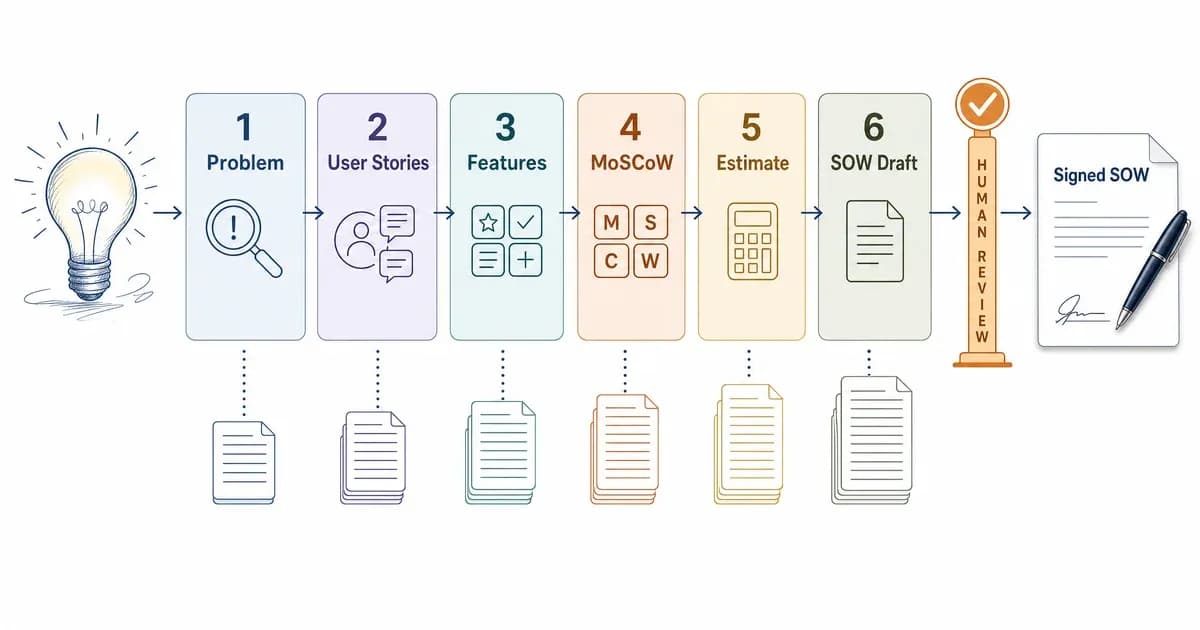
On our last five client scopes, the part that used to eat 12 to 16 hours of discovery calls dropped to roughly 3 hours of AI work plus a 1-hour human review. We run the whole thing inside a single Claude Project so the context carries forward. The catch? AI got three things wrong every single time. So we added a gate before anything reaches a client.
This is the actual 6-prompt chain we use, the artifact each prompt produces, one full worked example, and the failure modes you have to catch yourself.
Can AI scope a web app project? Yes. AI can draft the full scope (problem statement, user stories, features, MoSCoW priorities, and a statement of work) in a few hours instead of days. What it cannot do is validate that draft. It invents requirements and under-estimates effort, so a human gate is mandatory before sign-off.
Key Takeaways
- AI drafts a full web-app scope in hours, not days, but cannot validate its own output.
- The chain is six prompts: problem, user stories, features, MoSCoW, estimate, SOW.
- AI invents integrations and under-estimates edge cases, so always run a human gate.
- Use Claude Projects or ChatGPT Projects for the chain; agents come after the scope is signed.
AI can write your first scope draft in an afternoon. It just can't tell you when it's wrong.
What Is AI-Assisted Scoping (and What It Is NOT)?
AI-assisted scoping means using a series of LLM prompts to turn a rough idea into structured scope artifacts: requirements, user stories, a feature list, priorities, and a statement of work. The AI does the drafting and the structuring. A human still does the deciding, the stakeholder conversations, and the validation.
So is AI doing the thinking for you? Not quite. It is fast at ai requirements gathering, the part where you stare at a blank page and try to translate "I want a booking app" into something a developer can quote. It is bad at knowing what the client actually needs versus what sounds plausible.
A few things AI-assisted scoping is not: it is not autonomous, it is not a replacement for talking to real stakeholders, and it is not a guarantee of accuracy. The model will happily write a confident, well-formatted spec for a feature nobody asked for.
This post assumes you already understand the scoping process itself. If you want the fundamentals, our step-by-step scoping guide walks through the underlying non-AI process, the 7 steps, and the full scope-document structure. Here, we stay on the AI layer: which prompt, in what order, and where it breaks.
The AI Scoping Prompt Chain at a Glance
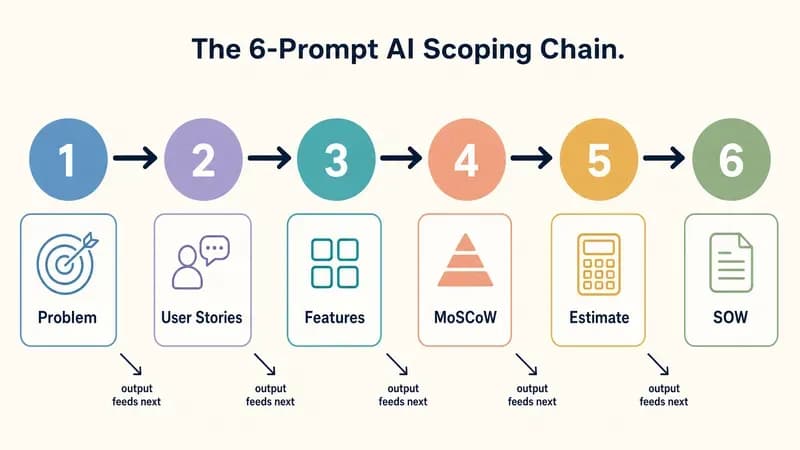
The chain is six prompts run in sequence, each one feeding its output into the next. In order: (1) problem and goals, (2) user stories, (3) feature list, (4) MoSCoW prioritization, (5) effort, cost, and timeline estimate, and (6) the SOW draft. Run them inside one project so context persists.
Here's the cool part: because each prompt builds on the last, you are not re-explaining your app six times. The model already knows the problem when it writes user stories, and it already knows the stories when it prioritizes features.
- Problem & goals: turns a rough idea into a problem statement plus SMART goals.
- User stories: converts goals into user stories with acceptance criteria.
- Feature list: derives a concrete feature inventory from the stories.
- MoSCoW prioritization: sorts features into Must, Should, Could, Won't.
- Estimate: produces an effort, cost range, and timeline.
- SOW draft: assembles everything into a statement of work.
This is also a clean set of ai prompts for project management in general, but we have tuned every prompt for web apps specifically (tech stack, integrations, edge cases). That tuning is what separates a usable scope from a generic one.
The trick isn't one magic prompt. It's six prompts that hand their output to each other.
How Do You Run the Chain, Step by Step?
You run the chain top to bottom inside one Claude Project or ChatGPT Project, pasting each prompt in order and letting the previous answer stay in context. Below are the six simple steps with the exact prompts we use. Each one is web-app specific on purpose, because generic business-analysis prompts produce generic scopes.
A note before you start: replace the bracketed placeholders with your own details, and never accept the first output as final. The pro move is to read each result, correct it, then run the next prompt.
Prompt 1: Problem statement & goals
You are a senior product manager scoping a web application.
Here is the rough idea: [describe the app in 2-4 sentences].
The target users are [who]. The business wants [outcome].

Write:
1. A one-paragraph problem statement.
2. 3-5 SMART goals with success metrics.
3. 3 assumptions you are making that I should confirm.
Flag anything that is unclear instead of guessing.
This produces your overview and goals section. Pro tip: the "3 assumptions" line is doing heavy lifting. It surfaces the gaps AI would otherwise paper over.
Prompt 2: User stories
Acting as the same product manager, turn the goals above into
user stories for a web app. Use the format:
"As a [role], I want [action], so that [benefit]."
Cover every user role. For each story, add 2-3 acceptance
criteria. Group stories by feature area.
You now have functional requirements. This is a clean ai user story generator step. Gotcha: it tends to forget admin and edge-case roles, so prompt it again with "now add stories for admins, failed payments, and empty states."
Prompt 3: Feature list
Based on the user stories above, produce a flat feature
inventory for this web app. Group features into: core, account
and auth, admin, integrations, and notifications. Note any
feature that requires a third-party service or API.
This is your in-scope feature candidate list. Watch this step closely, because it's where AI starts inventing integrations (more on that later).
Prompt 4: MoSCoW prioritization
Prioritize the feature list using MoSCoW (Must, Should, Could,
Won't) for a first release (MVP). For each feature give a
one-line reason. Assume a 3-month MVP budget and be ruthless:
most features should NOT be "Must."
This tags your in-scope and out-of-scope items. The "be ruthless" instruction matters; without it the model marks almost everything as a Must.
Prompt 5: Effort, cost & timeline estimate
Estimate effort, cost, and timeline for the Must-have features
only. Assume a stack of [e.g. Next.js, Supabase, Stripe] and a
team of [N] developers. Break the estimate down by feature in
days. State every assumption. Give a cost RANGE, not a single
number, and flag the 3 riskiest estimates.
This is your ai scope of work generator input for budget and timeline. Always demand a range and the assumptions, because a single confident number is the most dangerous output AI gives you.
Prompt 6: SOW draft
Assemble everything above into a draft statement of work for a
client. Include: overview, goals and success metrics, in-scope
features, explicit out-of-scope items, timeline, budget range,
deliverables, assumptions, and a sign-off section. Mark any
section where you are uncertain with [REVIEW].
The [REVIEW] tags become your human-gate checklist. This step assembles the idea-to-SOW span the whole chain promised.
Prompt → Scope-Section Mapping
Each prompt does not just answer a question, it fills a specific section of the document you hand the client. This mapping is what replaces the usual 11-section template: instead of memorizing a skeleton, you run the chain and the document assembles itself. Here is which prompt produces which deliverable.
| Prompt | Produces | Scope-doc section it fills |
|---|---|---|
| 1. Problem & goals | Problem statement + SMART goals | Overview, Goals & Success Metrics |
| 2. User stories | User stories + acceptance criteria | Functional requirements |
| 3. Feature list | Feature inventory | In-scope features |
| 4. MoSCoW | Prioritized Must/Should/Could/Won't | In-scope (tagged) + Out-of-scope |
| 5. Estimate | Effort, cost range, timeline | Timeline, Budget Range |
| 6. SOW draft | Assembled statement of work | The full SOW + deliverables + sign-off |
By the time you finish Prompt 6, you have a complete first draft of a document a client can actually read and sign, not a pile of disconnected notes.
Each prompt doesn't just answer a question. It fills a specific section of the document you'll hand the client.
A Full Worked Example: Scoping an Appointment-Booking SaaS
Here's the chain run end to end on one concrete case: an appointment-booking SaaS for a small dental chain. This is an illustrative example, not a real client deliverable, and yes, we caught two errors in the AI output, which we fix in the human-gate section below.
Prompt 1 output (problem & goals). Problem: a three-location dental chain loses bookings to phone tag and no-shows. Goals: cut no-shows by 30% via reminders, let patients self-book online, and give front-desk staff one shared calendar. Assumptions flagged: single time zone, English only, no insurance billing.
Prompt 2 output (sample user stories).
- As a patient, I want to book an appointment online, so that I don't have to call.
- As a patient, I want an SMS reminder, so that I don't forget my appointment.
- As front-desk staff, I want to see all three locations in one calendar, so that I can manage overlaps.
Prompt 3 output (feature list, condensed). Online booking, calendar sync, SMS and email reminders, patient accounts, multi-location admin, basic reporting, and a payments step (this last one was invented; nobody asked for it).
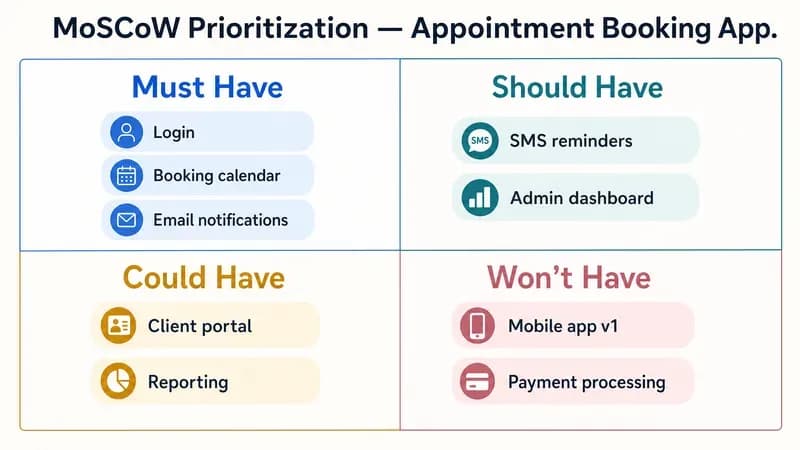
Prompt 4 output (MoSCoW grid).
| Priority | Features |
|---|---|
| Must | Online booking, multi-location calendar, SMS reminders, patient accounts |
| Should | Email reminders, basic reporting |
| Could | Patient self-rescheduling |
| Won't (v1) | Payments, insurance billing, native mobile app |
Prompt 5 output (estimate, condensed). Assuming Next.js, Supabase, and Twilio with two developers: Must-have features at roughly 45 to 60 developer-days, a cost range around $35K to $55K, and an 8 to 10 week timeline. Riskiest estimate flagged: the multi-location calendar logic.
Prompt 6 output (SOW excerpt). "In scope: online booking, multi-location shared calendar, SMS reminders (Twilio), patient accounts. Out of scope: payments, insurance, native mobile. Timeline: 8-10 weeks. Budget range: $35K-$55K. [REVIEW] Confirm Twilio vs alternative SMS provider with client."
Skim that and you can see a real, signable scope took shape in one sitting. If you plan to layer on smart features later, our guide to add AI features to your app picks up where this leaves off.
How Do You Estimate Cost and Timeline With AI?
You prompt the model to break the estimate down by feature in days, assume a specific tech stack, state every assumption, and return a range rather than one number. Then you sanity-check that range against known market tiers, because AI almost always anchors too optimistically on effort.
Treat AI estimates as a starting point, never a quote. The single most useful instruction is "flag the three riskiest estimates," which tells you exactly where to spend your own judgment. Here are the tiers we check every AI estimate against.
| Web app complexity | Typical cost range | Typical timeline |
|---|---|---|
| Simple MVP | $10K-$50K | 1-3 months |
| Moderate (auth, payments, dashboard) | $50K-$100K | 3-6 months |
| Complex (multi-role, integrations, scale) | $75K-$150K+ | 6-12 months |
These ranges line up with published agency and marketplace benchmarks; Clutch's app development cost research is a reasonable public reference point. If your AI estimate lands well under the relevant tier, it has probably missed edge cases. This is also the moment to ask the bigger question: build vs buy. A scope that balloons past the complex tier sometimes argues for buying instead of building.
Which AI Tool Should You Use for Each Job?
For the full chain, use Claude Projects or ChatGPT Projects, because both persist context across prompts so output carries forward without re-pasting. Use a standalone agent only after the scope is signed and you are generating repeatable artifacts. For one-off scoping, Projects beats an agent every time.
We run the chain in Claude Projects for the long-context steps (user stories, SOW assembly) and reach for ChatGPT when we want a second opinion on the estimate. According to Anthropic's Projects documentation, a Project keeps shared context and instructions across a conversation, which is exactly what a six-prompt claude projects for requirements workflow needs. OpenAI's Projects work the same way for chatgpt prompts software development.
One technique worth stealing: split the AI's role per step. Tell it "act as a product manager" for user stories and "act as a senior engineer" for the estimate. The role-switch changes how it reasons, and the engineer persona is noticeably more conservative on effort.
Once the scope ships and the build starts, the tooling question shifts to AI coding agents, which is a different decision entirely.
Where Does AI Get Scoping Wrong? The Human Validation Gate
AI gets scoping wrong in predictable ways: it hallucinates integrations nobody requested, under-estimates edge cases and error states, and either invents compliance requirements or quietly omits real ones. It also anchors cost estimates too optimistically. None of this is rare; it happens on essentially every run, which is why the human gate is non-negotiable.
Bad requirements are expensive whether a human or a model writes them. PMI's Pulse of the Profession research found inaccurate requirements gathering is a primary cause of project failure in roughly 37% of failed projects, so the point of the gate is to catch those misses before they reach a quote, not after.
The fix is a short checklist a human runs before any scope reaches a client:
- Delete invented features: remove anything (payments, exports, integrations) the client never asked for.
- Add the missing edge cases: failed payments, empty states, permissions, error handling.
- Verify every integration: confirm each named third-party service is real, needed, and budgeted.
- Check compliance claims: confirm or correct any auth, privacy, or regulatory requirement the AI asserted.
- Pad the estimate: adjust the optimistic numbers against your own velocity, especially the flagged risky ones.
AI will confidently scope a payment flow it invented. Your job is to delete the parts no one asked for.
What We Learned Running This on Real Client Scopes
Across our last several client scopes, discovery that used to take roughly 12 to 16 hours of calls and write-ups now lands a first-draft SOW in about 2 to 3 hours of AI work plus a 1-hour human review. These are honest ranges from our own runs, not a precise headline stat, and the human hour is the one we will never cut.
We run the chain in Claude Projects, with ChatGPT as a sanity-check on estimates. The time saved is real, but the value is in catching the same three failures every time:
- It invents integrations. A payments step in the dental example nobody requested. Almost every scope had at least one phantom feature.
- It under-estimates edge cases. Error states, empty states, and admin flows are consistently missing or under-counted, which is where real budgets blow up.
- It mishandles compliance and auth. Sometimes it hallucinates a requirement, sometimes it omits a real one. We never trust it on this.
So we added the human gate above as a fixed step. The chain writes the draft fast; the gate is what makes it safe to send. Skip the gate and you are just shipping a confident, well-formatted guess.
How Techsy Approaches AI-Assisted Scoping
This chain plus the human gate is the exact workflow we run for clients building web apps. We draft fast with AI, then a person who has shipped real builds validates every line before it becomes a quote. If you'd rather hand the scope to a team that does this daily, that's what we do. You get a defensible SOW without paying for two weeks of discovery calls first.
Frequently Asked Questions
Can AI write a project scope or SOW?
Yes, AI can draft a complete project scope or statement of work, including the problem, user stories, features, priorities, timeline, and budget range. Run a six-prompt chain inside a Claude or ChatGPT Project. The draft is reliable as a starting point, but a human must validate it before sign-off.
What is the best AI tool for scoping a software project?
Claude Projects and ChatGPT Projects are the best tools for scoping, because both persist context across the prompt chain so each output feeds the next. We use Claude Projects for long-context steps like user stories and SOW assembly, and ChatGPT as a second opinion on estimates. Agents are better suited to post-scope build work.
How do you use ChatGPT or Claude to gather requirements?
Run the prompt chain in order: ask for a problem statement and goals, then user stories with acceptance criteria, then a feature list, then MoSCoW priorities. Keep everything in one Project so context carries forward. Each prompt's output becomes the input for the next, which is what makes AI requirements gathering fast.
Can AI estimate software project cost and timeline?
Yes, as a starting point only. Prompt the model to break the estimate down by feature in days, assume a specific stack, state its assumptions, and return a range. Then sanity-check against market tiers: $10K-$50K for a simple MVP, up to $150K+ for complex apps. AI tends to anchor too optimistically.
Is AI-generated scope actually reliable?
Reliable for a first draft, not for sign-off. AI produces a well-structured scope quickly, but it invents integrations, under-estimates edge cases, and mishandles compliance on nearly every run. Treat the output as a fast draft, then run a human validation gate to delete invented features and add the missing edge cases before anyone signs.
How do I turn a rough idea into a spec with AI?
Start with Prompt 1: paste your idea in two to four sentences and ask the AI to write a problem statement, SMART goals, and the assumptions it's making. Then run the next five prompts in sequence. By Prompt 6 you have a draft SOW. The whole chain takes a few hours instead of days.
Does AI-assisted scoping replace a discovery phase?
No, it compresses discovery rather than replacing it. You still need real stakeholder conversations to know what the client actually wants. AI handles the drafting and structuring, turning your notes into requirements and a SOW in hours. Humans still validate, prioritize, and make the final calls on scope.
How long does it take to scope a web app with AI?
In our experience, a first-draft SOW takes roughly 2 to 3 hours of AI work plus about 1 hour of human review, versus 12 to 16 hours of manual discovery and write-ups. The AI time is fast; the review hour is non-negotiable, because it's where you catch the features AI invented and the edge cases it missed.