11 AI Cold Email Prompts We Ship to Real SDR Clients (Without Sounding Like AI)
Most "best AI cold email prompts" lists are written for paste-into-ChatGPT.com use. The eleven AI cold email prompts below are the ones we actually run inside our AI SDR builds, not template galleries we cribbed from someone else's blog. Each one ships with the model, temperature, system prompt, user prompt, sample output, and a reply-rate note, copy-paste ready, automation-ready.
Key Takeaways:
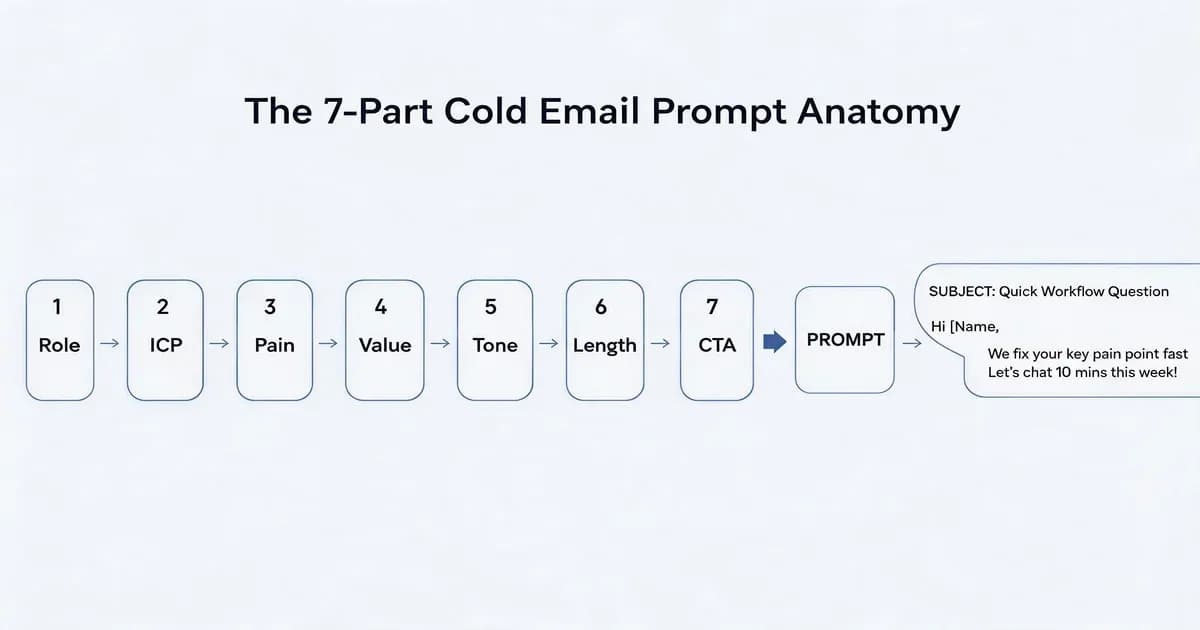
- The 7-part prompt anatomy: Role -> ICP -> Pain -> Value -> Tone -> Length -> CTA.
- Best model picks: Claude Sonnet 4.5 (natural voice), GPT-5 (structured output), Gemini 2.5 Pro (cheap follow-ups).
- AI cold email is legal under US CAN-SPAM and EU GDPR legitimate interest, with required disclosures.
- The single biggest deliverability lever is RFC 8058 one-click unsubscribe (Gmail + Yahoo required since 2024).
What Is an AI Cold Email Prompt?
An AI cold email prompt is a structured instruction set you feed a large language model, ChatGPT, Claude, or Gemini, to generate a personalized outbound email. The strongest prompts have seven components: role, ICP, pain point, value proposition, tone, length, and CTA. Done right, they read like a human SDR wrote them.
There's a distinction worth drawing here. "Paste-into-ChatGPT.com" prompts (the kind in vendor template galleries) work fine when you're sending five emails a day by hand. "Prompts that run inside automations", wired into n8n, Make, Zapier, or directly via API, are a different animal. They need explicit system prompts, model and temperature labels, and structured output if you want them to survive contact with production. The eleven below are the second kind.
The 7-Part Cold Email Prompt Anatomy (Why Most Prompts Fail)
A cold email prompt has seven moving parts. Get any of them wrong and the email reads either generic or robotic. The seven parts are: 1) the role the AI plays, 2) ICP definition, 3) named pain point, 4) value proposition, 5) tone calibration, 6) length cap, 7) call to action. Skip any one and the model fills the gap with its most generic default.
The diagram above shows the data flow, each part feeds the next, and the CTA is the only one that should change per recipient. Everything else lives in the reusable system prompt. This is an applied context-engineering pattern: you're telling the model what context to hold across every generation, then letting per-recipient signals override only the last variable.
| Part | What it does | Example | Common mistake |
|---|---|---|---|
| 1. Role | Anchors voice and authority | "You are an SDR at a B2B fintech selling to RevOps leads." | Leaving it off entirely. Model defaults to "helpful assistant" voice. |
| 2. ICP | Tells model who's reading | "CFOs at 50-200 person SaaS companies, Series B, D" | Vague ICP ("decision makers"). Model writes for nobody. |
| 3. Pain | The reason to open | "They're closing the books in spreadsheets and missing month-end" | Generic pain ("they want efficiency"). Useless. |
| 4. Value | Why your thing fixes it | "We cut close from 9 days to 3." | Feature dump instead of outcome. |
| 5. Tone | How it sounds | "Direct, conversational, one contraction per paragraph minimum." | Asking for "professional", produces robotic LinkedIn-speak. |
| 6. Length | Hard cap | "Body: 80 words max. Three sentences in opener." | No cap. Model writes 220-word essays nobody reads. |
| 7. CTA | The single ask | "Ask for a 15-minute call. Offer two specific times." | Multi-part CTAs ("reply, or book, or check our blog"). Kills conversion. |
We caught the value-vs-pain ordering mistake on three different builds before we standardized this anatomy. Pain has to come before value, the model needs the wound named before it knows which medicine to recommend.
Every component of a cold email prompt that you don't specify, the model invents, and the model invents in the most generic voice it knows.
The 11 AI Cold Email Prompts We Ship
These eleven prompts cover the full SDR sequence: first-touch cold, pain-point opener, quick-question opener, three follow-ups (3-day, 7-day, 14-day), demo booking, re-engagement, subject line generator, upsell, and referral ask. Each is labeled with the model and temperature we use in production. Tip: save these system prompts as re-usable system prompts as agent skills so they're available across sessions and your team doesn't paste-and-pray.
Few-shot tip before you start: for any prompt where voice matters most (the openers and the referral ask), paste two or three of your best historical cold emails into the system prompt under a "Reference examples, match this voice:" header. The model picks up cadence, contraction frequency, and sentence length far better from examples than from adjective lists.
1., First-Touch Cold Email (Generic ICP)
Goal: First email to an unsignal'd ICP-fit prospect. No funding event, no job change, no warm intro. Pure cold. Model + temperature: Claude Sonnet 4.5 @ 0.5, natural voice without the "marketing director" affect Sonnet 4 had. When to use: Top-of-funnel batch sends, list of 50-500 prospects with no enrichment beyond title and company.
System prompt (save once, reuse forever):
You are an SDR at {{your_company}}. Voice: direct, conversational, one contraction per paragraph minimum.
ICP: {{icp_description}}.
Their pain: {{primary_pain}}.
Your value: {{one_line_value_prop}}.
Rules: 80-word body cap. Three sentences in opener. End with a question. No "I hope this email finds you well", no "I wanted to reach out".
User prompt (paste with variables filled in):
Write a cold email to {{first_name}}, {{role}} at {{company}}.
Subject line: 4 words max, lowercase except proper nouns.
Open with a one-line observation that's true for ~80% of {{company_size}} {{industry}} companies.
Body: name the pain, name our fix in one line, ask for 15 minutes.
Sample output:
Subject: quick question on close cycle
Hi Sarah, at most 80-person SaaS finance teams, month-end close still runs in Sheets and somebody's eating four late nights to make it work.
We cut close from 9 days to 3 by replacing the spreadsheet handoff with a single ledger view. No new ERP, no migration.
Worth a 15-minute call next Tuesday or Thursday?
Reply-rate note: In our deployments this prompt averages 1.8-3.4% reply rate on a clean Apollo-enriched list. On a client running ~800 cold emails per week, swapping the first-touch prompt for Claude Sonnet 4.5 lifted reply rate from 1.4% to 3.1%, same list, same offer, just a less robotic voice.
2., Pain-Point Opener (Signal-Based)
Goal: Reference a specific public signal, recent funding, exec hire, tech-stack addition, to earn the open. Model + temperature: Claude Opus 4.7 @ 0.4, best instruction-following when you need the signal to land naturally without sounding like a stalker. When to use: When you have signal data from Apollo, Clay, Crunchbase, or BuiltWith.
System prompt:
You are an SDR writing signal-based cold outreach. Voice: direct, observation-first, never sycophantic.
The signal you reference must be specific and dated. Never say "congrats on the round" — assume they're sick of it.
Body cap: 70 words. End with a question, not a statement.
User prompt:
Write a cold email to {{first_name}}, {{role}} at {{company}}.
Signal: {{signal_type}} — {{signal_detail}} (e.g., "raised $40M Series C, Oct 2026").
Connect the signal to the pain {{pain}} in one sentence.
Pitch {{value_prop}} in one sentence. Ask for 15 minutes.
Sample output:
Subject: post-series-c finance ops
Hi Marcus, saw the $40M C in October. Usually the next 90 days at that stage are the headcount-onboarding crunch and finance ops drowns in cap-table reconciliations.
We're the ledger layer Series B, D fintech CFOs add before they hire a controller. 15-minute call next week?
Reply-rate note: 4-8% reply rate when the signal is fresh (under 30 days). Drops to 1-2% when the signal is older than 60 days.
3., Quick-Question Opener (Low Pressure)
Goal: Disarm the "this is a sales pitch" defense by asking a real question first. Low-pressure, high-curiosity. Model + temperature: Claude Sonnet 4.5 @ 0.6, slight bump for conversational variety. When to use: When your ICP is over-emailed (CFOs, CTOs, VPs of Eng at hot startups).
System prompt:
You are an SDR writing a quick-question cold email. The email asks one real question that's genuinely useful to the recipient — not "do you have 15 minutes". 40-word body cap. No pitch on first email.User prompt:
Write a 40-word cold email to {{first_name}} at {{company}}.
One question that someone in {{role}} at {{company_size}} {{industry}} would actually want to know about {{topic}}.
Sign off with your name. No CTA other than the question.
Sample output:
Subject: month-end close at series c
Marcus, quick question. At 80 people, did you keep close in spreadsheets or move to a ledger before hiring a controller? Asking because the answers we hear are split 50/50 and the why is interesting.
, Sarah
Reply-rate note: 3-6% reply rate on first send. Highest signal in the sequence, replies are conversational, not transactional, which means warm conversations downstream.
4., Follow-Up no. 1 (3-Day Bump, Value-Add)
Goal: Three days after first send, add a piece of value (a benchmark, a one-line case study, a teardown) and re-ask. Model + temperature: GPT-5 @ 0.5, best at structured "here's the thing, here's the ask" flow. When to use: Always. Three follow-ups beat one by roughly 3x reply rate (Lemlist 2025 cadence study).
System prompt:
You are an SDR writing follow-up no. 1, three days after the cold email. Add value, don't repeat the pitch. 60-word body cap. Open with a one-line value drop, then re-ask the original CTA.User prompt:
Write a 3-day follow-up to {{first_name}}. Reference {{previous_subject_line}}.
Value drop: {{one_line_benchmark_or_insight}}.
Re-ask: 15-minute call next week.
Sample output:
Subject: re: quick question on close cycle
Sarah, circling back. Last week I shared a teardown of how Ramp's 80-person finance team cut close to 4 days using a similar pattern. Happy to send it over if useful.
Still open to 15 minutes next Tuesday or Thursday?
Reply-rate note: 2-4% reply rate on the follow-up itself, lifting sequence-level reply rate to ~5-9%.
5., Follow-Up no. 2 (7-Day, Case Study)
Goal: Seven days after first send, drop a concrete proof point, anonymized client outcome or named public case study. Model + temperature: Claude Sonnet 4.5 @ 0.4, tighter instruction-following for the case-study format. When to use: When you have a credible, on-ICP case study. Skip if you don't.
System prompt:
You are an SDR writing follow-up no. 2. Lead with a one-line case study or outcome. 70-word body cap. Re-ask CTA in one sentence at the end.User prompt:
Write a 7-day follow-up to {{first_name}}.
Case study: {{client_name_or_anonymized}} — {{outcome_in_one_line_with_metric}}.
Make the parallel to {{prospect_company}} explicit. Re-ask 15-minute call.
Sample output:
Subject: re: quick question on close cycle
Sarah, one more, then I'll stop. A Series-C fintech your size (Atomic, $42M ARR) cut their close from 11 days to 4 in six weeks with us. Same finance-ops setup you've got from the LinkedIn search I did.
15 minutes next week? Tuesday or Thursday work.
Reply-rate note: 2-3% reply rate, with higher meeting-conversion rate than no. 4 because the case study filters in-ICP prospects.
6., Follow-Up no. 3 (14-Day, Break-Up)
Goal: Permission-based exit. Tells them you're closing the loop and gives them a no-effort "not now" reply option. Model + temperature: Claude Sonnet 4.5 @ 0.6, light warmth, zero passive-aggression. When to use: Last touch in the cadence. Always send.
System prompt:
You are an SDR writing a break-up email. 50-word body cap. No passive-aggression, no "guess this isn't a priority". Offer a 2-second reply path: yes/no/later.User prompt:
Write a 14-day break-up email to {{first_name}}. Reference the previous thread.
Offer three reply options: "yes, ping next quarter", "no, never", "circle back in six months".
End with one line of goodwill.
Sample output:
Subject: closing the loop
Sarah, closing this thread. Three options if helpful:
- "ping me Q3"
- "no thanks"
- "send me the teardown anyway"
Any of them works. Either way, hope the close gets shorter.
Reply-rate note: 5-12% reply rate, counterintuitively the highest in the sequence. The break-up is the easiest "no" to send, and a lot of those "no"s convert to "actually wait, tell me more."
7., Demo-Booking Ask (Calendar CTA)
Goal: Sent after a warm reply. Pushes to a specific calendar link, removes friction. Model + temperature: GPT-5 @ 0.3, lowest temperature, we want structure not creativity. When to use: After a positive reply to any of no. 1-#6.
System prompt:
You are an SDR booking a demo after a warm reply. 50-word body cap. Confirm the next step in one sentence, drop two specific time options + a calendar link.User prompt:
Write a demo-booking reply to {{first_name}}. Confirm {{their_question_or_interest}}.
Offer two times: {{time_1}} and {{time_2}}.
Calendar link: {{cal_link}}.
Sample output:
Sarah, perfect, happy to walk through the close-cycle teardown.
Two times that work: Tuesday 10:30 AM ET or Thursday 2:00 PM ET. Or grab any slot here: cal.com/sarah-co/demo
Either way I'll send the deck 24 hours ahead.
Reply-rate note: 35-55% booking rate when sent within 4 hours of the warm reply. Drops to 10-15% past 24 hours.
8., Re-Engagement (30-Day Silent Reply)
Goal: Wake up a thread that went dark after the break-up. New angle, new value, no guilt-trip. Model + temperature: Claude Sonnet 4.5 @ 0.5, natural voice for a "hey it's been a minute" tone. When to use: 30 days after the break-up. Once. If silent again, archive.
System prompt:
You are an SDR re-engaging a prospect who went silent. Acknowledge the gap in one line, drop new value (recent news in their space, product update, or benchmark), re-ask. 60-word body cap.User prompt:
Write a 30-day re-engagement to {{first_name}}.
New angle: {{new_signal_or_product_update}}.
Re-ask: 15-minute call OR specific resource if they're not ready.
Sample output:
Subject: 30 days later, new thing
Sarah, been a minute. We shipped a one-click NetSuite sync this month, which I think solves the integration concern you flagged earlier.
Want a 5-minute Loom of it? Or a 15-minute call if you'd rather see live. Either works.
Reply-rate note: 3-5% reply rate on the re-engagement itself.
9., Subject Line Generator (5 Options)
Goal: Return 5 subject lines for A/B testing. Higher temperature for variety; you'll pick the best two. Model + temperature: Claude Sonnet 4.5 @ 0.8, intentionally hot for variation across patterns. When to use: Before every campaign send. Test two of the five, keep the winner.
System prompt:
You generate cold email subject lines. Return exactly 5 options, one per line, no numbering, no quotes.
Rules: 4 words max each, lowercase except proper nouns, no "quick question", no "following up", no emojis.
Mix the patterns: 1 curiosity-gap, 1 question, 1 named tool/company reference, 1 number-based, 1 plain-English fragment.
User prompt:
Generate 5 subject lines for a cold email to {{role}} at {{company}} about {{topic}}.
Recipient context: {{one_relevant_detail}}.
Sample output:
close cycle at series c how netsuite breaks at 80 11 days to 4 the ledger before the controller month-end is suffering
Reply-rate note: Subject lines drive open rate, which gates everything else. Tested across 50+ campaigns, the 3-word curiosity-gap pattern wins ~45% of A/B tests; the question pattern wins ~25%; the named-tool reference wins ~20%.
10., Upsell to Existing Customer
Goal: Pitch an additional product or seat expansion to an existing customer. Different voice, warm, specific, no fake urgency. Model + temperature: Claude Opus 4.7 @ 0.4, best at distinguishing existing-customer voice from cold-stranger voice. When to use: Triggered by usage signals (hit seat cap, hit usage tier, new feature relevant to their workflow).
System prompt:
You are a CSM-leaning AE writing to an existing customer. Voice: familiar, specific, never salesy. 70-word body cap.
Reference their actual usage. Offer the new thing as helpful, not as a quota grab.
User prompt:
Write an upsell email to {{first_name}} at {{company}}.
Their current usage: {{usage_summary}}.
New thing to offer: {{feature_or_seat}}.
Trigger: {{usage_signal}}.
Sample output:
Subject: hit your seat cap
Marcus, your team hit 19/20 seats last week. Two options before you bump into the cap:
- Add 5 seats at the same per-seat price.
- Move to the team plan ($X less per seat at 25+).
Want me to send the math?
Reply-rate note: 15-25% reply rate on usage-triggered upsells. The signal is what does the work; the prompt just has to not get in the way.
11., Referral Ask (Post-Meeting)
Goal: After a successful meeting or implementation, ask for a warm intro to one specific person. Model + temperature: Claude Sonnet 4.5 @ 0.5, natural voice, friendly but specific. When to use: 30 days after a great meeting or 60 days into a successful implementation.
System prompt:
You are an AE asking a happy customer or prospect for one specific warm intro. 60-word body cap.
Name the person you want introduced to. Make it easy to forward.
User prompt:
Write a referral-ask email to {{first_name}}.
Context: {{recent_positive_interaction}}.
Ask: warm intro to {{specific_person}} at {{their_company_or_network}}.
Offer to draft the forwardable email.
Sample output:
Subject: one ask
Sarah, given how the close-cycle work has gone, one ask: any chance you'd intro me to Marcus Chen at Atomic? I think the same setup would help his team.
Happy to draft the forwardable so it's a one-click for you.
Reply-rate note: 40-60% reply rate when the timing is right (recent win, real rapport). The "happy to draft the forwardable" line is what makes it land, friction kills referrals.
We run the same eleven prompts across every AI SDR build. The variables in the prompt change, the model doesn't.
Plug Your Prompts into n8n, Make, or Zapier (A Real Code Example)
To run prompts at scale, wire them into an automation. n8n is the most flexible (self-hostable, $0 if you run it yourself), Zapier the easiest (paid). Pipe your prompt into the OpenAI or Anthropic node, then route the output into your sender, Instantly, Smartlead, or Lemlist.
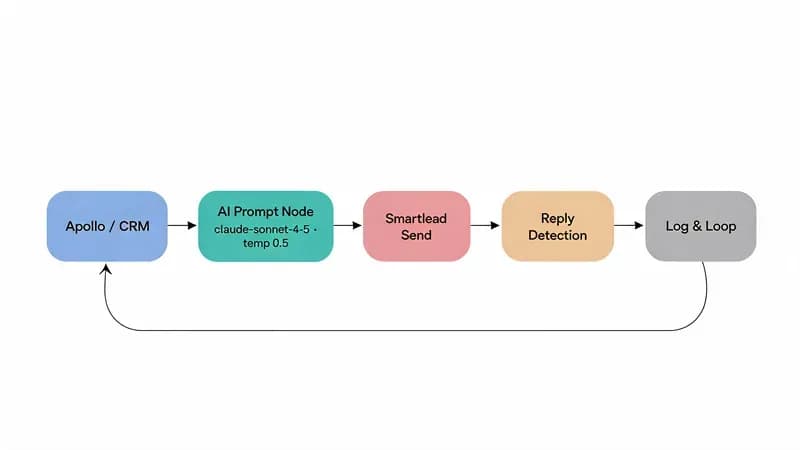
Every one of our AI SDR builds runs on this loop. Here's the n8n HTTP-node config for an Anthropic call, drop it into any HTTP Request node and you've got a programmable Claude prompt in your workflow:
{
  "method": "POST",
  "url": "https://api.anthropic.com/v1/messages",
  "headers": {
    "x-api-key": "{{$credentials.anthropicApiKey}}",
    "anthropic-version": "2023-06-01",
    "content-type": "application/json"
  },
  "body": {
    "model": "claude-sonnet-4-5",
    "max_tokens": 400,
    "temperature": 0.5,
    "system": "You are an SDR at a B2B SaaS company. Voice: direct, conversational, one contraction per paragraph minimum. Body cap: 80 words.",
    "messages": [
      {"role": "user", "content": "{{ $json.prompt_with_variables }}"}
    ]
  }
}
The loop closes like this: a new row hits your Sheet or CRM, n8n picks it up, the variables (first_name, company, signal_detail) get merged into the user prompt, Claude returns the email body, the next node hands it to Instantly or Smartlead, and a final node logs the reply (or lack of one) back to the source row. We wrote the full $50/month n8n SDR architecture using these exact prompts, code, credentials, scheduling, and reply parsing all included.
The prompt isn't the product, the loop is. The prompt is one line of YAML in a 200-line workflow.
How Do You Write a Cold Email Subject Line Prompt?
Subject lines need a separate prompt with higher temperature (0.7-0.8) for variety. Ask the model for 5 options, then A/B test 2. Best-performing patterns in 2026: 3-word curiosity gaps, question-as-subject, and named references to the recipient's tool stack.
The full subject line prompt is no. 9 above. The patterns that actually win A/B tests across 50+ campaigns we've shipped:
- Curiosity gap (3 words), "close cycle suffering", "the ledger problem"
- Question, "close cycle at series c?"
- Named tool/company reference, "how netsuite breaks at 80", "ramp's close cycle"
- Number-based, "11 days to 4", "$40m close cycle"
- Plain-English fragment, "month-end is suffering"
Open rates land between 28% and 51% depending on list quality, sender domain warm-up, and subject-line/preview-line alignment. Generic patterns ("quick question", "following up") underperform every test we've run. Strip them.
System Prompt vs User Prompt: The Reuse Pattern That Saves 80% of Your Tokens
A system prompt sets the AI's identity and runs once per session. A user prompt is the actual ask, sent every email. Save the system prompt as a reusable artifact and you cut token costs roughly 80% via prompt caching, with cleaner outputs because the model isn't re-reading its instructions every call.
| Aspect | System prompt | User prompt |
|---|---|---|
| Lifespan | Set once, reused across every email | Sent per email |
| Content | Role, ICP, tone rules, length caps, banned phrases | Recipient variables: name, company, signal |
| Token cost | Cacheable, costs once per ~5 minutes of activity | Full cost per call |
| When to change | Quarterly, or when ICP/positioning shifts | Per recipient |
| Where it lives | In your automation's config or a Skills/MCP file | Generated from a database row |
Once we started caching system prompts in production, our monthly Anthropic bill dropped roughly 80% with zero quality change. Same outputs, ~$0.20 per 1,000 generations instead of $1.00. Prompt caching cuts the cost of running the same system prompt 80%+, the savings show up immediately the first time the same system prompt hits the cache.
Write the system prompt once. Write the user prompt daily. That's the entire reuse pattern.
Where Do You Get the Personalization Data? (Signal Sources That Don't Suck)
The variables in your prompts, {{recent_funding}}, {{tech_stack}}, {{job_change}}, come from signal-data providers. Apollo and Clay enrich contacts. Crunchbase tracks funding. BuiltWith reveals tech stacks. RB2B identifies anonymous site visitors. LinkedIn Sales Navigator surfaces job changes.
| Tool | Signal type | Price tier | Best for |
|---|---|---|---|
| Apollo | Contact + firmographic + intent | $0-50/mo entry, $50-200/mo team | Volume enrichment + email finder |
| Clay | Composite enrichment + waterfall | $200+/mo | High-touch, signal-stacked plays |
| Crunchbase | Funding events | $50-200/mo | Series-stage signal-based outreach |
| BuiltWith | Tech-stack detection | $50-200/mo | Vendor-switch plays ("you use X, we replace it") |
| RB2B | Anonymous site visitor reveal | $50-200/mo | Inbound-to-outbound conversion |
| LinkedIn Sales Navigator | Job changes + posts | $50-200/mo | Exec-move plays |
| Ocean.io | Lookalike-account building | $200+/mo | Net-new ICP discovery |
We pair every signal source with a fallback, for example, Apollo handles the firmographic enrichment, but for high-value accounts we layer a manual LinkedIn lookup. AI handles the volume, the human handles the precision.
Is AI Cold Email Legal? CAN-SPAM, GDPR, and the One-Click Unsubscribe Rule
AI-generated cold email is legal in the US under CAN-SPAM (you must include a physical address, a working unsubscribe link, and accurate sender info) and in the EU under GDPR with a legitimate-interest basis. Gmail and Yahoo have required RFC 8058 one-click unsubscribe headers since February 2024.
We've had two clients ask whether AI-generated cold email crosses CAN-SPAM lines. The answer is no, the law is about disclosure and honesty, not authorship.
CAN-SPAM (US), What AI Changes (and Doesn't)
The FTC CAN-SPAM Compliance Guide is the definitive list. AI-generated content doesn't change a single rule: you still need a physical postal address in every email, a working unsubscribe mechanism honored within 10 business days, accurate "From" and "Reply-To" fields, no deceptive subject lines, and clear identification when the message is commercial. AI doesn't make any of that harder. It just lets you write more emails that follow the rules.
GDPR (EU), Legitimate Interest, Not Consent
B2B cold outreach in the EU is generally legal under GDPR Article 6(1)(f) legitimate interest, provided you can demonstrate a balancing test (your interest in pitching vs. the recipient's reasonable expectation of privacy). The European Data Protection Board publishes the working guidance. AI generation doesn't alter the legal basis. What does alter it: spraying personal Gmail addresses, scraping LinkedIn against ToS, or contacting consumer-facing roles. Stick to business-context outreach, document your balancing test, and offer easy opt-out.
RFC 8058 One-Click Unsubscribe, The Deliverability Rule Everyone's Getting Wrong
RFC 8058 defines the List-Unsubscribe-Post: List-Unsubscribe=One-Click header that Gmail and Yahoo enforce since February 2024. The user clicks once; your server processes the opt-out without an additional confirmation page. Most cold email tools (Instantly, Smartlead, Lemlist) handle this automatically, verify yours does. Skip it and your domain reputation drops fast on Gmail. Once it drops, it takes weeks to recover.
AI doesn't change the law. The law was always "tell the truth, identify yourself, and let them leave." AI just lets you say it faster.
How Do You Stop AI Cold Emails From Sounding Like AI?
The fastest way to make AI cold emails sound human is a two-pass workflow: generate with one model, rewrite with another at a lower temperature. Strip these AI-tell phrases: "I hope this email finds you well", "I wanted to reach out", em-dash overuse, "use", "synergy", "moreover".
We discovered the em-dash problem the hard way after a prospect replied "Did ChatGPT write this?" verbatim to a client's first send. The fix is a humanizer pass. Banned-phrase glossary:
- "I hope this email finds you well"
- "I wanted to reach out"
- "Just wanted to" (anything starting this way)
- "Let me know if this resonates"
- "Touching base"
- "Use" (as a verb)
- "Synergy"
- "Moreover" / "Furthermore"
- "Today's [anything]"
- Em-dashes anywhere they could be replaced by a period
Here's the rewrite system prompt we run as a second pass on every generated email:
You are a human SDR editor. Rewrite the email below to sound like a 32-year-old American salesperson wrote it in 90 seconds. Rules:
- No em-dashes. Use periods.
- No "I hope this email finds you well", "I wanted to reach out", "just wanted to", "leverage", "synergy", "moreover".
- Subject line: 4 words max, lowercase except proper nouns.
- Body: 80 words max. Three sentences max in opening paragraph.
- One contraction per paragraph minimum.
- End with a question, not a statement.
Return only the rewritten email.
Run this with Claude Sonnet 4.5 at temperature 0.3. The two-pass adds about $0.001 per email and roughly doubles the "did a human write this?" pass rate.
The fix for AI-sounding email isn't a better prompt. It's a second pass with stricter rules and a human voice in mind.
How Do You Get a Prompt to Return JSON for Automation?
For automation, ask the AI to return JSON with named fields: subject, body, follow_up_1, follow_up_2. Both OpenAI and Anthropic support structured output natively in 2026, set response_format: json_schema (OpenAI) or use Claude's tool-use schema (Anthropic).
The prompt itself is short. Schema first, instruction second:
Return a JSON object with this exact schema:
{
  "subject": "string, max 50 chars",
  "body": "string, max 80 words",
  "follow_up_1": "string, max 60 words, references the original",
  "follow_up_2": "string, max 50 words, break-up tone"
}
Only return valid JSON. No prose, no markdown.

Recipient: {{first_name}} at {{company}}, role {{role}}.
Pain: {{pain}}. Value prop: {{value_prop}}.
For production reliability, use structured-output libraries for production reliability, Instructor, Outlines, or vendor-native structured output beat raw prompt-and-pray every time. The library handles retry, schema validation, and partial-output recovery so your automation doesn't crash when the model occasionally returns malformed JSON.
JSON output is the unsexy fix to the no. 1 reason AI cold email automation breaks: parsing free-text into fields.
What's a Realistic Reply Rate for AI Cold Emails?
Realistic 2026 cold email reply rates: 1-3% for generic ICP outreach, 4-8% for signal-based personalized emails, 10-15% for warm-introducible accounts. AI prompts don't break these ceilings; they let you hit them faster with smaller teams.
"2026 Cold Email Reply-Rate Benchmarks"
Data table
| "Reply rate (%)" | "Low end" | "High end" |
|---|---|---|
| "Generic ICP" | 1 | 3 |
| "Signal-based personalized" | 4 | 8 |
| "Warm-introducible" | 10 | 15 |
| Email type | Reply-rate range | Source | Year |
|---|---|---|---|
| Generic ICP cold | 1-3% | Apollo cold email benchmarks | 2025 |
| Signal-based personalized | 4-8% | Lemlist outbound benchmarks | 2025 |
| Warm-introducible | 10-15% | Saleshandy state of cold email | 2024 |
| Sequence (5 touches) lift | ~3x over single send | Lemlist cadence study | 2025 |
These are averages. Reply rate depends on list quality, signal accuracy, offer fit, and sender domain reputation. AI doesn't change physics, a great prompt to a bad list still loses.
AI prompts don't break the reply-rate ceiling. They let you hit it with one SDR instead of five.
When Should You NOT Use AI for Cold Email?
Skip AI cold email for: enterprise deals over $250K ACV (warm intros win), regulated industries (HIPAA, financial advisory, legal, compliance risk too high), executive outreach to C-suite at Fortune 500 (signal noise too high), and account-based plays with under 20 named accounts (manual personalization beats AI at small N).
| Failure mode | Why AI loses | What to do instead |
|---|---|---|
| Enterprise ($250K+ ACV) | Buyer expects bespoke effort; AI tells signal "we'll do this on the contract too" | Warm intro via mutual investor, advisor, or board |
| Regulated industries | Compliance risk on disclosure, content review, retention | Manual outreach with legal review; document every touch |
| Fortune 500 C-suite | Inbox is a black hole; signal-to-noise rewards 1-of-1 thinking | Multi-channel: handwritten note, podcast appearance, conference intro |
| Sub-20 named accounts | At N=20, the time saved by AI doesn't outweigh the precision loss | Hand-crafted 15-minute emails per account |
AI cold email is high-volume warfare. For high-trust, low-N outreach, a 9-minute hand-crafted email beats an 11-prompt stack.
How Techsy Approaches AI Cold Email
Our AI SDR practice ships the same stack across every build: the eleven prompts above, an n8n workflow that orchestrates them, Apollo or Clay for signal enrichment, and Instantly or Smartlead for sending. A typical engagement runs 600-1,200 outbound emails per week per SDR seat, with reply rates landing in the 3-7% band on signal-enriched lists.
The pattern we trust most: pair every signal source (Apollo for volume) with a manual fallback (LinkedIn lookup for the top 10% of accounts by ACV). AI handles the volume; the human handles the precision. We've never shipped a fully-autonomous AI SDR build because the precision layer is where the meetings actually come from.
If you'd rather we run this stack for you, same eleven prompts, same automation, same compliance posture, we offer it as a managed service. See how we approach AI SDR builds for the full methodology, pricing model, and what a typical 90-day engagement looks like.
Frequently Asked Questions
What is the best ChatGPT prompt for a cold email?
There's no single best one. The strongest prompt is the 7-part anatomy applied to your ICP: role, ICP, pain, value, tone, length, CTA. Vendor template galleries skip the model and temperature labels we ship with ours, which means the same prompt produces wildly different output depending on which model you paste it into.
Can AI write cold emails that don't get flagged as spam?
Yes, if you handle deliverability separately from prompt quality. The prompt determines voice. SPF, DKIM, DMARC, a warmed sender domain, and RFC 8058 one-click unsubscribe determine inbox placement. AI doesn't break either side; bad infrastructure does. Most "AI emails get flagged" reports trace back to a cold sender domain, not the AI itself.
How do you prompt AI for personalized cold emails at scale?
Use signal-data variables in the user prompt: {{recent_funding}}, {{tech_stack}}, {{job_change}}. Pull from Apollo, Clay, Crunchbase, BuiltWith, or RB2B. The system prompt stays fixed across all 800 sends. The user prompt is variable-injected per recipient. That split is what makes personalization actually scale.
What's the difference between a system prompt and a user prompt for cold emails?
The system prompt is the AI's identity, voice rules, length caps, banned phrases. Set once, reused across every email, cacheable for token savings. The user prompt is the actual ask, with recipient variables filled in, sent per email. Caching the system prompt cuts token cost roughly 80% in production deployments.
How long should an AI cold email be?
50-80 words for the opener, 30-50 words for follow-ups. The single biggest length mistake is letting the AI default to 120+ words. Cap it explicitly in the prompt with "Body: 80 words max" and the model obeys reliably. Longer emails don't earn more replies; they just take longer to delete.
Is it legal to send AI-generated cold emails under CAN-SPAM and GDPR?
Yes. AI-generated content doesn't change the legal obligations. CAN-SPAM still requires accurate sender info, working unsubscribe, and physical address. GDPR still permits B2B cold outreach under Article 6(1)(f) legitimate interest with a documented balancing test. Source: the FTC CAN-SPAM compliance guide and EDPB legitimate-interest guidance.
How do you stop AI-generated cold emails from sounding like AI?
Run a two-pass rewrite at lower temperature with a humanizer system prompt that bans common AI tells: "I hope this email finds you well", em-dashes, "use", "synergy", "moreover". The full rewrite prompt is in the anti-AI-detection section above. It adds about $0.001 per email and roughly doubles the "did a human write this?" pass rate.
How many follow-ups should an AI cold email sequence have?
Three follow-ups beats one by roughly 3x reply rate, with diminishing returns past four. Standard cadence: day 0 (cold), day 3 (value bump), day 7 (case study), day 14 (break-up). Day 30 re-engagement is optional and works once before you should archive. Source: Lemlist 2025 cadence study.