
Claude Code doesn't actually parse --flags the way you'd expect for custom slash commands, but four patterns get you the same UX, and three of them are cleaner than CLI parsing ever was. Here's how to add flags to Claude Code slash commands properly, with working .md files you can copy today.
Quick Answer:
- Claude Code does not parse CLI flags (
--json,--verbose) for custom commands, the use has no flag parser. - For CLI-style UX, write flags into
$ARGUMENTSand let the LLM interpret them as natural language. - For typed arguments, use positional
$1/$2or named arguments declared in thearguments:frontmatter field. - Document expected flags in
argument-hint:so the/autocomplete shows them to the user.
How Do Claude Code Slash Command Arguments Actually Work?
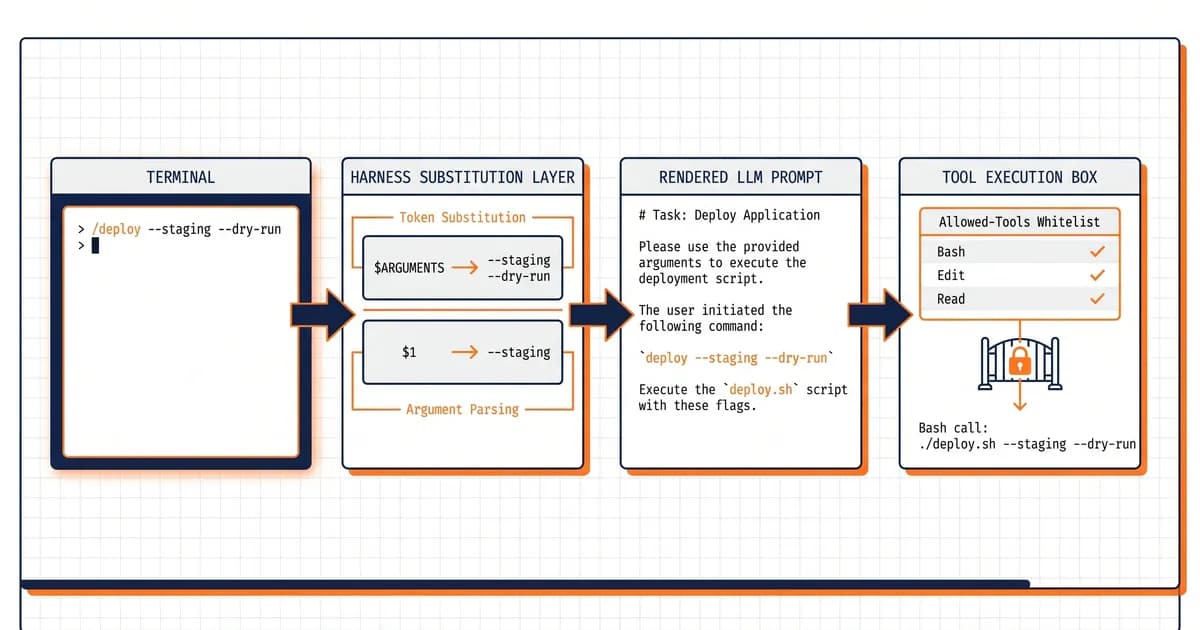
Claude Code's use substitutes three kinds of tokens before sending your command to the LLM: $ARGUMENTS (the entire string after the command name), positional $0/$1/$2 (shell-style quoted segments), and named $variableName declared in frontmatter. There is no built-in CLI flag parser, --dry-run lands in $ARGUMENTS as literal text.
Here's the part that trips everyone up. When you type /deploy --staging --dry-run, Claude Code does not run argparse against --staging --dry-run. The use pastes that whole string into wherever your .md file references $ARGUMENTS, then ships the rendered prompt to the model. The LLM sees --staging --dry-run as plain English and decides what to do.
That's not a bug, it's the design. The use is a substitution layer, not a parser. Built-in commands like /clear and /help (see the official CLI reference) do have flags, but custom commands you author live by different rules.
Claude Code's use substitutes tokens, then hands the rendered prompt to the LLM. There is no flag parser.
In our own Claude Code work, the single most common confusion is exactly this, developers spend an hour trying to figure out why --verbose "isn't being detected" before realizing the LLM is the parser. As of Claude Code v2.1.126 (May 2026), this behavior is documented in the official slash-commands docs and won't change anytime soon. Slash commands are a sibling primitive to Claude Code hooks, both extend the use, but commands trigger on user input while hooks trigger on tool events.
Here's the smallest possible custom command that proves the substitution model:
---
description: Echo whatever the user types after the command
argument-hint: [anything]
---

The user passed these arguments: $ARGUMENTS

Repeat them back verbatim, then describe what the user probably meant.
Save that as .claude/commands/echo-args.md, type /echo-args hello world --foo, and the LLM will see the literal string hello world --foo substituted into the prompt. That's the entire mental model. For a deeper walkthrough of how command files relate to the broader skills system, see our Skills primer.
Build Your First Parametric Slash Command in 5 Minutes
Create .claude/commands/greet.md with three lines of frontmatter and one prompt line that references $ARGUMENTS. Restart Claude Code, type /greet World, and watch World substitute into the prompt before the LLM sees it. That's the entire ceremony, five steps, no build tools.
Here's the recipe end-to-end:
- Create the directory. From your project root, run
mkdir -p .claude/commands. The.claude/folder lives alongside your code; commands inside it are auto-discovered when Claude Code starts a session. - Write the command file. Save the snippet below as
.claude/commands/greet.md. - Reload your session. Quit and relaunch Claude Code (or run
/reloadif your version supports it). Commands are read once at session start. - Invoke it. Type
/greet Worldin the chat. - Verify substitution. Open the transcript and confirm the LLM saw
Worldinterpolated into the prompt body, not the literal token$ARGUMENTS.
Here's the full file:
---
description: Greet someone enthusiastically
argument-hint: <name>
---

You are a friendly assistant. Greet the person named "$ARGUMENTS" with one short, warm sentence. Then ask them what they're working on today.
And the terminal interaction:
> /greet World
Hey World, great to see you! What are you working on today?
That's it. You now have a parametric slash command. The argument-hint field is what makes the / autocomplete menu show <name> next to your command, small UX touch, big payoff.
If
$ARGUMENTSdoesn't substitute, 9 times out of 10 it's because you typed$argsor$ARGS, the token is literal uppercase.
The token is case-sensitive and exact. $ARGUMENTS works. $arguments, $args, $ARGS, ${ARGUMENTS} all fail silently, they ship to the LLM as literal text and the model just sees garbage. Triple-check the spelling before assuming a deeper bug.
What Frontmatter Fields Control Argument Handling?
Five frontmatter fields shape how a slash command handles arguments: argument-hint (what autocomplete shows), allowed-tools (what the command may call), arguments (named-argument declaration), model (which Claude variant runs it), and disable-model-invocation (locks the command to user-only invocation). Together they cover virtually every parametric pattern you'll need.
Here's the complete frontmatter reference for Claude Code v2.1.x custom commands:
| Field | Purpose | Example | Required? |
|---|---|---|---|
description: | One-line summary in / menu | Run staging deploy | Recommended |
argument-hint: | Autocomplete hint shown after command name | [--dry-run] [--region us] | Recommended |
allowed-tools: | Whitelist of tools the command may call | Bash(git:*) Read Edit | Optional |
arguments: | Named-argument declaration | [issue, branch] | Optional |
model: | Override model for this command | claude-opus-4-7 | Optional |
disable-model-invocation: | Block agent from calling this command | true | Optional |
context: fork | Run in isolated context | fork | Optional |
Two gotchas worth pinning to your monitor. First, allowed-tools is space-separated, not comma-separated. Writing Bash(git:*), Read, Edit will silently fail to whitelist anything, the parser treats the whole string as one malformed entry. Use Bash(git:*) Read Edit. We learned this one the hard way; for more patterns like it, see our CLAUDE.md best practices on config-file conventions.
Second, the model: field overrides whatever model the user has currently selected for the session. Useful when a command is computationally cheap and you want to force it onto a smaller variant, see our guide on model selection for picking between Opus 4.7 and Sonnet for different command types.
The disable-model-invocation: true field is your safety net for destructive commands. Set it on /deploy-prod or /drop-database and other agents won't be able to call those commands programmatically, only a human typing into the chat can trigger them.
What Are the 4 Argument Patterns You'll Actually Use?
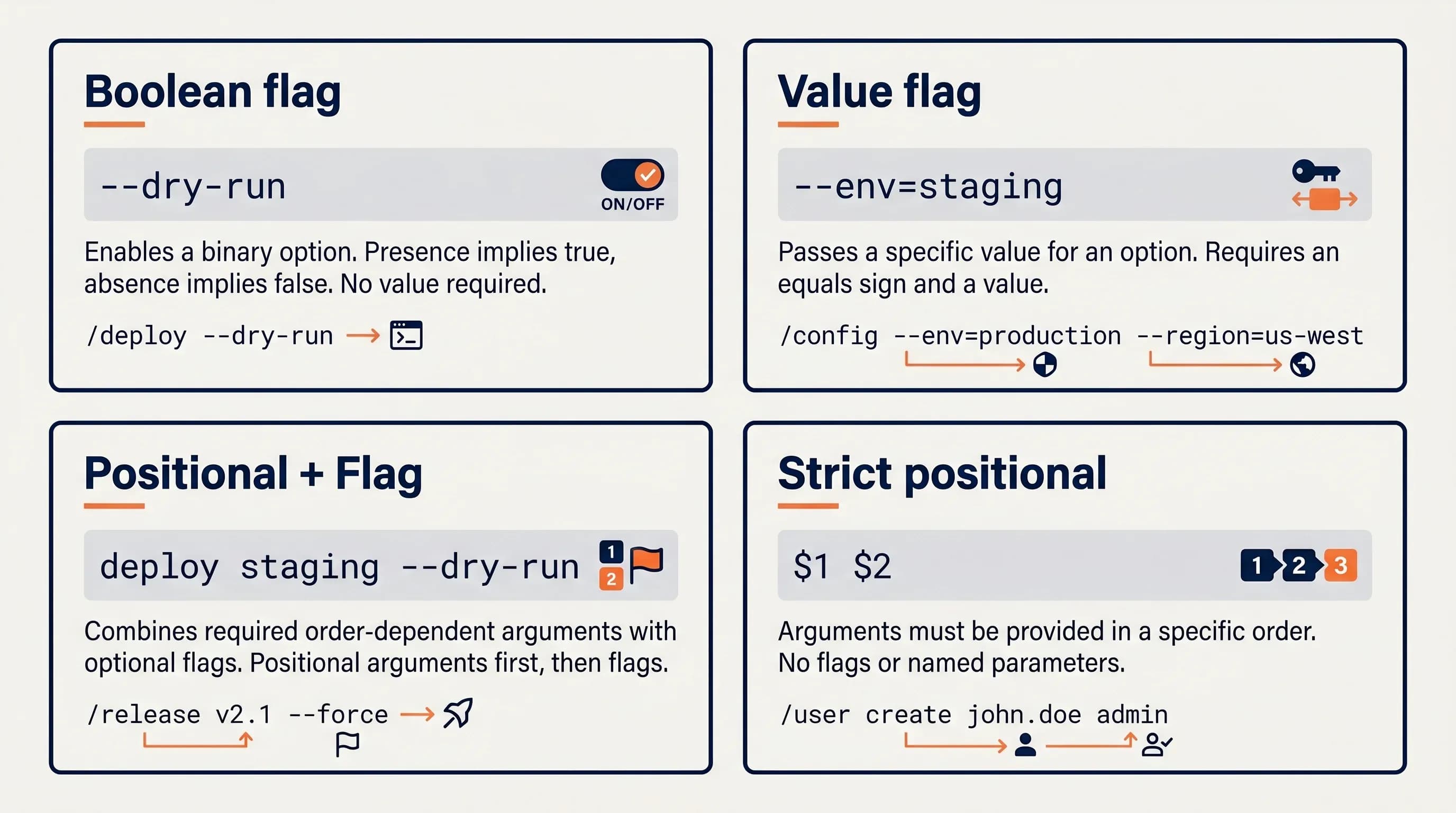
Four patterns cover roughly 95% of real Claude Code slash commands: (1) boolean flag like /deploy --dry-run parsed by the LLM from $ARGUMENTS, (2) value flag like /test --filter auth extracted from $ARGUMENTS, (3) required positional + optional flag like /fix-issue 123 --priority high mixing $1 and $ARGUMENTS, and (4) strictly typed positional like /migrate-component SearchBar React Vue using $0/$1/$2.
Pick whichever matches your command's shape. Here's a working .md file for each.
Pattern 1: Boolean Flag (--dry-run)
When you want CLI-flag UX and the flag is just on/off, lean on the LLM to detect it inside $ARGUMENTS. No parsing logic, no positional juggling, just describe the rule in the prompt.
---
description: Deploy to staging or production
argument-hint: [--dry-run]
allowed-tools: Bash(git:*) Bash(npm:*) Read
---

Deploy the current branch to staging.

Arguments passed: $ARGUMENTS

If "$ARGUMENTS" contains "--dry-run", DO NOT actually deploy. Instead, print the deployment plan: which files would change, which env vars would be set, and which commands would run. Stop after printing the plan.

Otherwise, proceed with the real deployment using `git push staging main` and `npm run deploy:staging`.
Type /deploy --dry-run and the LLM sees the flag, prints the plan, and stops. Type /deploy and it ships. The use did zero parsing, the LLM did all the work, which is exactly what it's good at.
Pattern 2: Value Flag (--filter <pattern>)
Same idea, but now the flag carries a value. The LLM reads --filter auth out of $ARGUMENTS and uses the substring after it.
---
description: Run the test suite, optionally filtered
argument-hint: [--filter <pattern>]
allowed-tools: Bash(npm:*) Read
---

Run the project's test suite.

Arguments: $ARGUMENTS

If "$ARGUMENTS" contains "--filter <pattern>", run only tests matching <pattern>. Use `npm test -- --grep <pattern>` for the actual command.

If no `--filter` is present, run the full suite with `npm test`.

Report pass/fail counts at the end.
/test --filter auth runs only the auth tests. /test runs everything. The LLM extracts the pattern after --filter reliably because Claude is genuinely good at this kind of structured-text extraction, far more reliable than people expect.
Pattern 3: Required Positional + Optional Flag
This is the hybrid we use most in our own command library. $1 carries the required argument, $ARGUMENTS carries everything (so the LLM can still spot optional flags). It's the cleanest mix when one argument is non-negotiable and the rest is freeform context.
---
description: Fix a GitHub issue
argument-hint: <issue-number> [--priority high|medium|low] [context...]
allowed-tools: Bash(gh:*) Bash(git:*) Read Edit
---

Fix GitHub issue #$1.

Full arguments: $ARGUMENTS

Steps:
1. Run `gh issue view $1` to load the issue body.
2. Read the codebase to locate the relevant file(s).
3. If "$ARGUMENTS" contains "--priority high", create a hotfix branch off main. Otherwise branch off develop.
4. Apply the fix, run tests, and open a PR linked to the issue.

Anything else in $ARGUMENTS after the issue number is freeform context — fold it into your understanding of the bug.
Invoke as /fix-issue 1234 --priority high the login form blanks the email field after a failed attempt. $1 resolves to 1234. $ARGUMENTS resolves to the entire trailing string, which the LLM happily parses for both the priority flag and the freeform description.
We use this exact $1 + $ARGUMENTS mix in our /fix-issue command, $1 for the issue number, the rest for free-form context the LLM parses. It's been the highest-ROI pattern across a year of daily Claude Code use.
Pattern 4: Strict Positional (Typed)
When every argument is required and the order matters, drop $ARGUMENTS entirely. Use $0/$1/$2 (or named arguments via the arguments: frontmatter field) for unambiguous typed slots.
---
description: Migrate a component between frameworks
argument-hint: <component> <from-framework> <to-framework>
arguments: [component, fromFramework, toFramework]
allowed-tools: Read Edit Write
---

Migrate the component named "$component" from $fromFramework to $toFramework.

1. Read the existing component file (search for `$component.{jsx,tsx,vue,svelte}`).
2. Translate the component idioms from $fromFramework to $toFramework: lifecycle methods, state handling, prop syntax, event binding.
3. Write the new file in the matching extension for $toFramework.
4. Print a diff summary at the end.

If $fromFramework or $toFramework is unsupported, abort and tell the user which frameworks ARE supported (React, Vue, Svelte, Solid).
Invoke as /migrate-component SearchBar React Vue. The named-argument declaration makes the autocomplete and the prompt body self-documenting, anyone reading migrate-component.md can tell at a glance which slot is which. This pattern shines for commands with three or more required arguments. You can also see this style across community libraries like wshobson/commands on GitHub.
Boolean and value flags work because the LLM is a flexible parser. Strict positional works because no LLM intelligence is required. Mixing the two is the secret.
When Should You Use $ARGUMENTS vs Positional vs Named?
Use $ARGUMENTS when arguments are CLI-flag-style and you want LLM-flexible parsing. Use positional $1/$2 when arguments are typed, ordered, and you want zero LLM ambiguity. Use named arguments: when there are 3+ args and clarity in the autocomplete matters more than terseness. Here's the decision matrix:
| Use case | Best choice | Syntax | Pros | Cons | Example |
|---|---|---|---|---|---|
| CLI-flag UX with optional args | $ARGUMENTS | $ARGUMENTS in body | Flexible, mirrors Unix UX | LLM-side parsing, no validation | /deploy --staging --dry-run |
| Typed, ordered required args | Positional $0/$1 | $0 $1 $2 in body | Zero ambiguity, fast | Brittle to arg order | /migrate Button React Vue |
| 3+ args where clarity matters | Named via arguments: | arguments: [a, b, c] then $a $b $c | Self-documenting | Verbose frontmatter | /issue 123 main high |
| Mixed required + optional | Hybrid ($1 + $ARGUMENTS) | $1 then $ARGUMENTS | Best of both | Two mental models in one file | /fix-issue 123 --priority high |
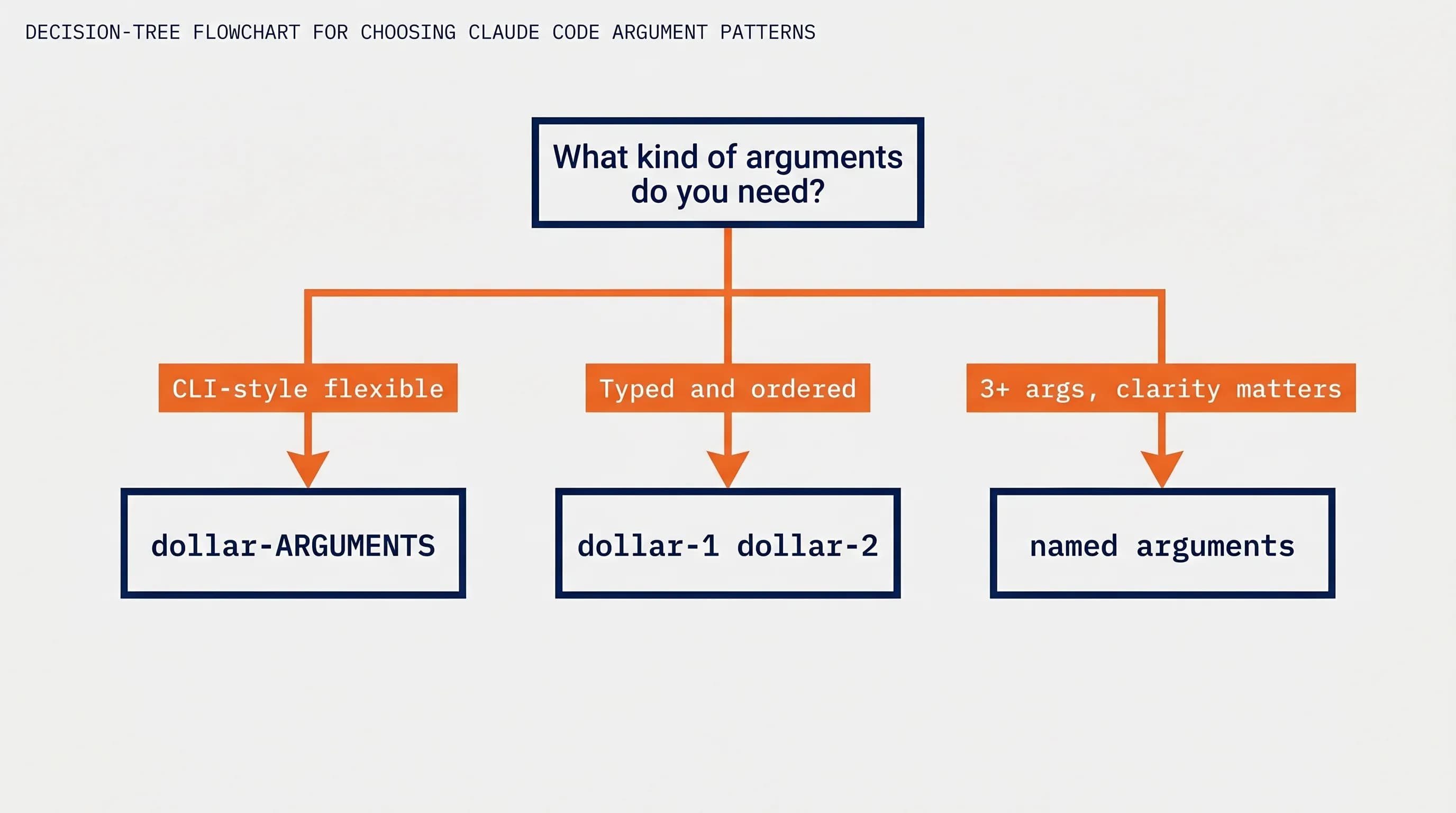
The instinct most developers have is to reach for $ARGUMENTS first because it feels closest to the bash world they know. That's fine for prototypes, but typed positional is genuinely better when the contract is stable. The LLM doesn't need to parse $1, it's already a clean string.
A rough rule of thumb: if you can describe the command's signature in one English sentence without using the words "or" and "optionally," go positional. If you need those words, go $ARGUMENTS.
Are Slash Commands the Same as Skills Now?
Anthropic merged custom commands into the broader skills system in spring 2026, but .claude/commands/*.md files still work and use the same frontmatter. A skill is a directory (.claude/skills/foo/SKILL.md plus supporting files) with extra invocation control like disable-model-invocation. A command is a single .md file. Same substitution rules, different packaging.
Here's the practical difference:
| Aspect | .claude/commands/foo.md | .claude/skills/foo/ |
|---|---|---|
| File shape | Single .md file | Directory with SKILL.md + supporting files |
| Best for | Quick one-off commands, project-local automations | Reusable bundles with templates, references, sub-files |
| Invocation control | Frontmatter only | Frontmatter + per-file disable-model-invocation |
| Argument handling | Identical ($ARGUMENTS, $1, named) | Identical ($ARGUMENTS, $1, named) |
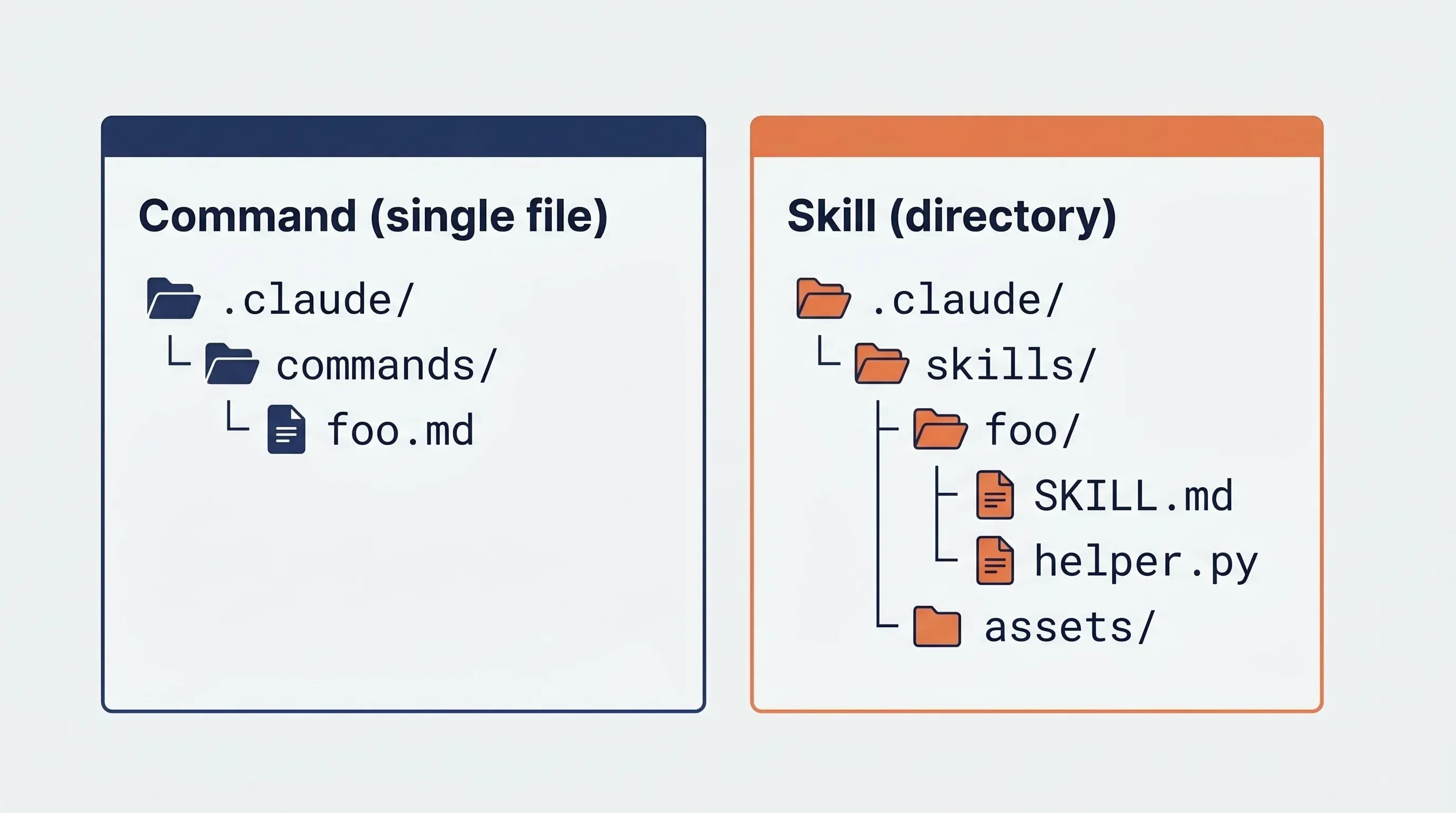
So no, .claude/commands/ is not deprecated. Anthropic explicitly kept the file form working when they merged the systems, too many projects have command libraries pinned in version control. If you want supporting files (like a CONTRIBUTING.md reference your skill loads, or a template.json it copies), reach for skills. Otherwise stay with commands.
The merger is part of a broader push toward the open agentskills.io standard, and it's one of several v2.1.x changes worth knowing, see our roundup of Claude Code v2.1 features for the full feature landscape and our skills tutorial for a deeper skills walkthrough.
Why Isn't My $ARGUMENTS Substituting? Common Bugs Fixed
Five common reasons $ARGUMENTS fails to substitute: (1) lowercase or shorthand token ($args, $ARGS, $arguments, must be literal $ARGUMENTS), (2) multi-word arguments not quoted (/cmd hello world splits; /cmd "hello world" keeps it together), (3) allowed-tools comma-separated instead of space-separated, (4) command file not in .claude/commands/ or .claude/skills/, (5) Claude Code session needs reload after editing the file.
$ARGUMENTS Is Appearing Literally in the LLM Prompt
Symptom: Your prompt shows $ARGUMENTS as plain text in the model's response, like the use ignored it. Cause: Wrong case or wrong spelling. The token is literally $ARGUMENTS, eight characters, all caps. Fix: Open the .md, grep for $args, $ARGS, $arguments, ${ARGUMENTS}, replace with $ARGUMENTS. The $args typo bug has hit every developer on our team at least once; it's the single highest-volume bug in the "unknown slash command" family.
Multi-Word Argument Is Splitting Unexpectedly
Symptom: You ran /migrate-component Search Bar React Vue and $1 is Search, $2 is Bar. Cause: Whitespace splits positional args. Fix: Quote the multi-word argument: /migrate-component "Search Bar" React Vue. Now $1 is Search Bar. This matches shell behavior, which is the mental model the use deliberately mirrors.
allowed-tools Not Being Honored
Symptom: The command runs but Claude refuses to call tools you thought you whitelisted, or it calls tools you didn't list. Cause: Comma-separated instead of space-separated. Fix: Change allowed-tools: Bash, Read, Edit to allowed-tools: Bash Read Edit. For tool sub-patterns, format as Bash(git:*) Bash(npm:*) Read.
Command Not Appearing in / Autocomplete
Symptom: You type / and your command isn't in the list. Cause: File location, missing frontmatter, or disable-model-invocation set incorrectly. Fix: Confirm the file is at .claude/commands/yourcmd.md (or .claude/skills/yourcmd/SKILL.md) relative to your project root. Confirm the frontmatter has at least a description: field. If you set disable-model-invocation: true, the command won't surface to other agents but will still appear in the human-typed / menu.
You Edited the .md File but Nothing Changed
Symptom: You fixed the bug, saved the file, ran the command again, same broken behavior. Cause: Claude Code caches command files at session start. Fix: Quit and relaunch Claude Code, or run /reload if your version supports it.
Claude Code reads
.mdfiles at session start. If you edit a command and it 'doesn't change', restart your session before assuming a deeper bug.
For edge cases beyond these five, the Claude Code repo issues are the best place to search. Most weird substitution bugs we've seen are some flavor of one of the above.
FAQ: Claude Code Slash Command Arguments
What is $ARGUMENTS in Claude Code?
$ARGUMENTS is a substitution token in custom slash command files that the Claude Code use replaces with the entire argument string the user typed after the command name. If a user runs /deploy --staging --dry-run, then $ARGUMENTS becomes the literal string --staging --dry-run inside the rendered prompt before the LLM ever sees it.
How does argument-hint work in Claude Code?
argument-hint is a frontmatter field that controls what the / autocomplete menu shows next to your command name. Setting argument-hint: <issue-number> [--priority high] displays exactly that template after the user types /. It's UX-only, it doesn't validate or parse arguments. It's still worth setting because it's the cheapest documentation you'll ever write.
How do I create a custom slash command with multiple arguments?
Two clean options. For positional: reference $1, $2, $3 in your prompt body. For named: declare arguments: [first, second, third] in frontmatter and reference $first, $second, $third. Named is more readable for three-plus arguments. Use $ARGUMENTS only when you want the LLM to parse a free-form trailing string after the required positional slots.
Can I require certain arguments?
Not at the use level, there's no native required-argument validation. The pattern is to instruct the LLM in your prompt: "If $1 is empty, stop and tell the user to provide an issue number." The model enforces the contract. It's not bulletproof, but in practice it's reliable enough for daily use, especially when paired with a clear argument-hint.
Does model: in frontmatter override CLI flags?
Yes, frontmatter wins. If your command file declares model: claude-haiku-4, that command runs on Haiku regardless of which model the user selected for the session. This is useful for cheap, frequently-invoked commands you want to keep off Opus. See our guide on switching Claude models for picking the right variant per command type.
Wrapping Up
Four patterns. Pick the one that fits your command's shape:
- Boolean flag (
--dry-run), write it into$ARGUMENTS, let the LLM detect it. - Value flag (
--filter <pattern>), same approach, the LLM extracts the value. - Required positional + optional flag,
$1for the must-have,$ARGUMENTSfor the rest. - Strict positional,
$0/$1/$2(or named viaarguments:) when every slot is required and ordered.
Now that your commands are parametric, the next step is wiring them into agent workflows, start with our Claude Skills tutorial for the multi-file packaging upgrade, or browse alternative AI coding tools if you're comparing harnesses. Either way, your .claude/commands/ folder just got a lot more useful.