
Here's the thing most creators miss: one good long video is already a month of shorts — you just have to cut it right. This guide shows you how to turn long videos into shorts with AI using one repeatable workflow, plus honest tool picks so you stop tool-hopping and start posting. Let's get you a system, not just a list of apps.
The Short Answer: How AI Turns Long Videos into Shorts
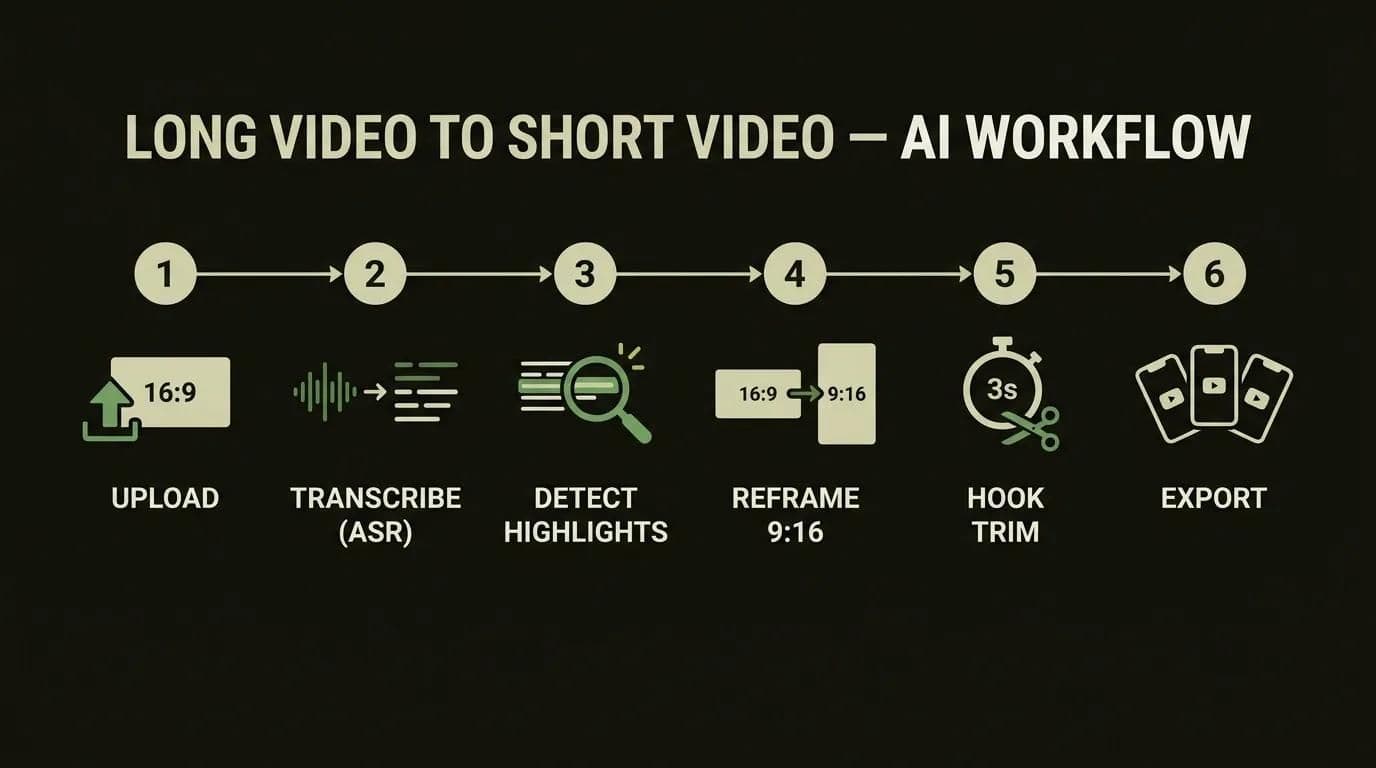
AI turns long videos into shorts by transcribing the audio, detecting the highest-engagement moments, reframing them to a 9:16 vertical crop, adding captions, and exporting ready-to-post clips. You upload one long-form video; the tool hands back a stack of short candidates you review and publish.
In 5 steps, here's how a long video to short video AI actually works:
- Upload your long-form video, or paste a YouTube link.
- The AI transcribes the audio into a searchable transcript.
- It detects and ranks the highlight moments in that transcript.
- It reframes each pick to 9:16 and adds auto-captions.
- You review the hook and export each clip per platform.
How fast is it? In our own runs, a 60-minute source spits out first clips in about 10 minutes. Add your review, caption tweaks, and exports, and you're at roughly 1.5–2.5 hours for a batch of 20 publish-ready shorts — versus 8–10 hours doing it by hand. That's a production-observed 4–5× speedup, not a vendor headline.
The Repeatable Long-to-Shorts Workflow (Step by Step)
Tools change every quarter; the workflow doesn't. Learn to turn long video into shorts AI-style once, and you can run any app through the same six steps. Here's the pipeline we use on real client footage.
1. Pick a source video worth clipping
Density beats length. A tight 20-minute interview with ten strong opinions clips better than a rambling two-hour stream. Before you upload anything, ask: does this footage have quotable moments, clear takes, or emotional peaks? If the answer's no, no AI will manufacture them. Pro tip: podcasts, webinars, and Q&As are gold; slow, meandering tutorials are hit-or-miss.
2. Upload and auto-transcribe (ASR)
Everything downstream depends on this step. The tool runs ASR (speech-to-text) over your audio and builds a transcript — and that transcript is what the AI actually "reads" to find moments. Clean audio means a clean transcript, which means better clips. Most tools also let you paste a YouTube URL and pull the video straight from the link, so you can clip content you already own without downloading a thing.
3. Let AI detect highlights — then re-rank by hook
Now the AI scores segments and surfaces its top picks, usually with a virality score attached. Here's the gotcha: don't trust that score blindly. In practice, the model's #1 pick is often a solid B, and the real banger is sitting at #4. Skim the top ten yourself, watch the first three seconds of each, and re-rank by which ones genuinely grab you. This 60-second human pass is the single biggest quality lever in the whole process.
4. Reframe to 9:16 and auto-caption
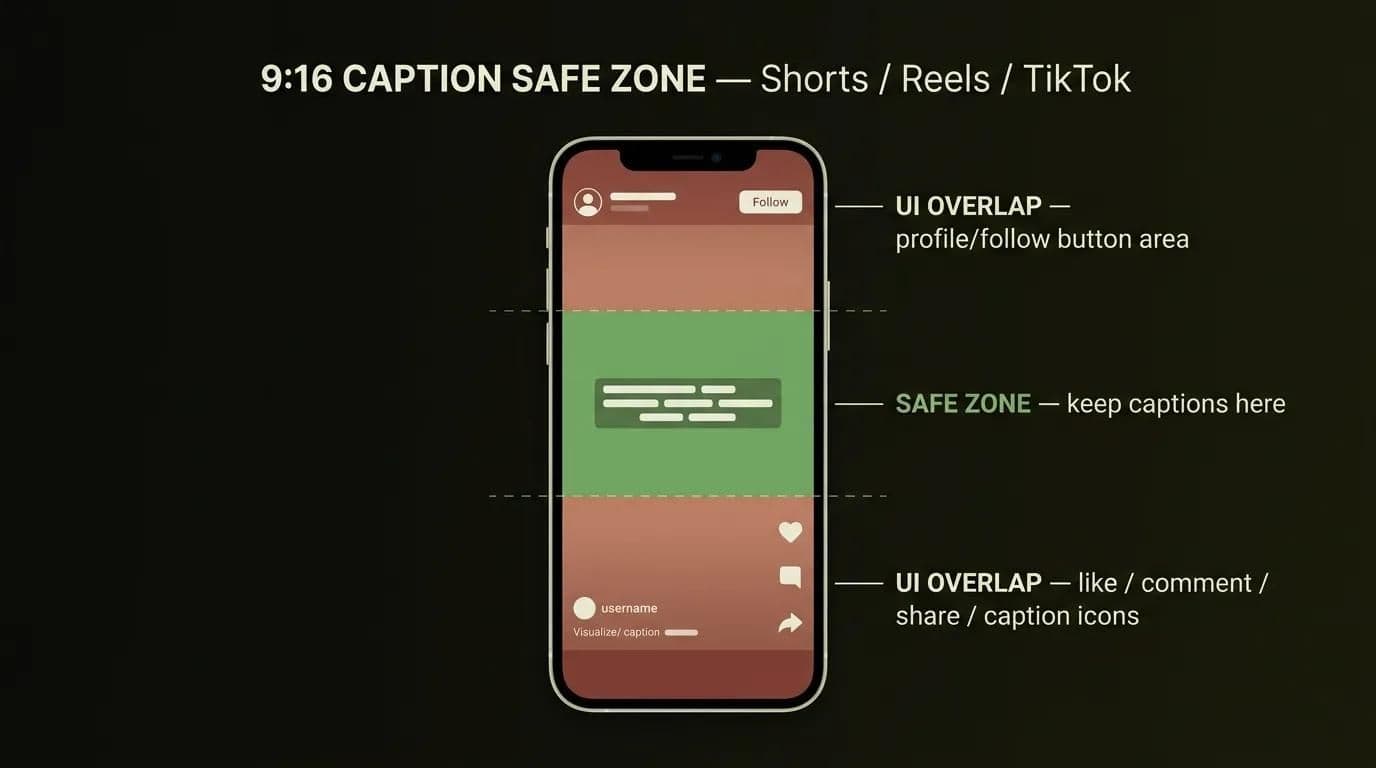
Your source is probably 16:9 landscape; Shorts, Reels, and TikTok want 9:16 vertical. Auto-reframe with face tracking keeps the speaker centered as they move, so you're not stuck with a head cropped out of frame. The tool also drops in animated captions — essential, since most feeds autoplay muted. Safe-zone tip: keep caption text in the middle third, above the platform's UI buttons, or TikTok's interface will bury your words.
5. Trim for a hook-first opening (the 3-second rule)
The first three seconds decide whether someone keeps watching or swipes away. If you want to turn long videos into viral shorts, cut straight to the payoff — the surprising claim, the punchline, the number — and delete the throat-clearing intro. Move the strongest line to the very front, even if it landed mid-sentence in the source. A great clip earns the swipe-stop in second one.
6. Export and schedule per platform
Last step: turn your convert long video into shorts AI output into platform-ready files and get them on a calendar. Each platform has its own sweet spot — roughly 9:16 vertical, 15–60 seconds, with a little more headroom on YouTube and TikTok. Batch-export the whole set, then space the clips out over days instead of dumping all twenty at once. Consistency beats a one-day flood every time.
Here's the ideal aspect ratio and length for each platform at a glance:
| Platform | Aspect ratio | Sweet-spot length | Max (2026) |
|---|---|---|---|
| YouTube Shorts | 9:16 | 15–60s | up to 3 min |
| Instagram Reels | 9:16 | 15–60s | up to 3 min |
| TikTok | 9:16 | 15–60s | up to 10 min |
Best AI Tools to Turn Long Videos into Shorts (by Creator Type)
Ask the internet for the best AI tools to repurpose video into shorts and you'll get a different "winner" on every page — usually whichever tool the site happens to be selling. The honest answer? There's no single best tool. The right one depends on who you are and what you're clipping. For the bird's-eye view, see our full roundup of the best AI video & voice tools; below, here's how to choose by creator type.
For podcasters and interviewers
If you're clipping two people talking, prioritize speaker detection and multi-face tracking — you want the crop to follow whoever's speaking, with clean cuts on the turns. OpusClip and Vizard both handle conversational footage well. Podcasts are the highest-yield source there is, so this is where AI clipping pays off fastest. Here's a deeper walkthrough on how to turn a podcast episode into clips.
For marketers repurposing webinars
Repurposing a webinar or a brand talk? Prioritize a brand kit, templates, and multi-platform auto-posting so every clip stays on-brand and ships to five channels without manual reuploads. Vizard and Submagic lean this way, and Klap is quick for pure volume. If clipping is one piece of a bigger plan, our guide to the wider AI marketing stack shows where it fits.
For solo creators on a budget
Flying solo with no budget? Prioritize a usable free tier, honest watermark limits, and speed over polish. CapCut's free online editor, OpusClip's free plan, and Klap's trial all get you moving — just know the free-tier tradeoffs (more on those in a second). If you're an early-stage team weighing every subscription, these lean tool picks for early-stage teams are worth a look.
Cost and Clip-Accuracy Comparison (2026)
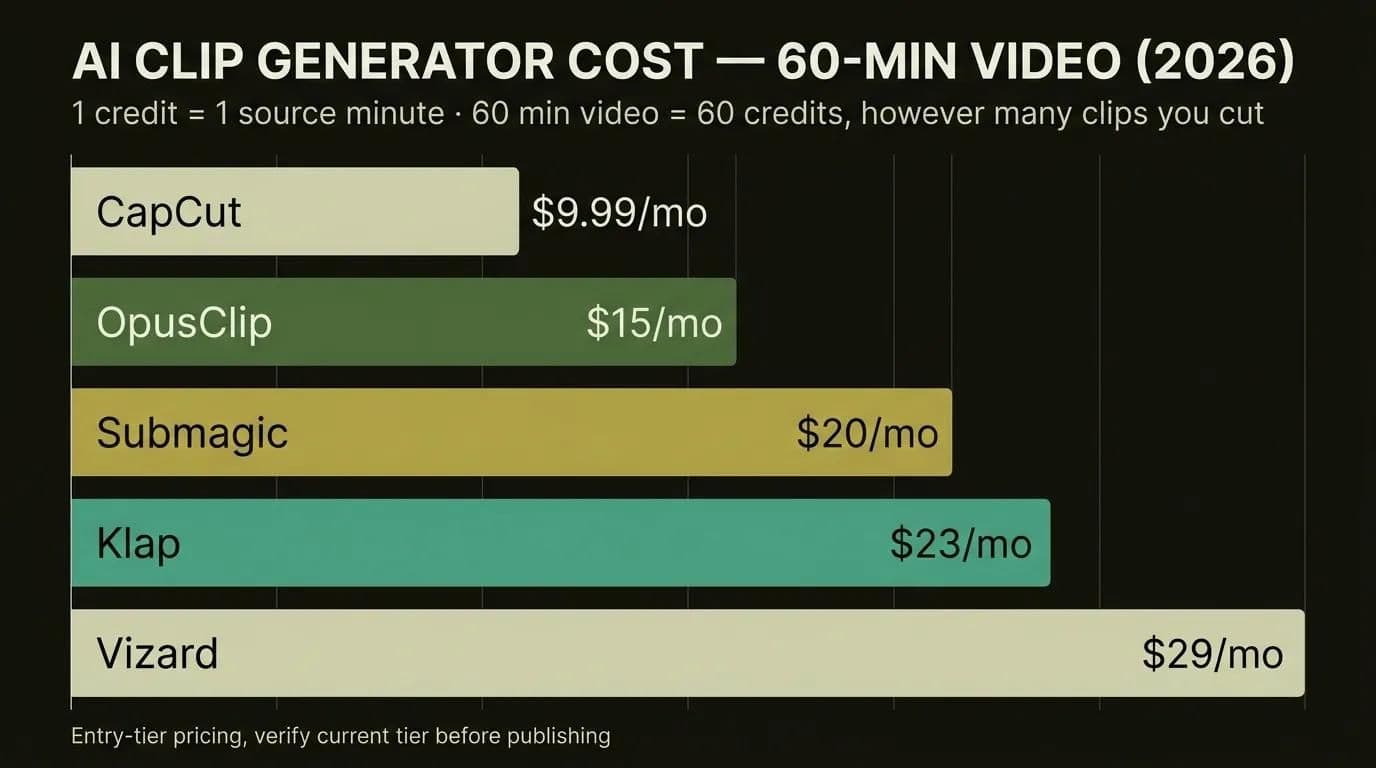
Every AI clip generator prices things differently, and the sticker $/mo hides the real cost. Here's a side-by-side of the main players — what each is best at, the free-tier reality, entry pricing as of 2026, how they bill, and how accurate the clips actually are.
| Tool | Best for | Free tier / watermark | Entry price (2026) | Billing mechanic | Clip-accuracy note |
|---|---|---|---|---|---|
| OpusClip | Virality scoring, auto-reframe | 60 min/mo, watermark (gone after 3 days) | Starter ~$15/mo; Pro ~$29/mo | 1 credit = 1 source minute | Strong hook detection; occasional mid-sentence cut |
| Vizard | Volume and value, webinars | Limited free tier | Creator ~$29/mo (verify current tier — sources vary $19–$29) | 1 min = 1 credit | Good value; framing weaker on multi-speaker |
| Klap | Fast one-click clips | Trial | ~$23–29/mo (verify base tier) | Per-plan minute caps | Decent selection; fewer edit controls |
| Submagic | Captions, b-roll suggestions | 3 videos/mo, watermark | Starter ~$20/mo | Per-video, not per-minute | Caption-first; clip selection lighter |
| CapCut | Free general editing | Yes, free online | Pro ~$9.99/mo (confirm 2026 tier) | n/a | High manual control; auto-clipping basic |
| Descript (mention only) | Transcript editing | Limited free tier | ~$16–24/mo (verify current tier) | Per-plan hours | Text-based; not a pure auto-clipper |
Notice the billing column. Most of these tools run on the same mechanic: 1 credit = 1 source minute. So a 60-minute podcast costs the same 60 credits whether you make 3 clips or 30. Your cost scales with input length, not output count — which means the more clips you squeeze from one long video, the cheaper each one gets. Nobody puts this on their pricing page, but it should change how you batch.
Where does AI clipping still fall down? Mid-sentence cuts that lop off the end of a thought. "Hooks" that aren't actually hooks. Clips that lose the context that made the moment land in the first place. When a segment leans on a visual or a callback, a two-minute manual trim still beats the AI's pick. The tech is genuinely good in 2026 — it's just not a set-and-forget button yet, so human review stays in the loop.
If you're deciding between the two most popular auto-clippers, the OpusClip vs Vizard head-to-head breaks down which one wins for which job.
Free vs Paid: What the "Free / No-Watermark" Tools Actually Give You
"Free" and "no watermark" show up in nearly every search on this topic, so let's be straight about what free actually buys you. In most cases, a free tier means three things: a watermark on your clips, a monthly minute cap, and lower export resolution (720p instead of 1080p). A few tools drop the watermark after a trial window — OpusClip's, for example, disappears after three days.
Can you turn long videos into shorts free without a watermark? Sometimes. CapCut's online editor is genuinely free and watermark-free for basic edits, but its auto-clipping is manual and thin compared to a purpose-built tool. If you want real AI highlight detection and no watermark, you're usually looking at a paid entry tier, and the cheapest useful ones start around $15–20/mo.
Here's the honest math for a solo creator. If you're posting a few clips a month, a free tier plus a little manual cleanup is perfectly fine. If you're shipping 20+ shorts a month, the paid tier pays for itself in saved hours inside the first week. Don't buy capacity you won't use — but don't burn ten hours dodging a $15 subscription either.
Getting More Reach from Every Clip (Hooks, Captions, B-Roll)
A clip the AI picked is a candidate, not a finished post. The gap between a clip that gets 400 views and one that gets 40,000 usually comes down to three things you control after the AI hands off.
Hook first. We covered the 3-second rule, but it bears repeating because it's the whole ballgame: lead with the most surprising or useful line and cut everything before it. If your clip opens with "so, um, anyway," you've already lost half the audience.
Captions carry retention. Most people watch muted, so captions aren't optional — they're the reason someone stays. Keep them punchy, one or two lines, inside the safe zone. If you want to auto-caption every clip in a batch without hand-syncing each word, that's its own quick workflow.
B-roll, but only when it earns its place. A static talking head gets stale after about 15 seconds; a well-timed cutaway resets attention. Don't overdo it — b-roll for its own sake is just noise. Modern tools can drop in AI b-roll automatically based on your transcript, which saves the stock-footage hunt.
Honestly, the best AI video editor for YouTube Shorts is the one you'll actually open twice a week — consistency beats features. And one lever most creators skip: language. A clip that performs in English often performs in Spanish, German, or Arabic too. Dub or translate a winning short into a few languages and you can multiply its reach without filming anything new.
How Techsy Approaches This
Full disclosure: we build content-repurposing pipelines for teams, so here's how we actually think about it. Most solo creators don't need us — a single tool plus the workflow above will carry you a long way, and we'll happily tell you so.
Where it gets genuinely hard is scale. When a company wants one long video turned into a batch of shorts, in multiple languages, on a schedule, running every week without someone babysitting it — that's a real pipeline, not a single app. We wire the clipping, captioning, translation, and scheduling steps into one system that runs hands-off, and we've learned the failure modes the hard way: the mid-sentence cuts, the false hooks, the review step you can't skip. That production experience is what we bring to the table.
Building a content-repurposing pipeline for your team? Get a free consultation →
Frequently Asked Questions
Can AI really turn long videos into shorts automatically?
Yes, largely — it transcribes the audio, detects highlight moments, reframes to 9:16, adds captions, and exports. The one caveat: a quick human pass still lifts quality noticeably. Treat the AI as a fast first-drafter that gets you 80% of the way, not a hands-off machine.
What's the best AI tool to turn long videos into shorts?
There's no single winner — it depends on your creator type. Podcasters want speaker detection (OpusClip, Vizard); marketers want brand kits and multi-platform posting (Vizard, Submagic, Klap); solo creators want a real free tier (CapCut, OpusClip free). Pick for the job you actually do, not the tool with the loudest homepage.
Can I turn long videos into shorts for free without a watermark?
Partly — most free tiers give you a watermark, a minute cap, and lower resolution. CapCut's online editor is a genuine free, watermark-free option for manual edits, but for real AI highlight detection without a watermark you'll usually need a paid entry tier starting around $15–20/mo.
How long does AI take to make shorts from a 1-hour video?
Expect about 10 minutes to first clips on most tools. Add your review, caption tweaks, and per-platform exports, and you're at roughly 1.5–2.5 hours for a batch of publish-ready shorts. That's still 4–5× faster than the 8–10 hours the same batch takes by hand.
How does the AI decide which moments become clips?
It reads the ASR transcript, scores each segment for hooks, emotion, and keyword density — often surfaced as a "virality score" — and ranks them. That score is a starting point, not gospel. Always re-rank the top picks yourself, because the model's #1 choice often isn't your best clip.
How many shorts can I get from one long video?
You can typically get 10–25 shorts from one 30–60 minute video, depending on how dense the content is. Remember the credit mechanic: cost is tied to source minutes, not clip count, so squeezing more clips out of one video makes each one cheaper. Density is your friend here.
Can I turn a YouTube video into shorts with AI from just a link?
Yes — most tools accept a YouTube URL and pull the video for you, no download needed. Just make sure you own the rights to the footage you're clipping. It's the fastest way to repurpose your own back catalogue into shorts.
What aspect ratio and length should Shorts, Reels, and TikTok be?
All three want 9:16 vertical, with a 15–60 second sweet spot. In 2026, Shorts and Reels support up to 3 minutes and TikTok up to 10. Keep your captions inside the safe zone so the platform's UI buttons don't cover them.
Do AI-generated shorts actually go viral — and are the clips accurate?
The AI finds strong candidates, but virality still comes down to your hook and topic. Accuracy is imperfect — expect the occasional mid-sentence cut or false hook — so review every clip before posting. The tools are good, not flawless; that final human check is what separates a decent clip from a great one.
Is CapCut or OpusClip better for turning long videos into shorts?
They solve different problems: CapCut is a free, flexible general editor with basic auto-clipping, while OpusClip is purpose-built for automatic clipping with virality scoring and auto-reframe. If you want automatic highlight detection and hook scoring, OpusClip wins; if you want granular manual control for free, CapCut does. The same tradeoff — general editor vs dedicated clipper — is worth weighing before you commit to a subscription.
Key Takeaways
- One workflow beats tool-hopping. Master the six steps — source, transcribe, detect, reframe, hook, export — and any tool slots right in.
- Pick by creator type, not hype. Podcaster, marketer, or solo creator: your needs decide the tool, not a listicle's #1.
- Mind the credit mechanic. You pay per source minute, so more clips per long video means a lower cost per clip.
- Always human-review the AI's picks. The virality score is a starting point; your 60-second re-rank is the quality lever.
Want a repurposing system that turns one long video into a month of content — in 10 languages? Talk to our team →