Ideogram 4.0 Is Open-Weight Now: What Runs on a 24GB GPU (2026)
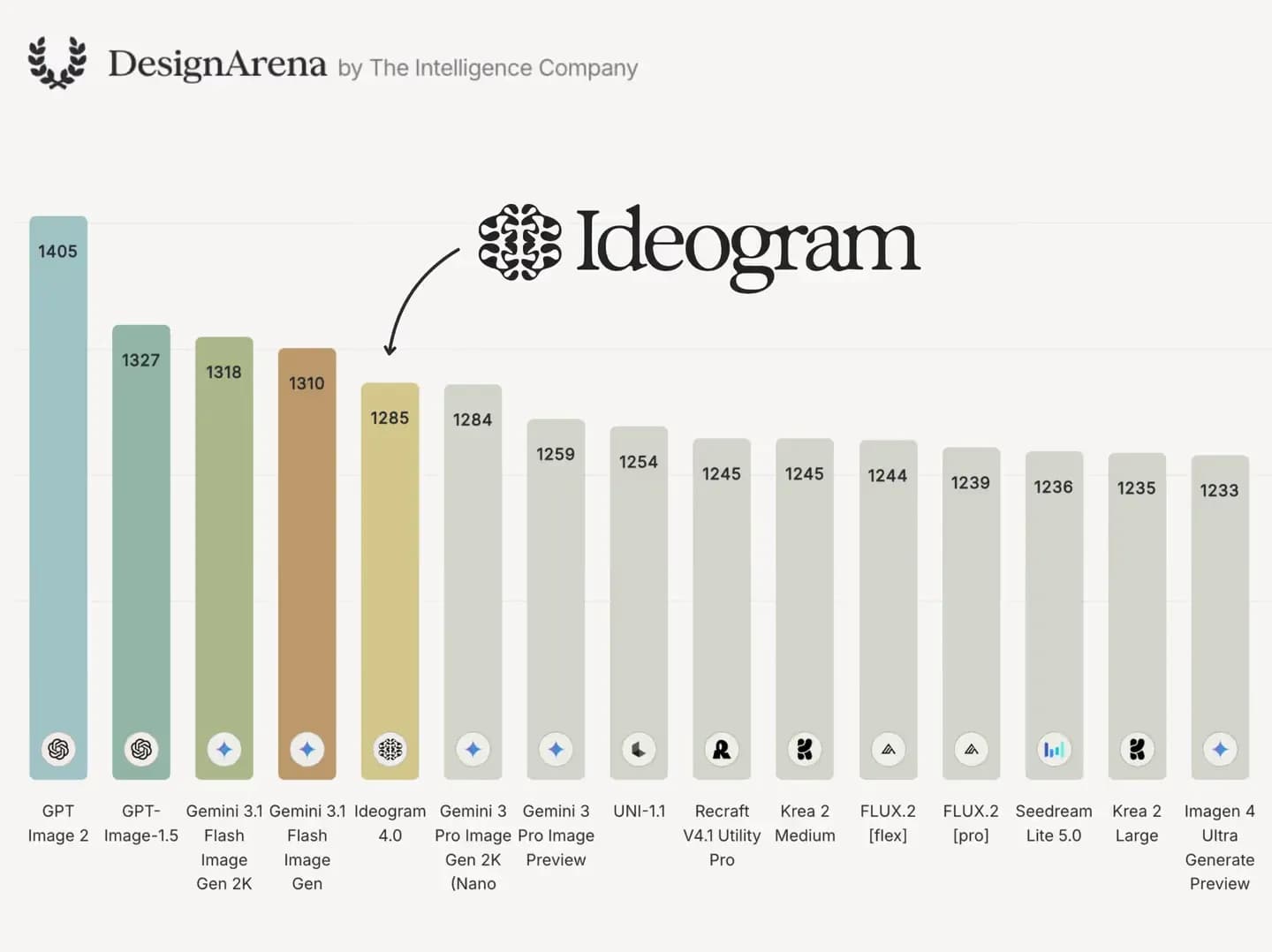
Ideogram 4.0 landed on June 3, 2026, and it broke the pattern. Every Ideogram before it lived behind a web app. This one ships weights. You can pull a 9.3-billion-parameter model off Hugging Face and run the nf4 build on a single 24GB GPU, like an RTX 4090, at home. It is not the aesthetic champion. On the DesignArena Elo board, GPT Image 2 sits ahead at roughly 1405 while Ideogram 4.0 lands near 1285. But for text and typography? Nothing open gets close. Here's the honest breakdown.
Quick Verdict:
- Ideogram 4.0 (June 3, 2026) is Ideogram's first open-weight model: a 9.3B-param DiT that runs on a 24GB GPU.
- It wins decisively on text and typography; it trails GPT Image 2 on aesthetic Elo (~1285 vs ~1405).
- Three ways to use it: web app, cloud API, or local self-host via the nf4 checkpoint.
- "Open-weight" is not open-source here. The download license is non-commercial. Check it before you ship.
What Is Ideogram 4.0?
Ideogram 4.0 is a 9.3-billion-parameter text-to-image model released on June 3, 2026, and it's the first Ideogram you can download and run yourself. Every release before it, from 0.1 through 3.0, was cloud-only. The headline feature is best-in-class text rendering at native 2K resolution, aimed at designers, developers, and anyone generating posters, logos, or signage.
So what's actually under the hood? A few specs worth knowing, kept short:
- Architecture: a Diffusion Transformer (DiT). In plain terms, it's a model that starts from visual noise and refines it step by step toward your prompt, using the same transformer math that powers large language models. The "9.3B" is its parameter count, which is small next to Flux 2's ~32B.
- Text encoder: Ideogram pairs it with a Qwen3-VL vision-language encoder, which is the main reason its lettering comes out so clean.
- Resolution: native 2K output, no upscaling tricks required.
- Magic Prompt: an optional auto-enhancer that rewrites your short prompt into a richer one before generation. Handy for casual users, annoying if you want exact control. You can turn it off.
The real story isn't the architecture, though. It's that Ideogram joined the open-weight model wave that's been reshaping how teams build with AI. If you've followed the open-weight LLM releases this year, you already know the pattern: a strong proprietary lab posts downloadable weights, and suddenly hobbyists and startups can self-host what used to be an API-only product. Ideogram 4.0 is the first version you can download and run on your own hardware. According to Ideogram's official technical post, the weights live on Hugging Face in two quantized flavors, and the inference code is on GitHub.
Can You Actually Run Ideogram 4.0?
Yes, three different ways. The web app needs zero setup and suits casual and design users. The cloud API is for developers wiring image generation into an app. And local self-host is the new one: download the open weights from Hugging Face, run them on a 24GB GPU, and pay nothing per image. Pick the path that matches your hardware and budget.
Here's how to choose:
- Web app at ideogram.ai. Pick this if you just want images and don't want to think about GPUs. Free tier exists, paid plans add volume and speed.
- Cloud API. Pick this if you're building image generation into a product and want predictable per-image billing without owning a GPU. Pricing is in the next section.
- Local self-host. Pick this if you have a 24GB card and want unlimited generation with no per-image cost. This is also the route if you care about privacy or want to fine-tune.
For the local route, the practical path right now is ComfyUI, the node-based interface most open image models target first. The basic flow looks like this:
- Accept the license gate on the Hugging Face model page (
ideogram-ai/ideogram-4-nf4) and download the checkpoint. - Drop it into your ComfyUI models folder.
- Load a community Ideogram 4.0 workflow (several are circulating already).
- Generate.
One gotcha: as of late June 2026, the fp8 checkpoint isn't supported in the Diffusers library yet, so fp8 users are mostly on ComfyUI. The nf4 build has wider tooling support. If you'd rather skip local hardware entirely, you can deploy it to a cloud GPU and rent the VRAM by the minute, which is the same trick people use for running open models locally without buying a 4090.
What Hardware and VRAM Do You Need to Run It Locally?
The nf4 checkpoint on a 24GB VRAM card (like an RTX 4090) is the sweet spot. 16GB is a tight squeeze that works with offloading but slows down. 32GB and up is comfortable. The higher-fidelity fp8 build wants more, realistically an A100 or H100. And to be clear, this is GPU VRAM, not system RAM.
| Checkpoint | Min VRAM | Recommended GPU | Quality | Notes |
|---|---|---|---|---|
| nf4 | ~16GB (tight) | 24GB (RTX 4090) | Good | Diffusers-supported; the sweet spot |
| fp8 | ~32GB+ | A100 / H100 | Higher | No Diffusers support yet; ComfyUI route |
If you've got a 24GB card, you can run Ideogram 4.0 at home. Anything less and you're squeezing.
What about Mac? Honest answer: there's no practical Apple Silicon local path yet. The released tooling assumes CUDA, which means Nvidia. M-series Macs can't run the checkpoints usably today, so Mac users should stick with the web app or the API. That may change as the community ports things, but don't buy a Mac Studio expecting to self-host this in June 2026.
Generation speed depends heavily on your exact GPU, so I won't invent a number. Reddit users testing the nf4 build report that 2K images on a 4090 land in the low tens of seconds, but treat that as a community figure, not a lab benchmark. If you need exact latency for production planning, time it on your own card. The takeaway that matters: a consumer 24GB GPU is genuinely enough, which was never true for Ideogram before.
How Much Does the Ideogram 4.0 API Cost?
The Ideogram 4.0 API charges a flat fee per output image, split into three tiers: Turbo at about $0.03, Default at about $0.06, and Quality at about $0.10. There's also a free web-app tier for casual use. These figures are from the official pricing page as of June 26, 2026, so confirm them live before you budget at volume.
| Tier | Price per image | Best for |
|---|---|---|
| Turbo | ~$0.03 | Drafts, bulk iteration |
| Default | ~$0.06 | Everyday production |
| Quality | ~$0.10 | Final hero assets |
A request that returns four images costs four times the per-image rate, so batch generously only when you mean it. The math is simple: if you're generating thousands of images a month, self-hosting the open weights on your own GPU eventually beats the API on cost. Below a few hundred a month, the API is cheaper than electricity and a 4090. Ideogram's own API pricing page is the source to trust here, since launch-week blogs already quoted stale numbers.
What Is Ideogram 4.0 Actually Good At?
Text. That's the one-word answer. Ideogram 4.0 renders legible, correctly spelled multi-word text better than any open model and most closed ones. It also handles multilingual signage, logos with taglines, poster layout via structured JSON prompts, and clean 2K photoreal product shots. If your work involves words inside the image, this is the model.
Let's break down each strength:
- Text and typography. This is the signature. Ideogram reports roughly 0.97 X-Omni OCR accuracy on dense text in its technical writeup, which is the share of rendered characters a reader can correctly make out. For comparison, an independent review measured Midjourney around 30% on multi-word text, and Flux variants in the 30 to 40% range. That gap is enormous.
- Multilingual text. Latin scripts come out clean, and Spanish-language testers on Reddit specifically praised its accent and diacritic handling.
- Logos and taglines. Brand mockups with a name plus a strapline render crisply, which is why design teams are circling it.
- Layout control via JSON. This is the developer-friendly part. You can pass a structured prompt with bounding boxes telling the model where each element goes.
Here's a minimal JSON-style layout prompt to show the idea:
{
  "prompt": "minimalist coffee shop poster, cream background",
  "elements": [
    { "type": "heading", "text": "MORNING RITUAL", "box": [0.1, 0.1, 0.9, 0.3] },
    { "type": "subtext", "text": "single-origin, slow-brewed", "box": [0.1, 0.35, 0.9, 0.45] }
  ]
}
That bounding-box control is what separates "an image with words" from "a designed layout," and it's rare in this class of model.

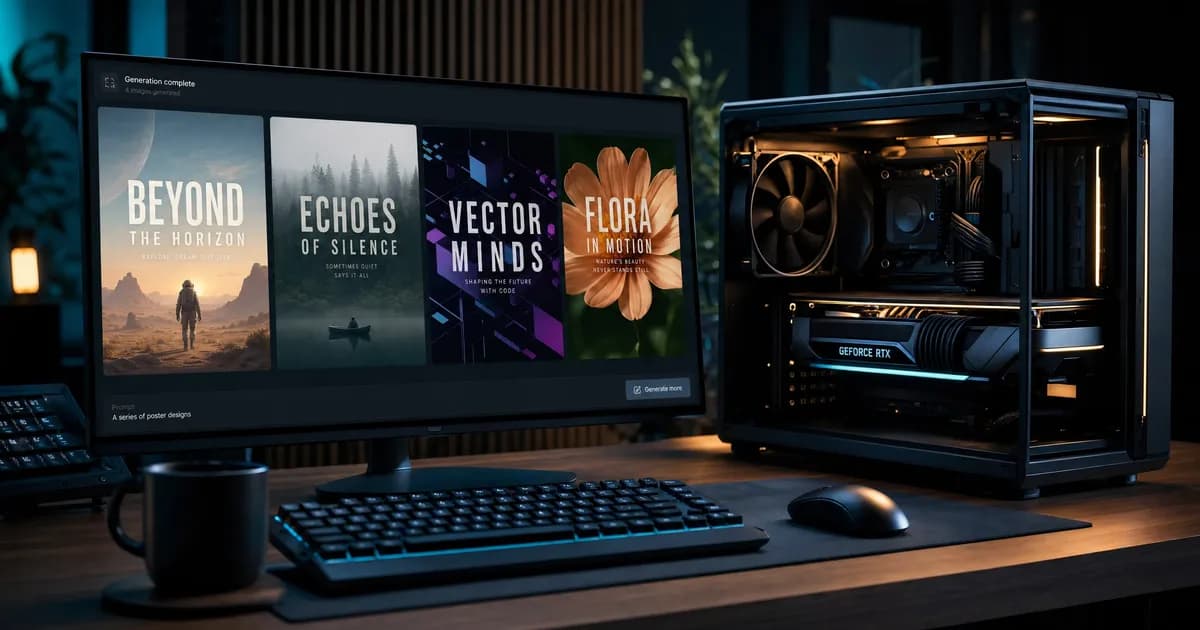
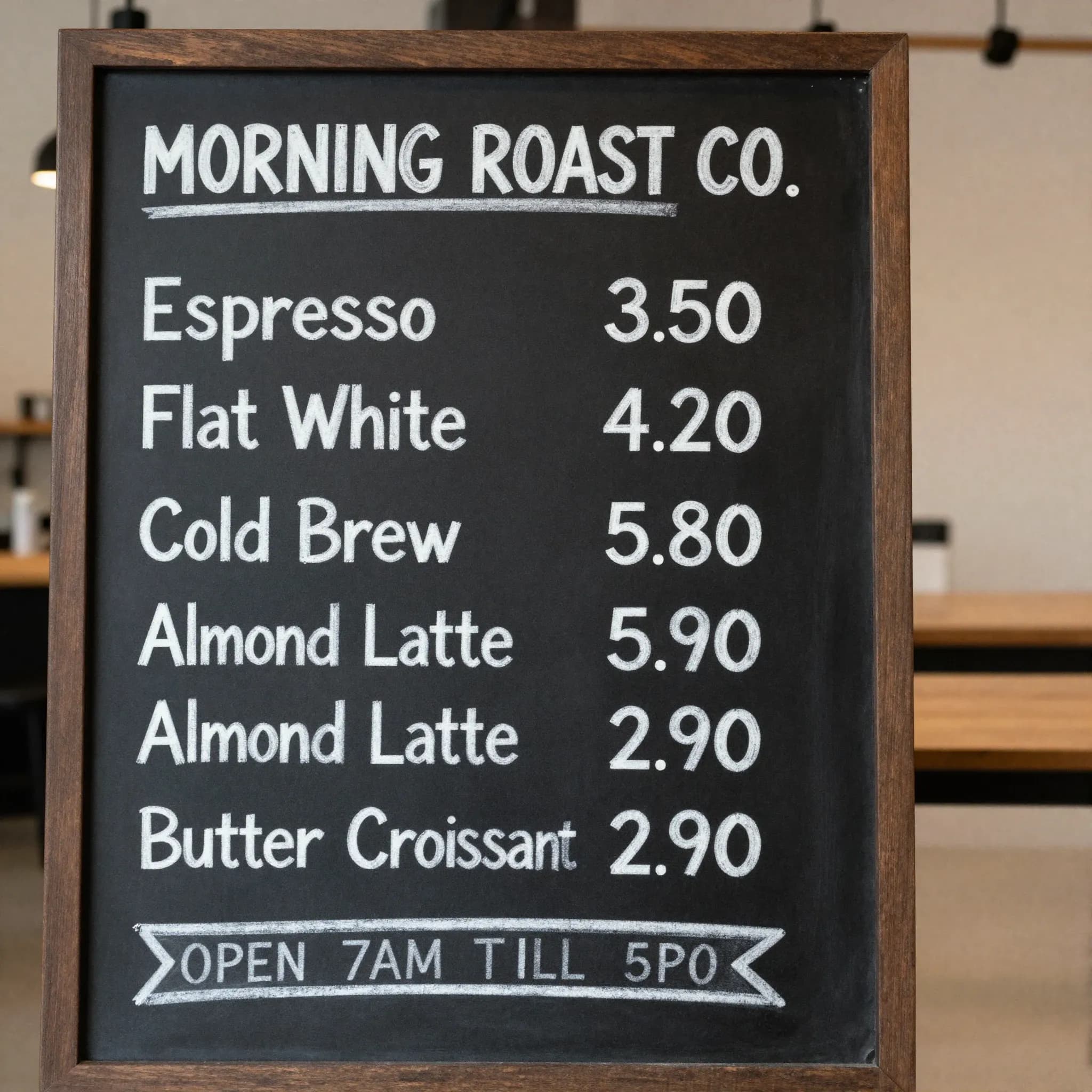
A quick honesty note on the data below. I did not personally run a private 10-prompt local test, so I'm not going to fake one. Instead, here's a synthesis of what the documented public tests report, each attributed to its source. The images in this article (above and further down) are our own original generations, made with Higgsfield using GPT Image 2 and FLUX.2 as stand-ins for the quality tiers, not literal Ideogram output.
| Task | Documented result | Source |
|---|---|---|
| Multi-word poster text | ~0.97 OCR accuracy on dense text | Ideogram (X-Omni OCR, official blog) |
| Multilingual signage | Strong on Latin scripts; Spanish praised | Reddit r/LocalLLaMA testers |
| Logo + tagline | Clean and legible | goenhance review |
| Hands in busy scenes | Frequently broken | goenhance review |
| Face + caption together | Conflicts reported | goenhance review |
| 2K photoreal product | Good but behind GPT Image 2 / Imagen | Artificial Analysis leaderboard |
Across the documented public reviews, the consensus is consistent: for text-heavy work, no other open model gets close.
Where Does Ideogram 4.0 Fall Short?
It's blunt where it loses. Hands break in busy compositions. Multi-person scenes get muddy. Asking for a face and readable caption in the same image often makes one of them suffer. The safety filters are aggressive and refuse a lot. And the JSON prompting that powers layout control adds real friction for casual users.
The failure modes reviewers keep hitting:
- Hands and anatomy. In goenhance's review, hands degraded in most busy, multi-element shots. Ask for a person holding a sign and you'll often get great lettering above a hand with six fingers.
- Face plus text together. When a prompt demands both a recognizable face and a readable caption, the model tends to nail one and fumble the other.
- Busy human scenes. Crowds and complex interactions lose coherence faster than they do on GPT Image 2 or Imagen.
- Safety filters. The content filters are strict and trigger on plenty of benign prompts. If you need unrestricted output, this isn't your model.
- JSON friction. The bounding-box prompting is powerful but fiddly. Casual users will find it slower than Midjourney's "type a sentence" flow.
So don't reach for Ideogram 4.0 when you need crowded human scenes, raw photoreal portraiture, low-friction casual generation, or anything the filters will reject. For those, Imagen and Flux 2 Pro are better calls. Use it for what it's elite at, and route the rest elsewhere.
Can Ideogram 4.0 Replace Midjourney, GPT Image 2, and Flux 2?
Partly, and only for the right job. Ideogram 4.0 wins decisively on text, typography, and being open-weight and locally runnable. It loses on aesthetic Elo and anatomy. On the DesignArena board it sits near 1285 while GPT Image 2 leads around 1405. There's no single winner here. It depends entirely on your use case.
Here's the head-to-head by use case:
| Model | Best for | Text rendering | Open weights / local | Aesthetic Elo |
|---|---|---|---|---|
| Ideogram 4.0 | Text, logos, posters | Best-in-class | Yes (24GB GPU) | ~1285 (mid top-tier) |
| GPT Image 2 | All-round, photoreal | Strong | No | ~1405 (leads) |
| Midjourney v7 | Artistic, aesthetic | Weak (~30%) | No | High |
| Flux 2 [dev/Pro] | Photoreal, anatomy | Weak to mid | dev is open | Varies |
| Imagen | Photoreal | Mid | No | High |
| Recraft | Vector, design | Strong | No | Not listed |
A note on the numbers: benchmark sources disagree wildly across the web, so read the Elo figures as "around X," not gospel. I checked the Artificial Analysis text-to-image leaderboard on June 26, 2026, and even there the standings shift as new entries get added. The honest framing: Ideogram 4.0 is a 9.3B model holding its own against rivals two and three times its size, which is impressive, but it is not topping the aesthetic board. GPT Image 2 is.
So who should switch? If your output is posters, ad creative, logos, or anything with words, Ideogram 4.0 can replace Midjourney outright and often beats GPT Image 2 on the text itself. If you need painterly art, photoreal humans, or crowded scenes, keep your current tool. The model gap shows up most clearly in text fidelity, which the comparison below makes obvious.
If you're picking a generator for a specific pipeline, the use case decides everything. We've gone deep on adjacent choices before, from AI image tools for game assets to other generative-art tools we've compared, and the same rule holds: match the model to the job, don't chase a single leaderboard rank.
Is Ideogram 4.0 Really Open Source?
No, not in the clean OSI sense, and this is the part most guides get wrong. Ideogram calls it "open-weight," which is accurate. You can download the weights for free. But the actual license on the Hugging Face model card is the Ideogram Non-Commercial Model Agreement. That means free for personal and research use, paid license required for commercial deployment. Verify it before you ship anything.
Let's clear up the confusion, because there's a lot of it. Wikipedia and several launch-week blogs claimed Apache 2.0. That's wrong. When you open the ideogram-ai/ideogram-4-nf4 model card and click through the access gate, the license you accept is the Non-Commercial Model Agreement, with no revenue threshold and no small-business exemption. Any monetized use of the self-hosted weights needs a separately negotiated commercial license from Ideogram. Reddit's r/LocalLLaMA caught this within days of launch, and it remains the single most-debated point about the release.
Downloadable weights are not the same as a permissive license. Read Ideogram's LICENSE before you ship anything commercial.
What does that mean in practice?
- Personal projects, research, learning: fine, go ahead.
- Client work, products, paid services: you need a commercial license. Self-hosting the free download for a paying client violates the agreement.
- Fine-tuning and LoRA: technically possible since the weights are downloadable, and the community is already training adapters. But the same non-commercial restriction applies to what you do with the results.
This isn't a reason to avoid the model. It's a reason to read the terms. Plenty of teams will use the API (which comes with commercial rights) for production and keep the local download for experimentation. Just don't assume "open-weight" means "do whatever you want," because here it doesn't.
Frequently Asked Questions
Is Ideogram 4.0 open source?
Not in the strict sense. Ideogram calls it "open-weight," which is fair: the weights are downloadable from Hugging Face. But the license is the Ideogram Non-Commercial Model Agreement, not Apache 2.0, despite some blogs claiming otherwise. It's free for personal and research use, and commercial deployment needs a separate paid license.
How much VRAM do you need to run Ideogram 4.0?
A 24GB GPU (like an RTX 4090) running the nf4 checkpoint is the sweet spot. 16GB technically works with memory offloading but runs slower and tighter. 32GB and up is comfortable, and the higher-quality fp8 build realistically wants an A100 or H100. Remember this is GPU VRAM, not system RAM.
Can Ideogram 4.0 run on a Mac?
Not practically, at least not in June 2026. The released tooling assumes CUDA, which means Nvidia GPUs. Apple Silicon Macs can't run the checkpoints usably yet. Mac users should use the web app or the cloud API instead. This could change if the community ports the model, but there's no usable local path today.
Is Ideogram 4.0 better than Midjourney?
For text, logos, and posters, yes, by a wide margin. Ideogram reports about 0.97 OCR accuracy on dense text versus roughly 30% measured for Midjourney on multi-word text. For painterly, artistic, and stylized aesthetics, Midjourney v7 usually still wins. Pick based on whether your images contain readable words.
Is Ideogram 4.0 better than GPT Image 2?
It depends on the metric. On aesthetic Elo, no: GPT Image 2 leads at around 1405 versus Ideogram's ~1285 on DesignArena. On text rendering and on being open-weight and locally runnable, Ideogram wins. GPT Image 2 is the better all-rounder; Ideogram 4.0 is the better text specialist.
How much does the Ideogram 4.0 API cost?
Per output image, the tiers are roughly $0.03 (Turbo), $0.06 (Default), and $0.10 (Quality) as of June 26, 2026. A request returning four images costs four times the rate. There's also a free web-app tier for casual use. Confirm current pricing on the official page before budgeting at volume.
Can I use Ideogram 4.0 commercially?
Only with the right license. The free Hugging Face download is non-commercial under the Ideogram Non-Commercial Model Agreement, so self-hosting it for paid work isn't allowed. Commercial use requires either the cloud API (which includes commercial rights) or a separately negotiated commercial license for the weights. Verify the model card first.
What is Magic Prompt in Ideogram 4.0?
Magic Prompt is an optional feature that automatically rewrites your short prompt into a richer, more detailed one before generation. It helps casual users get better results from a few words. If you want exact control over the output, you can switch it off and write your full prompt yourself.
Is Ideogram 4.0 free?
Partly. The web app has a free tier with limits. Self-hosting the open weights costs nothing per image if you already own a 24GB GPU, though commercial use still needs a license. The cloud API is paid, billed per image. So it's free to try and free to run locally for personal use.
Can you fine-tune Ideogram 4.0 or use LoRA?
Yes, technically. Because the weights are downloadable, fine-tuning and LoRA training are possible, and the community is already producing adapters. The catch is the license: the non-commercial agreement still governs what you do with anything you train on top of the base model, so commercial fine-tunes need proper licensing.
The Verdict
Ideogram 4.0 is the most important open-weight image release of 2026, but not for the reason the hype suggests. Here's who should do what:
- Run it locally if you have a 24GB GPU, do text-heavy design work, and your use is personal or research. Free, private, unlimited.
- Use the API if you're building a product or doing client work, since it includes commercial rights and skips the hardware question.
- Stick with GPT Image 2 or Midjourney if you need photoreal humans, painterly art, or crowded scenes, where Ideogram still loses.
The model is a text-rendering specialist that happens to be downloadable, not an all-around Midjourney killer. Treat it that way and you'll get the best out of it. And read the license before you ship.
If you're weighing which image or AI model to build into a real product, that's exactly the kind of call our team makes with clients every week. Get a free consultation and we'll help you match the model to the job.