
7 Best Open Source CRMs for Startups (Self-Hosted, Tested 2026)
Listing CRM names is the easy part. The hard question, the one that sends you back to Google ten minutes later, is which of these your team can actually extend in code without hitting a wall. So we spun the best open source CRM options up on a real $24/mo Hetzner box and ranked them on that. Twenty booted in about 12 minutes. EspoCRM was live in under 5. That gap tells you most of the story before you read a single review below.
This is a developer's roundup, not a generic SMB buyer's guide. The tool list is the easy part; the customization ceiling is what actually decides which CRM a startup can live with.
Key Takeaways
- Best overall for developers: Twenty (TypeScript/React, GraphQL + REST, AGPL-3.0) is the easiest to extend in code.
- Best no-code customization: EspoCRM (PHP/MySQL) is ~90% configurable from the admin panel, no fork needed.
- Most feature-complete: SuiteCRM ships the full Salesforce-style suite, but it's heavier to run.
- Watch the license: AGPL-3.0 (Twenty, Odoo) versus MIT (Krayin) changes what you can legally do if you commercialize.
What Is an Open Source CRM (and What Does Self-Hosted Actually Mean)?
An open source CRM is a customer-relationship tool whose source code is public, free to inspect, and free to modify. A self-hosted CRM is one you run on your own server instead of paying a vendor to host it. You get the code, you get the data, and you also get the responsibility for keeping it online.
The difference from a SaaS CRM like HubSpot or Salesforce comes down to two words: ownership and control. With a cloud CRM, your contacts, deal history, and call notes live on someone else's servers, and you rent access per seat per month. With a self-hosted CRM, that data sits in a Postgres or MySQL database you control, on infrastructure you rent or own. No vendor can lock you out, raise your per-seat price overnight, or sunset a feature you depend on.
That's the upside. The catch is that "self-hosting" isn't free in the way people assume. It means a server (usually a $20-50/mo VPS), a Docker setup, and someone on your team who can do basic ops: backups, security patches, the occasional upgrade that breaks. We'll get to those hidden costs later. For now, the mental model is simple. Self-hosted means you trade a monthly bill and total convenience for full control and a maintenance job. For a lot of startups, that's a great trade. The same logic that makes self-hosting open source software appealing for a CMS applies here: own the data, skip the lock-in, accept the ops.
The 7 Best Open Source CRMs for Startups at a Glance
Here's the whole field in one table. We compared these on data, not vibes: live GitHub stars (a rough proxy for momentum and community size), license, primary tech stack, API surface, how painful self-hosting is, and the one column nobody else publishes, the customization ceiling. That last column is the most important. Two of these you customize entirely from an admin panel; the other five you customize in code, and that single difference matters more than feature count.
GitHub star counts are a June 2026 snapshot pulled from each project's repo. They move week to week, so treat them as relative scale, not gospel.
| Tool | GitHub stars | License | Stack | API | Self-host difficulty | Customization ceiling | Best for |
|---|---|---|---|---|---|---|---|
| Twenty | ~45.4K | AGPL-3.0 | TypeScript / React / NestJS | GraphQL + REST | Medium | High (code-first) | TypeScript teams |
| EspoCRM | ~2.9K | GPL-3.0 | PHP / MySQL | REST | Easy | High (no-code admin) | Non-technical founders |
| SuiteCRM | ~5.4K | AGPL-3.0 | PHP / MySQL | REST (V8) | Hard | Very high (code + studio) | Full Salesforce-style suite |
| Odoo CRM | ~52K | LGPL-3.0 (Community) | Python | XML-RPC / JSON-RPC | Hard | Very high (code modules) | CRM + ERP in one |
| Krayin | ~22.7K | MIT | PHP / Laravel | REST | Medium | High (code-first) | Laravel teams, permissive license |
| Dolibarr | ~6K | GPL-3.0 | PHP / MySQL | REST | Medium | Medium (modules) | SMB CRM + ERP modules |
| BottleCRM | ~0.5K | GPL-3.0 | Python / Django | REST | Medium | Medium (code) | Lean startups wanting free + simple |
Honorable mentions that didn't make the ranked 7 but belong on your radar: YetiForce (PHP, extreme configurability, steep learning curve), Frappe CRM (Python, part of the Frappe framework), and NocoBase (low-code app builder you can shape into a CRM). They're worth a look if none of the seven fit, but they're either heavier or more niche for a startup's first CRM.
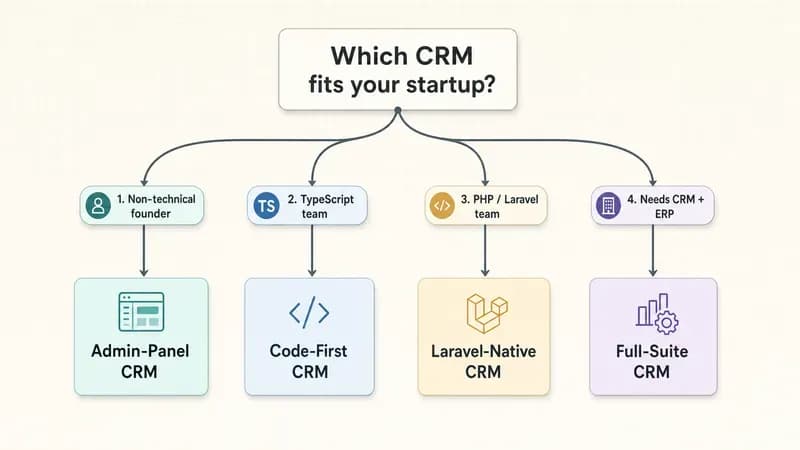
How do you read this table? Start with the customization ceiling column. If you have a non-technical founder, you want EspoCRM, because you'll never touch code. If you have a TypeScript team, Twenty lets you live in the stack you already know. Per Marmelab's open source CRM benchmark (February 2025), Twenty also ranked first among the eight CRMs they tested, which tracks with what we saw.
1. Twenty, best for a TypeScript team that wants to live in code
Twenty is the fastest-growing open source CRM on GitHub right now, and it's built for developers who don't want to learn PHP to customize their tools.
Why it stands out:
- Modern stack: TypeScript, React, and NestJS, so a typical startup web team can read and extend it day one. No context switch into an unfamiliar language.
- Both a GraphQL API and a REST API out of the box, which makes it the cleanest of the seven to integrate with. If you want to connect a voice agent to your CRM or pipe in form data, the GraphQL schema does most of the work for you.
- Y Combinator-backed (S23), ~45.4K stars per their GitHub repo as of June 2026, and 300+ contributors, so this is an active project, not a weekend hobby.
Self-host reality: medium difficulty. Docker Compose gets you running, but it pulls several services (Postgres, Redis, a worker) and wants ~2GB RAM minimum to behave.
Not for: a non-technical founder. Twenty assumes you're comfortable in a terminal and a codebase. If nobody on your team writes TypeScript, you'll feel it.
2. EspoCRM, best for a PHP shop or a founder who wants zero code
EspoCRM is the answer for anyone who wants a real CRM without ever opening an editor. Roughly 90% of what you'd normally customize, fields, layouts, entities, workflows, you do from the admin panel.
Why it stands out:
- No-code customization that goes deep. Per EspoCRM's official docs, you can create new entities, relationships, and full workflows through the UI. Most teams never fork it.
- Mature and stable. It's been shipping since 2014, runs on plain PHP and MySQL, and installs on cheap shared hosting if you want it to.
- A clean REST API for when you do need to push data in programmatically, plus a formula engine for logic without code.
Self-host reality: easy. This was the lightest install of the seven for us. Standard LAMP stack, minimal moving parts.
Not for: a team that wants a modern JavaScript codebase to hack on. EspoCRM's strength is the admin panel, not the source. If you want to live in code, Twenty or Krayin fit better.
3. SuiteCRM, best when you need the full Salesforce-style suite
SuiteCRM is the most feature-complete CRM on this list. It's a fork of the old SugarCRM Community Edition, and it ships nearly everything a sales team could ask for: quotes, contracts, workflows, reporting, a customer portal.
Why it stands out:
- Feature depth that rivals paid CRMs. If your requirement is "we need what Salesforce does but self-hosted," this is the closest match among open source options.
- A V8 REST API and a built-in "Studio" module for editing modules and fields without code, so it sits between no-code and code-required.
- Large, long-running community with millions of downloads, which means plenty of documentation and third-party modules.
Self-host reality: hard. All that feature surface means a heavier app. Budget more RAM, expect a slower first boot, and plan for a real upgrade process.
Not for: a lean startup that needs contacts and a pipeline. SuiteCRM is a lot of CRM. If you only need the basics, you'll spend your first week turning features off.
4. Odoo CRM, best when you want CRM and ERP in one
Odoo isn't really a CRM. It's a full business suite (accounting, inventory, HR, e-commerce) with a strong CRM module bolted into it. If you can see yourself needing ERP within a year, starting here saves a migration later.
Why it stands out:
- One platform for CRM plus everything else. The CRM, invoicing, and inventory all share one database, so your sales-to-cash flow lives in a single system.
- ~52K GitHub stars per their repo (June 2026), making it the most-starred project on this list and one of the largest open source business apps anywhere.
- Python-based with a module system, so a Python team can build custom apps on top. You can automate CRM workflows with n8n against its JSON-RPC API when you outgrow the built-in automation.
Self-host reality: hard. The Community edition is genuinely free, but the install is the heaviest here, and Odoo nudges you toward paid Enterprise features constantly.
Not for: a team that just wants a focused CRM. Odoo's breadth is overkill if sales tracking is all you need, and the upsell pressure toward Enterprise gets tiring.
5. Krayin, best for a Laravel team that cares about license freedom
Krayin is the pick when the MIT license matters to you. It's the only tool in the ranked seven you can fork, modify, and ship inside a commercial product with essentially no strings attached.
Why it stands out:
- MIT-licensed, which is the most permissive option on this list. If you plan to build a product on top of your CRM and sell it, this removes the AGPL headache entirely (more on that below).
- Built on Laravel, so any PHP/Laravel shop is instantly productive. It uses the same patterns your team already writes.
- ~22.7K stars per their repo (June 2026) and an active package ecosystem for extensions.
Self-host reality: medium. Standard Laravel deployment, Composer, a database, and a queue worker if you want background jobs.
Not for: a non-Laravel team. Outside the Laravel world, Krayin's appeal drops fast. The license is great, but the codebase only sings if you live in Laravel.
6. Dolibarr, best for an SMB that wants CRM plus light ERP modules
Dolibarr is a modular CRM and ERP for small businesses. You enable only the modules you need (CRM, invoicing, stock, projects) and leave the rest off. It's pragmatic rather than flashy.
Why it stands out:
- Truly modular, so you start tiny and grow into ERP features without switching tools.
- GPL-3.0, PHP/MySQL, and famously easy to install, including on shared hosting via one-click installers.
- A REST API and a huge add-on marketplace for extending without writing core code.
Self-host reality: medium. Light enough for a small VPS, with an installer that holds your hand.
Not for: a developer who wants a clean, modern codebase. Dolibarr is functional and battle-tested, but its UI and code feel their age compared to Twenty.
7. BottleCRM, best for a lean startup that wants free and simple
BottleCRM is the newest and smallest project here, built specifically for startups that want a free, self-hostable CRM without the weight of the bigger suites. It's Python/Django, focused on the CRM basics.
Why it stands out:
- Startup-first by design: contacts, accounts, leads, opportunities, and not much else to get in your way.
- Free to self-host with no per-seat pricing, which is the whole pitch.
- A Django codebase that's approachable for any Python team, and a REST API for integrations like feeding an AI SDR pipeline into your CRM.
Self-host reality: medium. A standard Django deploy, so nothing exotic, but expect to do some manual setup.
Not for: a team that needs depth. BottleCRM is intentionally minimal. The moment you need advanced workflows or reporting, you'll outgrow it, and you should pick something heavier from the start.
How Hard Is It to Self-Host One? What Actually Broke When We Tried This
Self-hosting an open source CRM ranges from a 5-minute job to a half-hour of debugging, depending on the tool. The lightweight PHP options install in minutes. The modern multi-service apps like Twenty take longer because they pull a database, a cache, and a worker, and any one of them can stall on first boot.
Here's our actual run. In June 2026 we deployed Twenty (v0.42.x) and EspoCRM (v8.x) on a single Hetzner CX22 VPS, 2 vCPU / 4GB RAM, which runs €4.59/mo per Hetzner's pricing (roughly $24/mo once you add a backup and the VAT we paid). Both went up via Docker Compose.
EspoCRM was the easy one. Up and serving the install wizard in under 5 minutes, sitting comfortably around 400MB RAM at idle.
Twenty was the interesting one. First boot took about 12 minutes, and the database migration step choked once on a Postgres connection timeout, the container came up before Postgres was ready to accept connections. The fix was bumping the healthcheck so the app waited for the database. After that, clean boot. It settled around 1.8GB RAM with all services running, which is why we'd warn against trying to squeeze Twenty onto a 2GB box.
Here's the minimal Twenty start, the one code block in this post:
# Twenty CRM via Docker Compose (June 2026, v0.42.x)
git clone https://github.com/twentyhq/twenty.git
cd twenty/packages/twenty-docker
cp .env.example .env

# Set a real APP_SECRET before first boot, or migrations fail:
#   openssl rand -base64 32  ->  paste into APP_SECRET in .env
# And make sure the app healthcheck waits on Postgres readiness.

docker compose up -d
# First boot ~12 min while migrations run. Watch logs:
docker compose logs -f server
The takeaway: Twenty took about 12 minutes and one timeout fix to boot on a $24 VPS; EspoCRM was live in under 5. Your stack choice is also an ops choice. A modern multi-service CRM buys you a great developer experience and costs you more setup and RAM. A classic PHP app costs you less of both and gives you a less modern codebase.
What Each License Actually Means for Your Startup
The license isn't a footnote. It decides what you're legally allowed to do once you start modifying the code, and the gap between AGPL and MIT is the one that bites startups who plan to commercialize. Here's the plain-English version.
| License | Self-host internally | Build a product on top and sell it |
|---|---|---|
| AGPL-3.0 (Twenty, SuiteCRM) | Totally fine. Run it, change it, no obligations to anyone. | The network clause kicks in. Offer it as a hosted service to others and you may have to publish your changes. |
| MIT (Krayin) | Totally fine. Do whatever you want. | Also fine. Fork it, sell it, keep your changes private. The most permissive option. |
| GPL / LGPL-3.0 (EspoCRM, Odoo, Dolibarr) | Totally fine for internal use. | Distributing modified code triggers copyleft, but LGPL is friendlier for linking than full GPL. |
The one to understand is AGPL's network clause. Per the OSI's AGPL-3.0 text, if you modify an AGPL CRM and offer it to users over a network (say, as a paid hosted product), you're obligated to make your modified source available to those users. For internal use, this never triggers. AGPL is fine if you self-host internally; it gets serious the moment you turn the CRM into a product you sell.
So the rule of thumb: running any of these inside your own company? Pick on stack and features, ignore the license. Planning to build a commercial SaaS on top of one? MIT (Krayin) is the safe default, and AGPL (Twenty) needs a real conversation with a lawyer first.
Is Open Source CRM Really Free? The Hidden Costs of Self-Hosting
Open source CRM software is free to license, not free to run. You pay nothing for the software, then you pay for the server, the maintenance hours, the backups, and the fact that you are now the support team. For a small startup, the total is still far below per-seat SaaS, but it isn't zero.
Let's put real numbers on it. The license is $0. The server is $20-50/mo for a VPS that can handle a small team (our Twenty box was ~$24/mo). Then come the costs nobody quotes you:
- Maintenance: a few hours a month for upgrades, patches, and the occasional thing that breaks after an update. Call it 2-4 hours.
- Backups: automated, tested, and stored somewhere off the box. A few dollars a month plus the setup time.
- Security: you patch it, not a vendor. Miss a critical update and your customer data is exposed.
- Support: there's no helpdesk. When it goes down at 11pm, that's your problem.
Now compare. A 5-person team on a paid CRM at $30/seat/month is $150/mo, $1,800/year, forever, and it climbs as you grow. Self-hosting the same team is maybe $24/mo of server plus a handful of engineering hours. The math favors self-hosting hard, right up until those engineering hours get expensive. This is exactly the build-vs-buy math every startup eventually runs: cheap infrastructure plus your team's time versus a predictable monthly bill and zero ops.
For a developer-heavy startup with spare ops capacity, free open source CRM software is a genuine win. For a sales team with no engineer to spare, those "free" hours can quietly cost more than the SaaS seat.
When Self-Hosted CRM Stops Making Sense
Self-hosting is a great deal until the maintenance hours cost more than a managed seat. Knowing where that line is before you cross it saves you a painful, mid-growth migration. Here are the signals that you've outgrown it.
You hit the tipping point when:
- Your team scales past ~20-30 active users and the ops burden grows faster than the savings.
- Nobody owns the deployment anymore. The engineer who set it up left, and now it's a server nobody wants to touch.
- You need features none of these ship: advanced forecasting, native dialer, deep marketing automation, enterprise SSO.
- Compliance overhead (SOC 2, HIPAA, strict data-residency audits) makes "we host it ourselves" a liability instead of an asset.
At that point your real options are a managed CRM (someone else handles ops, you pay per seat) or a custom build (you own a CRM shaped exactly to your workflow, and you own all of it). Both are legitimate. The wrong move is white-knuckling a self-hosted setup that's quietly costing more in engineering time than a managed seat would.
That's the part most roundups skip because it doesn't sell anything, so here's our honest funnel: this is what we do at Techsy. We help startups choose or build the right CRM stack, whether that's picking from the seven above, extending one, or building a custom system when none of them fit. If you're staring at that tipping point, talk to Techsy.
Frequently Asked Questions
Do I need to know how to code to run a self-hosted CRM?
For day-to-day customization, not always. EspoCRM lets you build entities, fields, and workflows from the admin panel. But to deploy and maintain any self-hosted CRM, someone needs basic ops skills: Docker, backups, updates. Extending the code (like adding features to Twenty) does need a developer. So no for EspoCRM's UI, yes for keeping any of them online.
Is Twenty CRM good? Is it better than EspoCRM?
Twenty is genuinely good and the fastest-growing open source CRM on GitHub, with ~45.4K stars as of June 2026. Whether it beats EspoCRM depends on your team. Twenty wins for a code-first TypeScript team that extends the CRM programmatically. EspoCRM wins for a non-technical founder who wants deep customization without code.
Can I migrate my existing CRM data to an open source CRM?
Yes. Every tool here supports CSV import for contacts, leads, and deals, which covers most basic migrations. For larger moves, each one offers a REST API (and Twenty adds GraphQL) so you can script the import field by field. The harder part is usually mapping old custom fields and relationships, not moving the raw records.
Which open source CRMs have a REST or GraphQL API?
All seven offer a REST API. Twenty is the standout because it ships both GraphQL and REST, making it the cleanest to integrate with modern apps. Odoo uses XML-RPC and JSON-RPC instead of plain REST, while EspoCRM, SuiteCRM, Krayin, Dolibarr, and BottleCRM expose conventional REST endpoints. If GraphQL matters, Twenty is the clear pick.
Open source CRM vs Salesforce, is it worth it for a startup?
For most early startups, yes. A self-hosted open source CRM costs ~$24/month of server versus hundreds per month for Salesforce seats, and you own your data with no vendor lock-in. The trade is convenience: Salesforce is managed and polished out of the box, while open source means you handle hosting and maintenance. With engineering capacity, cost and control usually win.