Connecting AI Voice Agents to Your CRM: HubSpot, Salesforce & Pipedrive (With the Webhook Code)
On a Vapi build we shipped earlier this year, the voice agent → our internal lookup API → HubSpot contact read clocked 410ms at p50 and 1,240ms at p95. That number is the whole reason this post exists. Voice agent CRM integration lives or dies on a clock the caller controls. Wire it the way a Zapier sync works and the agent goes silent mid-sentence while a webhook crawls. The fix isn't more API calls. It's two patterns, one timeout, and a fallback line. Here's all three, with code you can deploy.
Most guides on this topic teach the idea and then sell you their product. None ship the handler. We're going the other way.
Key Takeaways
- Voice agents connect to a CRM two ways: function calling for live reads during the call, webhooks for post-call writes.
- Reads during a call need a 5-second budget plus a spoken fallback line so the caller never hears dead air.
- Map call data to CRM fields with an idempotency key so retried webhooks don't create duplicate records.
- Pipedrive has no webhook for custom-field changes, you poll
dealFieldson a schedule instead.
What "Voice Agent CRM Integration" Actually Means (2 Methods, Not One)
Voice agent CRM integration connects a voice agent to your CRM in two distinct ways: function calling for live data reads while the caller is on the line, and webhooks for writing the call result back after they hang up. The live read personalizes the conversation; the post-call write logs what happened. They run on different clocks and fail in different ways.
Here's the one-sentence mental model: function calling is the voice agent asking your CRM a question mid-sentence; a webhook is the agent filing its report after it hangs up.
Function calling: reading data live
Function calling is how an LLM pauses generating text, calls an external tool you defined, and folds the result back into what it says next. For a voice agent, that tool is "look up this caller in the CRM." The model decides it needs the data, your server fetches it, and the agent greets the caller by name with their plan tier. If you want the deeper mechanics, our function calling guide breaks down the tool-definition schema. The catch: this happens live, so it's racing the caller's patience.
Webhooks: writing data after
A webhook is a POST request your server receives when something finishes. For voice agents, the big one is the end-of-call event: the platform sends you the transcript, summary, disposition, and recording URL the moment the call ends. You take that payload and write it into the CRM as an Activity, then move the deal stage. No clock pressure here. The caller is gone. You can retry, queue, and reconcile.
Most production integrations use both. Read live, write after.
The Architecture: What Happens on an Inbound Call, End to End
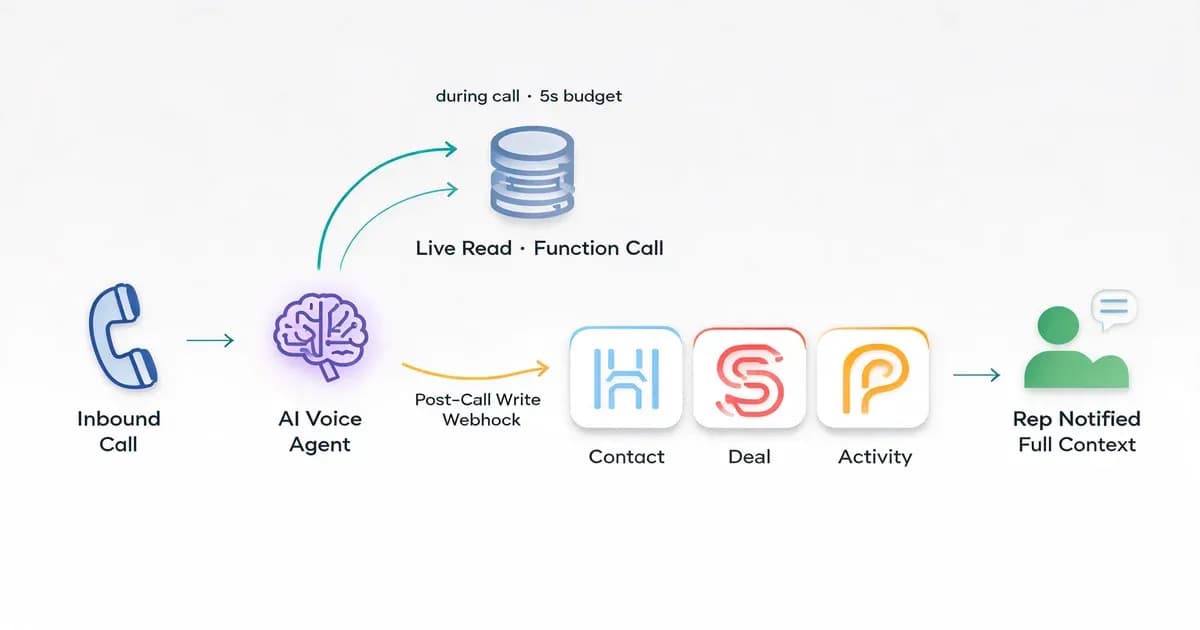
A voice agent CRM integration follows a fixed five-step lifecycle on every inbound call. The call arrives, the agent reads the caller's record live via a function call, the conversation happens, an end-of-call webhook fires, and your handler writes the result to the CRM and notifies a human if needed. Every code example in this post hangs off one of those five steps.
Here's the flow, step by step:
- Inbound call arrives. The platform (Vapi, Retell, or your own voice agent stack) answers and identifies the caller by phone number.
- Live lookup (function call). The agent calls your lookup tool, which queries the CRM and returns the contact, deal stage, and recent context.
- Conversation. The agent talks, optionally calling more tools (check appointment slots, look up an order).
- End-of-call webhook. The call ends, the platform POSTs an end-of-call report to your server.
- CRM write + handoff. Your handler logs the Activity, sets the disposition, moves the deal, and creates a task for the human rep with full context.
The hero diagram above maps to this exactly: one inbound arrow, a split into "live read" and "post-call write," three CRM destination cards, and a handoff node. Keep that picture in your head. Everything below is just filling in the boxes.
Reading CRM Data During the Call (and Why You Have a 5-Second Budget)
Yes, a voice agent can pull CRM data during a call. It uses a function call that hits your lookup endpoint and returns before the agent's next sentence. The constraint is time. Per Vapi's server events docs, function tool calls run against a timeout, and on a live call your real ceiling is the caller's patience, not the API's. Budget five seconds and have a fallback.
Here's the part nobody on the SERP measures. On our Vapi → internal lookup API → HubSpot contact-read path, we logged 410ms p50 and 1,240ms p95 round-trip across a few thousand calls. Most reads are fast. But the p95 tail (HubSpot rate-limit backoff, a cold lambda, a slow association fetch) is where calls go quiet. That tail is why we set the function-call tool timeout to 5 seconds: comfortably above p95, comfortably below the point where a human says "hello? are you there?"
And here's the rule that matters: if your CRM lookup takes longer than the caller's patience, the agent should say something. Never go silent. Dead air is the fastest way to lose a call. On our builds the agent speaks a fallback line the instant the tool times out: "Let me pull that up, bear with me one sec." The caller hears a human-sounding pause, not a broken bot.
This is the function-call tool definition we ship for a live CRM lookup:
{
  "type": "function",
  "function": {
    "name": "lookup_crm_contact",
    "description": "Look up the caller in the CRM by phone number before greeting them. Returns name, plan, and open deal stage.",
    "parameters": {
      "type": "object",
      "properties": {
        "phone": {
          "type": "string",
          "description": "Caller phone number in E.164 format"
        }
      },
      "required": ["phone"]
    }
  },
  "server": {
    "url": "https://api.yourdomain.com/voice/crm-lookup",
    "timeoutSeconds": 5
  }
}
Two things make this voice-safe. The timeoutSeconds: 5 ceiling stops the agent waiting forever. And the server.url points at your endpoint, not the CRM directly, so you control caching, retries, and the shape of what comes back. In our experience, putting an internal API between the agent and the CRM is the single best decision you can make; it's where the fallback logic and the field mapping live.
Writing Back After the Call: Logging the Activity, Summary & Disposition
To log an AI voice agent call into a CRM, you receive the platform's end-of-call webhook, extract the transcript, summary, and disposition, then POST a call Activity to the CRM and set the lead status. There's no latency budget here (the caller's gone), so this is where you do the heavy writes, retries, and deal-stage moves you'd never risk mid-call.
The end-of-call payload (Vapi calls it the end-of-call-report event, per their server events docs) carries the transcript, a generated summary, the call outcome, the recording URL, and call duration. Your job is to map that into a CRM Activity and move the record forward.
Here's a runnable Node/TypeScript handler that receives the report and writes a HubSpot call engagement, then advances the deal stage. The POST /crm/v3/objects/calls endpoint and the association-to-contact pattern come straight from HubSpot's calls API guide:
import express from "express";

const app = express();
app.use(express.json());

const HUBSPOT_TOKEN = process.env.HUBSPOT_TOKEN!;
const seen = new Set<string>(); // swap for Redis/DB in production

app.post("/voice/end-of-call", async (req, res) => {
  const report = req.body.message; // Vapi end-of-call-report
  if (report?.type !== "end-of-call-report") return res.sendStatus(200);

  const key = report.call.id; // idempotency key (see field-mapping section)
  if (seen.has(key)) return res.sendStatus(200);
  seen.add(key);

  const { contactId, dealId } = report.call.metadata; // set when call started

  // 1. Write the call Activity (engagement)
  await fetch("https://api.hubapi.com/crm/v3/objects/calls", {
    method: "POST",
    headers: {
      Authorization: `Bearer ${HUBSPOT_TOKEN}`,
      "Content-Type": "application/json",
    },
    body: JSON.stringify({
      properties: {
        hs_call_title: "AI Voice Agent Call",
        hs_call_body: report.summary,
        hs_call_duration: String(report.durationMs ?? 0),
        hs_call_recording_url: report.recordingUrl ?? "",
        hs_call_status: "COMPLETED",
        hs_timestamp: Date.now(),
      },
      associations: [
        {
          to: { id: contactId },
          types: [{ associationCategory: "HUBSPOT_DEFINED", associationTypeId: 194 }],
        },
      ],
    }),
  });

  // 2. Move the deal stage based on disposition
  if (dealId && report.analysis?.disposition === "qualified") {
    await fetch(`https://api.hubapi.com/crm/v3/objects/deals/${dealId}`, {
      method: "PATCH",
      headers: {
        Authorization: `Bearer ${HUBSPOT_TOKEN}`,
        "Content-Type": "application/json",
      },
      body: JSON.stringify({ properties: { dealstage: "qualifiedtobuy" } }),
    });
  }

  res.sendStatus(200);
});

app.listen(3000);
That's the payoff the H1 promised: a deployable handler, not a description of one. Don't want to hand-code and host this? A no-code workflow alternative like n8n can receive the same webhook and write to the CRM with visual nodes, at the cost of some control over retries and error handling.
Mapping Call Data to CRM Fields (Without Creating Duplicates)
Field mapping connects each piece of call data to a specific CRM object and field: caller intent to a deal property, disposition to lead status, summary to the Activity body. Two production gotchas bite here: formatting data for speech before the agent reads it aloud, and using an idempotency key so a retried webhook doesn't create a second record for the same call.
On our builds we keep the mapping in one config object so non-engineers can edit it without touching the handler. Here's the shape of a real one:
| Call data | CRM object.field | Type | Example |
|---|---|---|---|
| caller intent | deal.intent_summary | string | "Wants Pro plan demo" |
| disposition | contact.lead_status | enum | "qualified" |
| call summary | call.hs_call_body | string | "Discussed pricing, booked demo" |
| recording URL | call.hs_call_recording_url | url | "https://..." |
| duration (ms) | call.hs_call_duration | number | 184000 |
| qualified flag | deal.dealstage | enum | "qualifiedtobuy" |
First gotcha: speech-tuned formatting. A voice agent that reads raw JSON to a caller sounds broken. Format CRM data into a sentence before it hits the TTS. Don't return {"plan":"pro","renewed":"2026-03"} to the model. Return "they're on the Pro plan, renewed last March" so the agent says it naturally.
Second gotcha: idempotency. Voice platforms retry webhooks. If your handler isn't idempotent, the same call gets logged twice and you get duplicate records. Use the call ID as a key:
const key = report.call.id;
if (await store.has(key)) return res.sendStatus(200); // already processed
await store.add(key);
// ...do the CRM write
In production, that store is Redis or a database row with a unique constraint on the call ID, not an in-memory Set. The Set above works for a demo; it loses its memory every time the server restarts.
Before the per-CRM sections, here's how the three platforms differ on the things that actually matter for voice:
| HubSpot | Salesforce | Pipedrive | |
|---|---|---|---|
| Activity/call object | engagement / crm/v3/objects/calls | Task / Activity | Activity |
| Deal object | Deal | Opportunity | Deal |
| Auth | OAuth / private app token | OAuth | API token / OAuth |
| Post-call write | engagement API | REST / Composite | Activities API |
| Custom-field webhook | yes | yes | no, poll dealFields |
HubSpot Integration (Vapi → HubSpot, Step by Step)
For a Vapi → HubSpot integration, you map the live read to a Contact lookup and the post-call write to a call engagement associated with that Contact and its Deal. HubSpot's object model is Contact, Deal, and engagement (the Activity), and the POST /crm/v3/objects/calls endpoint is your write target. This is the vapi hubspot integration pattern most searchers actually want.
The live read is a function call to your lookup endpoint, which queries GET /crm/v3/objects/contacts/search by phone number and returns the Contact and any open Deal. The post-call write is the handler from the section above: it creates a call engagement and associates it to the Contact via association type 194, then PATCHes the Deal's dealstage.
The detail people miss: HubSpot associations are typed. A call-to-contact association uses a specific associationTypeId, and the call won't show on the contact's timeline if you skip it. HubSpot's calls API guide lists the IDs. For auth, a private app token is the fastest path for a single workspace; use OAuth if you're shipping this to multiple HubSpot accounts.
For the complete OAuth, custom-object, rate-limit, and retry implementation outside the voice-agent use case, use our HubSpot custom API integration guide.
Salesforce Integration (Objects, Auth, Real-Time Read/Write)
A Salesforce voice agent integration reads from Contact or Lead during the call and writes a Task (the Activity object) after it. The deal lives on Opportunity. The pattern is identical to HubSpot (live function-call read, post-call write), but the object names and the auth flow differ. You'll hit the REST API or the Composite API for the write.
For the live read, your lookup endpoint queries Salesforce with a SOQL request like SELECT Id, Name, Account.Name FROM Contact WHERE Phone = '...' and returns it to the agent. For the post-call write, you create a Task with WhoId set to the Contact/Lead and WhatId set to the Opportunity, per the Salesforce REST API guide:
await fetch(
  `${INSTANCE_URL}/services/data/v60.0/sobjects/Task`,
  {
    method: "POST",
    headers: {
      Authorization: `Bearer ${sfToken}`,
      "Content-Type": "application/json",
    },
    body: JSON.stringify({
      Subject: "AI Voice Agent Call",
      Description: report.summary,
      Status: "Completed",
      WhoId: contactId,      // Contact or Lead
      WhatId: opportunityId, // Opportunity
      CallDurationInSeconds: Math.round((report.durationMs ?? 0) / 1000),
    }),
  }
);
The voice-specific gotcha: Salesforce OAuth tokens expire, and you do not want a token refresh racing your 5-second live-read budget. Refresh tokens on a schedule in the background, cache the access token, and keep it warm so the live lookup never pays the refresh cost on a call.
Pipedrive Integration (the One Everyone Skips)
Pipedrive integration works through Persons, Deals, and Activities, and it has one real trap: there's no webhook for custom-field changes. If your voice agent writes a custom field and you need to react to that change elsewhere, you can't subscribe to it. Pipedrive won't webhook you when a custom field changes; you have to poll dealFields on a schedule. Almost nobody covers this, which is exactly why voice agent Pipedrive integrations break in subtle ways.
The voice lifecycle maps cleanly: the live read queries GET /persons/search by phone, the post-call write creates an Activity (POST /activities) linked to the Person and Deal, and qualification moves the Deal to the next stage. Standard stuff.
The trap is custom fields. In Pipedrive, custom fields are referenced by a 40-character hash key, not a human name, so your mapping config has to store something like dcf558aba6... instead of plan_tier. And per Pipedrive's DealFields docs, there's no change event for them. If a downstream system needs to know when the agent updated a custom field, you poll GET /dealFields and diff against your last snapshot on a cron. It's not elegant. It's just how Pipedrive works, and finding out at 2am in production is worse than reading it here.
The Lead-Qualification Handoff: Moving the Deal & Briefing the Human Rep
The handoff is where the voice agent moves the deal stage on qualification, creates a task for the human rep, and passes the transcript and summary so the rep walks in already knowing the context. Done right, the human picks up a warm, qualified lead with notes attached, not a cold name and a phone number.
Mechanically it's three writes, all in the post-call handler: PATCH the deal to the qualified stage, POST an Activity/Task assigned to the rep with a due date, and stuff the call summary into the task body. The rep opens their CRM, sees "AI qualified: wants Pro demo, budget confirmed, prefers Thursday," and calls back prepared.
This is also where platform choice shows. If you're still deciding which engine to build on, our breakdown of which platform handles CRM integration best compares how Vapi, Retell, and Bland expose call metadata and webhook events, and that difference directly shapes how clean your handoff can be.
Build It Yourself vs Hand It Off (Honest Hours)
Building a production-grade voice agent CRM integration runs roughly 20–40 hours per CRM, and the hours don't go where you'd guess. The happy-path read-and-write is maybe a day. The rest is auth token management, field mapping, fallback handling, idempotency, and testing against the CRM's rate limits and quirks. So how long does this actually take to build? Here's the honest breakdown.
On our builds, the time splits roughly like this: 3–5 hours on auth and token refresh, 4–6 on field mapping and the speech-tuned formatting layer, 4–8 on fallback and timeout handling, 3–5 on idempotency and dedupe, and the rest on testing against real call traffic. The first CRM teaches you the pattern; the second and third go faster, but each has its own trap, like Pipedrive's missing custom-field webhook.
Should you build or buy? If you've got a developer who can host a webhook endpoint and you're integrating one CRM, build it. This post is your blueprint. If you need three CRMs, multi-tenant auth, and someone on call when HubSpot rate-limits you at 9am, the math changes. We walk through that decision in detail in our DIY vs hire guide, and the pricing breakdown shows how much integration work adds to a build.
If you'd rather not maintain any of this, we do it for clients. Techsy ships production voice agents wired into your CRM: the function-call reads, the webhook write-backs, the fallback handling, all of it. No pressure either way; the code above is yours to run regardless.
Frequently Asked Questions
How do you integrate an AI voice agent with a CRM?
You connect the agent to the CRM two ways: function calling for live reads during the call, and a webhook for the post-call write. The agent looks up the caller live via your endpoint, then an end-of-call webhook fires your handler, which logs an Activity and updates the deal stage in the CRM.
Does Vapi integrate with HubSpot, Salesforce, and Pipedrive?
Vapi doesn't ship native connectors for all three, but it integrates with any of them through its function-call tools (live reads) and server URL webhooks (post-call writes). You point those at your own endpoint, which talks to HubSpot, Salesforce, or Pipedrive via their REST APIs. The pattern is identical across all three CRMs.
Can a voice agent update my CRM in real time during the call?
It can read in real time, but most production builds defer writes to after the call. Live reads need to be fast and are safe. Live writes risk latency and partial updates if the call drops mid-write. The standard pattern is read live, write on the end-of-call webhook, which protects the caller's experience.
Does Retell integrate with Pipedrive?
Retell integrates with Pipedrive through the same function-call and webhook pattern as any CRM, even where a native connector isn't listed. You wire Retell's call events to your endpoint, which uses Pipedrive's Activities and Deals APIs. Watch the custom-field limitation: Pipedrive has no webhook for custom-field changes, so you poll dealFields instead.
How long does it take to build a voice-agent CRM integration?
Roughly 20–40 hours per CRM for a production-grade build. The happy path is quick; the time goes into auth and token refresh, field mapping, fallback and timeout handling, idempotency, and testing against real call traffic. The first CRM is slowest because it teaches you the pattern. Each additional CRM still has its own quirks.