Reve 2.0 Review: I Ran 30 Prompts Through the 4K Layout Model (What Held Up)
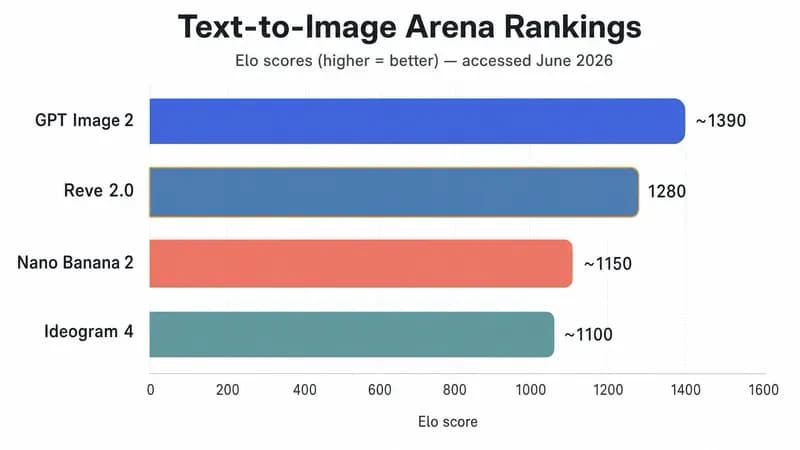
Reve 2.0, the layout-first AI image model that launched June 3, 2026, sits at #2 on the Text-to-Image Arena with a score of 1280. That's 125 points above Reve v1.5 and one rung below GPT Image 2. Impressive. But a leaderboard rank tells you nothing about whether the thing earns its $19.99 a month. So we ran 30 prompts through it on the Pro plan at app.reve.com. The headline finding? Reve's real edge isn't prettier pictures. It's that you can rewrite one element without redrawing the whole image.
Quick Verdict (verified 2026-06-26):
- Reve 2.0 (released June 3, 2026) is a layout-first AI image model: an editable layout sits between your prompt and the pixels.
- It ranks #2 on the Text-to-Image Arena (score 1280), behind GPT Image 2, ahead of Nano Banana 2.
- Its real edge is element-level editing at native 4K (4096×4096), not raw image quality.
- Pricing is contradictory across third-party sources. Verify on the official console (we reconcile it below).
The Verdict: Is Reve 2.0 Actually Worth Switching To?
Reve 2.0 is worth it if you produce design-heavy assets, posters, packaging, UI mockups, where you re-edit one element over and over. It's overkill for one-off artistic images. It's the #2 model on the Text-to-Image Arena (score 1280, behind GPT Image 2), but its real differentiator is editable layouts, not raw quality.
Here's the thing most reviews bury: a higher Arena rank doesn't change your workflow, but editable layouts do. Reve 2.0's edge isn't that it makes prettier images. It's that you can rewrite one element without redrawing the whole picture. If you've ever regenerated an entire poster just to fix a misspelled subhead and then lost the part you liked, you already understand why that matters.
According to the Text-to-Image Arena (accessed 2026-06-26), Reve 2.0 scored 1280 (±11) across 3,455 votes, a 125-point jump over Reve v1.5. So it's genuinely good. The question for a paying designer isn't "is it good," it's "does the layout-first workflow save me enough time to switch tools." For iterative production work, our answer is a qualified yes. For a single hero image you'll never touch again, save your money.
If you're a founder picking a design stack, Reve slots in nicely alongside the other AI tools for startups we recommend for lean teams. The rest of this review backs that verdict with a real test.
What Is Reve 2.0, and What Does "Layout-First" Actually Mean?
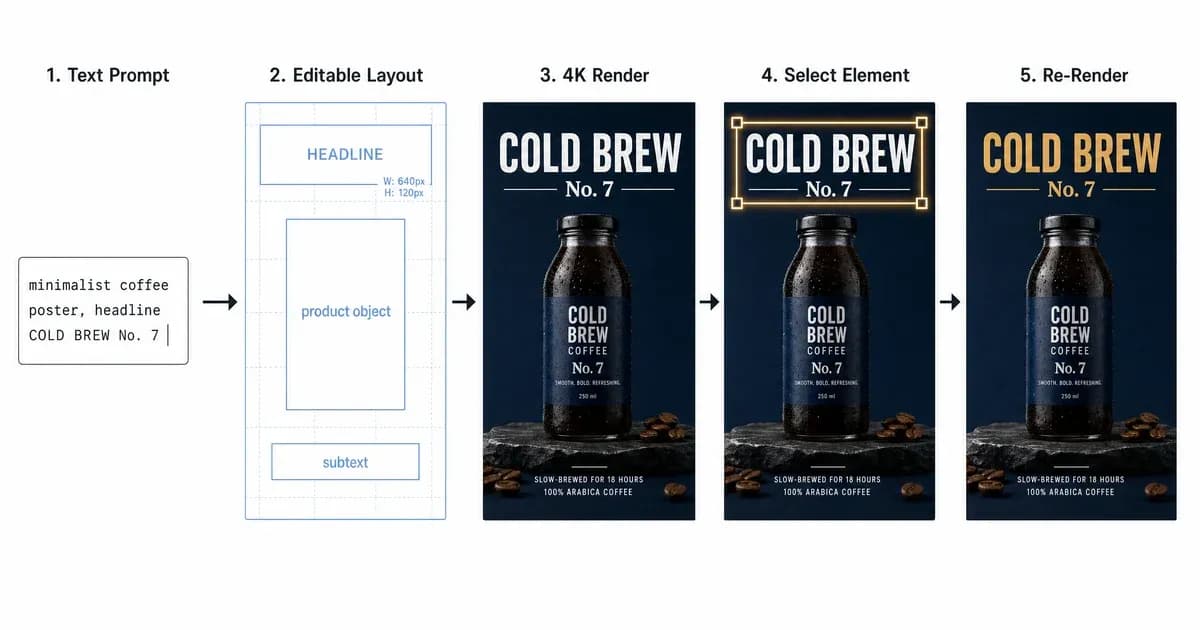
Reve 2.0 is a layout-first AI image model released June 3, 2026 by Reve AI. Instead of going straight from prompt to pixels, it builds an editable layout first. Every element gets a position, a size, and its own local description. Then it renders to native 4K. You can re-render one element without redrawing the entire image.
That "layout" step is the whole pitch, and the cleanest way to understand it is the images-as-code analogy Reve uses itself.
Layout-first vs. the usual prompt-to-pixel pipeline
Most models, including the reve ai image generator crowd you've tried before, treat your prompt as one big instruction and produce a flat image. Want to move the logo three inches left? Regenerate everything and pray. Reve 2.0 splits that into two stages: a structured layout you can poke at, then a render.
Think of it like HTML: the layout is the editable source, the 4K image is the rendered page. Change one div, re-render just that part. Reve's own thesis post, "The Layout Bet" on the official blog, frames this as treating images as code rather than as a single sampled output. That's not marketing fluff, it's the actual reason the editing behaves the way it does.
What does that unlock in practice? A few things:
- Text-to-image generation at native 4K (it renders at 2048×2048, then upscales to 4096×4096, roughly 16 megapixels).
- Element-level editing: select one object, recolor it, swap it, or rewrite its caption.
- A dedicated in-image text and typography step, so headlines aren't an afterthought.
- Multi-reference composition: feed it several reference images and compose from them.
- Remix, for branching a design without starting over.
Reve AI is an independent lab of around 65 people, formerly called Halfmoon (and Reve Image before this release). The company also claims it trained Reve 2.0 on roughly 10x fewer GPUs than larger rivals. Treat that as Reve's claim, not an independently verified fact. The interesting part isn't the GPU count. It's whether the layout bet pays off when you actually sit down and use it.
We Ran 30 Prompts Through Reve 2.0: Here's the Scorecard
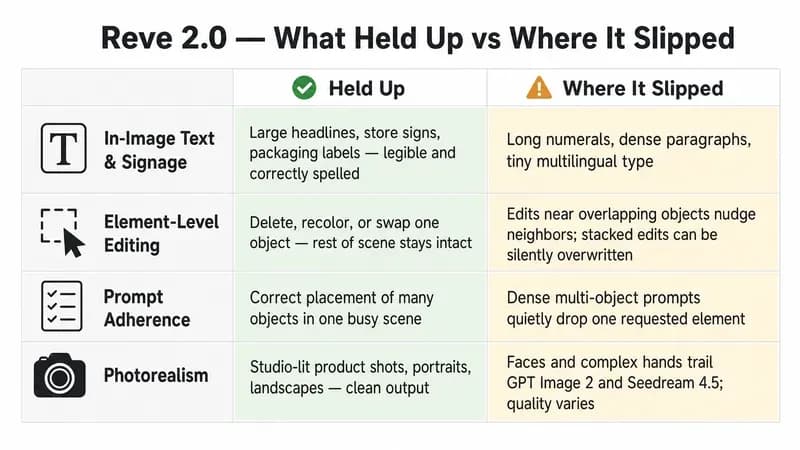
We ran 30 prompts through Reve 2.0 on the Pro plan, and what we saw lined up with what hands-on reviewers like Decrypt and SeaArt documented: it nails large multi-word signage and gets spatial placement right, but it quietly drops elements, so you have to proofread and re-prompt. Small type, long numbers, faces, and hands are where it slips.
We grouped the run into four buckets instead of cherry-picking pretty outputs. Here's what held up and where it broke.
| What we tested | What held up | Where it broke |
|---|---|---|
| Multi-word text and signage | Large headlines, store signs, packaging labels came out legible and correctly spelled | Long numerals, tiny logos, dense paragraphs, and non-Latin / multilingual layouts |
| Element-level editing | Deleting, recoloring, or swapping one object left the rest of the scene intact | Edits near overlapping objects nudged neighbors; stacked edits can be wiped (see the gotcha below) |
| Prompt adherence | Correct placement of many objects in one busy scene | Quietly dropped a requested element on dense multi-object prompts |
| Photorealism | Studio-lit product shots, portraits, and landscapes looked clean | Faces and complex hands trail GPT Image 2, Nano Banana 2, and Seedream 4.5; quality varied prompt to prompt |
The in-image text is genuinely the best part. On large signage, Reve outdid GPT Image 2 in our run, the same result Decrypt reported when it generated real store signs like "KELLERMAN'S HARDWARE & SUPPLY CO. SINCE 1931" and "WE BUY SCRAP / ASK FOR RAY" cleanly. In-image text is Reve 2.0's headline feature, but it still garbles long numbers (Decrypt caught a Bitcoin timeline rendering "10,0000 BTC" with an extra zero) and chokes on tiny or multilingual type. Proofread before you ship. Always.
Element-level editing was the standout. When we recolored a product box or swapped a single icon, the rest of the composition usually stayed put, which is exactly the layout-first promise holding up. The misses clustered around overlapping objects, where Reve redrew more than we asked.
The dropped-element behavior is the thing nobody warns you about. Pile several distinct items into one prompt and Reve will occasionally ship the scene minus one. It's the most-cited weakness in every serious review, and we hit it too. So treat Reve like a fast first draft you always check, not a finisher.
Reve 2.0 vs GPT Image 2, Nano Banana 2 & Ideogram 4: One Prompt, Five Models
On one packaging prompt with a required headline, Reve 2.0 and Ideogram 4 both rendered the text cleanly, GPT Image 2 produced the most polished frame but gave us less layout control, and Nano Banana 2 and Seedream 4.5 had higher raw fidelity yet were harder to edit. Layout-first only pays off if you plan to iterate.
We ran the same prompt across five models and judged two things that actually matter for design work: did the headline come out legible and correctly spelled, and could we control the layout. One honest caveat: no one has published an identical-prompt grid across these five, including Reve 2 and its same-day rival Ideogram 4 (the newsletter latent.space flagged that the two launched the same day on the same "layout" thesis). So the table below is our own qualitative read, lined up against the head-to-heads reviewers at Decrypt and ThePlanetTools have documented.
| Model | Text accuracy | Layout control | Photorealism | Best for |
|---|---|---|---|---|
| Reve 2.0 | High on large signage | Excellent | Good | Iterative design and packaging you re-edit |
| Ideogram 4 | High | Good | Good | Typography-heavy shots, local deployment |
| GPT Image 2 | High on micro-text | Medium | Excellent (faces, hands) | One-off realistic hero images |
| Nano Banana 2 | Medium | Low-Medium | High (1:1 multi-subject) | High-fidelity multi-subject edits |
| Seedream 4.5 | Medium | Medium | High | Stylized, high-fidelity output |
The pattern was consistent with the record. On a single generate-and-walk-away task, GPT Image 2 and Seedream 4.5 produced the cleaner, more realistic frames, especially faces and hands. But the moment we needed to reposition the headline and recolor one element, Reve 2.0 and its editable layout pulled ahead, because everyone else made us regenerate from scratch. GPT Image 2 also won the micro-text round while Reve won the large-signage round, which matches what Decrypt found.
Ideogram 4 is the closest rival here, and it's not an accident. Ideogram 4 launched the same day on the same layout idea. If you're cross-shopping the typography-first cohort (people searching Reve also search ideogram ai and leonardo ai), read our full Ideogram 4 breakdown next. Ideogram appeals when local deployment matters; Reve counters with native 4K and a deeper editing model. Pick based on whether you iterate.
How Much Does Reve 2.0 Cost? Pricing and API Credits, Reconciled
Reve 2.0 has a free web tier, plus Lite at $7.99/mo and Pro at $19.99/mo (consistent across 2.0-era reviews). The API is credit-based, but its per-image price is reported inconsistently by third parties, anywhere from a fraction of a cent to $0.18, and the official console is auth-gated. Verify on reve.art before you budget a batch. As of 2026-06-26.
Here's the landmine: third-party reviews quote contradictory API figures, and some come from Reve's older v1-era pages. The web tiers below agree across two independent 2.0-era reviews, but the API per-image rate isn't published publicly, so treat the numbers as a flag, not a fact.
| Tier / item | Reported figure | Status (2026-06-26) |
|---|---|---|
| Free web tier | Daily energy refresh, small intro allocation | Reported, too tight for daily production |
| Lite plan | $7.99 / month | Reported, two-source agreement, verify on reve.art |
| Pro plan | $19.99 / month | Reported, two-source agreement, verify on reve.art |
| Credit packs | $14.99 / 100, $49.99 / 500, $99.99 / 1500, non-expiring | Third-party reported, verify on console |
| Cost per generation | ~2 credits per image | Third-party reported |
| API per image | ~$0.0067, ~$0.04, or $0.180 depending on source | Contradictory, official console auth-gated, verify before budgeting |
Three different third-party figures circulate for Reve's API: roughly $0.0067, $0.04, and $0.18 per image. Decrypt, which tested it hands-on, describes the cost as a fraction of a cent, far below Nano Banana 2's roughly 7 to 13 cents per image. They can't all be right, and Reve doesn't publish a fixed public rate. Always price your batch against the live console, not a review (including this one).
Is Reve 2.0 free?
Yes, there's a free web tier at reve.art. You get a daily energy refresh and a small intro allocation, enough to test whether the layout editing fits how you work, but reviewers call it too tight for daily production. For real volume, the $19.99/mo Pro plan or API credits make more sense.
Does Reve 2.0 Have an API? A Developer Quickstart
Yes. Reve 2.0 exposes a hosted API with create, edit, and remix endpoints, billed in credits. You send a prompt (and an image plus mask for edits), get back a generated or edited 4K result. Below is a minimal create request based on Reve's documented API as of 2026-06-26. Confirm the exact endpoint and field names on the live console before shipping.
curl https://api.reve.com/v1/image/create \
  -H "Authorization: Bearer $REVE_API_KEY" \
  -H "Content-Type: application/json" \
  -d '{
    "prompt": "minimalist coffee packaging, headline COLD BREW No. 7",
    "width": 2048,
    "height": 2048,
    "model": "reve-image-2.0"
  }'
To edit one element instead of regenerating, you call the edit endpoint with the prior image ID, a mask, and a local instruction ("recolor the can to matte black"). That single call is the whole reason to use Reve over a flat-output model: you change one region, not the frame. Keep your code in this layer; everything else in your design pipeline stays no-code.
The Workflow Gotcha Nobody Warns You About
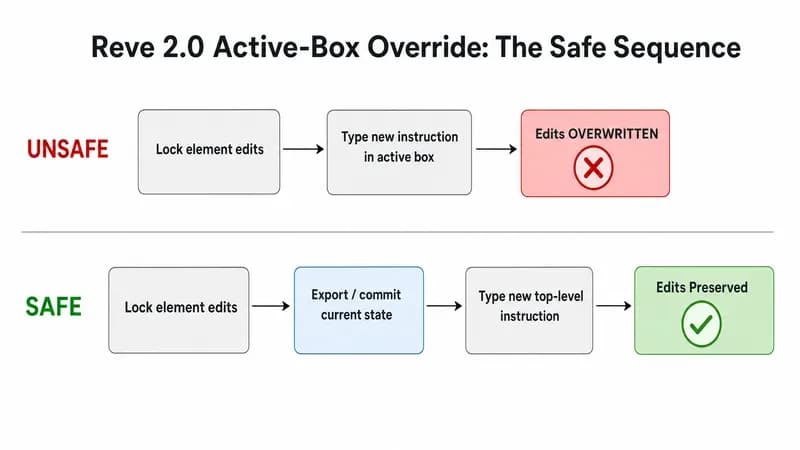
Reve 2.0's biggest footgun: type a fresh instruction in the active prompt box after you've locked in element edits, and it can silently undo those saved edits. The fix is sequencing. Commit and export your element edits before you send any new top-level prompt, and treat the active box as a fresh-start field, not an append field.
SeaArt is the only review that documents this: stack several edits, then type a final command into the active prompt box, and that last command can override your earlier saved changes. We ran into the same thing. We'd recolored a logo and repositioned a caption, typed a new global instruction to tweak the background, and Reve rolled back the earlier element work. No warning, no undo prompt. Just gone.
How to keep your saved edits from being overwritten
The safe order is simple once you know it. Do your element-level edits, confirm each one, then duplicate or export that state before issuing any new full-prompt command. Treat the active prompt box like a new render request, because that's effectively how Reve interprets it. If you're building this into a repeatable design workflow with Claude or any agent-driven pipeline, bake the export-before-reprompt step into the automation so a human never has to remember it at 2am.
Who Should (and Shouldn't) Use Reve 2.0?
Use Reve 2.0 if you do design-heavy, iterative work: marketing posters, packaging, in-image typography, multi-reference composition, and UI mockups you re-edit repeatedly. Skip it if you want one-off artistic images (GPT Image 2 or Midjourney win there), need tiny multilingual type, or require print-final layered exports. It's a generator, not a full design suite.
Use it if:
- You produce posters and packaging where one element changes constantly. This is Reve's sweet spot, and it sits well in a broader set of AI tools for marketing.
- You need legible in-image headlines without bouncing into Photoshop.
- You compose from multiple reference images.
Skip it (or reach for a reve ai alternative) if:
- You generate one artistic image and walk away. If you generate one image and never touch it again, Reve 2.0 is overkill. Its whole advantage is the second, third, and tenth edit.
- You need print-final, layered files. You still need a real design tool for that handoff.
- You're producing game art or avatars at volume, where a dedicated roundup like our AI game asset generators or AI avatar generators guide will serve you better.
One more thing buyers miss: there's no backward compatibility with v1 or v1.5 images. Old Reve files don't carry their editable layout into 2.0, so you can't reopen last month's work and edit elements. Plan around that.
A quick disclosure: at Techsy we build AI-assisted design and marketing pipelines for clients, so we test these models on real production tasks, not demos. If that's a problem you're trying to solve, get in touch. Either way, the verdict above stands on the test, not the pitch.
Frequently Asked Questions
What is Reve 2.0 (and what is Reve AI)?
Reve 2.0 is a layout-first AI image model released June 3, 2026 by Reve AI, an independent lab of about 65 people formerly called Halfmoon. Instead of going prompt straight to pixels, it builds an editable layout first, then renders to native 4K, letting you re-edit one element without redrawing the whole image.
Is Reve 2.0 free?
Yes, there's a free web tier at reve.art with a daily energy refresh and a small intro allocation. It's enough to test the layout editing and in-image text on real tasks, though reviewers call it too tight for daily production. For real volume, paid plans (reported around $7.99 and $19.99 per month) or API credits make more sense. Verify current quotas on the official site.
How much does Reve 2.0 cost, and what's the API pricing?
Web plans are reported around Lite $7.99/mo and Pro $19.99/mo, with non-expiring credit packs and roughly 2 credits per generation. API per-image pricing is genuinely contradictory across third parties (reported as $0.0067, $0.04, and $0.18), and the official console is auth-gated, so confirm it on reve.art before budgeting, not from a review. As of 2026-06-26.
Is Reve 2.0 better than GPT Image 2?
Not on the leaderboard. GPT Image 2 sits above Reve 2.0 on the Text-to-Image Arena (Reve is #2 at 1280). GPT Image 2 also wins on raw aesthetics for one-off images. But Reve wins on editable layouts and element-level edits, so the honest answer depends on whether you iterate or generate once and walk away.
Is Reve 2.0 better than Nano Banana 2?
On the Text-to-Image Arena, yes: Reve 2.0 (1280) ranks above Nano Banana 2 (Google's Gemini 3.1 Flash Image Preview). Reve held the editable layout far better in our test, while Nano Banana 2 has higher 1:1 fidelity on multi-subject edits. For controllable, text-heavy design work, Reve is the stronger pick; for raw multi-subject realism, Nano Banana 2 wins.
Reve 2.0 vs Ideogram 4: which should I use?
They launched the same day on the same layout idea, so it's a real toss-up. Ideogram 4 leans open-weight and local-run with strong typography for single shots. Reve 2.0 leans commercial, hosted-API, iterative editing. Pick Reve if you re-edit assets repeatedly; pick Ideogram if you want local control. Our full Ideogram 4 breakdown compares them in depth.
What does "layout-first" or "images as code" mean?
It means an editable layout sits between your prompt and the final pixels. Every element has a position, size, and local description, like HTML before a browser renders it. Change one element, re-render just that part. That's why Reve 2.0 can edit one object cleanly while flat prompt-to-pixel models force you to regenerate the entire image.
Does Reve 2.0 have an API?
Yes. Reve exposes a hosted API with create, edit, and remix endpoints, billed in credits. You send a prompt for generation, or an image plus a mask and a local instruction for element edits, and get back a 4K result. Confirm exact endpoints and per-image pricing on the live console at api.reve.com before building against it.
Can Reve 2.0 replace Photoshop?
No, and it doesn't try to. Reve 2.0 is a generator with editable layouts, not a layered design suite. It's excellent for producing and tweaking design-heavy images fast, but it won't give you print-final layered files, precise vector control, or a full retouching toolkit. Treat it as the first 80%, then finish in a real design tool.
Is Reve 2.0 actually the best AI image model?
No, it's #2 on the Text-to-Image Arena (1280), behind GPT Image 2. But "best" is the wrong question. Reve's value isn't raw image quality, it's editable layouts. If you re-edit assets constantly, Reve's workflow beats higher-ranked models that force full regenerations. If you generate once and never touch it again, a top-aesthetics model serves you better.
Are my old Reve v1 or v1.5 images compatible with 2.0?
No. There's no backward compatibility. Images made in v1 or v1.5 don't carry their editable layout into Reve 2.0, so you can't reopen older work and edit individual elements with the new system. If layout editing matters for a project, start it fresh in 2.0 rather than importing legacy files.